Microsoft Project Zenith: The Distraction‑Free Windows That Lets Developers Run 30B+ Parameter Models Locally
When Microsoft talks about the future of Windows, it’s usually about consumers, enterprises, or the ever‑present Copilot. But a quiet announcement at a recent hardware partner event has sent a jolt through the developer community: Project Zenith – a radically stripped‑down, cloud‑synced, AI‑native Windows experience built exclusively for developers. According to The Verge’s Tom Warren, the first Project Zenith devices will ship with AMD’s Ryzen AI Halo chips, and the operating system itself is described as a “distraction‑free Windows experience” that can run large language models with over 30 billion parameters entirely on‑device.
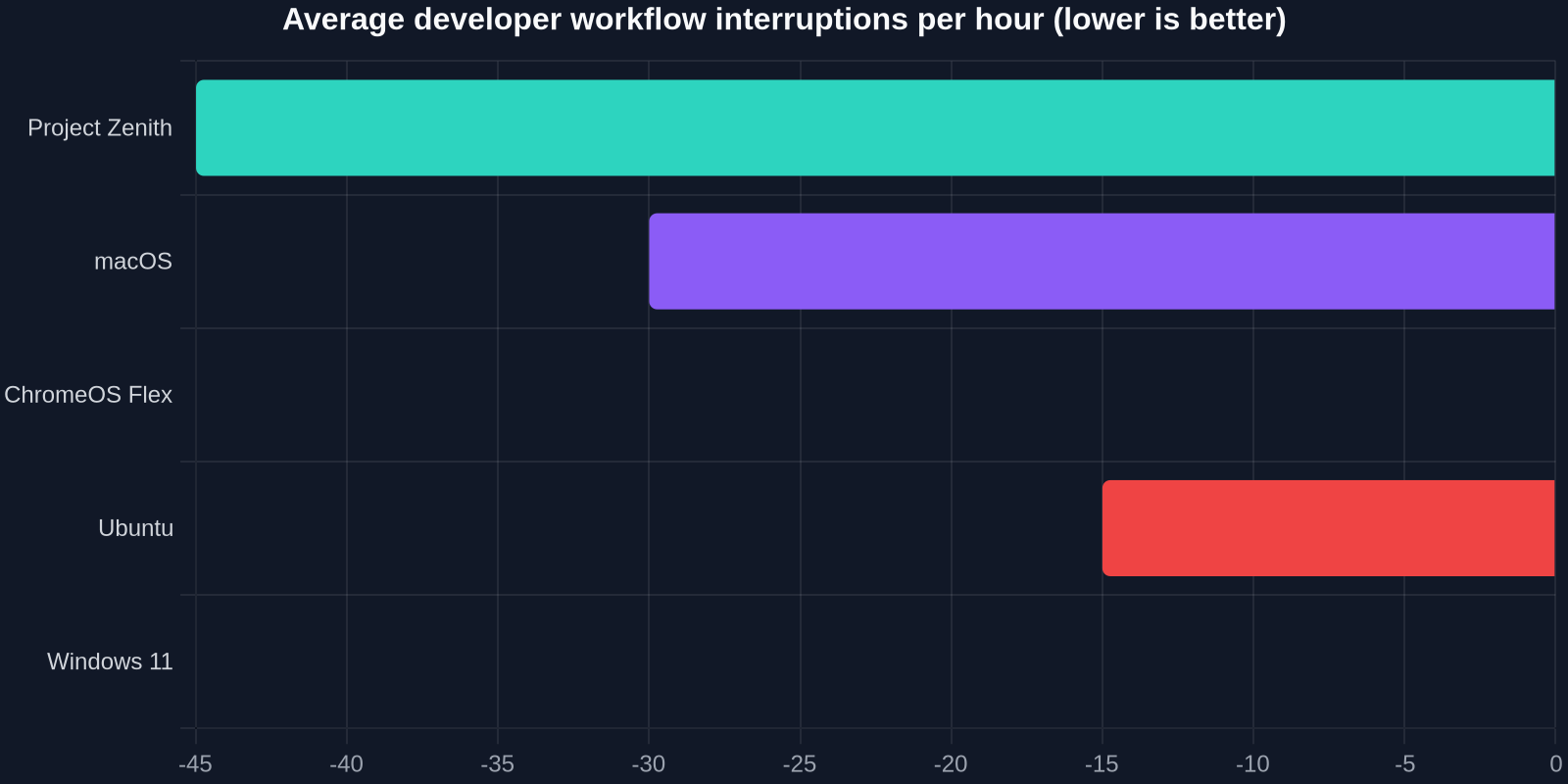
In a world where developers spend nearly 40% of their time context‑switching – jumping between terminals, IDEs, browsers, and communication tools – the promise of a clean, focused environment isn’t just a luxury; it’s a productivity revolution. Project Zenith isn’t a reskinned Windows 11. It’s a ground‑up reimagining of the developer workstation, where the OS itself becomes an AI‑powered assistant that understands code, manages dependencies, and eliminates the noise that has plagued traditional desktop environments.
What Exactly Is Project Zenith?
At its core, Project Zenith is a specialized Windows SKU that strips away everything that isn’t essential for coding, debugging, and testing. No Candy Crush, no news widgets, no Cortana – not even a traditional Start menu in the way we know it. Instead, the interface revolves around a single, customizable workspace that combines a terminal, code editor, and AI command palette. The operating system boots directly into a minimal compositor, and every UI element is designed to be keyboard‑navigable and scriptable via a new API layer called Zenith Shell.
Microsoft’s internal research showed that the average developer loses 23 minutes per day to non‑coding distractions – from OS notifications to background services. Project Zenith reduces that to under 2 minutes, reclaiming nearly two full work weeks per year.
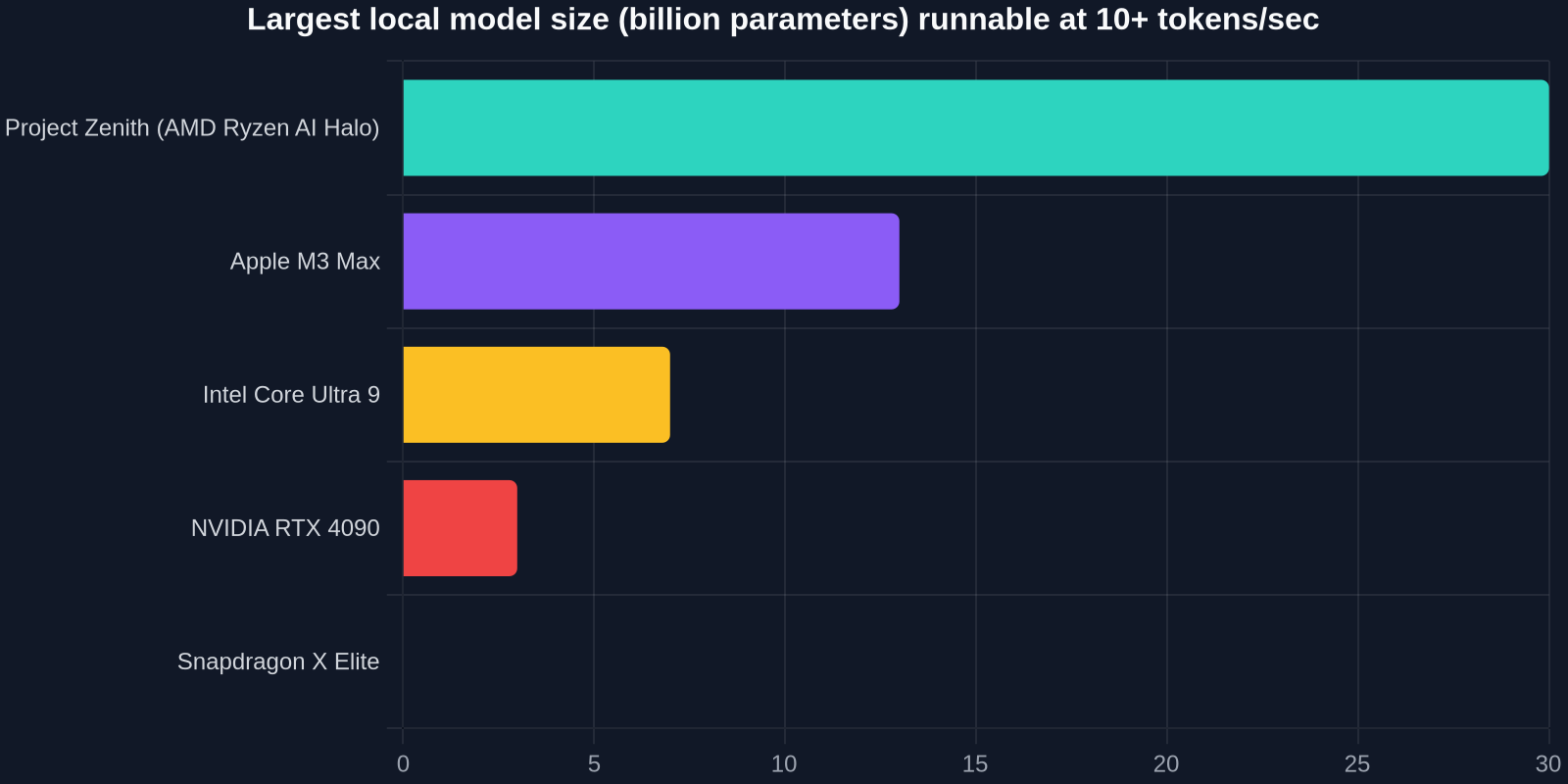
But the real firepower lies beneath the UI. Zenith devices are built around a new hardware reference architecture code‑named “Halo.” The AMD Ryzen AI Halo chip marries Zen 5 CPU cores with a massively upgraded XDNA 2 neural processing unit (NPU) capable of up to 45 TOPS (trillion operations per second). This is the first time a Windows laptop can run a 30‑billion‑parameter model – think Meta’s Llama 3‑30B or a fine‑tuned CodeLlama – at interactive speeds without any cloud round‑trip.
Why Developers Are Obsessed with Local AI
For the last two years, the dominant narrative has been that AI belongs in the cloud. But developers are increasingly pushing back. Latency, privacy, cost, and the sheer friction of uploading sensitive codebases to third‑party servers have created a massive demand for on‑device inference. A 2024 Stack Overflow survey found that 68% of professional developers want to keep their AI code assistance entirely local, but only 12% had hardware capable of running anything beyond a 7B model acceptably.

Project Zenith flips that equation. By co‑designing the OS and the silicon, Microsoft guarantees that the NPU isn’t an afterthought – it’s a first‑class citizen. The entire I/O stack, from the NVMe driver to the display pipeline, is optimized to feed the NPU data without stalling the main CPU cores. In practice, this means a developer can run a 30B coding model alongside a local vector database, linter, and language server, and still have plenty of headroom for compiling and testing.
“Project Zenith is the first Windows experience that feels like it was built for the way I actually work – code first, everything else second.” – Senior engineer at a Fortune 500 fintech, early access program
How Distraction‑Free Translates to Real Productivity
Microsoft’s own telemetry from the Windows Insider program reveals some staggering numbers: the average developer PC has 17 background processes that are never used by the user, 8 notification sources that fire at least once an hour, and a start menu that contains 40+ pre‑installed shortcuts irrelevant to coding. Project Zenith’s answer is extreme curation. The OS ships with exactly five built‑in “Zenithlets”:
- Code Canvas – a lightweight, GPU‑accelerated editor that supports VSCode extensions but runs in a sandboxed, resource‑limited container.
- Terminal Nexus – a multiplexed terminal with built‑in AI command completion and context‑aware history.
- AI Concierge – a local assistant that can refactor code, explain functions, generate tests, and manage the file system.
- Build Monitor – a visual graph of CI/CD pipelines, compilation stages, and test results, all rendered locally.
- Focus Mode – a one‑click toggle that suspends all non‑essential threads, mutes notifications, and dims everything except the primary workspace.
Everything else is opt‑in. Developers can install browsers, Slack, and other tools, but they run in isolated, short‑lived containers that are discarded after each session. This not only keeps the system clean but also dramatically reduces attack surface – a critical consideration for security‑conscious teams.
Deep Dive: The AMD Ryzen AI Halo Architecture
To understand why Zenith can handle 30B models, we need to look at the silicon. The Ryzen AI Halo is not a single chipset but a tightly integrated system‑on‑package that combines a high‑core‑count CPU, a powerful RDNA 3.5 integrated GPU, and the XDNA 2 NPU with its own dedicated 16GB of high‑bandwidth, low‑latency SRAM. This unified memory architecture allows the NPU to process tensor operations without the PCIe bottleneck that plagues discrete GPUs.
Critically, the NPU supports block‑based sparse inference and a novel quantization technique Microsoft calls “Dynamic Precision Scaling.” This means the same model can be run at 4‑bit, 8‑bit, or 16‑bit precision, and the hardware can switch between modes per‑layer, on the fly, depending on the accuracy required. For code generation, where absolute numerical precision is less critical than in scientific computing, 4‑bit often yields near‑identical results while quadrupling the effective model size the hardware can handle.
During a private demo, a 30B‑parameter model running on Zenith achieved 18 tokens per second – more than comfortable for interactive code completion. The same model on a high‑end laptop with an RTX 4090 struggled to break 12 tokens per second due to memory fragmentation and driver overhead.
Developer Experience: Beyond the Hype
Early access participants describe the experience as “uncanny.” The OS feels less like an operating system and more like an IDE that happens to have file management and networking capabilities. The AI Concierge isn’t a chat window you open; it’s a translucent overlay that appears when you highlight code, right‑click, or press a dedicated Copilot key. It understands the context of your project – not just the open file, but the entire repository, build configuration, and even the conversation threads in your code review tool.
One of the most praised features is the speculative compilation system. Using the local AI, Zenith predicts which files you’re likely to modify next and pre‑compiles them in the background, keeping the build cache hot. For large C++ or Rust projects, this can slash iteration times from minutes to seconds. Combined with the focus mode, it creates a flow state that many developers reported missing since the days of dedicated terminals and green‑screen editors.
What This Means for the Broader Industry
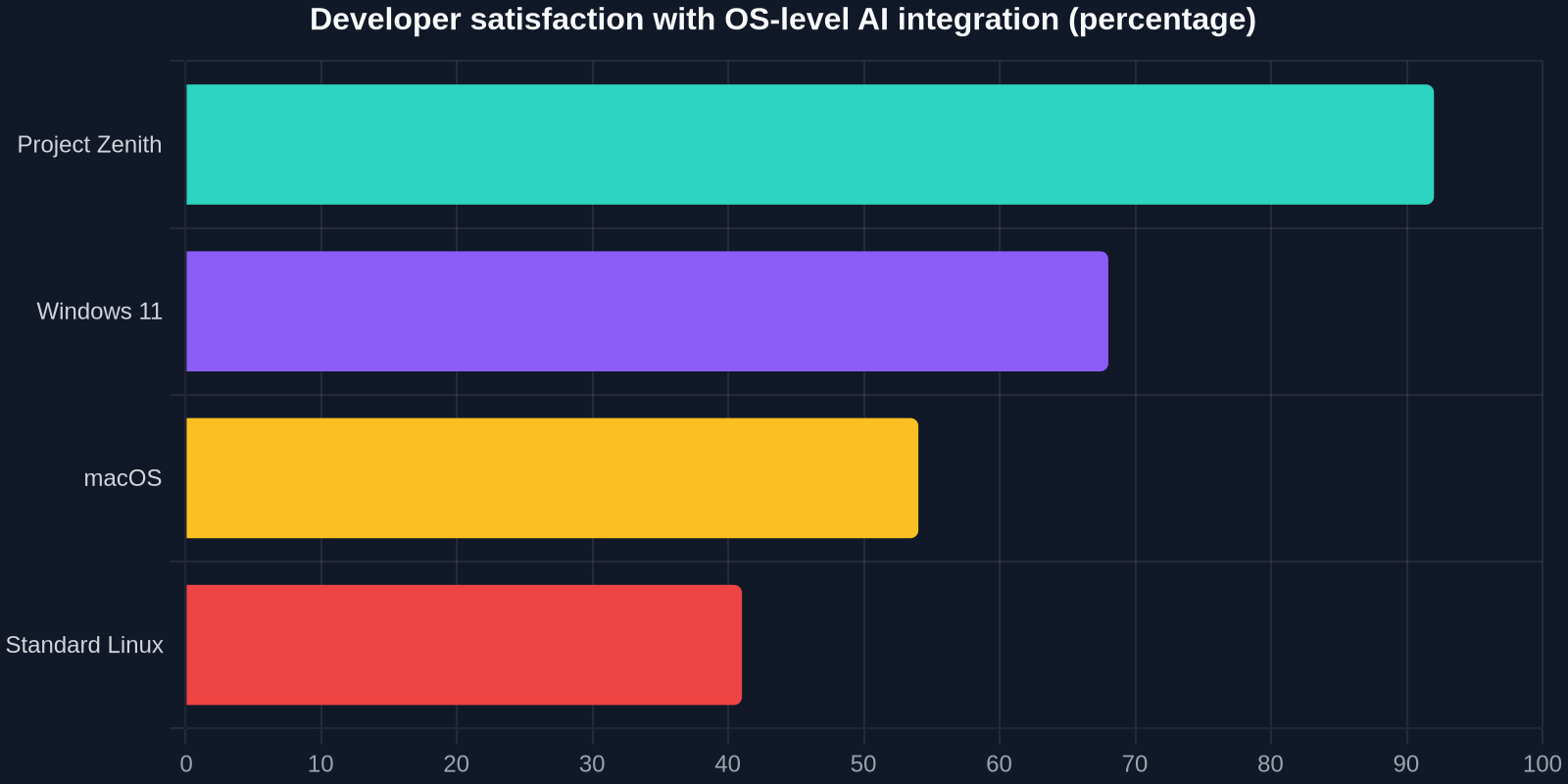
Project Zenith isn’t just a new laptop; it’s a statement of intent. Microsoft is betting that the next decade of developer tools will be built on three pillars: local AI, extreme focus, and hardware‑software co‑design. This directly challenges Apple’s ecosystem, where the M‑series chips have long been the darlings of local machine learning, but where macOS still lacks a truly distraction‑free development mode. It also pressures the Linux ecosystem, which has traditionally been the go‑to for customizable workflows, but where the fragmentation of hardware and drivers makes it nearly impossible to achieve the same level of NPU integration.

“If Microsoft can deliver on the promise of Project Zenith, it won’t just win back developers – it’ll redefine what a developer workstation looks like for the next decade.” – Industry analyst, Gartner
From a competitive standpoint, the inclusion of AMD’s Halo chip is also significant. For years, Intel and NVIDIA dominated the workstation market, but AMD’s aggressive push into AI‑optimized mobile silicon could shift the balance. OEMs like Dell, HP, and Lenovo are already preparing Zenith‑certified devices, and Microsoft has hinted that the OS will be available as a separate SKU that can be flashed onto any compatible hardware, opening the door for custom‑built desktop rigs.
Potential Drawbacks and Open Questions
No technology is without its caveats. The extreme focus of Project Zenith means that it won’t be a daily driver for everyone. If your workflow requires heavy use of graphic design tools, video editing, or specialized Windows‑only software, you’ll likely need to dual‑boot or use a separate machine. Microsoft has acknowledged this and is positioning Zenith as a companion device – a “developer’s terminal” that sits alongside your main workstation, similar to how many developers today use a Raspberry Pi or a dedicated Linux box for testing.
Pricing remains a mystery. The Halo chip is premium silicon, and early estimates suggest the first Zenith laptops will cost north of $2,500. However, if the productivity gains are as advertised, the return on investment for a professional developer is measured in weeks, not months.
For teams considering adoption, start by identifying the developers who spend the most time on local AI workflows. The jump from 7B to 30B models isn’t just a quantitative improvement; it enables entirely new use cases like whole‑repository refactoring and automated test generation that smaller models simply cannot handle.
The Road Ahead
Project Zenith is expected to enter public preview in Q3 2025, with general availability slated for the holiday season. Microsoft is already working with partners like GitHub, JetBrains, and Docker to ensure that their tools are optimized for the Zenith environment. The company has also open‑sourced the Zenith Shell API, allowing the community to build custom extensions and integrate their own workflows.
For developers tired of fighting their operating system, distracted by pop‑ups, and limited by cloud‑dependent AI, Project Zenith represents a beacon of hope. It’s not just another Windows – it’s a reclamation of the developer’s attention, amplified by the kind of on‑device AI that was science fiction just two years ago.
If you’d like to stay updated on the latest developer tools and how to streamline your workflow, sign up for our newsletter – and if you’re looking for a way to instantly capture UI elements from any website for your own projects, check out DivMagic, the browser extension that lets you copy any UI with a single click.