Front-end development has become exponentially more complex over the past decade. What once required nothing more than a text editor and a basic understanding of HTML and CSS now involves a sprawling ecosystem of frameworks, build tools, preprocessors, and design systems. While these tools promise efficiency, they often introduce hidden costs that quietly erode productivity, inflate budgets, and delay product launches. According to a recent analysis by InfoWorld, the hidden cost of front-end complexity is one of the most underappreciated challenges facing modern development teams. In this article, we’ll dissect those hidden costs and explore practical strategies to streamline UI development.
The True Cost of Front-End Complexity
Front-end complexity is not just an abstract annoyance, it has measurable financial and operational impacts. Developers spend countless hours wrestling with CSS specificity, build configurations, and framework quirks instead of building features. This time adds up quickly, especially for teams shipping multiple products or maintaining large codebases.
The problem compounds because front-end work is often perceived as “easy” by stakeholders, leading to under-budgeting and unrealistic timelines. In reality, modern UI development requires deep expertise in accessibility, responsive design, performance optimization, and cross-browser compatibility, all of which add layers of complexity. Each of these areas has its own set of best practices, edge cases, and tooling, and the interaction between them creates a web of constraints that can overwhelm even experienced developers.
One of the most insidious aspects of front-end complexity is its impact on team morale and developer experience. When developers spend more time fighting their tools than solving user problems, burnout rates rise and innovation stalls. A 2024 survey by Stack Overflow found that 62% of developers cite “complicated tooling” as a major frustration, and 41% have considered leaving their job because of it. The hidden cost is not just dollars, it’s the loss of creative energy and team cohesion.
Where Complexity Comes From
Modern front-end stacks are a far cry from the simple days of static HTML files. Today, a typical project might include React or Vue, a state management library like Redux or Pinia, a CSS-in-JS solution such as styled-components or Emotion, a build tool like Vite or Webpack, TypeScript for type safety, and a component library like Material UI or Ant Design. Each of these choices adds dependencies, configuration files, and cognitive load. The average project now pulls in over 1,000 transitive npm packages, many of which are front-end related.

Key drivers of front-end complexity include:
- Framework proliferation and the need to keep up with constant updates, React 18 to 19, Vue 2 to 3, Angular’s major releases every six months.
- The shift from monolithic stylesheets to component-scoped styles, which can lead to duplication and inconsistency across components if not carefully managed.
- Responsive design requirements across an ever-growing array of devices, from 320px-wide phones to 8K ultra-wide monitors.
- Accessibility standards (WCAG 2.2) that demand careful attention to semantic HTML, ARIA attributes, keyboard navigation, and screen reader compatibility.
- Performance budgets that force optimization of bundle sizes, rendering cycles, and network requests, often requiring code splitting and lazy loading.
Each of these factors is manageable on its own, but together they create a combinatorial explosion of complexity. A developer who wants to change a button’s color might need to trace through multiple abstraction layers just to find where the style is defined, possibly inside a theme object, overridden by a variant prop, and further modified by a media query.
This statistic, widely echoed across the software industry, highlights why investing in upfront simplicity pays massive dividends later. Every hour spent simplifying your front-end architecture saves multiple hours of debugging, refactoring, and firefighting down the line. In a medium-sized codebase, a single production bug that could have been caught during development might consume 4–8 hours of a senior developer’s time once you factor in reproduction, diagnosis, fix, regression testing, and deployment. Multiply that by a dozen bugs per sprint, and the cost becomes staggering.
How Complexity Impacts Your Bottom Line
The financial impact of front-end complexity manifests in several concrete ways that directly affect the P&L of any software company:
-
Slower time-to-market: Every additional tool, configuration step, and abstraction layer adds friction to the development process. Features that should take days end up taking weeks. In a competitive market, being two weeks late can mean losing first-mover advantage or missing a critical launch window.
-
Higher maintenance costs: Complex codebases require more time to understand, modify, and test. Simple changes become risky because of hidden dependencies. A single “quick fix” can cascade into unintended style regressions across multiple pages, forcing extensive manual QA.
-
Increased bug rates: The more moving parts, the more likely something breaks. Front-end bugs are particularly costly because they directly affect user experience, a broken checkout button or a misaligned form on mobile can lead to abandoned carts and lost revenue. According to Baymard Institute, the average cart abandonment rate is 70%, and poor UI is a top reason.
-
Expensive onboarding: New developers take longer to become productive when the codebase is convoluted. The time to first commit stretches from days to weeks, delaying their contribution and increasing training costs. A complex front-end also makes it harder to retain talent; developers prefer working in clean, well-organized codebases.
| Approach | Time to Implement | Maintenance Overhead | Consistency | Developer Experience |
|---|---|---|---|---|
| Hand-coded custom CSS | High | High | Variable | Poor |
| Design system built from scratch | Very high | Medium | High | Moderate |
| Component library (e.g., Material UI) | Medium | Medium | High | Good |
| Using DivMagic to copy UI | Low | Low | High | Excellent |
As the table illustrates, the approach you choose for building your UI has dramatic consequences for both speed and long-term sustainability. Teams that rely on hand-coded CSS often find themselves trapped in a cycle of reinventing the wheel for every new component. A design system is a noble goal, but building one from scratch is a multi-month project in itself, time that few product teams can afford.
Real-World Example: The SaaS MVP Design Bottleneck

Consider a startup building a SaaS MVP. Before developers can write any production code, the design team must create wireframes, mockups, and interactive prototypes. This phase alone can take anywhere from one to six weeks, depending on product complexity, the number of user flows, and the size of the design team. During those weeks, developers are either idle or working on non-UI tasks. The longer the design phase drags on, the later the product reaches the market, and the more money is burned on payroll without revenue.
Let’s do the math. A typical seed-stage startup with 5 developers and 2 designers burns roughly $50,000–$80,000 per month in salaries alone. A design phase of just three weeks costs $12,000–$20,000 in design salaries, plus the opportunity cost of developers not building features that generate revenue. If the MVP launch is delayed by two weeks, that’s an additional $25,000–$40,000 in developer salaries with nothing shipped. And if the design isn’t quite right, you’re back to square one.
The design phase is a hidden tax on every software project: you pay for it in time, money, and missed opportunities, yet it rarely shows up on a balance sheet.
But what if you could shortcut that process? What if developers could instantly copy high-quality UI components from existing websites instead of waiting for custom designs? That’s where tools like DivMagic come in, they eliminate the need for a lengthy design phase by providing ready-made, production-ready UI snippets. Instead of waiting for a designer to produce a pixel-perfect mockup, a developer can browse the web, find a component they like, and copy its exact HTML and CSS into their project in seconds. The design phase shrinks from weeks to hours.
Strategies to Reduce Front-End Complexity
Reducing front-end complexity is not about abandoning modern tooling, it’s about being deliberate in your choices and automating wherever possible. Here are six proven strategies that successful engineering teams use to keep their front-end manageable.
1. Adopt a Design System
A design system centralizes UI components, styles, and guidelines, ensuring consistency and reducing duplication. Instead of every developer writing their own button styles, they use a shared component with predefined variants. This dramatically cuts down on CSS bloat and improves maintainability. However, building a design system from scratch is a substantial investment. Many teams find that adopting an existing component library or using a tool like DivMagic to extract reusable components from the web gets them 80% of the benefit with 20% of the effort.
2. Use Component Libraries
Libraries like Material UI, Chakra UI, or Ant Design provide pre-built, accessible components that follow best practices. They eliminate the need to build common UI elements from scratch and reduce the surface area for bugs. The trade-off is that you lose some visual uniqueness, but for most business applications, that’s a worthwhile trade. For teams that need a custom look, DivMagic can extract components from sites with a specific design language and let you reuse them as the foundation for your own library.
3. Automate Repetitive UI Tasks
The most effective way to reduce front-end complexity is to stop doing repetitive work manually. Many front-end tasks are inherently repetitive: copying a button style, replicating a card layout, extracting a color palette, or recreating a form. Tools like DivMagic let developers copy any UI from any website and paste it directly into their project. This automation saves hours of manual work and ensures visual fidelity.
4. Simplify Your Stack
Every dependency you add is a potential point of failure and a learning curve for new developers. Question whether you really need that state management library or if React’s built-in hooks suffice. The simpler your stack, the lower your complexity tax. For many projects, a minimal stack of React + TypeScript + CSS modules is sufficient, no Redux, no styled-components, no Webpack config. The fewer pieces, the fewer places for bugs to hide.
5. Leverage Modern CSS Features
CSS Grid, Flexbox, custom properties, and container queries have eliminated the need for many CSS hacks and preprocessors. Modern CSS is powerful enough to handle complex layouts without the added complexity of Sass or Less. Custom properties alone can replace much of what CSS-in-JS libraries offer, and they’re native, fast, and easy to debug. By sticking to modern CSS, you reduce the number of tools in your stack and make your styles more predictable.
6. Code Splitting and Lazy Loading
Performance complexity can be managed by splitting your code into smaller chunks and loading them only when needed. This reduces initial bundle size and improves perceived performance without adding cognitive load to developers. Frameworks like React and Vue support dynamic imports out of the box, and build tools automate the chunking. This strategy keeps your codebase modular and maintainable while delivering a blazing-fast user experience.
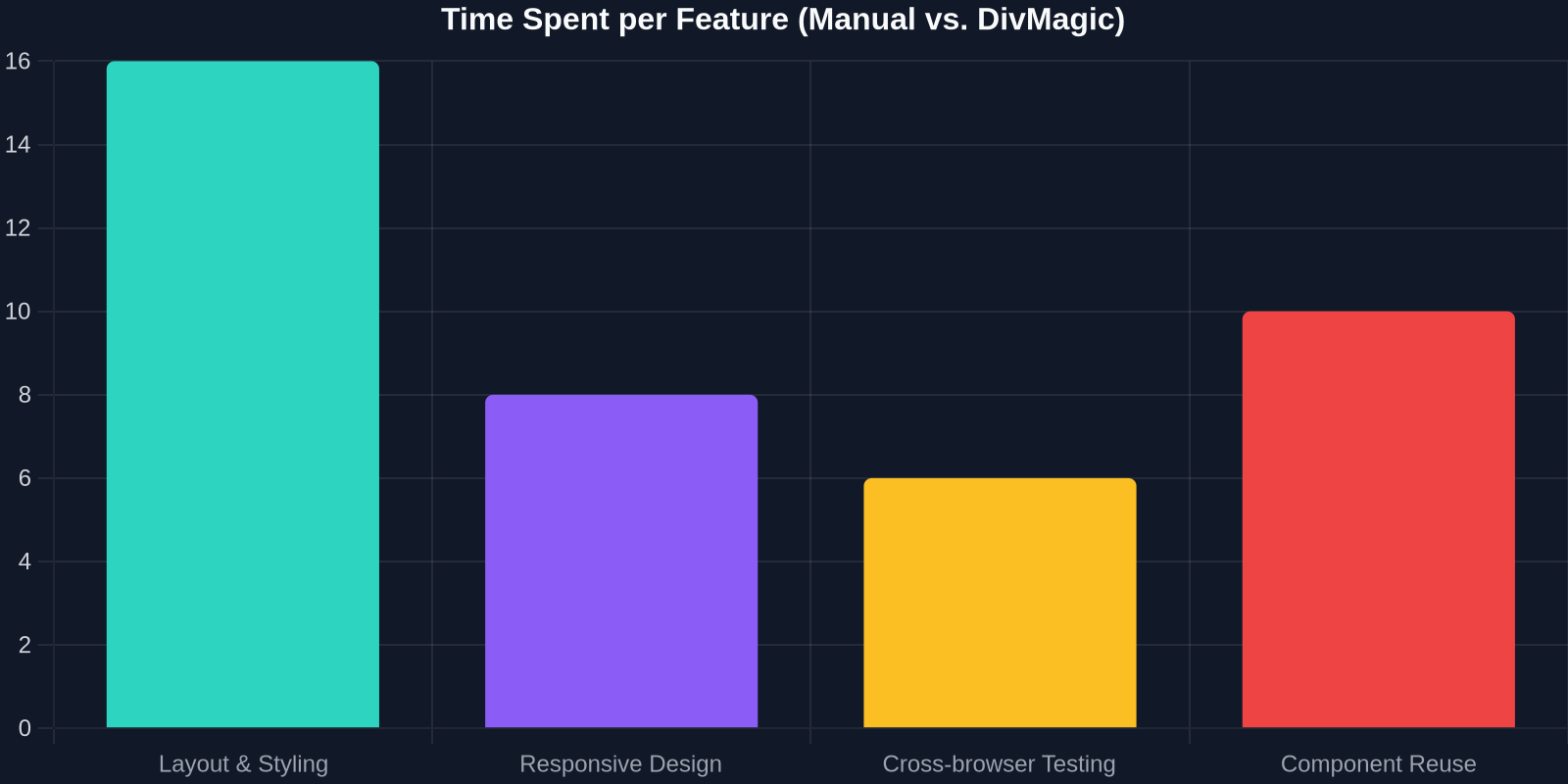
How DivMagic Eliminates UI Complexity
DivMagic is a browser extension designed specifically for front-end developers who want to stop spending hours recreating UI components. With DivMagic, you can click on any element on any website and instantly copy its HTML and CSS, fully styled and ready to paste into your project. No more inspecting elements, copying style rules one by one, or trying to reverse-engineer a layout.

Here’s how DivMagic tackles the hidden costs of front-end complexity:
- Instant component extraction: No more manually inspecting elements and copying styles piece by piece. DivMagic gives you clean, production-ready code in seconds, including responsive rules and pseudo-classes.
- Visual fidelity: The copied components look exactly like the original, preserving layout, typography, spacing, and responsive behavior. You get pixel-perfect results without the design phase.
- No design bottleneck: Instead of waiting for designers to produce mockups, developers can pull inspiration from existing sites and get working UI immediately. This is especially valuable in agile environments where speed is paramount.
- Consistency by default: By reusing components from a single source, teams can maintain visual consistency without extensive documentation. DivMagic makes it easy to create an internal library of extracted components.
- Learning resource: For developers who want to learn how a particular UI is built, DivMagic reveals the underlying CSS techniques, acting as an educational tool.
For teams building MVPs, prototypes, or even production apps, DivMagic can shave weeks off the development timeline. The time saved can be redirected toward business logic, user testing, and feature differentiation, the things that actually matter. A developer who saves 10 hours a week on UI tasks adds over 500 hours of productivity per year, equivalent to more than three months of full-time work.
The Future of Front-End Development
The trend is clear: front-end development is moving toward greater abstraction and automation. Low-code platforms, AI code generation, and tools like DivMagic are all part of a broader shift toward removing manual, repetitive work. Just as compilers abstracted away assembly language and frameworks abstracted away DOM manipulation, the next layer of abstraction will hide the complexities of CSS and component styling.
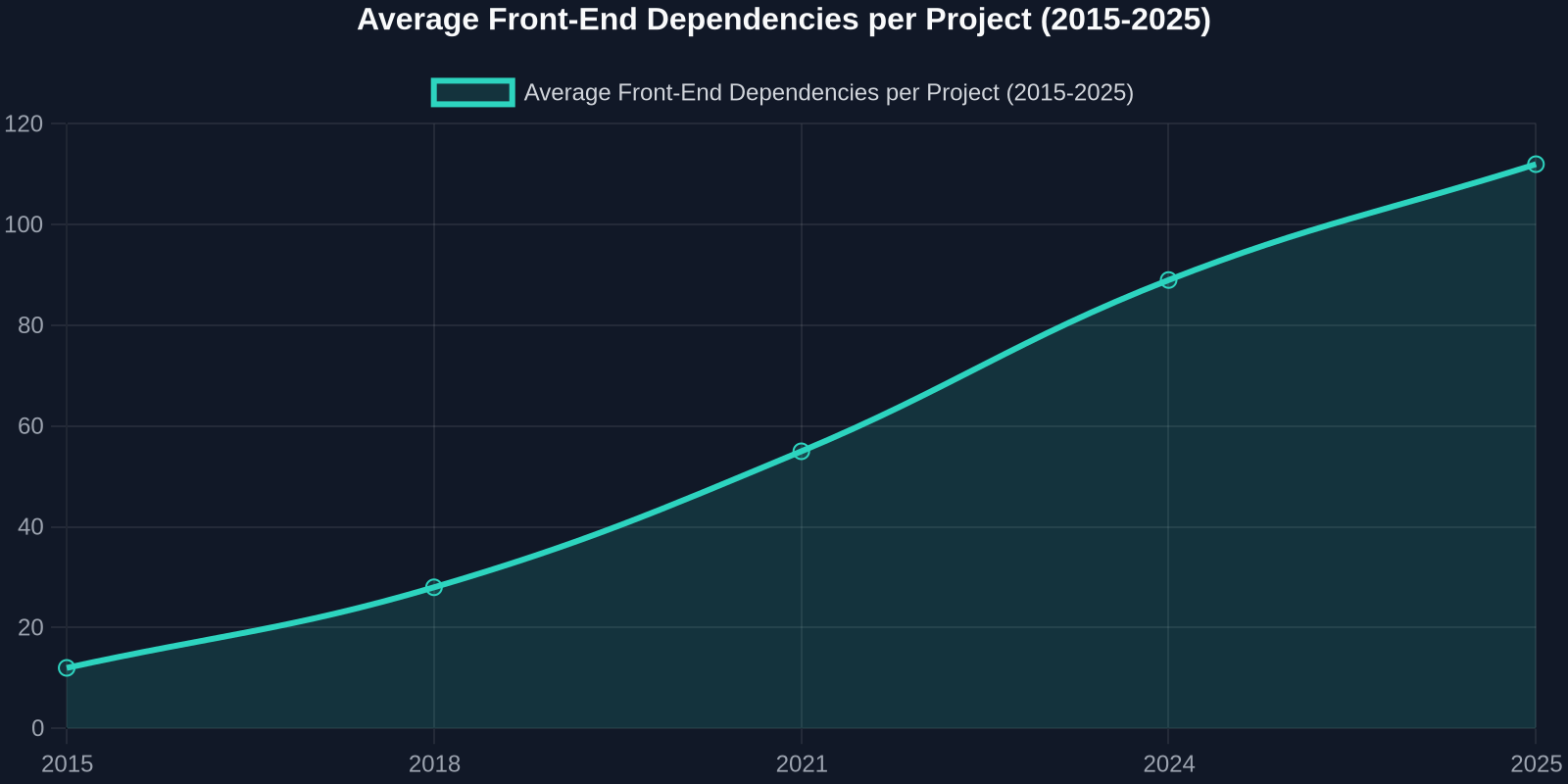
As the chart shows, the number of front-end dependencies per project has skyrocketed over the past decade. While this growth has enabled richer user experiences, it has also increased complexity disproportionately. The only sustainable path forward is to adopt tools and practices that abstract away that complexity, not by hiding it behind even more tooling, but by providing direct solutions that reduce the amount of code you need to write.
The best front-end code is the code you never have to write. Tools that automate UI extraction and reuse are not just conveniences, they are competitive advantages.
In the coming years, we can expect to see:
- AI-driven UI generation that turns natural language descriptions into fully styled components, further reducing the need for manual CSS.
- Greater adoption of component libraries as companies prioritize speed over bespoke design; custom design will become a luxury reserved for brand-critical pages.
- Tools like DivMagic becoming standard in every front-end developer’s toolkit, much like browser DevTools or version control. The ability to copy any UI instantly will be seen as a basic skill, not a hack.
Common Pitfalls and How to Avoid Them
While reducing front-end complexity is essential, many teams fall into traps that undermine their efforts:
- Over-abstracting too early: Creating a design system before you have a product can waste time on components that never get used. Start simple and abstract only when you see repeated patterns.
- Chasing the latest framework: FOMO on new libraries leads to churn and rewrites. Pick a stack and stick with it for at least two years.
- Ignoring CSS fundamentals: Even with tools like DivMagic, understanding CSS is critical for debugging and customization. Don’t skip the basics.
- Neglecting performance: A beautiful UI that takes 10 seconds to load is worthless. Always keep performance budgets in mind.
Conclusion
Front-end complexity is a silent drain on productivity, budgets, and developer happiness. It shows up in longer design phases, slower feature delivery, higher maintenance costs, and frustrated teams. But it doesn’t have to be this way.
By simplifying your stack, leveraging design systems, and automating repetitive UI tasks with tools like DivMagic, you can reclaim hundreds of hours and deliver better products faster. The hidden cost of front-end complexity is real, but so is the solution.
Ready to eliminate UI complexity? Try DivMagic today and start copying production-ready UI from any website in seconds. Your future self, and your team, will thank you.