

Google’s A2UI v0.9: How Generative UI is Reshaping Frontend Development
The way we build user interfaces is about to change. For years, frontend development has been a craft of pixel-perfect precision: writing JSX, carefully crafting CSS, and manually wiring up event handlers. This workflow is powerful but incredibly time-consuming. Google’s introduction of A2UI (Agent-to-User Interface) in its v0.9 specification signals a paradigm shift. It’s not just another framework, it’s a protocol for how AI agents construct and deliver dynamic, streaming-generated UIs directly to users.
In this post, we’ll dissect A2UI v0.9, explore its technical underpinnings, and confront the practical reality for developers today. While AI can now write UI code, it still can’t copy UI from the world’s best-designed websites. That’s where tools like DivMagic bridge the gap, turning inspiration into production-ready code instantly. Let’s dive in.
What Exactly is Generative UI and A2UI?
Generative UI is a concept where a user interface is created dynamically by artificial intelligence in response to a user’s intent or a system’s state. Instead of a developer pre-designing every possible screen, an AI agent assembles a bespoke interface on the fly. Google’s A2UI is a proposed JSON-based protocol to standardize this interaction.
A2UI is not a replacement for frameworks like React or Flutter. It’s an interchange format that lets an AI agent declare a tree of stateful, interactive widgets that a client-side renderer can paint natively.
A2UI v0.9 focuses on structured output: an AI model generates a JSON payload describing a widget tree (buttons, cards, text fields, lists) with their properties and data bindings. The client (a browser, mobile app, or even an in-chat canvas) interprets this JSON and renders native components. The "generative" magic happens in two places: the AI deciding which widgets to show, and the potential to stream this UI incrementally, much like an LLM streams text tokens.
A2UI v0.9: A Technical Deep Dive
Let’s look at what the v0.9 spec actually defines. The core is a simple but extensible schema. A UI is represented as a flat list of "nodes" with unique IDs, and a hierarchical "surface" that references them. This flat structure is brilliant for incremental streaming: the AI can send a button, then a text field, then an update to the button’s label, all without restructuring a nested tree.

The A2UI Node Structure
An A2UI node typically looks like this simplified JSON:
\{
  "nodeId": "confirm-btn-1",
  "type": "Button",
  "properties": \{
    "text": "Book Flight",
    "style": "primary",
    "action": \{
      "type": "event",
      "name": "confirm_booking"
    \}
  \}
\}
Each node has a type (like Button, Text, Card, Column, Row, Image, List), a bag of properties that control layout and styling, and optional event handlers for interactivity. Data binding is achieved through path expressions that point to a shared data model, kept separate from the UI tree. This separation allows the AI to update the state without resending the entire widget tree.
Streaming and Incremental Updates
One of the killer features of A2UI is incremental rendering. The protocol supports a sequence of UIUpdate messages, each containing only the nodes that changed or were added. Imagine a chat interface asking you to "build a CRM dashboard." The AI doesn’t need to hallucinate the entire complex page at once. It first streams a top-level navigation, then a data table header, then begins populating rows as it fetches information. You see the UI assemble piece by piece, offering immediate feedback.
This is conceptually similar to how React reconciles the Virtual DOM, but the reconciliation happens on the server/AI side, and the diff is pushed over the wire. The client merely applies patches. This keeps the client simple and stateless, while the AI retains the complex logic of what to show next.
Early implementation reveals a key challenge: latency in AI processing can make the progressive rendering feel sluggish if the model is slow to produce the next JSON fragment. Local models or edge-deployed small models are crucial for fluid experiences.
Widget Catalog and Extensibility
A2UI v0.9 defines a base catalog of widgets that map neatly to Material Design or common web primitives. It’s not trying to be a pixel-precise design tool; rather, it’s a semantically meaningful UI description. A Card widget encapsulates an image and some text. The client decides exactly how to render the card based on its own theme. This is a huge win for cross-platform consistency, the same AI-generated UI can look native on Android, iOS, and the Web.
However, this also means custom-branded micro-interactions or highly sophisticated CSS effects fall outside the initial scope. A2UI is for application chrome, not artistic landing pages. That’s exactly where the synergy with DivMagic becomes so potent, as we’ll explore later.
The Developer’s Perspective: What Changes, What Stays the Same
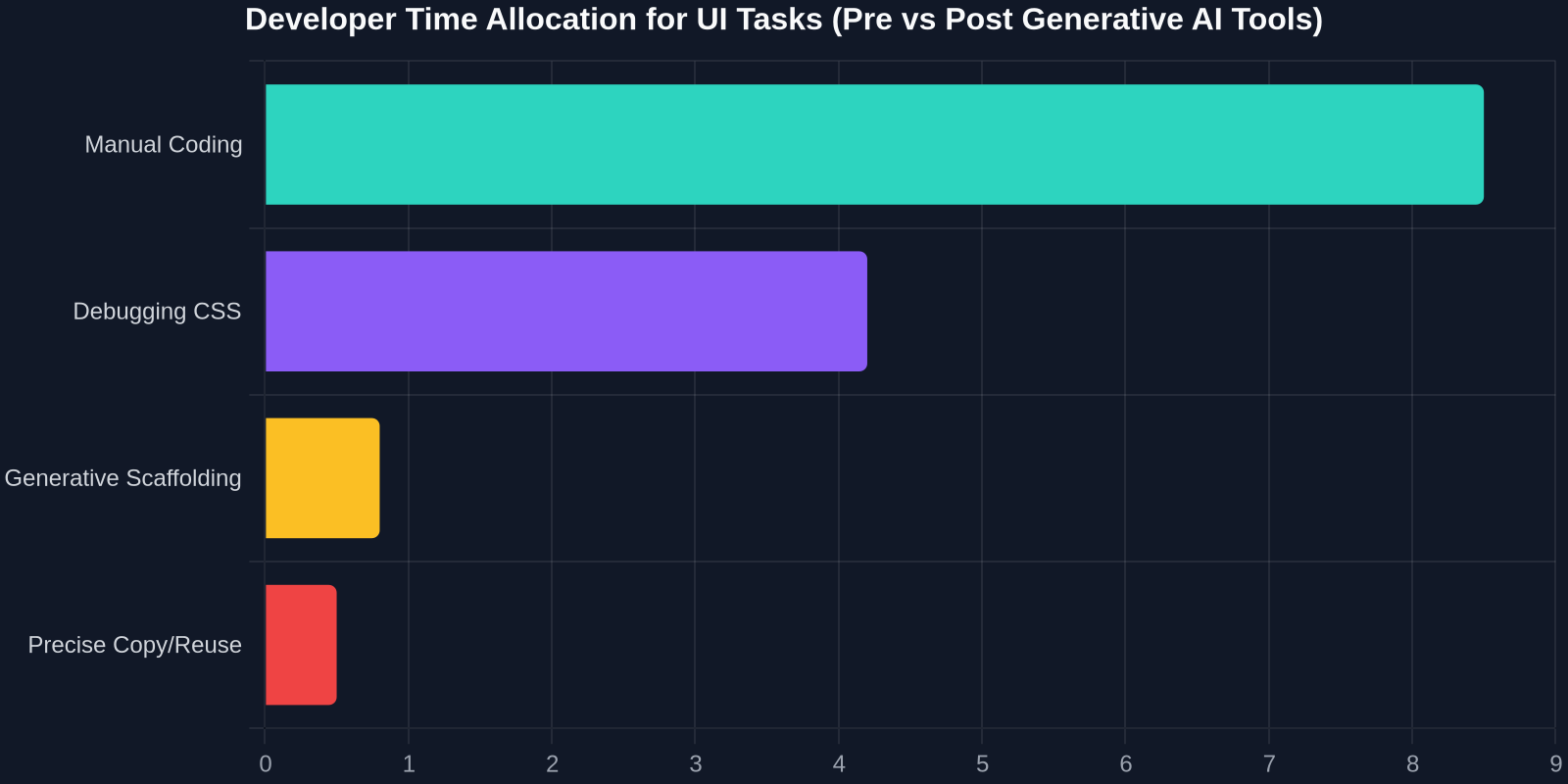
As a frontend developer, the prospect of an AI generating UIs on the fly can feel like a threat or a salvation. The reality is more nuanced. A2UI shifts a large chunk of composition from design-time to run-time. Today, you sit in Figma or code an array of cards and map over it. Tomorrow, the AI decides how many cards, what their fields should be, and whether a comparison chart makes more sense than a list, all based on user intent.
Shift from Pixel-Pushing to Constraint-Setting
Developers using A2UI won’t be tweaking CSS paddings for every screen. Instead, they’ll define the theme, the widget catalog, and the business logic that the AI can trigger. Your role becomes setting boundaries and ensuring the AI doesn’t invent a "Launch Nukes" button unless the user really needs it. This is a move towards declarative intent-based engineering.
State Management Evolves
A2UI’s data binding model centralizes application state in a JSON object that both the client and AI can read and write. This is a radical simplification of Redux, Zustand, or Context APIs. Instead of weeks architecting a store, you define a schema, and the AI manages transitions. But this also introduces new testing challenges: How do you assert the correctness of a UI whose structure is non-deterministic?
"The hardest part of frontend engineering has never been writing the UI, it’s making sure the right UI appears under all possible states. A2UI flips this by making states dynamic, but it demands a new class of AI-aware testing."
The Gap: When You Still Need Exact UI Replication
Here’s the critical limitation of A2UI and all generative AI UI tools: they are probabilistic. They generate a solution, not the solution from a specific source of truth. If you see a perfectly implemented, accessible, and user-tested component on a website like Stripe, Linear, or Vercel, an A2UI agent cannot simply "copy" that implementation. It doesn’t have access to the exact CSS, the subtle box-shadows, the responsive breakpoints, or the intricate aria-labels that make the component exceptional.

This is the practical bottleneck in modern frontend workflows. You can ask ChatGPT to "create a glassmorphism card like Stripe’s pricing table," and it will generate something serviceable. But it won’t be the actual Stripe component. The colors will be slightly off. The hover transition timing function will be linear instead of the custom cubic-bezier. You’ll spend 45 minutes debugging a CSS property the AI hallucinated. You revert to copy-pasting from DevTools, which is itself messy and time-consuming.
Introducing DivMagic: The Bridge Between Inspiration and Implementation
If A2UI represents the future of dynamically constructed, AI-driven interface generation, DivMagic represents the present-day superpower for exact interface replication. DivMagic is a browser extension built for developers who need to copy any UI from any website and convert it into clean, reusable code instantly.
How It Works
DivMagic operates on a fundamental insight: web UIs are, at their core, structured HTML and CSS. By intelligently parsing the DOM and computed styles, DivMagic extracts not just the visible content but the entire visual DNA of a component. It handles:
- Style Isolation: Extracts only the relevant CSS for the selected element, eliminating conflicts.
- Responsive Extraction: Captures media queries and variable-based sizing where possible.
- Framework Agnostic Output: Whether you need plain HTML/CSS, Tailwind classes, or a JSX component, DivMagic transpiles on the fly.
- Stateful Elements: Handles hover, focus, and active states by analyzing pseudo-class styles.
For A2UI developers: Use DivMagic to capture the exact design tokens and component structure you want your A2UI renderer to target. Build a precise visual spec in seconds.
DivMagic + A2UI: A Perfect Workflow Symbiosis
Imagine you’re building a generative UI agent for a travel booking app. Your A2UI agent can show hotel cards, but you need them to look like the best-in-industry examples from a site like Airbnb. You can’t ask the AI to "look like Airbnb" because the AI has no direct access to the rendered, computed styles, only to a textual prompt.
- Capture with DivMagic: You open Airbnb, click the DivMagic extension, select a listing card. DivMagic gives you the exact HTML/CSS for that card.
- Reactor into a Widget Schema: You abstract the design into your A2UI widget library, defining the
HotelCardtype with the precise CSS DivMagic extracted. - Deploy to your AI Agent: Now when your A2UI agent generates a
HotelCardnode, the client renders the pixel-perfect design, no guesswork, no hallucinated styles.
DivMagic eliminates the most frustrating part of frontend development: the gap between seeing a great design and having it in your codebase. It turns every website into a design library you can legally use for inspiration.
Comparing the Ecosystems: A2UI Plugins vs. DivMagic
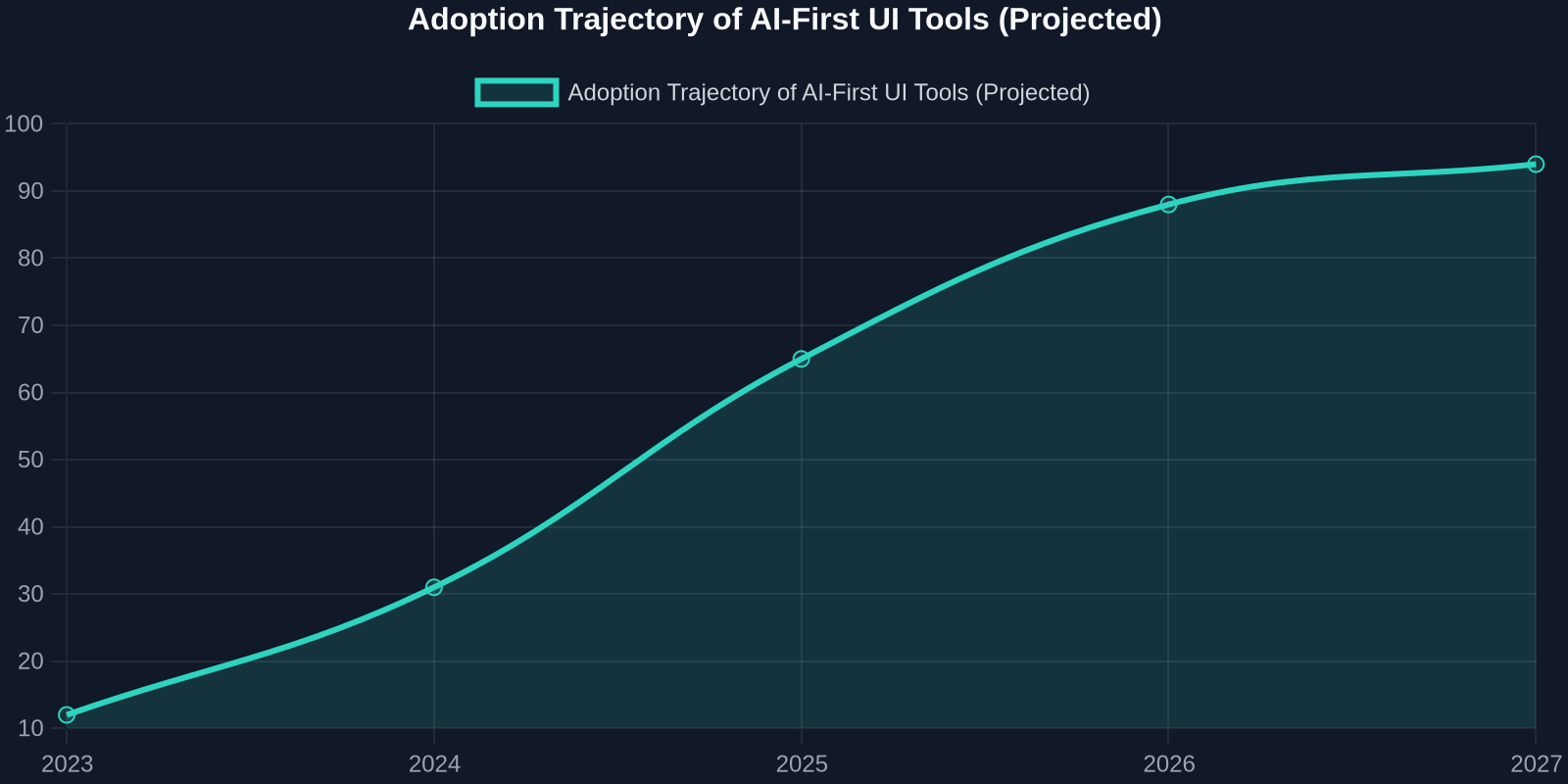
The A2UI blog post mentions "community plugins" and lists "AionUi Explorer" as an example of a client-agnostic library that lets "the AI insert streaming-generated UI into the conversation." The ecosystem around generative UI is nascent but growing. These plugins aim to provide the runtime for A2UI protocols.

DivMagic occupies a different but complementary layer of the stack. It is a development-time tool, not a runtime renderer. It excels at:
- Design research and rapid prototyping
- Reverse-engineering complex CSS without inspecting rules manually
- Building a personal component library from the best of the web
- Refactoring legacy sections into clean, modern Tailwind or CSS modules
"Generative AI decides what goes where. DivMagic ensures it looks flawless when it gets there."
The Future of UI Development: a Hybrid Model
The blog post on A2UI v0.9 makes it clear: we’re moving towards a world where UIs are not just rendered from code we write but are living artifacts dynamically composed by AI in real-time. However, the quality of these UIs will always depend on the fidelity of the source material, the design tokens, the widget implementations, and the CSS craftsmanship baked into the renderer.
A2UI handles the "intelligence layer", figuring out the optimal layout for a set of data to accomplish a user goal. But the "craft layer", the motion design, the responsive elegance, the brand-specific visual language, must be intentionally created by developers. For that creation process, tools like DivMagic are indispensable. They close the loop: you spot an interaction or a component that delights you as a user, and with a single click, you have it in your workspace, ready to be parameterized into your own AI-driven UI system.
Preparing Your Toolchain for Generative UIs
If you’re a frontend developer looking to stay ahead of this curve, here’s your immediate action plan:
- Master JSON-based UI schemas: Understanding how to serialize a UI into a declarative JSON format will be key, even if you don’t use A2UI directly.
- Build a Design Token Library Fast: Use DivMagic to aggregate the best buttons, forms, and cards from five top-tier SaaS products into a single reference token file.
- Learn Prompt Engineering for UI: Getting consistent, high-quality output from AI requires you to understand how to describe UI patterns textually.
- Embrace Streaming Mental Models: Think about your UIs as a series of intermediate representations, not a single final render. Start experimenting with partial rendering and progressive enhancement.
Conclusion: The Best of Both Worlds
Google’s A2UI v0.9 is not vaporware, it’s a concrete, sensible step towards a world where software adapts its interface to the user, not the other way around. It promises to commoditize the boilerplate of UI construction. But distinction and delight come from the surface-level details that AI, by its nature, approximates.
By combining the generative power of A2UI with the precision extraction of DivMagic, developers can finally have their cake and eat it too: interfaces that are both intelligent and impeccably crafted. The future of frontend isn’t about choosing between AI and hand-crafted code. It’s about using AI to assemble, and precise tools to refine, the UIs that make the web a beautiful, functional place.
Frequently Asked Questions
Is A2UI going to replace React or Vue?
No. A2UI is a protocol for AI agents to deliver UI over the wire. The client that renders A2UI could itself be built using React, Flutter, or plain JavaScript. Think of it as a replacement for a REST API that delivers data, except this delivers structured UI descriptions.
Can I use DivMagic to copy a whole page?
Absolutely. DivMagic allows you to select an element and it intelligently grabs all child components, preserving the structure and styles. It’s built to handle complex, nested layouts without breaking or pulling in irrelevant global styles.
Does A2UI support custom design systems?
Yes. The widget catalog is open. You can define a BrandButton with specific properties, and teach your AI agent how to use it via few-shot examples or fine-tuning.
How does streaming UI affect SEO?
This is a crucial consideration. Streaming UI, like any client-side rendered content, must be handled carefully for search engine indexing. SSR (Server-Side Rendering) of the A2UI output will be essential for public-facing content sites. Application-like dashboards are less affected.