CSS Performance Optimization: Why GitHub Ships More CSS (Not Less) for Faster Load Times
For over a decade, the frontend performance playbook has been remarkably consistent: minimize your CSS, inline the critical path, split the rest, and deliver everything asynchronously. The mantra of “ship less code” has been so deeply embedded in our collective developer psyche that questioning it feels almost heretical.
Then GitHub’s engineering team published a post titled “Improving site performance by shipping more CSS”, and the frontend community collectively raised an eyebrow. The title alone reads like a contradiction. Shipping more CSS to make a site faster? Isn’t that backwards?
As it turns out, no. GitHub’s findings challenge the conventional wisdom that has governed CSS delivery strategies for years. Their data reveals that the traditional approach of inlining critical CSS and code-splitting the remainder, while theoretically sound, often produces diminishing returns in real-world conditions. In some cases, it actively hurts performance.
In this deep dive, we’ll unpack GitHub’s counterintuitive discovery, examine the metrics that explain why shipping more CSS can be faster, and explore what this means for your own development workflow, including how tools like DivMagic fit into a modern, performance-first CSS strategy.
The Traditional CSS Delivery Playbook
Before we can appreciate why GitHub’s approach is revolutionary, we need to understand the framework it challenges. The standard CSS optimization strategy that most performance guides recommend looks something like this:
Step 1: Inline Critical CSS
Extract the CSS rules required to render the above-the-fold content and inline them directly in the <head> of your HTML. This eliminates the render-blocking request for the external stylesheet during the initial paint.
Step 2: Async-Load the Full Stylesheet
Load the complete CSS file asynchronously using the preload or media attribute trick, so the browser can start rendering immediately with the inline styles and apply the full stylesheet once it arrives.
Step 3: Code-Split CSS by Route or Component
In single-page applications, serve only the CSS needed for the current view. Tools like PurgeCSS, CSS modules, and framework-specific code-splitting utilities make this granular approach possible.
On paper, this strategy optimizes every byte. In practice, however, it introduces a cascade of trade-offs that are rarely discussed, and that’s exactly where GitHub’s engineering team started their investigation.
GitHub’s Counterintuitive Discovery
GitHub, like most large-scale platforms, had implemented a sophisticated CSS delivery system. They inlined critical CSS, split the rest into route-specific chunks, and used modern loading techniques to avoid render-blocking behavior. Yet their real-user monitoring (RUM) data told a story that contradicted their expectations.

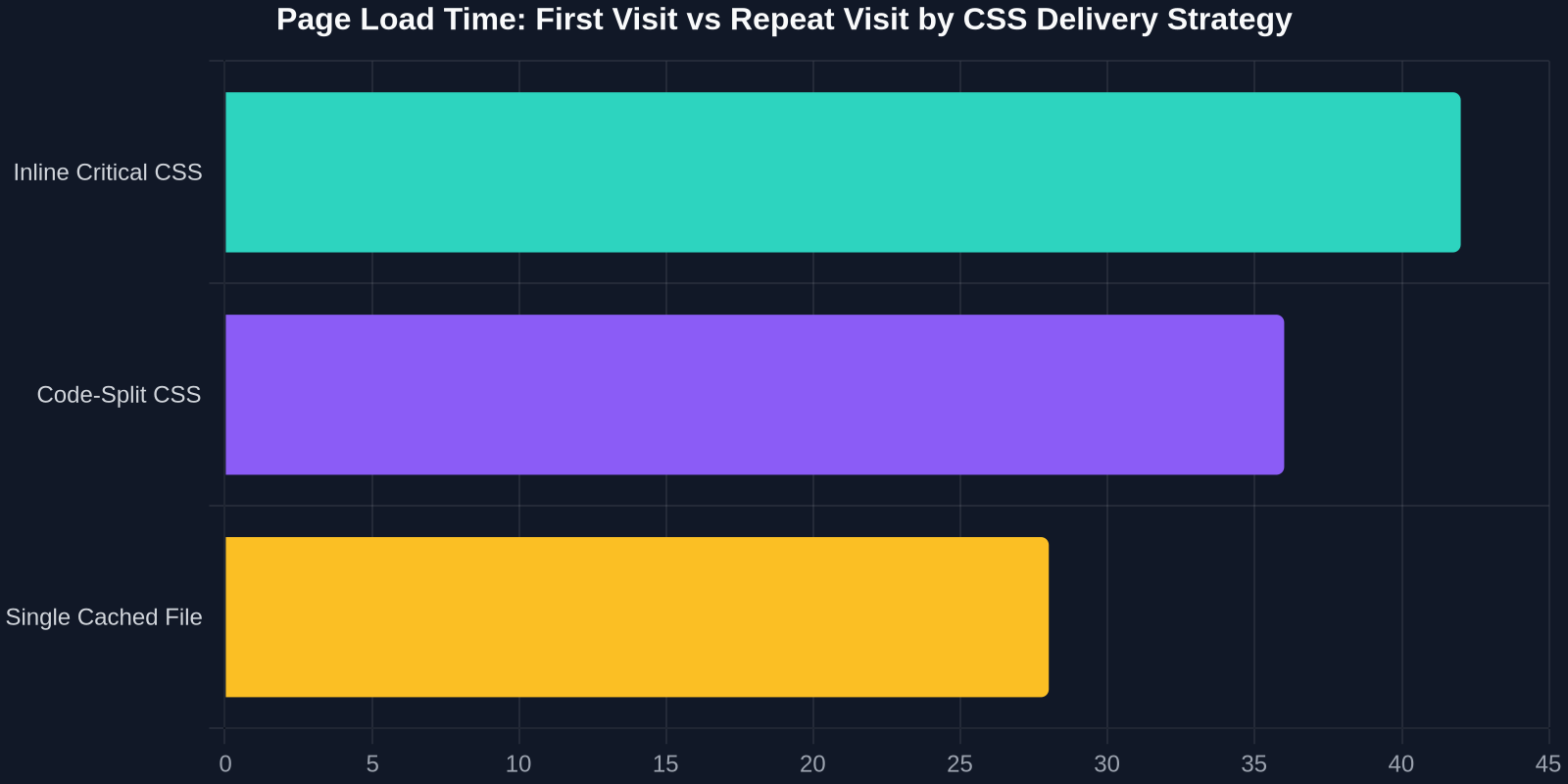
Repeated visits, the norm for a site like GitHub, where developers return dozens of times a day, were slower than they should have been. The inline critical CSS, executed on every page load, was adding JavaScript execution time. The route-based chunks meant that each navigation triggered a new CSS request. The complexity of the system was adding overhead without proportional benefit.
Their solution was to flip the script: serve a single, larger CSS file that gets cached by the browser on the first visit and reused across all subsequent navigations. No inline critical CSS. No per-route splitting. No async loading hacks. Just one file, one request, fully cached.
The result? Faster page loads for the overwhelming majority of users, reduced JavaScript execution overhead, and a dramatically simpler codebase.
“The fastest CSS request is the one that never happens. A single cached stylesheet makes every repeat visit nearly free.”
Why “More CSS” Isn’t Actually More
There’s an important nuance here that’s easy to miss. GitHub isn’t shipping bloated CSS, they’re shipping a consolidated, optimized, and cacheable CSS file. The word “more” in their title refers to the volume of CSS delivered in a single request, not an endorsement of oversized stylesheets.
The key distinction is between total bytes transferred and effective bytes transferred. When a CSS file is cached, the browser doesn’t need to fetch it again on subsequent page loads. The HTTP request is never made, the bytes are never transferred, and the render path is clean. By contrast, inline CSS is re-sent with every single HTML response, regardless of whether the content has changed.
This metric, the repeat-visit experience, is where GitHub’s data showed the most dramatic improvement. For a platform where users navigate rapidly between repositories, issues, pull requests, and code views, repeat navigation dominates the user experience.
The Metrics That Actually Matter
To understand GitHub’s decision, you need to look beyond the surface-level metric of “total CSS file size” and examine what actually drives perceived performance in the real world.
First Contentful Paint (FCP)
FCP measures when the browser renders the first piece of DOM content. Traditional critical CSS aims to minimize FCP by eliminating render-blocking CSS. However, if the CSS file is cached, there is no render-blocking request on repeat visits, the browser reads from cache and paints immediately.
Time to Interactive (TTI)
TTI measures when a page becomes fully interactive. Inline critical CSS, when combined with JavaScript that manages async stylesheet loading, can actually delay TTI because the browser must execute the JavaScript before it can resolve the full stylesheet. A single cached CSS file eliminates this JavaScript dependency entirely.
Cumulative Layout Shift (CLS)
CLS measures visual stability. One of the most common complaints about critical CSS implementations is that they cause the page to “flicker”, the layout shifts as the full stylesheet loads and overrides the inline styles. A single, fully loaded CSS file from the start eliminates this layout shift on repeat visits.
The takeaway is clear: for any site or application that users visit more than once, the caching strategy is more important than the initial file size. And for developer tools, dashboards, and platforms, where repeat visits are the rule, not the exception, this is a decisive factor.
HTTP/2 and the Death of the “Many Small Requests” Era
One of the original motivations for code-splitting CSS was the overhead of HTTP/1.1 requests. Each request required a separate TCP connection, and browsers could only open a limited number of connections per domain. Splitting CSS into smaller pieces meant more requests, but each request was faster to download, a trade-off that was sometimes worth it.

HTTP/2 changed the game. With multiplexing, a single TCP connection can handle dozens of simultaneous requests without head-of-line blocking. This eliminates much of the overhead that made code-splitting attractive in the first place. The modern calculus favors fewer, larger requests over many smaller ones, especially when those larger requests can be cached.
When Shipping More CSS Makes Sense, And When It Doesn’t
GitHub’s approach isn’t a universal solution. It works brilliantly for sites with specific characteristics, but it’s not a one-size-fits-all answer. Here’s how to evaluate whether it applies to your project.
When It Works
- High repeat-visit rate: Platforms, dashboards, internal tools, and developer products where users return multiple times per day
- Moderate CSS footprint: Total gzipped CSS under 200KB, large enough to benefit from caching, small enough to avoid download penalties
- Multi-page or multi-view navigation: Applications where users navigate between many different views or routes
- HTTP/2 with CDN caching: Infrastructure that supports efficient delivery and strong cache headers
When It Doesn’t
- Single-visit landing pages: Marketing pages or campaign sites where most users arrive once and never return
- Massive CSS bundles: Stylesheets over 500KB gzipped, where the initial download penalty outweighs caching benefits
- Extremely diverse styles: Sites with dramatically different CSS requirements across sections (though this is rare in practice)
| Approach | Initial Load | Repeat Load | Complexity |
|---|---|---|---|
| Inline Critical CSS + Async | Fast (render-blocking JS) | Medium (re-inlines each time) | High (build tooling needed) |
| Code-Split CSS per Route | Medium (multiple requests) | Medium (new request per route) | High (router integration) |
| Single Cached CSS File | Slightly slower first visit | Very fast (zero requests) | Low (one file, one request) |
What This Means for Your Development Workflow
The practical implications of GitHub’s discovery extend beyond performance metrics. The simplification of CSS delivery strategy has a cascading effect on your entire development pipeline.

Simpler Build Configuration
Inline critical CSS requires build tooling that can identify critical styles, extract them, and inject them into the HTML at build time. It requires maintenance, testing, and ongoing tuning. A single CSS file eliminates all of that complexity. Your build step goes from a multi-stage pipeline to a straightforward CSS compilation.
Fewer Dependencies
Critical CSS extraction tools, async loading libraries, and route-based CSS injection frameworks all become unnecessary. This reduces your dependency footprint and the associated security and maintenance burden.
Easier Debugging
When something goes wrong with inline critical CSS, debugging is notoriously difficult. The page may render incorrectly, then suddenly “jump” when the full stylesheet loads. Styles may be duplicated, conflicting, or missing. A single CSS file eliminates this entire class of debugging scenarios.
Optimizing the CSS You Ship
Accepting that “shipping more CSS” can be faster isn’t a license to ignore CSS quality. The CSS you ship in that single file should be as clean, efficient, and purposeful as possible. Here’s how to make sure the CSS you consolidate is worth caching.
Purge Unused Rules
Tools like PurgeCSS and framework-specific utilities (Tailwind’s JIT mode, for example) remove CSS rules that aren’t used in your project. This is especially critical when consolidating CSS across an entire site, you don’t want rules for components that no longer exist.
Optimize Selector Efficiency
Complex selectors (.nav ul li a span) require more work for the browser to evaluate than simpler ones (.nav-link). While the performance impact of selectors is often overstated, it’s still worth keeping your selectors lean.
Minify and Compress
CSS minification removes whitespace, comments, and redundant characters. Gzip or Brotli compression then reduces the transferred size by 60–80%. A 200KB unminified CSS file might be only 40KB gzipped, a trivial download on even modest connections.
How DivMagic Fits Into a Performance-First CSS Workflow
One of the most time-consuming aspects of building with CSS is recreating UI components from websites you admire. You see a beautiful button, a well-designed navbar, or a complex card layout, and you spend hours reverse-engineering the CSS to replicate it.
This process has a hidden cost: the CSS you write during reverse-engineering is often less efficient than the original. You include redundant rules, you miss the original’s clever cascade, or you over-specific your selectors trying to match the visual result. The result is bloated CSS that undermines the performance gains you’re trying to achieve.
This is where DivMagic changes the workflow. Instead of manually reconstructing CSS, DivMagic lets you copy the exact UI element, with its CSS, directly from any website. The output is the real, production-grade CSS that the original site uses, not an approximation.
“Stop reverse-engineering UI. Copy the exact CSS from any website and ship production-grade styles in seconds, not hours.”
The performance benefit is twofold: you spend less time writing CSS, and the CSS you ship is cleaner and more efficient because it’s the original, optimized stylesheet, not a hand-written approximation.
From Copy to Cacheable: A Practical Workflow
Here’s a practical workflow that combines DivMagic with GitHub’s “ship more CSS” strategy:
Step 1: Use DivMagic to copy UI components from reference sites. Extract the exact HTML and CSS for each element you need.
Step 2: Consolidate the copied styles into a single, coherent stylesheet. Organize them logically, resolve any conflicts, and ensure consistent naming conventions.
Step 3: Purge unused rules using PurgeCSS or your framework’s built-in tools. Remove anything that isn’t actively used in your project.
Step 4: Serve the consolidated CSS as a single file with strong cache headers (Cache-Control: public, max-age=31536000, immutable for versioned files).
Step 5: Deploy behind a CDN that supports HTTP/2 and Brotli compression.
This workflow achieves the best of both worlds: you ship production-quality CSS that you didn’t have to write from scratch, and you deliver it using the caching strategy that GitHub’s data proves is fastest for repeat visits.
Measuring the Impact in Your Own Projects
The only way to know whether GitHub’s approach works for your specific project is to measure it. Fortunately, the tools for doing so are widely available and straightforward to implement.
Real User Monitoring (RUM)
Tools like Google Analytics, Sentry Performance, and New Relic Browser provide real-user data on Core Web Vitals. Track FCP, TTI, and CLS for both first-time and repeat visitors. The repeat-visitor metrics are where you’ll see the most dramatic difference from a cached CSS strategy.
Synthetic Testing
Lighthouse, WebPageTest, and similar tools provide controlled, reproducible measurements. While they don’t capture the caching behavior of repeat visits, they’re useful for identifying obvious bottlenecks and verifying that your CSS delivery strategy is working as intended.
A/B Testing CSS Delivery Strategies
The most rigorous approach is to A/B test different CSS delivery strategies. Serve half your users the traditional inline critical CSS approach and the other half a single cached file, then compare RUM metrics. This eliminates the guesswork and gives you data specific to your user base.
The Future of CSS Performance
GitHub’s findings are part of a broader shift in how the frontend community thinks about performance. The era of micro-optimizing bytes is giving way to a more holistic view that prioritizes caching, request count, and the user’s total experience across multiple visits.
Several trends support this evolution:
- HTTP/3 and QUIC: The next generation of HTTP protocols further reduces the overhead of individual requests, making the “fewer, larger requests” strategy even more favorable
- Improved browser caching: Browsers are becoming more sophisticated in their caching behavior, making cache-first strategies more reliable
- CDN ubiquity: Content delivery networks are now standard infrastructure, making edge-cached assets dramatically faster to serve
- CSS-in-JS evolution: Frameworks like styled-components and Emotion are moving toward static extraction, blurring the line between CSS and JavaScript optimization
Conclusion: The Counterintuitive Path to Faster CSS
GitHub’s “ship more CSS” discovery is a reminder that performance optimization is rarely as straightforward as it appears. The conventional wisdom, inline critical CSS, code-split your stylesheets, minimize every byte, emerged in an era of different constraints and different browsers. In the modern web, with HTTP/2, advanced caching, and ubiquitous CDNs, the calculus has shifted.
The key takeaway isn’t that you should ship bloated CSS. It’s that the strategy of CSS delivery matters more than the size of the CSS file. A single, well-organized, cacheable stylesheet, even if it’s larger than the theoretical minimum, can deliver a better user experience than a hyper-optimized system that re-sends inline styles on every request.
For frontend developers, the implications are liberating: simplify your CSS delivery, focus on caching, prioritize repeat-visit performance, and spend your optimization budget where it actually matters. And when it comes to building the CSS itself, tools like DivMagic eliminate the hours of manual reverse-engineering that often introduce bloat in the first place.
Ship more CSS. Just ship it smart.