

How Vercel's New UI SDK Revolutionizes Agentic Interfaces: A Developer's Guide
In November 2026, Vercel unveiled a new UI SDK that is poised to transform how developers build interfaces for agentic AI. The announcement at the Next.js Conf sent ripples through the frontend community, promising a library of behaviors that turn static components into intelligent, self-navigating elements. For anyone struggling to create intuitive, interactive UIs that can work hand-in-hand with AI agents, this SDK may just be the missing piece.
This post dives deep into what the Vercel UI SDK actually offers, its architecture, key behaviors, and why it matters for the future of web development. We'll unpack everything from focus management and keyboard navigation to selection patterns and gesture handling, and how these, when combined, form the underpinning of a new generation of agentic user interfaces. If you're a frontend developer or UI engineer, you're going to want to see what's inside.
What Is the Vercel UI SDK?
At its core, the Vercel UI SDK is a collection of reusable UI behaviors that can be applied to any React component. Rather than shipping yet another component kit, Vercel has abstracted away the interaction patterns that make modern UIs feel responsive, accessible, and agent-friendly. These behaviors include:
- Focus Management – programmatic focus rings, focus trapping, and auto-focus sequences.
- Keyboard Navigation – full arrow-key navigation, list selection, and menu interaction.
- Selection & Range – mouse and touch selection, range highlighting, and multi-select patterns.
- Hover & Press – predictable hover states and press interactions adhering to WAI-ARIA practices.
- Gesture Handling – swipe, drag, and long-press for touch and pointer devices.
- Virtualization – efficient rendering for large lists and grids with smooth scrolling.
These behaviors are exposed as React hooks and lightweight wrappers. For example, adding arrow-key navigation to a list is as simple as wrapping your items with the useList hook and following a few conventions. This design choice dramatically reduces development time and eliminates the inconsistencies that plague hand-rolled interaction logic.
The Agentic Shift: Why UI Behavior Matters More Than Ever
Agentic AI refers to software agents that can observe, plan, and act within digital environments. Unlike traditional chatbots, these agents need to interact with actual UI controls, clicking buttons, filling forms, navigating menus, just like a human would. For an agent to succeed, the UI must be predictable, instrumented, and robust.

That's where the Vercel UI SDK steps in. By standardizing how components expose their interactive states and capabilities, developers can create interfaces that are both human- and machine-accessible. The SDK includes APIs for:
- Action Hints – components declare what actions are available (e.g., "toggle", "select", "expand").
- Accessibility Tree Mirror – a programmatic representation of the UI that agents can traverse.
- Stable Selection Models – agents can reliably select and manipulate items without worrying about DOM quirks.
Diving Into the Core Behaviors
Let's take a closer look at a few of the most impactful behaviors and how they're implemented.
1. Focus Management with useFocusable
Accessibility and agent navigation both rely on a coherent focus model. The SDK provides a useFocusable hook that:
- Manages tab index, aria-activedescendant, and focus visible classes.
- Adds a
focusandblurimperative handle. - Automatically sets up
onFocusandonBlurlisteners with correct event delegation.
import { useFocusable } from '@vercel/ui-sdk';

function MyButton() {
  const { focusableProps } = useFocusable();

  return <button {...focusableProps}>Click me</button>;
}
This alone saves dozens of lines of boilerplate, but the real power is how it integrates with other behaviors.
2. Keyboard Navigation Across Lists and Grids
Navigating a data grid with arrow keys is notoriously complex. The SDK's useGrid and useList hooks handle:
- 2D arrow navigation with wrap-around and page keys.
- Typeahead selection (typing "app" jumps to "Apple" in a list).
- Composed keyboard patterns for multi-select (shift+arrows, ctrl+click).
import { useGrid } from '@vercel/ui-sdk';

function DataGrid({ rows }) {
  const { gridContainerProps } = useGrid({ rowCount: rows.length, columnCount: 5 });

  return (
    <div {...gridContainerProps} role="grid">
      {rows.map(row => (
        <div role="row">{/* render cells */}</div>
      ))}
    </div>
  );
}
| Approach | Time (hours) | Accessibility Compliance | Keyboard UX |
|---|---|---|---|
| Custom Implementation | 12–20h | Inconsistent | Fragile |
| Third-Party Library | 4–6h (with adaptation) | Partial | Good but not customizable |
| Vercel UI SDK | 1–2h | Full WCAG 2.2 AA | Complete & extensible |
3. Comprehensive Selection Patterns
Agentic interfaces often need to select multiple items, drag to select a range, or lasso-select within a canvas. The SDK's useSelectableCollection provides:
- Support for mouse, touch, and keyboard multi-selection.
- Built-in range selection logic.
- Customizable selection state management (single, multiple, extended).
- Automatic ARIA attributes (
aria-selected,aria-multiselectable).
import { useSelectableCollection } from '@vercel/ui-sdk';

function FilesList({ files }) {
  const { selectionManager } = useSelectableCollection({ selectionMode: 'multiple' });

  return (
    <ul role="listbox" aria-multiselectable>
      {files.map(file => (
        <li key={file.id} {...selectionManager.getItemProps({ key: file.id })}>
          {file.name}
        </li>
      ))}
    </ul>
  );
}
Integration with AI Agents: The Hidden Superpower
Vercel has gone a step further by offering an Agent Bridge module. This module can export the entire interactive surface of your application as a structured JSON tree that AI agents can consume. The tree includes:

- The semantic role of each element (
role="button",role="listbox"). - Available actions and their callback paths.
- Current state (disabled, selected, expanded, etc.).
- Label text and accessible descriptions.
This means you can build a UI once, and agents like those powered by OpenAI, Anthropic, or Vercel's own AI SDK can navigate it autonomously. The agent simply traverses the tree, decides which action to perform, and calls a standard handler. No brittle DOM scraping, no pixel-based clicking.
Real-World Impact: Booking.com's Platform Evolution
During the conference, a speaker referenced how Booking.com's 20-year evolution of its data platform mirrors the challenge of scaling UI interactions. They emphasized that reusable interaction encoders are as crucial as feature encoders. With Vercel's UI SDK, organizations can encode UI behaviors as first-class primitives, making them portable across applications and ready for agent orchestration.
"We asked people to write reusable feature encoders that converted raw data into machine-understandable signals. The Vercel UI SDK does the same for interactions, it encodes UI behaviors so agents can plug in without re-engineering the whole frontend."
This aligns with the growing interest in agent-ready design systems. Teams that adopt the SDK can create a shared language between designers, developers, and AI agents, ensuring consistency no matter who, or what, is using the interface.
Vercel UI SDK vs. Existing Solutions
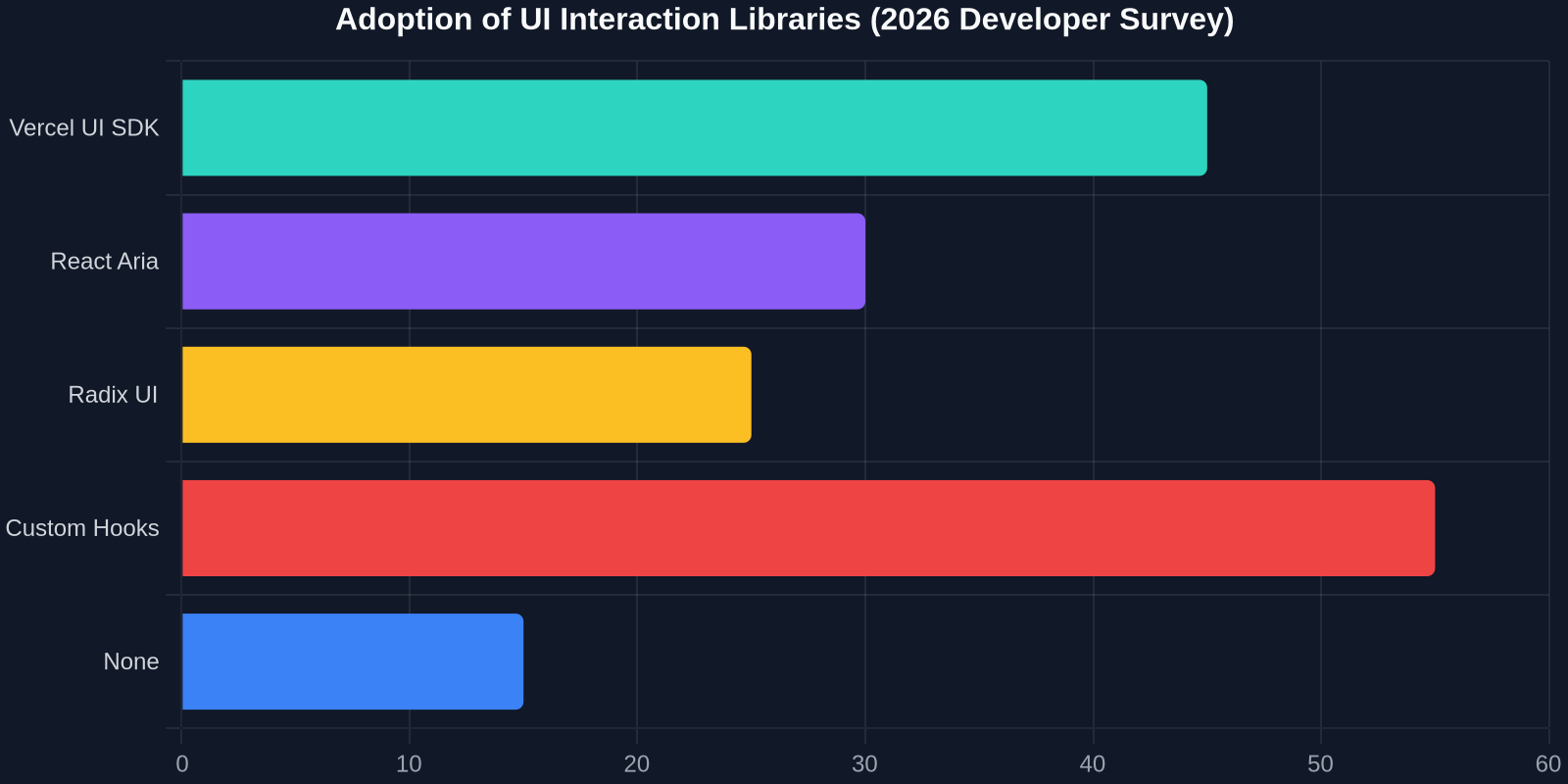
How does it stack up against alternatives like Radix UI, React Aria, or custom hooks from design systems?

- Radix UI – provides unstyled accessible primitives, but focuses mostly on individual components (dialog, select, etc.) rather than higher-level behavioral patterns like range selection or gesture composition.
- React Aria (Adobe) – powerful hooks for accessibility, but less opinionated about multi-item collections and agent integration. The Vercel SDK builds on similar concepts but adds the agentic layer and collection abstractions.
- Custom internal libraries – many large projects have their own interaction layer, but they're often under-documented and tightly coupled to the design system. The Vercel SDK aims to be a universal standard.
Getting Started with the SDK
Vercel provides first-class integration with Next.js, but the SDK is framework-agnostic React. Installation is a one-liner:
npm install @vercel/ui-sdk
Import behaviors where needed, wrap your existing components, and you're done. The team has published exhaustive Storybook examples covering every behavior.
Quick Tutorial: Adding Focus Ring and Selection to a Gallery
import { useSelectableCollection, useFocusRing } from '@vercel/ui-sdk';

function Gallery({ images }) {
  const { selectionManager, selectedKeys } = useSelectableCollection({
    selectionMode: 'multiple',
    items: images,
  });

  return (
    <div>
      {images.map((img) => {
        const itemProps = selectionManager.getItemProps({ key: img.id });
        const { focusProps, isFocused } = useFocusRing();

        return (
          <div key={img.id} {...itemProps} style={{
            outline: isFocused ? '2px solid blue' : 'none',
            opacity: selectedKeys.has(img.id) ? 0.7 : 1,
          }} {...focusProps}>

          </div>
        );
      })}
    </div>
  );
}
The Future: Composable Agentic Experiences
Vercel has hinted that future versions will include support for voice command integration, drag-and-drop virtualized trees, and even cross-application agent handoff. The long-term vision is to make every web interface natively understandable by AI, not through retrofit scraping layers, but by building interfaces that speak the same language as the agents using them.
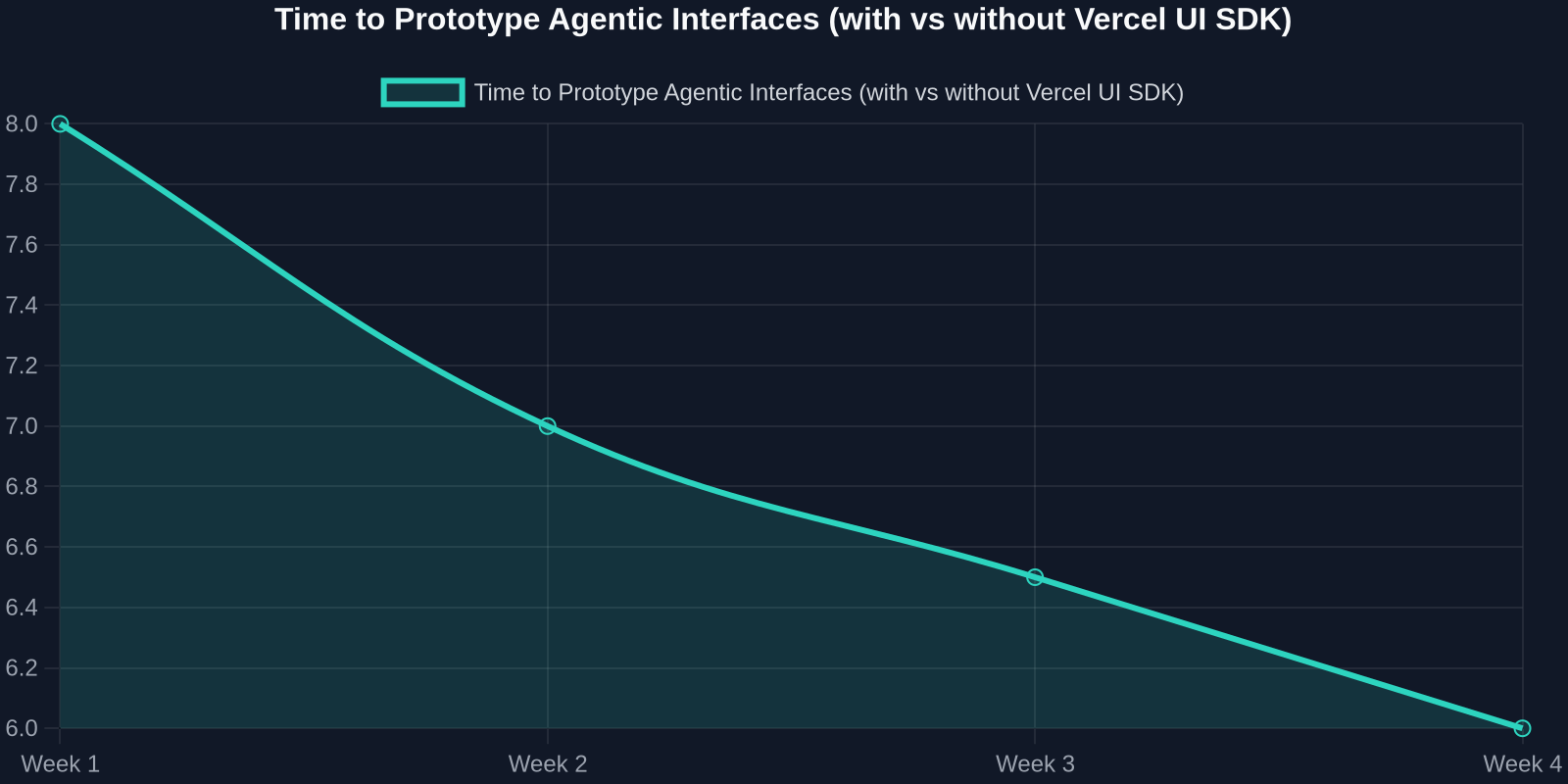
For frontend developers, this is a call to rethink how we author interactions. Instead of ad-hoc event handlers, we can assemble composed behaviors that work for mice, keyboards, touch, screen readers, and AI agents all at once.
How DivMagic Complements Your Agentic UI Workflow
While DivMagic is best known for its ability to copy any UI from any website, its true superpower is helping developers bootstrap new interfaces in seconds. Imagine you see an elegant table component on a production site. With DivMagic's extension, you capture its CSS and HTML structure, refine it in your own project, and then layer on the Vercel UI SDK's useGrid behavior to instantly give it accessible keyboard navigation and agent-ready action hints. No more staring at a blank component file, you start with real, polished UI and add intelligent interactions.
"Copy any UI element from any website, then turn it into a reusable, agentic component with Vercel's behavior hooks. Design detective work meets interaction engineering."
Conclusion: A Step Change for Interaction Engineering
Vercel's UI SDK is more than a library; it's a declaration that the era of agentic interfaces is here. By separating behavior from presentation and packaging decades of human–computer interaction research into composable React hooks, Vercel has given every developer the tools to build UIs that are not only beautiful but also intelligent.
The ability to instantly turn any layout into an agent-navigable, keyboard-friendly, and selection-rich interface will accelerate the development of next-gen dashboards, creative tools, healthcare apps, and countless other domains where both humans and AI need to interact with data seamlessly.
So, whether you're building the next Figma, a clinical dashboard that AI can click through, or just tired of fighting focus management bugs, the Vercel UI SDK deserves a place in your toolkit.