Snap's New Developer Tools: Why Specs and Spectacles Are Reshaping the UI Frontier
The recent announcement from Snap's newsroom, launching new tools for Specs developers, marks a seismic shift not just for augmented reality, but for the very fabric of user interface (UI) development. For frontend engineers and web designers accustomed to pixel-pushing in a 2D browser viewport, the leap to spatial computing represents both a monumental challenge and an unprecedented opportunity. Snap is positioning itself at the vanguard, offering a new generation of AI-powered, low-friction tools designed to democratize the creation of AR experiences. This blog will dissect these releases from a frontend developer's perspective, exploring the technical underpinnings, the time-saving workflows they enable, and what they mean for the future of UI engineering.
Decoding the Announcement: AI Specs and Enhanced Spectacles
Snap’s dual-pronged approach focuses on two distinct, yet interconnected, pillars. First, the unveiling of Snap Specs, a generative AI tool designed to build Lenses from simple text or image prompts, fundamentally lowering the barrier to entry for AR creation. Second, the evolution of the Spectacles hardware and software platform, now backed by a more robust Lens Studio and a nascent ecosystem that encourages developers to build shared, interactive, and spatially aware experiences that break free from the confines of a smartphone screen.
This is not merely an incremental update; it's a strategic play to dominate the spatial computing developer mindshare. For frontend developers, the message is clear: the skills of crafting responsive, intuitive 2D interfaces are about to become directly transferable, and highly valuable, in a 3D world.
The Frontend Revolution: From DOM to DoM (Depth of Movement)
Traditional frontend development revolves around the Document Object Model (DOM), a tree-like structure representing a 2D plane. Layouts are governed by box models, flexbox, and grid. Snap’s new tools force us to rethink this paradigm. A Lens built for Spectacles isn't just an overlay; it's a 3D object with spatial coordinates, physics, and a symbiotic relationship with the physical environment and other users.

This shift makes the new Snap Specs AI particularly potent. Instead of painstakingly coding an object's position, rotation, and scale in a 3D scene graph, a designer can prompt, “A retro boombox floating above a park bench, with a play button that triggers a music visualization.” The AI handles the heavy lifting of generating the asset, rigging the interaction, and applying the correct physics. This is analogous to how modern no-code or low-code website builders abstract away raw CSS, but for a far more complex environment.
Interactive Design Principles Reimagined for AR
Building UI for AR on Spectacles introduces interaction models that web developers rarely consider:
- Gaze and Dwell: Where the user looks becomes the cursor. UI elements must react to being looked at without a traditional hover state, requiring new feedback loops and timing thresholds.
- Gesture-Driven Interfaces: Pinch, grab, and pull gestures replace clicks and scrolls. These must be intuitive and provide unmistakable visual and haptic (via the wrist-worn Snap Pad) feedback.
- World-Anchored vs. Body-Anchored UI: Does the menu follow the user's hand, or stay pinned to a physical table? This fundamental layout decision, which Snap's tools make configurable, has no direct 2D CSS equivalent.
It's a fundamental re-skilling, but the core competencies of a great UI engineer, empathy for the user, clarity of layout, and responsive design thinking, remain the bedrock. The new developer tools from Snap are the sandbox for learning these new rules.
Deep Dive: Snap Specs and Generative UI Engineering
The most immediately impactful tool for many frontend developers will be Snap Specs. This is not a single piece of software; it's a suite of generative AI capabilities integrated into the Lens Studio workflow. Its direct analog in the web development world is not a single tool, but a combination of functionalities: an AI image generator like Midjourney, a text-to-code transformer like GitHub Copilot, and an asset store like the Unity Asset Store, all rolled into one AR-focused package.
Text-to-3D and Beyond: How It Works
At its core, Snap Specs leverages a diffusion model trained on a vast dataset of 3D objects and their associated textual descriptions. When a developer types a prompt like “a pair of steampunk goggles with glowing purple lenses,” the AI doesn't just create a 2D image. It generates a 3D mesh with corresponding textures and materials. This process, which traditionally could take a skilled 3D artist half a day, is reduced to minutes. The generated asset is then automatically formatted to be compatible with Lens Studio’s material and physics systems.
For a frontend developer, this is akin to having an AI that doesn't just generate a JPEG placeholder, but outputs a fully-formed <div> structure with scoped CSS, event listeners, and a responsive Flexbox layout based on a single descriptive line of text. The time savings are astronomical.
Automating Interaction Logic
Snap Specs goes further by helping define interaction logic. Using the Lens Studio Behavior helper, developers can define chain reactions. For example: “When the user taps the boombox’s play button, the speaker mesh should deform with an audio visualizer and the boombox should project a 3D equalizer into the world.” Much of this logic, previously written in Lens Studio’s visual scripting or JavaScript APIs, can now be prompted and auto-generated.
This is the direct route to the “developers saving time and automating repetitive work” ideal. The manual, tedious task of binding audio analysis data to a mesh’s vertex positions is abstracted away, allowing the UI engineer to focus on the creative, high-level experience design.
Spectacles: A New Hardware Frontier for Shared Spatial UIs
The second pillar of the announcement is the expanding capabilities of the Spectacles hardware, now deeply interwoven with this new developer ecosystem. The standout technical feature for a frontend dev is the Shared Spectacles Experience. This allows multiple Spectacles wearers to see and interact with the same virtual objects, persistently anchored in the real world.

This is a profound departure from the siloed, single-user experience of most AR on phones. It introduces the concept of multiplayer UI design. How does a button behave if two people can press it at the same time? How do you design privacy for a virtual sticky note left on a public mural? These are the UI problems of tomorrow, and Snap is providing the primitive tools to solve them today.
The Technical Backend: Connected Lenses
This is achieved through Connected Lenses, a powerful feature in the updated Lens Studio. It provides the SDK for syncing state across devices in real-time. From a development perspective, this means working with shared data stores, network latency compensation, and distributed event handling, concepts familiar to any full-stack web developer who's built collaborative tools like Figma or Google Docs.
Snap is essentially bringing the real-time, multiplayer backend paradigms of the web (WebSockets, CRDTs, operational transforms) into the physical world. The frontend is no longer a screen; it's the room you're standing in. The laser pointer a coworker draws on a virtual whiteboard is not a mere replica; it's a synchronous, co-located, 3D drawing that you both perceive from your unique perspectives. This is the ultimate evolution of “responsive design”, responding not just to screen size, but to physical viewpoint and shared state.
| UI Paradigm | Core Technology | Collaboration Model | Development Bottleneck |
|---|---|---|---|
| Traditional Web | DOM, CSS, JS | Asynchronous, server-mediated | Cross-browser compatibility |
| Mobile AR (Phone) | Device tracking, 2D overlay | Solitary experience | 3D asset creation |
| Spectacles AR | Spatial mapping, world mesh | Real-time, co-located, shared state | Spatial interaction design |
The table above illustrates the paradigm leap. The bottlenecks shift from compatibility and asset creation to the very design of spatial interactions, a space where creative UI engineers, not just 3D artists, will thrive. This is precisely the gap Snap’s new tools are designed to bridge.
Dissecting the Developer Workflow: From Prompt to Product
Let's construct a hypothetical, but entirely plausible, workflow using the new tools to illustrate the time-saving potential for a frontend team.
Project: Build a shared AR “Memory Garden” for Spectacles where users can leave virtual flowers and notes anchored at specific GPS locations for friends to find.
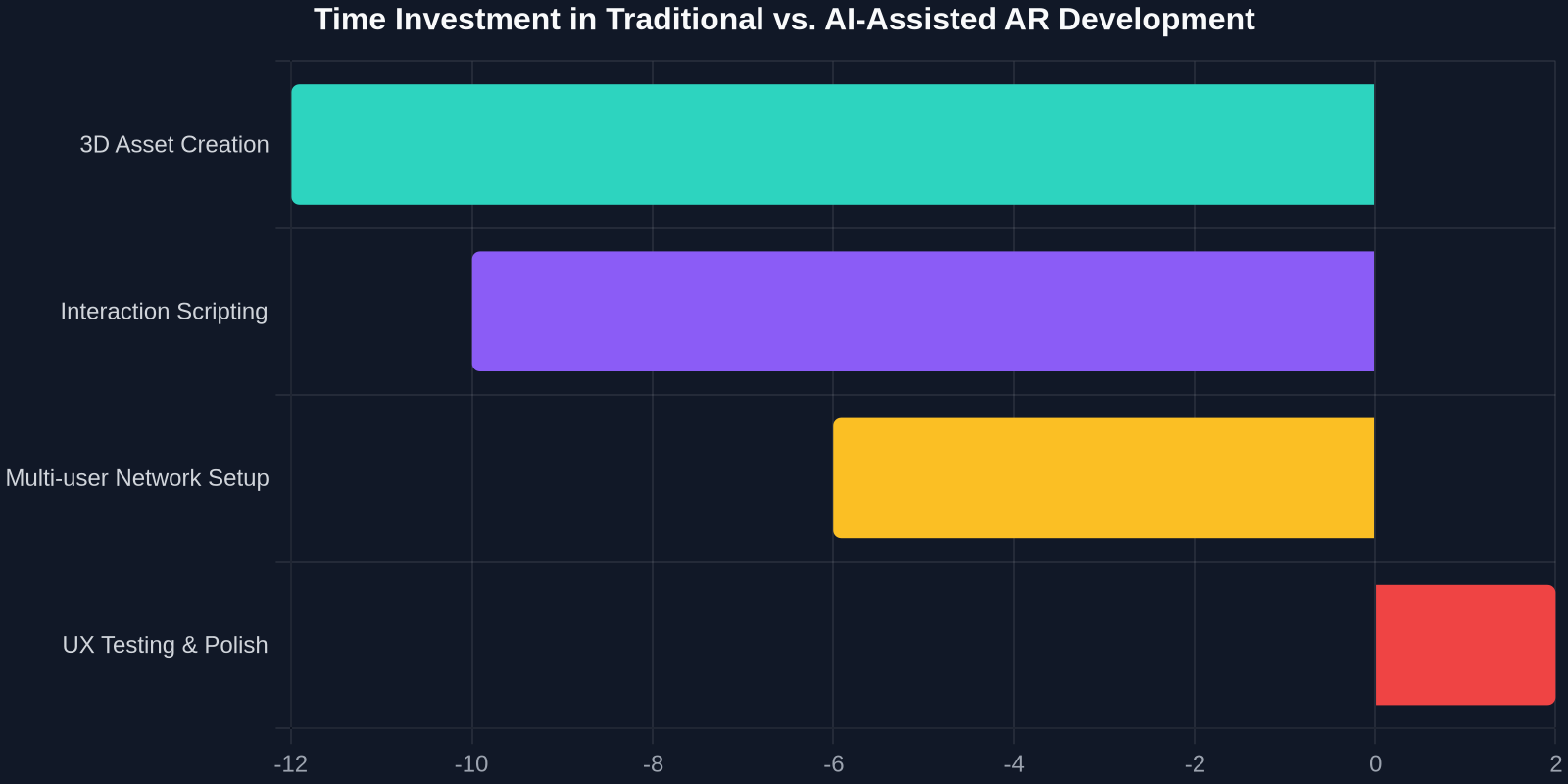
1. Asset Generation with Snap Specs (15 minutes)
A designer, with no 3D modeling background, opens Lens Studio and types prompts: “a low-poly, stylized sunflower with a wheel of cheese for a center,” “a whimsical note made of folded parchment with a wax seal,” and “a floating glass jar filled with fireflies.” Snap Specs generates these as optimized, textured 3D meshes complete with level-of-detail (LOD) models automatically. The team has a cohesive asset pack in under an hour, a process that previously would have outsourced cycles and taken a week.
2. Scripting Interactions with the Behavior Helper (30 minutes)
The lead UI engineer uses the Behavior helper, empowered by generative AI, to map interactions:
- Prompt: “When user stares at the patch of dirt for 1.5 seconds, spawn the sunflower. Play a soft 'pop' sound. Bind the sunflower's glow to a Lumen socket.”
- This auto-generates the necessary visual scripting or JavaScript bindings for the interaction and audio-visual feedback. The engineer then tweaks the timing curves and sound effect, fine-tuning the UI feel.
3. Building the Shared Experience with Connected Lenses (4 hours)
The full-stack developer configures the Connected Lenses SDK. They set up a shared data model for the scene state (object type, position, rotation, author ID). They write the logic for real-time synchronization, ensuring that when one user plants a flower, it seamlessly appears for any other user with Spectacles in the vicinity. They implement simple ownership rules (only the planter can pick their flower) and a conflict resolution system for planting in the exact same spot, a distributed systems problem made tangible.
4. UI Polish and UX Testing (1 day)
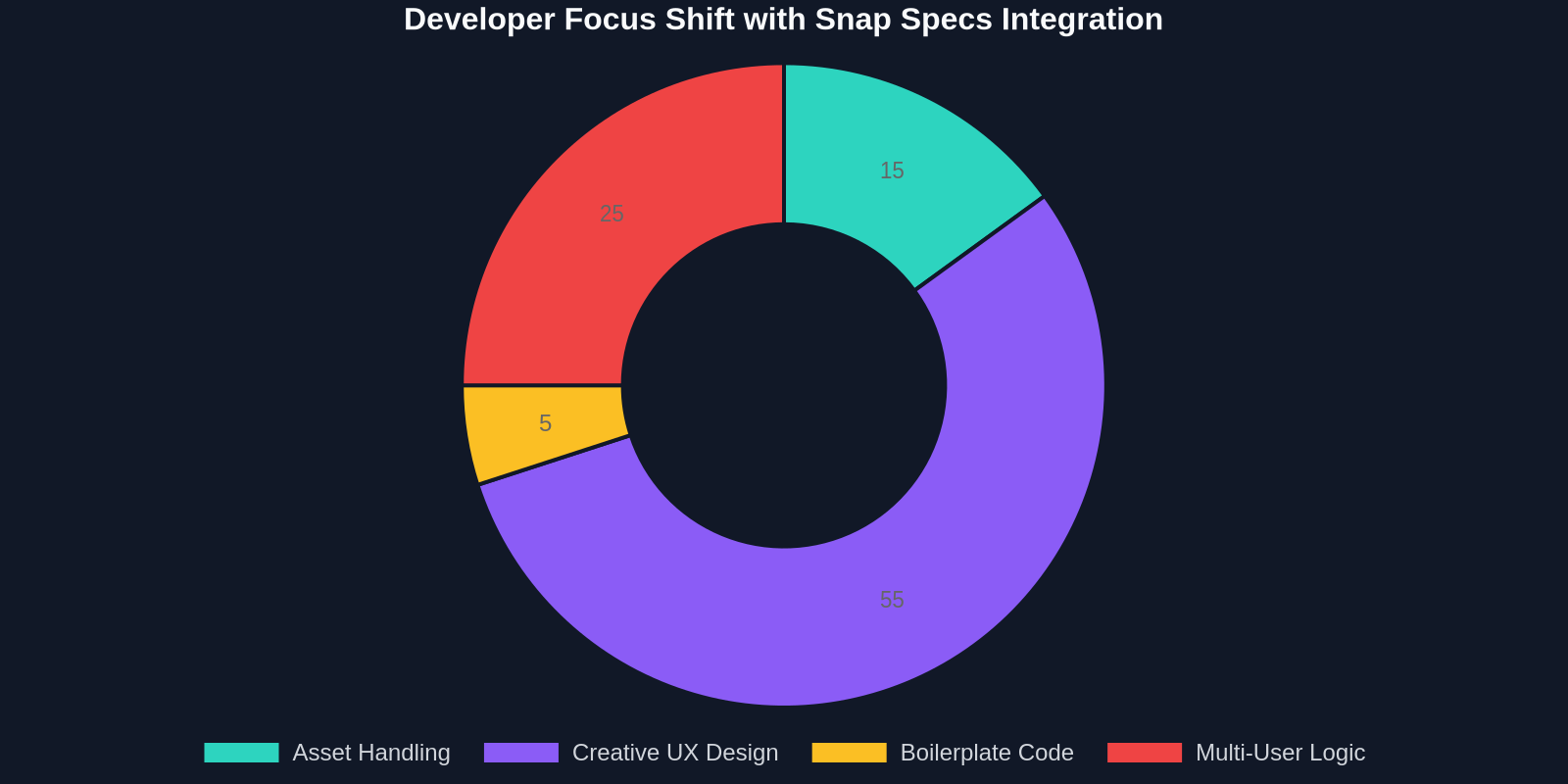
The team tests the UX. Is the 1.5-second dwell too long? They adjust the constant in the generative script. Is the gesture for picking up a note intuitive? They swap the script-generated grab gesture for a simpler pinch-pull. Because the heavy lifting of asset creation and basic scripting was automated, the team spends the vast majority of their time on the most valuable aspects: user experience, feel, and creative polish.
“The true power of Snap's new toolchain is the compression of the boring parts of development, giving creators more time to focus on the magic of shared, spatial interaction.”
Snap’s Developer Ecosystem vs. The Giants: A Strategic Analysis
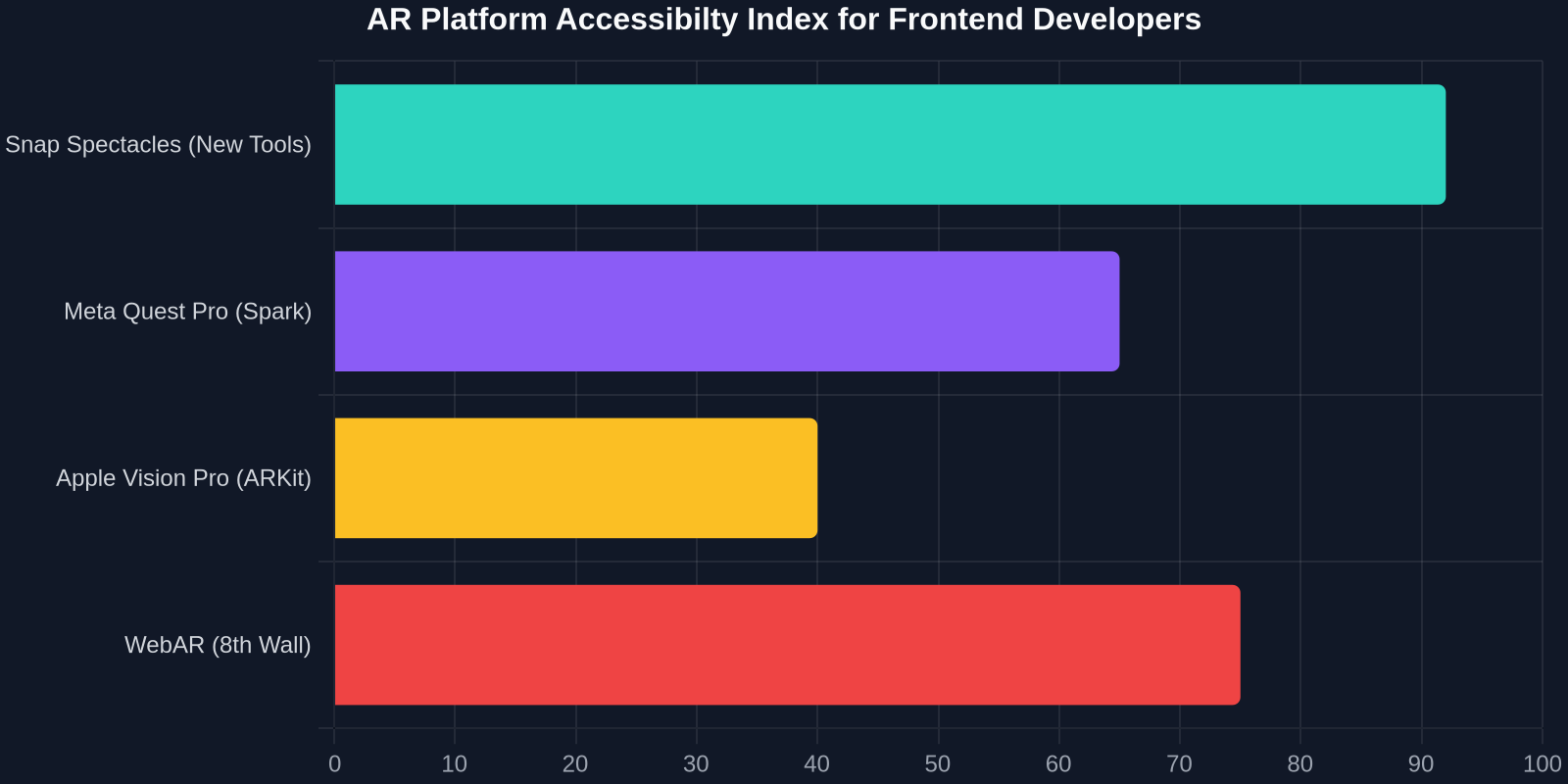
It's impossible to view this launch in a vacuum. Apple (with Vision Pro and ARKit) and Meta (with Quest and Spark AR) are fierce competitors. Snap’s strategy, however, appears to be a distinct middle path that is particularly developer-friendly.

- Meta’s Approach: Heavy investment in VR-first mixed reality. Powerful, but often isolating. Their developer tools are robust but are moving towards a Horizon OS model that may have higher barriers for individual creators compared to a mobile-first, fun-centric Lens ecosystem.
- Apple’s Approach: Ultra-premium hardware with Vision Pro. Exquisite for pass-through AR, but its price point makes it a B2B and prosumer tool, and its UX is heavily anchored to eye-tracking and micro-gestures. The developer story is powerful but tailored for a smaller, highly skilled audience.
- Snap’s Approach: Social, outdoor, and creative-first. Spectacles are explicitly not a VR headset; they are lightweight AR glasses. The new tools double down on this. The GenAI-powered workflows are designed for speed and viral creativity, not corporate training modules. They are lowering the bar for a single developer or a small team to create a shared, real-world experience that can be instantly published to a network established on ephemeral, visual fun.
This positions Snap as the platform of choice for experimental, social AR that lives in the world. For a frontend developer, it's a chance to build the whimsical, delightful “websites of the real world” with an immediacy that Apple and Meta’s heavier ecosystems can't currently match.
Addressing the Frontend Developer's Skills Gap
For the average frontend developer reading this, the journey from CSS Grid to spatial world-grid can seem daunting. The toolchain involves game-engine-adjacent concepts: meshes, shaders, physics colliders, and scene graphs. Yet, Snap’s new tooling is explicitly meant to manage this complexity. The developer's core skill is no longer writing the perfect JavaScript loop to deform a mesh; it's having the vision for why that mesh should deform and how that deformation makes the user feel informed, delighted, or connected.
This aligns with a broader industry trend where AI is transforming the developer from a pixel-perfect implementer to a director of systems. In web development, tools like Vercel's v0 or GitHub Copilot are doing the same: generating the underlying Tailwind CSS or React component boilerplate from a natural language description. DivMagic itself, as a tool, reflects this ethos by letting developers instantly capture and convert any live 2D UI element into clean, reusable code, drastically cutting the research and manual recreation cycle. This focus on capturing the exact visual output and converting it to a standard format (HTML/Tailwind) is directly parallel to what Snap Specs does for 3D objects and interactions, it turns a visual vision into a production-ready artifact, instantly.
The transferable skills are more conceptual than syntactic. A deep understanding of:
- State Management: Just as you manage app state in Redux or Vuex for a web app, you manage world state for a shared Lens. The principle is identical, only the ‘view’ is a 3D environment.
- Event Handling and Debouncing: A gaze event is an interaction event. Understanding how to debounce a dwell to prevent false triggers is the same problem as preventing a rapid-fire button submit in a web form.
- Responsive Layouts: Designing a UI that flows correctly when anchored to a hand, a wall, or floating in space is the ultimate responsive design challenge, requiring logic that adapts to an infinite set of physical viewports.
Practical First Steps into the Snap AR Ecosystem
Engaging with these new tools isn't a career pivot; it's a skill expansion. Here’s how a frontend developer can tangibly begin bridging the gap today, using Snap’s newly lowered barrier.
1. Download Lens Studio and Use the Ghost Kit
Start with the most iterative tool. Don't aim for Spectacles yet. Use Lens Studio’s Ghost Kit, which integrates directly with Snap Specs’ generative abilities. Input a prompt, generate a 3D asset, and place it in a simple Face or World Lens. The immediate feedback loop of seeing your text prompt become an interactive 3D object on your phone is the critical first step. It demystifies the pipeline.
2. Replicate a Simple Web UI in AR
A powerful learning exercise is to port a familiar 2D UI component to a 3D spatial one. Take a music player card, album art, play button, progress bar. Recreate it as a world-anchored panel in Lens Studio. Use Snap Specs to generate a stylized set of headphones to float beside it. Script the play button. This teaches the 3D layout logic while leaning on the AI for asset generation, directly mirroring a real- world workflow.
3. Study the Connected Lense Shared World Template
Lens Studio provides a template for a simple shared experience. Open it and examine the JavaScript code for synchronizing a single object’s position. Treat it like you would a new Node.js WebSocket server. The core function, syncTransform(), will look familiar, it’s a network tick updating a coordinate. This is your entry point into building real-time, multi-user spatial features. The AI tools can now help you build the interesting objects to sync.
The Long-Term Vision: The Invisible Interface
The ultimate destination of tools like Snap Specs and the Spectacles platform is the “invisible interface”, UI that is so seamlessly integrated with the real world that it ceases to feel like a separate technology layer. When a virtual calendar is elegantly pinned to your physical fridge, or a contextual repair guide hovers perfectly over a bicycle’s gears, the interface disappears. You just fix the bike.
This is the holy grail of UI engineering, and it requires a complete collapse of the distinction between the digital and the physical. The tools announced by Snap are not just about making it easier to create AR effects. They are about training a generation of developers to think in a new design language where a button is a physical gesture, a div is a 3D volume, and responsive design means responding to the entire world. For the frontend engineer willing to learn this new vocabulary, the next decade promises to be the most creatively explosive period in the history of the field.
Conclusion: Your Frontend Skills Just Became More Valuable
Snap’s launch of new tools for Specs developers is a clarion call. The artificial barrier between “web developer” and “3D/AR developer” is dissolving, and it's being dissolved by generative AI that speaks the language of UI design. The core promise, describe an interface visually and conversationally, and get back a functional, interactive 3D component, is a direct upgrade to the developer experience. It allows the foundational principles of clarity, responsiveness, and user delight to transcend the screen.
The opportunity for frontend developers is not to become 3D artists, but to become spatial UI architects. The tools to handle the painful translation of visual intent into 3D assets and complex scripts are now being automated. What’s left is the uniquely human and profoundly valuable task of designing experiences that feel intuitive and magical in the unlimited canvas of the real world. The launchpad is built, the tools are on the table, and the new frontier of UI isn't a new browser, it’s the entire world around you.