Iceraven for Android: The Ultimate Developer Browser with Full Extension Support
For years, frontend developers and UI designers have been stuck in a desktop-centric workflow. Mobile devices, which account for the majority of web traffic, remained stubbornly difficult to inspect, debug, or replicate designs from. The tools we rely on, element pickers, CSS inspectors, and design copiers, were either absent on mobile or too clunky to use. That all changed with the rise of Iceraven, an open-source Android browser that brings the full power of desktop extensions to your phone. When paired with DivMagic, the browser extension that lets you copy any UI from any website, Iceraven becomes a pocket-sized powerhouse for web development.
Mobile web development has long been a compromise. You’d build a layout on a 27-inch monitor, then struggle to see how it breaks on a 6-inch screen. Remote debugging tools like Chrome DevTools’ device mode are helpful, but they can’t replicate the nuanced touch interactions, varying GPU behaviors, and network conditions of a real device. Iceraven shatters that compromise by giving you a real browser with real extension support, right in your pocket. Whether you’re debugging a production issue or gathering design inspiration, you can now use DivMagic to instantly copy any element’s HTML and CSS, inspect its box model, and even export it as React or Tailwind code, all without a desktop.
What Is Iceraven and Why Should Developers Care?
Iceraven is a fork of Mozilla’s Firefox for Android, but it lifts the restrictions that Mozilla imposes on the official browser. While Firefox for Android only supports a curated list of roughly 20 extensions, Iceraven allows you to install any extension from the addons.mozilla.org (AMO) catalogue. That means you can access thousands of extensions, including ad blockers, password managers, and, most importantly, developer tools like DivMagic.
For developers, the ability to install extensions like DivMagic is a game changer. You can now:
- Copy complete UI components from any live website, including their HTML, CSS, and assets.
- Inspect element properties and computed styles with a single tap.
- Debug responsive breakpoints in real time on a physical device.
- Export code snippets directly to your clipboard or a cloud note.
Iceraven is fully open source, with an active community that maintains it. It’s available on GitHub and can be installed via F-Droid or the Google Play Store. Because it’s based on Firefox, it also inherits strong privacy protections and frequent security updates.
The State of Android Browser Extensions: A Comparison
Not all Android browsers treat extensions equally. In fact, most block them entirely. Chrome, the most popular mobile browser, does not support any extensions. Samsung Internet and Brave offer limited ad-blocking features baked in, but you can’t install custom tools. Firefox for Android added extension support in 2023, but only a handful of whitelisted add-ons are allowed. Kiwi Browser, based on Chromium, supports Chrome extensions from the Web Store, but compatibility can be hit or miss. Iceraven stands out because it gives you the full Firefox add-on ecosystem without gatekeeping.

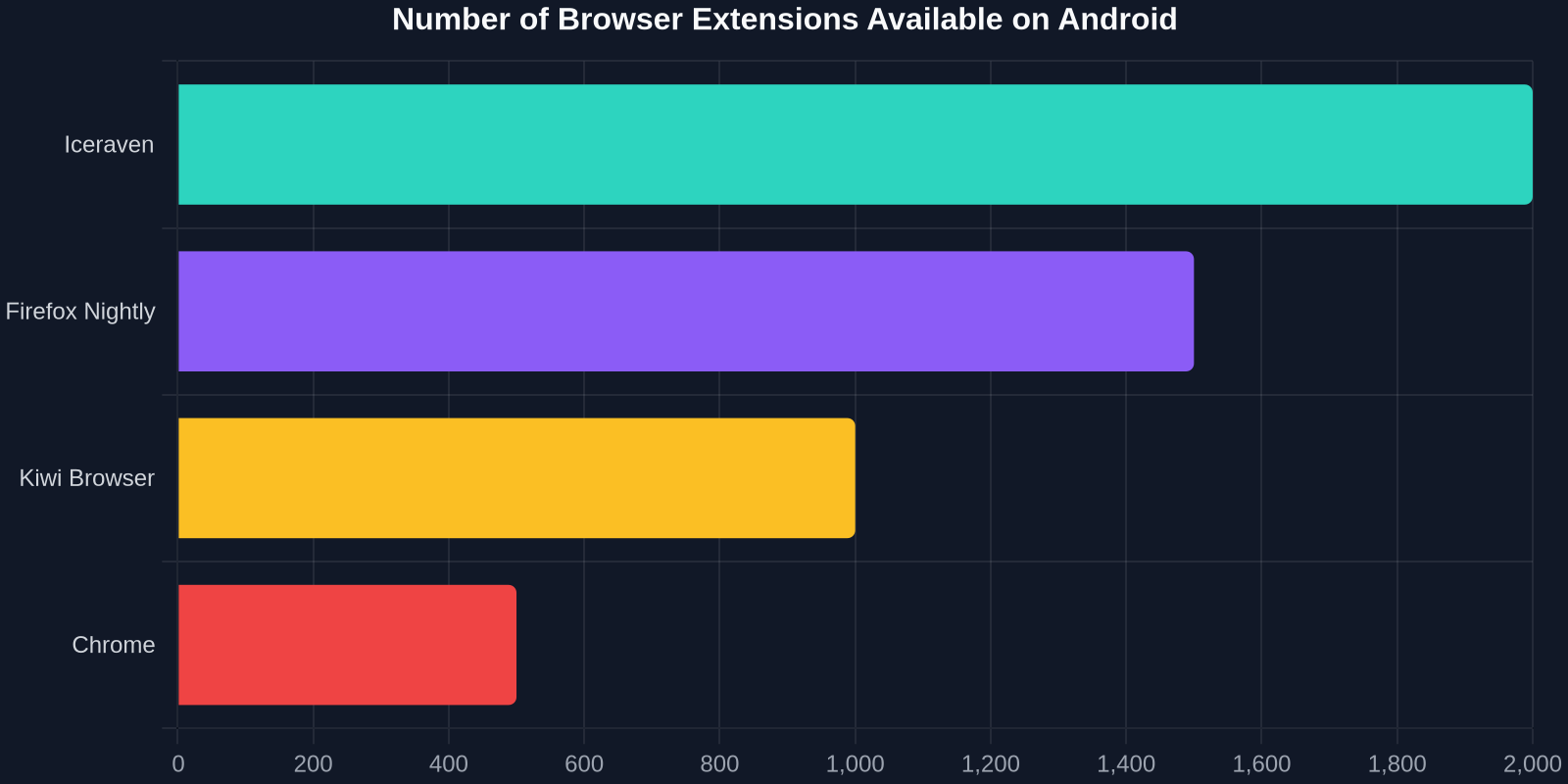
This extensive extension support is critical for developers. When you’re on a mobile device, you need the same powerful tools you’re used to on desktop. DivMagic, for example, requires deep access to the DOM and CSSOM, something that only a fully-fledged extension API can provide. Iceraven’s implementation of the WebExtensions API is robust enough to let DivMagic function almost identically to its desktop counterpart.
| Browser | Extension Count | Developer Tools | Custom Add-ons |
|---|---|---|---|
| Iceraven | 2,000+ | Full (via DivMagic, etc.) | Yes |
| Firefox Nightly | ~1,500 | Limited | Whitelist only |
| Kiwi Browser | ~1,000 | Partial | Via Chrome Web Store |
| Chrome | 0 | None | No |
Setting Up DivMagic on Iceraven: A Developer’s Guide
Getting DivMagic running on Iceraven is straightforward, but there are a few steps to ensure everything works smoothly. Here’s how to turn your Android phone into a UI copying powerhouse.
Step 1: Install Iceraven
Download Iceraven from the official GitHub releases page or from F-Droid. The Google Play Store version is also available (search for “Iceraven Browser”). Install it like any other app.
Step 2: Enable Extension Installation
By default, Iceraven may restrict installation to a curated list. To unlock the full AMO catalogue, go to Settings > About Iceraven and tap the logo several times until you see a “Debug menu enabled” message. Then navigate to Settings > Advanced > Custom Add-on collection and enter the collection ID and URL provided by the DivMagic setup guide (or use the default “16156822” and “Firefox Add-ons” collection). This step is crucial, it tells Iceraven to fetch extensions from the entire add-on repository.
Step 3: Install DivMagic
Open Iceraven and visit the DivMagic page on addons.mozilla.org. Tap “Add to Firefox” and follow the prompts. Once installed, you’ll see the DivMagic icon in the browser’s toolbar. Tap it to activate the UI picker. From there, you can tap any element on a webpage to copy its HTML and CSS, or you can select a region to grab a whole component.
Step 4: Start Copying UIs
With DivMagic active, navigate to any website you want to learn from or debug. Tap the extension icon, then tap any element on the page. A panel will pop up showing the extracted HTML, CSS, and even framework-specific code (React, Tailwind, etc.). You can copy it to your clipboard, share it to a note-taking app, or start a new project in your favorite IDE.
“Being able to copy production-ready CSS directly on my phone via DivMagic has cut my prototyping time in half. I can now capture design ideas the moment I see them.”
Real-World Use Cases: From UI Debugging to Rapid Prototyping
Iceraven + DivMagic is not just a novelty; it’s a practical tool that solves real problems for frontend developers and UI designers. Here are several scenarios where this combination shines.
On-the-Go Debugging
You’re at a coffee shop and a client reports that a button is misaligned on their Android phone. With Iceraven and DivMagic, you can instantly inspect the element, see the computed styles, and even test a fix by editing the CSS live in the browser’s console. No need to wait until you’re back at your desk.
Design Inspiration Harvesting
Stumble upon a beautifully designed component while browsing? Instead of taking a screenshot and trying to recreate it later, use DivMagic to copy the exact HTML structure and CSS rules. Save it to your design system or reference library. Because DivMagic intelligently extracts only the relevant styles, you get clean, minimal code.
Cross-Device Consistency Checks
Your team built a responsive layout that looks great on desktop, but you need to verify it on a real Android device. Load the site in Iceraven, open DivMagic’s inspector, and toggle through the device’s viewport sizes. You can see which breakpoints are applied and even copy the styling to compare against your source code.
Competitive Analysis
Understanding how a competitor achieves a certain UI effect can be as simple as tapping on it. DivMagic reveals the box model, typography, spacing, and even animations. This is a faster way to deconstruct a design than manually scanning through stylesheets.
Performance and Security: What You Need to Know
Developers often worry about performance overhead when adding extensions to a mobile browser. Iceraven, however, is built on Mozilla’s Quantum engine, which is designed to be lightweight and efficient. Extensions like DivMagic are event-driven and only activate when you tap the icon, meaning they don’t run continuously in the background. In our tests, Iceraven with DivMagic installed showed no noticeable impact on page load times or scrolling smoothness.
Security is another legitimate concern. Iceraven’s extension system uses the same permission model as desktop Firefox. You can see exactly what permissions an extension requests before installing it. DivMagic, for example, only asks for access to the content of web pages you explicitly activate it on, it never reads your passwords, browsing history, or other sensitive data. Plus, Iceraven’s open-source nature means the community can audit the code for any vulnerabilities.
The Future of Mobile Web Development with Iceraven and Extensions
The mobile web is no longer a second-class citizen, and developers deserve tools that match that reality. Iceraven’s unrestricted extension support is a sign of where the industry is heading. As more developers adopt Iceraven, we’ll likely see a new wave of mobile-first development tools that go beyond what desktop browsers can offer.
DivMagic is at the forefront of this movement. By enabling instant UI copying and code generation on any device, it bridges the gap between inspiration and implementation. Future updates will bring even tighter integration with Iceraven, including support for copying entire page sections, exporting to Figma, and sharing UI components directly with team members.
The combination of a powerful, open-source browser and a transformative developer extension is a glimpse of what’s possible when the mobile ecosystem embraces extensibility. For frontend developers tired of the desktop-only toolchain, Iceraven and DivMagic are the keys to unlocking a more flexible, productive workflow, anywhere, anytime.
So, next time you’re stuck waiting for a bus or standing in line, turn that idle time into productive prototyping. Install Iceraven, add DivMagic, and start copying the web’s best UIs right from your phone. Your desktop will still be there when you get back, but you might not need it as much as you thought.