How to Build Modern UI Components Using CSS Generators: A Developer's Guide
Every frontend developer knows the grind: staring at a blank CSS file, trying to remember the exact syntax for a multi-stop gradient, tweaking box-shadow values pixel by pixel, or wrestling with keyframe animations that just don't feel right. The modern web demands rich, interactive interfaces, but hand-coding every visual effect from scratch is neither efficient nor enjoyable. That's precisely where CSS generators come in, they transform what used to be tedious guesswork into a fast, visual, and error-free process.
In this guide, we'll explore the world of CSS generators, how they help you build modern UI components, and why they've become an indispensable part of any professional frontend workflow. We'll look at real-world use cases, code examples, and best practices, and we'll see how tools like DivMagic take the concept even further by letting you copy any UI from any website, instantly.
What Exactly Are CSS Generators?
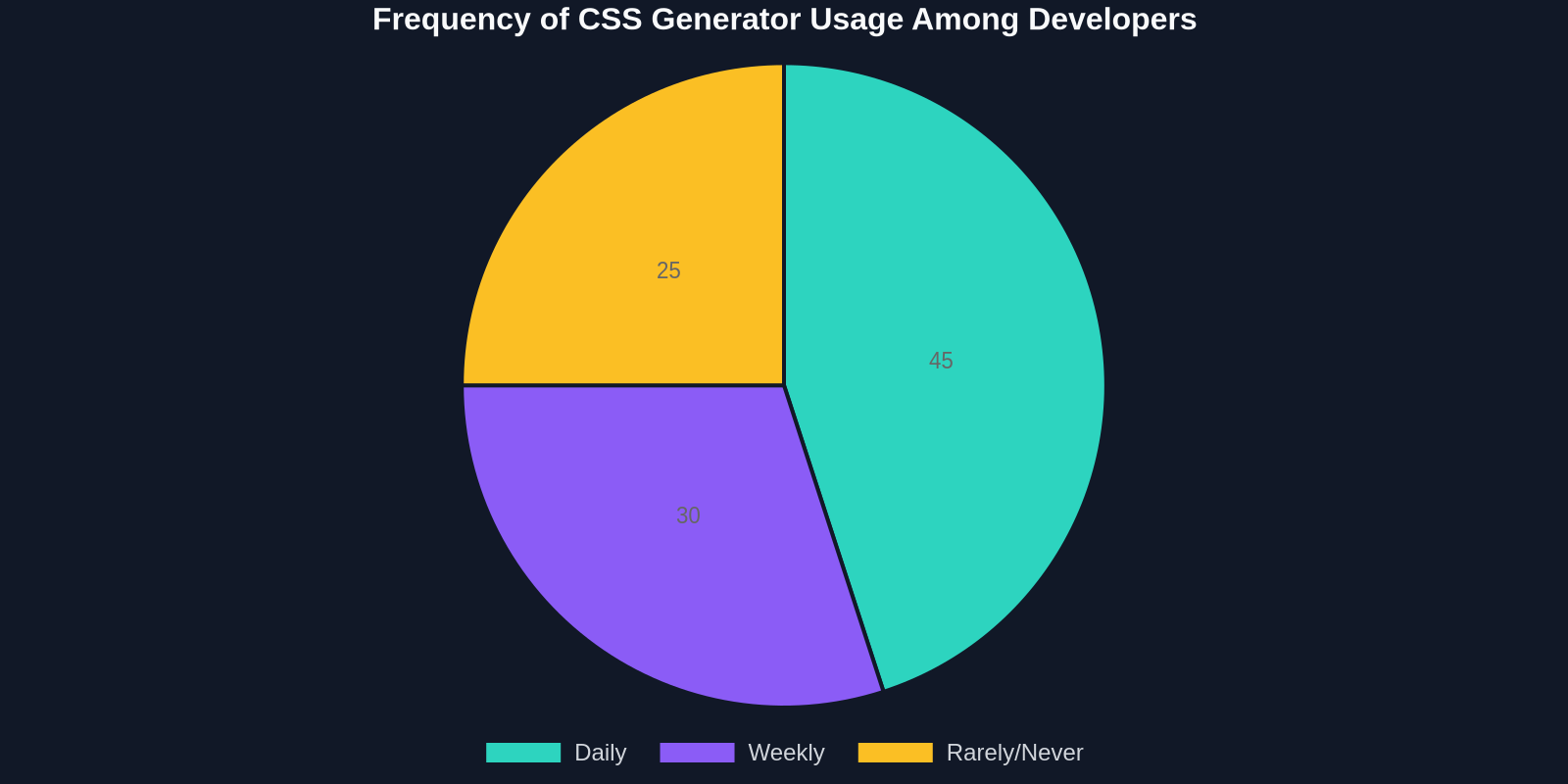
A CSS generator is a tool, usually web-based, that provides a visual interface for creating CSS code. Instead of manually typing out complex properties, you adjust sliders, pick colors, and tweak values, and the tool immediately shows you a preview while generating the corresponding CSS. The most common generators handle gradients, box shadows, text shadows, transforms, animations, filters, and even layout systems like grid and flexbox.
These tools aren't just for beginners. Even seasoned developers use them to quickly prototype ideas, experiment with different visual treatments, and avoid the trial-and-error cycle that often comes with advanced CSS. The output is standard, valid CSS that you can paste directly into your stylesheets or modify further.
The Rise of Automated CSS: Why Now?
Modern web development moves at a breakneck pace. Design systems, component libraries, and rapid iteration cycles demand that UI components be built, themed, and adapted quickly. Writing CSS from scratch for every gradient, shadow, or animation is unsustainable. At the same time, the CSS specification has grown tremendously, features like CSS Grid, custom properties, and complex filter functions offer incredible power but also add complexity. CSS generators demystify these features and make them accessible.

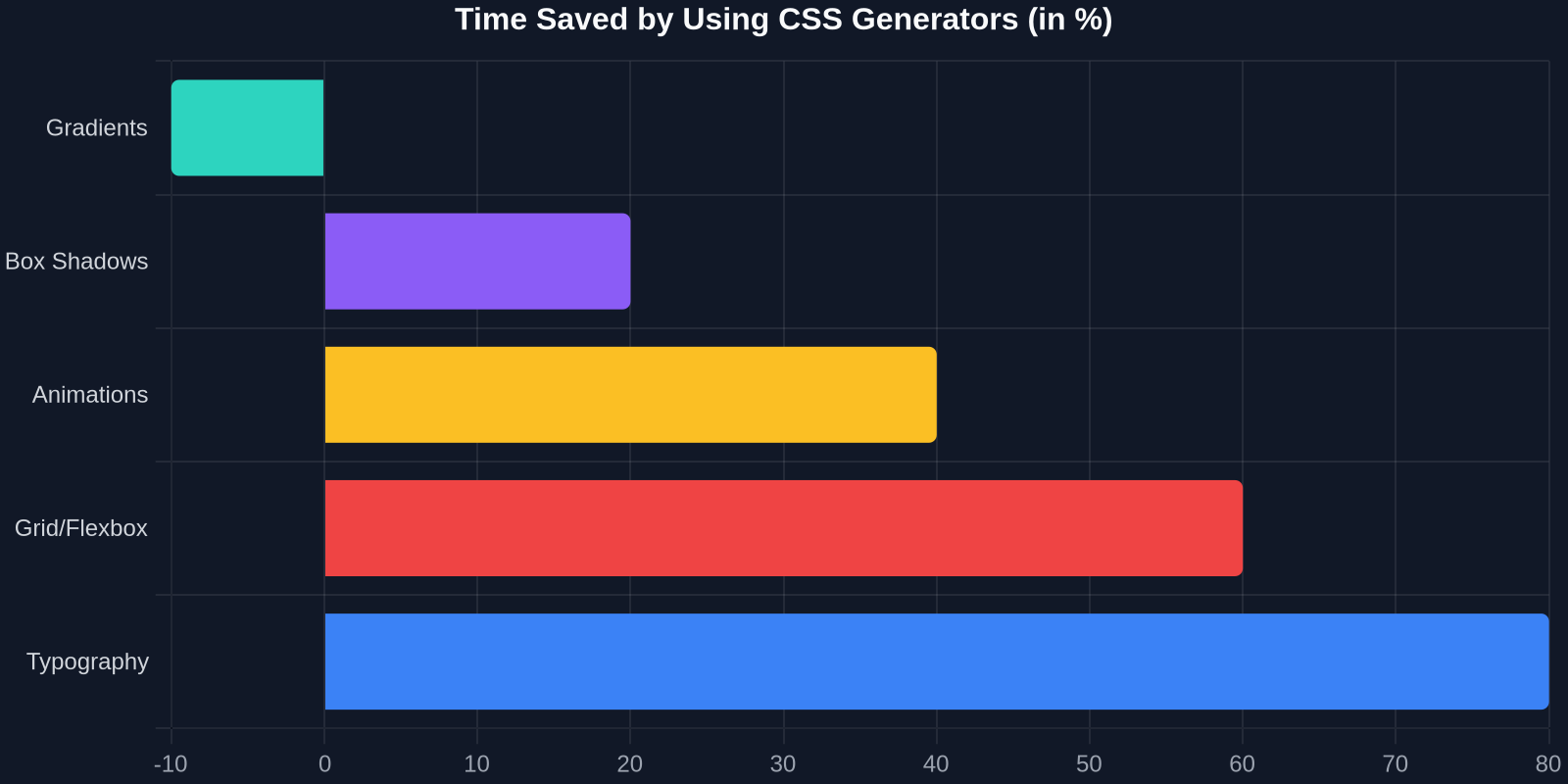
The chart above shows typical time savings across different CSS tasks. For gradients and box shadows, you can save up to 80% of the time you'd spend tweaking values manually. Even for more logic-heavy tasks like grid layouts, the visual feedback from a generator can cut your work in half.
Building Blocks: Essential CSS Generators for Modern UI
Let's dive into the most impactful generators and how they speed up real component development.
Gradient Generators
Linear and radial gradients are cornerstones of modern UI design, from subtle background overlays to vibrant button states. Writing a gradient manually, especially with multiple color stops and angles, is error-prone. A good gradient generator lets you add color stops, adjust angles visually, and even export the code with vendor prefixes already included.
For example, consider a hero section with a gradient background:
/* Hand-coded: error-prone and hard to visualize */
.hero {
  background: linear-gradient(135deg, #667eea 0%, #764ba2 100%);
}
With a generator, you could quickly experiment with a more complex, multi-stop gradient:
.hero {
  background: linear-gradient(45deg, #ff9a9e 0%, #fad0c4 30%, #fad0c4 60%, #a18cd1 100%);
}
The visual feedback ensures the result matches your design intent before you write a single line.
Box-Shadow and Border-Radius Generators
Shadows are notoriously fiddly. That's why dedicated box-shadow generators are among the most popular CSS tools. You can adjust horizontal and vertical offsets, blur, spread, color, and even add multiple shadows to create layered, realistic effects. The generator outputs the precise code, often with a live preview of the shadow on a sample element.
Animation and Keyframe Generators
CSS animations bring interfaces to life, but crafting keyframes by hand is time-consuming. Animation generators allow you to define properties like translate, rotate, scale, and opacity at different keyframe percentages, then preview the animation in real time. Some even provide easing presets and bounce effects.
Imagine building a loading spinner: instead of writing four keyframe steps manually, you sketch the motion with a timeline interface and get the following code instantly:
@keyframes spin {
  0% { transform: rotate(0deg); }
  100% { transform: rotate(360deg); }
}
.spinner {
  animation: spin 0.8s linear infinite;
}
This is a trivial example, but for complex entrance animations or micro-interactions, the time savings are significant.
Grid and Flexbox Layout Generators
Layout generators are slightly different: they often provide a visual editor where you can draw rows and columns, define gaps, and align items. They output the corresponding CSS Grid or Flexbox code. While you still need to understand the underlying model, these tools are fantastic for quickly scaffolding a complex layout or for learning how the properties interact.
Take a dashboard layout with asymmetric columns:
.dashboard {
  display: grid;
  grid-template-columns: 250px 1fr 1fr;
  grid-template-rows: auto 1fr auto;
  gap: 20px;
}
A grid generator lets you drag and drop areas, making the structural decisions visual before you commit to code.
From Generator to Production: Workflow Integration
Using a CSS generator is only half the story. The real power comes when you seamlessly integrate generated code into your existing workflow.
Design Tokens and Custom Properties
Modern component libraries rely on design tokens, variables for colors, spacing, shadows, etc. When you use a generator, don't just copy the raw values; refactor them into custom properties. This makes your components themeable and consistent.
For example, a generated shadow:
.card {
  box-shadow: 0 8px 32px rgba(0, 0, 0, 0.12);
}
Refactored with design tokens:
:root {
  --shadow-card: 0 8px 32px rgba(0, 0, 0, 0.12);
}
.card {
  box-shadow: var(--shadow-card);
}
Now, if the design system changes, you update the token once, and every component using that shadow follows suit.
Tailwind CSS and Utility Classes
If you're using Tailwind, you can still benefit from CSS generators. Generate a gradient, then extract the values into Tailwind's arbitrary value syntax or into your tailwind.config.js extension. This keeps your markup clean while leveraging the generator's visual precision.
<div class="bg-[linear-gradient(45deg,#ff9a9e,#fad0c4_30%,#fad0c4_60%,#a18cd1)]">
  ...
</div>
AI-Powered CSS Generation
A new frontier is AI-assisted CSS. Tools like ChatGPT and specialized AI layout synthesizers can generate entire component styles from natural language descriptions. For instance, "Create a card with a glassmorphism effect and a hover animation" yields CSS that would take minutes to write manually. But AI is not perfect, it often needs tweaking. Combining a visual CSS generator with AI suggestions gives you the best of both worlds: speed and precision.
DivMagic: Copy Any UI, Instantly
While CSS generators are fantastic for creating individual properties, what if you could copy an entire UI component, its HTML, CSS, and all, directly from any website? That's where DivMagic fits into the modern developer's toolkit.
DivMagic is a browser extension that lets you select any element on any website and copy its complete style and structure. It's like having an inspector that doesn't just show you the code, but hands it to you ready to use. Imagine you see a beautifully designed button or a perfectly balanced card on a site you admire. With DivMagic, you click, copy, and paste the generated code into your project. It's the ultimate CSS generator, one that works on real, live production UI.
"The best CSS is the one you don't have to write from scratch. DivMagic turns the entire web into your personal component library."
This isn't about copying stolen designs; it's about learning, reverse-engineering, and accelerating your own work. You can grab a complex grid layout, a multi-layered shadow, or a sleek animation, then adapt it to your own design language. In a world where time-to-market matters, DivMagic is a game-changer.
Comparing Approaches: Manual, Generators, and AI
Let's put the different methods side by side to see the clear advantages.

| Approach | Time to Build a Card Component | Consistency | Learning Curve |
|---|---|---|---|
| Manual CSS coding | 2–4 hours | Dependent on developer skill | Steep for complex effects |
| CSS generators | 30–60 minutes | High, if tokens are used | Moderate – visual feedback helps |
| AI-assisted generation | 10–20 minutes | Moderate – requires review | Low – but understanding is essential |
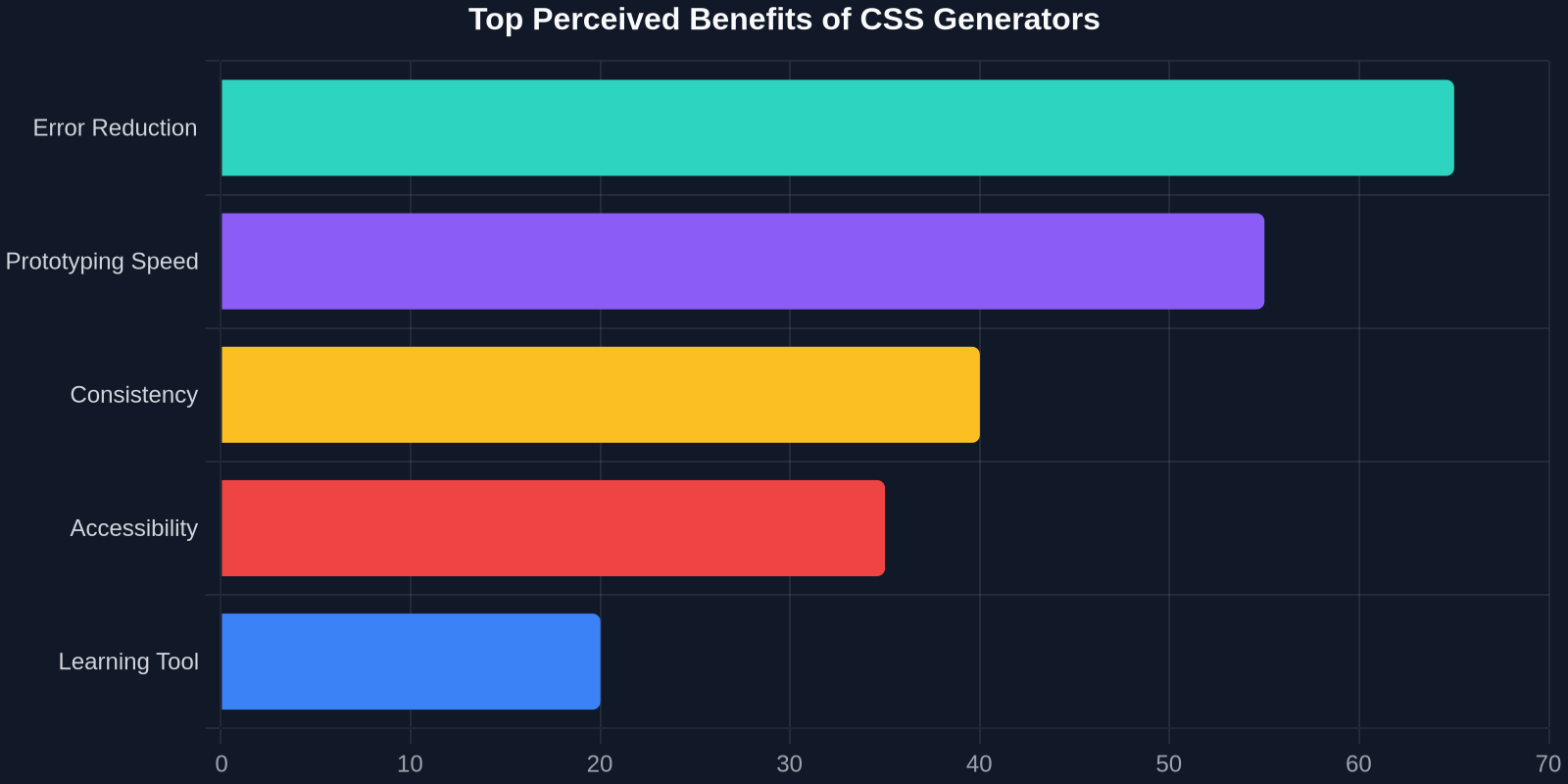
As you can see, CSS generators strike a balance between speed, control, and quality. They don't hide the CSS from you; they help you produce it faster and with fewer errors.
Best Practices for Using CSS Generators
To get the most out of these tools, follow these guidelines:
- Always understand the output: Don't blindly copy-paste. Read the generated CSS and make sure you know what each property does. This is how you learn.
- Refactor into design tokens: Immediately convert raw values to custom properties. This future-proofs your code and makes it maintainable.
- Combine multiple generators: Use a gradient generator for the background, a shadow generator for the card, and an animation generator for the hover effect. The whole is greater than the sum of its parts.
- Test across browsers: While generators often include vendor prefixes, always verify your components in multiple browsers and devices.
- Keep accessibility in mind: Generated visual effects must not hinder readability or usability. Ensure sufficient color contrast and avoid animations that might cause discomfort.
Common Pitfalls and How to Avoid Them
Even with generators, mistakes can happen. Here are a few traps:
Over-reliance on generated code without comprehension. If you don't understand the CSS, you'll struggle to debug or customize it later. Use generators as a learning aid, not a crutch.
Ignoring performance. Complex gradients, heavy box-shadows, and continuous animations can impact rendering performance. Always profile your components and consider using will-change or transform for animations to keep the compositor happy.
Neglecting responsive design. A generator's visual output is often static. Make sure the generated styles adapt to different screen sizes. Use relative units and media queries.
Copying code without license considerations. When using DivMagic or any tool that copies from existing websites, be mindful of copyright and licenses. Use it for inspiration and learning, not for outright replication of someone else's proprietary design.
The Future of CSS Generation
We're moving toward a world where AI and visual tools merge. Imagine a design tool that not only generates CSS but also understands your design system and automatically creates reusable, tokenized components. DivMagic is already a step in that direction, it lets you capture real-world UI and turn it into code. As AI matures, we'll see even more intelligent assistants that can generate entire component libraries from a single screenshot or a natural language brief.
"CSS generators aren't just a convenience; they're a necessity for keeping up with the pace of modern UI development."
Conclusion
Building modern UI components doesn't have to be a chore. CSS generators take the pain out of writing complex styles, reduce errors, and give you back hours of development time. Whether you're crafting a delightful hover effect, a intricate grid layout, or a full-blown design system, these tools are your allies. And when you need to replicate a stunning UI you've seen on the web, DivMagic closes the loop by letting you copy any element's style instantly.
Start integrating CSS generators into your workflow today. Experiment with different tools, refine your process, and watch your productivity soar. The web is full of inspiration, and now you have the tools to bring it to life, faster than ever before.