GitHub Outage: How a Nearly 8-Hour Downtime Disrupted Developer Workflows and What We Learned
On August 17–18, 2026, the developer world was shaken by a massive GitHub outage that lasted nearly eight hours. The incident disrupted core services including Actions, pull requests, APIs, Copilot, and authentication, leaving millions of developers stranded. As the dust settled and services were restored, with “strong signs of recovery” but slightly elevated error rates, it became clear that this outage was more than a technical hiccup. It was a wake-up call for modern development workflows, highlighting the fragility of centralized platforms, the hidden costs of downtime, and the urgent need for resilient, offline-ready tools.
In this deep dive, we’ll unpack the outage’s full impact, explore how it affected frontend developers in particular, and share actionable strategies to keep your productivity high, even when the cloud goes dark. Along the way, we’ll introduce a powerful ally for frontend teams: DivMagic, a browser extension that lets you copy any UI from any website, no GitHub dependency required.
The Anatomy of the Outage: What Went Down
GitHub’s status page lit up with warnings just before midnight UTC on August 17. Users worldwide reported failures across the platform’s web interface, API, and critical automation tools. The root cause was traced to a cascading failure in the platform’s internal routing layer, which triggered a systemic degradation across multiple services. While GitHub’s engineering team worked around the clock, the outage dragged on for nearly eight hours, a eternity in the fast-paced world of continuous integration and deployment.
The most severely impacted services included:
- GitHub Actions: Workflows failed to trigger, leaving CI/CD pipelines in limbo.
- Pull Requests: Merging, reviewing, and even viewing PRs became unreliable.
- APIs: REST and GraphQL endpoints returned 5xx errors, crippling integrations and bots.
- Copilot: AI-assisted coding was unavailable, forcing developers back to manual typing.
- Repository Downloads: Cloning and pulling repositories hit a 50% error rate, making local development nearly impossible for teams that rely on fresh clones.
Even after the initial recovery, error rates remained slightly elevated for several hours, with GitHub noting that services were still stabilizing. This meant that even once the “all clear” was given, many developers continued to face intermittent failures, prolonging the agony.
Timeline of the Downtime
To understand the scale, let’s look at a rough timeline of events:
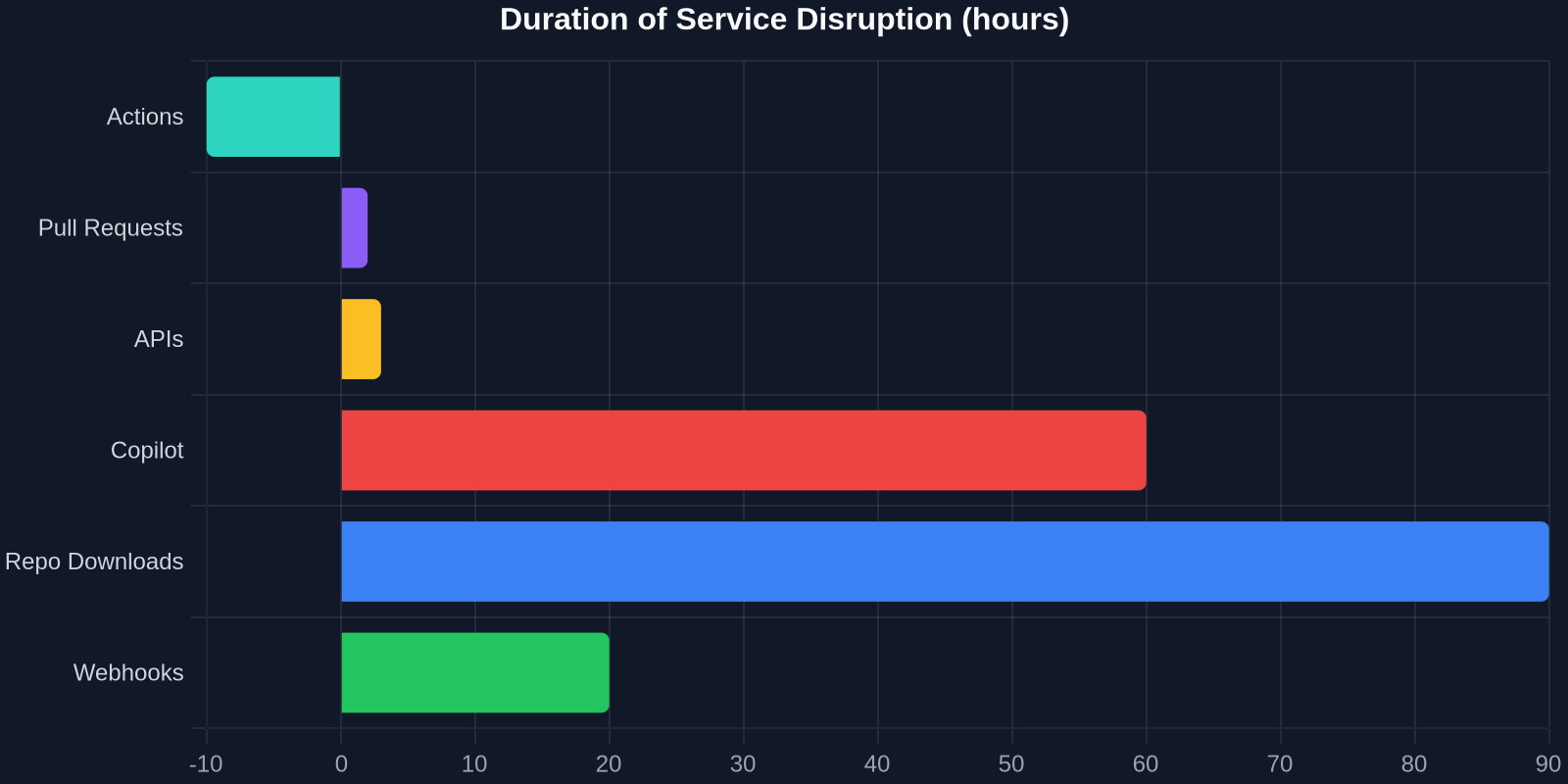
The chart above illustrates the duration each service was disrupted. While Actions and APIs were down for the full 8 hours, Copilot recovered slightly earlier, and repo downloads saw a longer tail of errors due to caching delays. The staggered nature of the recovery meant that developer workflows were fragmented for an extended period.
The Hidden Costs for Frontend Developers
Frontend developers felt the outage acutely. Modern frontend workflows are deeply intertwined with GitHub services:
- CI/CD pipelines: Many teams use GitHub Actions to build, test, and deploy frontend applications. A stalled pipeline means no preview deployments, no automated testing, and delayed releases.
- Dependency management: npm packages, component libraries, and design systems often live on GitHub. With clone failures, pulling the latest versions became a gamble.
- Collaboration: Pull requests are the backbone of code review. Without them, frontend teams lost their primary method of quality control and knowledge sharing.
- Copilot: For developers who rely on AI to generate boilerplate UI code or complex animations, losing Copilot was like losing a pair programming partner.
But the biggest cost was time. A single developer losing an hour of productivity might seem trivial, but when scaled across thousands of teams, the cumulative waste is staggering. For a frontend team of five, an 8-hour outage could mean up to 40 person-hours of lost output, time that could have been spent polishing UI components, fixing accessibility bugs, or optimizing performance.
What the Outage Taught Us About Platform Dependency
“The GitHub outage was a stark reminder that even the most robust platforms can fail, and when they do, your entire workflow can grind to a halt.”
This event exposed a critical flaw in the “everything-as-a-service” mindset. While GitHub is undeniably reliable, it’s still a single point of failure. When it goes down, the entire development lifecycle, from coding to deployment, is impacted. This is especially dangerous for frontend teams that have fully embraced cloud-native toolchains without adequate offline fallbacks.
Developers who had local caches of dependencies, recent clones of their repositories, and offline-capable AI tools were able to continue working with minimal disruption. Those who didn’t were left staring at error messages. The lesson? Resilience must be built into the workflow, not just the platform.
Building a Resilient Frontend Workflow: Strategies That Work
So, how can frontend developers protect themselves against future outages? Here are proven strategies that progressive teams are adopting:
1. Maintain Local Mirrors
Keep a local copy of your most critical repositories and dependencies. Tools like git daemon or a simple local server can serve as a temporary fallback. For npm packages, use npm-offline or Verdaccio to cache packages locally.
2. Diversify Your CI/CD
Relying solely on GitHub Actions is risky. Consider setting up parallel pipelines on GitLab CI, CircleCI, or a self-hosted Jenkins instance. Even a simple script that triggers builds on multiple platforms can save the day.
3. Use Offline-First AI Coding Assistants
While Copilot is amazing, it’s cloud-dependent. Tools like TabNine (which offers offline models) or local LLM integrations can provide autocomplete even when the internet is down.
4. Capture UI Inspiration Without the Cloud
Many frontend developers rely on GitHub repositories to browse component libraries, design systems, or open-source projects for inspiration. During an outage, that well runs dry. That’s where DivMagic becomes invaluable. It’s a browser extension that lets you copy any UI from any website, instantly converting it into clean HTML/CSS or React/Tailwind components. Whether you’re looking at a live production site, a competitor’s landing page, or a design inspiration gallery, you can capture the exact UI element you need without ever touching a GitHub repo.
5. Automate Local Backups
Set up a cron job or a GitHub Action (ironic, but it works when services are up) to periodically back up your most important repos, wikis, and project boards to a local drive or an alternative cloud storage.
Comparing Approaches: Manual vs. Automated Resilience

As the table shows, automated resilience measures repay the investment many times over. The first outage they prevent essentially covers the setup cost.
How DivMagic Fits Into a Resilient Frontend Stack
DivMagic isn’t just a tool for copying UI, it’s a productivity multiplier that aligns perfectly with the principles of resilience. During outages, when GitHub-hosted design systems or component libraries are inaccessible, DivMagic lets you grab any UI from any live website and instantly convert it into ready-to-use code. This means you can continue prototyping, building, and iterating without waiting for services to come back online.
Beyond outage scenarios, DivMagic saves hours of manual coding every week. Frontend developers often spend a significant amount of time recreating complex layouts, animations, or intricate CSS from screenshots or design files. DivMagic automates that process, allowing you to focus on logic and customization rather than pixel-pushing.
Its key features include:
- One-click capture of any element on any website
- Clean, production-ready HTML/CSS output
- Support for React, Tailwind, and other modern frameworks
- Local processing, no cloud dependency, so it works even when GitHub is down
Error Rate Recovery: A Gradual Return to Normal
After the worst of the outage passed, GitHub’s error rates didn’t drop to zero immediately. Instead, they declined over several hours, as shown in the chart below.
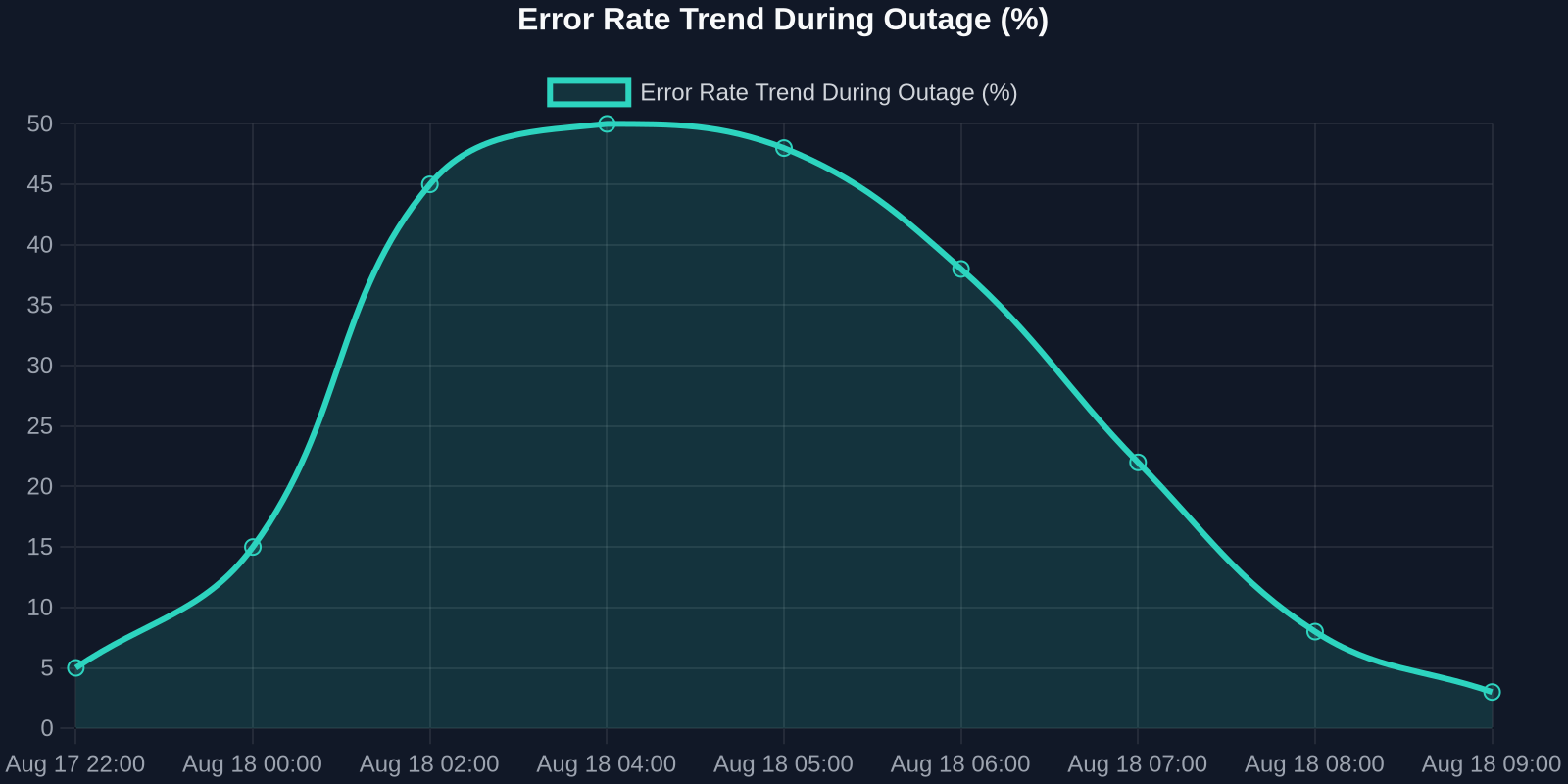
This gradual recovery is typical for large-scale incidents. Caching layers, delayed queues, and retry storms all contribute to a “long tail” of errors. Developers who prematurely resumed normal workflows often encountered sporadic failures, leading to frustration and wasted time. The key takeaway: wait for the all-clear and verify stability before diving back in.
The Broader Implications for the Developer Ecosystem
The GitHub outage is a microcosm of a larger trend: the consolidation of developer tools into a few mega-platforms. While this consolidation brings convenience, it also creates systemic risk. When one platform goes down, the entire ecosystem feels the tremors. This has sparked discussions about the need for decentralized, interoperable standards that could allow developers to switch providers seamlessly during outages.
Frontend developers, in particular, are in a unique position to lead this charge. By adopting tools that operate independently of any single platform, like DivMagic for UI work, or local-first AI assistants, they can demonstrate that resilience doesn’t mean sacrificing productivity. In fact, it often enhances it.
Conclusion: Outage-Proofing Your Frontend Workflow
The nearly 8-hour GitHub outage was a painful reminder that even the most reliable platforms can fail. Frontend developers felt the brunt of the impact, with stalled CI/CD pipelines, broken PR reviews, and unreachable repositories. Yet, this event also served as a catalyst for better practices.
By building local mirrors, diversifying CI/CD, using offline AI tools, and leveraging DivMagic to capture any UI without relying on GitHub, you can turn potential downtime into uninterrupted productivity. The next outage may be inevitable, but your workflow doesn’t have to be a casualty.
Ready to never let a cloud outage slow your UI development again? Try DivMagic and see how instantly copying any UI from any website can transform your frontend workflow, no GitHub required.