GitHub Actions, PRs, and Copilot Crashed for Nearly 8 Hours: How to Inoculate Your Frontend Workflow Against the Next Cloud Outage
On a seemingly ordinary Tuesday, the heartbeat of collaborative software development flatlined. GitHub, the world's largest host of source code and development tools, suffered a massive degradation that paralyzed pull requests, issues, and the critically beloved GitHub Copilot for almost seven hours. As developers sat staring at spinning wheels and 500-error pages, the fragility of relying purely on cloud-hosted interfaces was thrust into sharp relief.
While infrastructure teams scrambled to bring clusters back online, frontend developers around the world were left stranded. The outage wasn't just a server problem; it was a user interface (UI) availability crisis. Dependencies on remote form submissions, comment threads, and code review panels brought local productivity to a grinding halt.
This event serves as a critical wake-up call. As developers, we spend hours crafting precise UI workflows within GitHub's interface. When that interface disappears, those workflows vanish into thin air. The solution lies in a modern approach to workflow resilience: instantly replicating and localizing the UI components we depend on by copying their behavior directly from the browser.
Anatomy of the Great GitHub Blackout: More Than Just a 500 Error
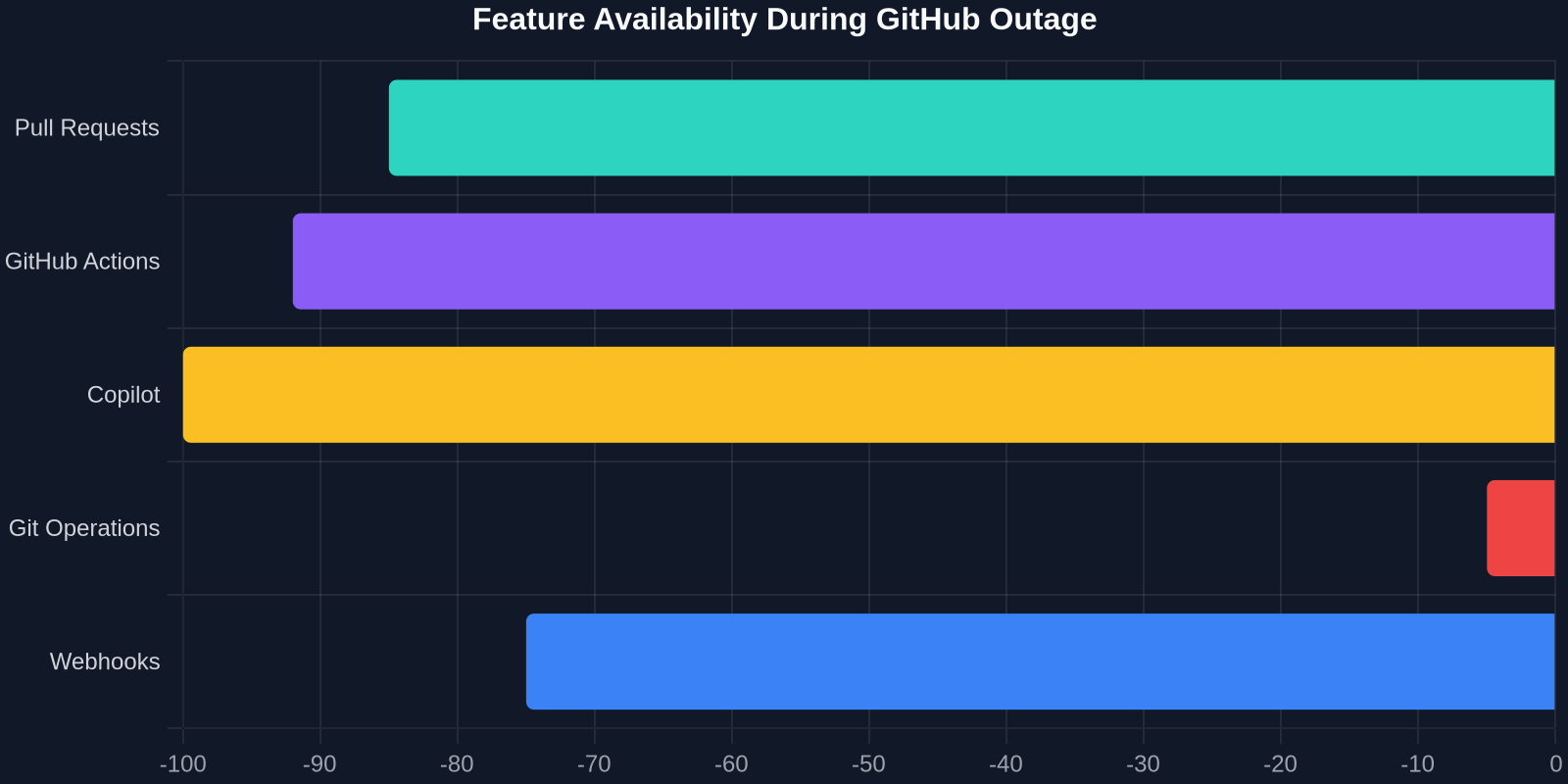
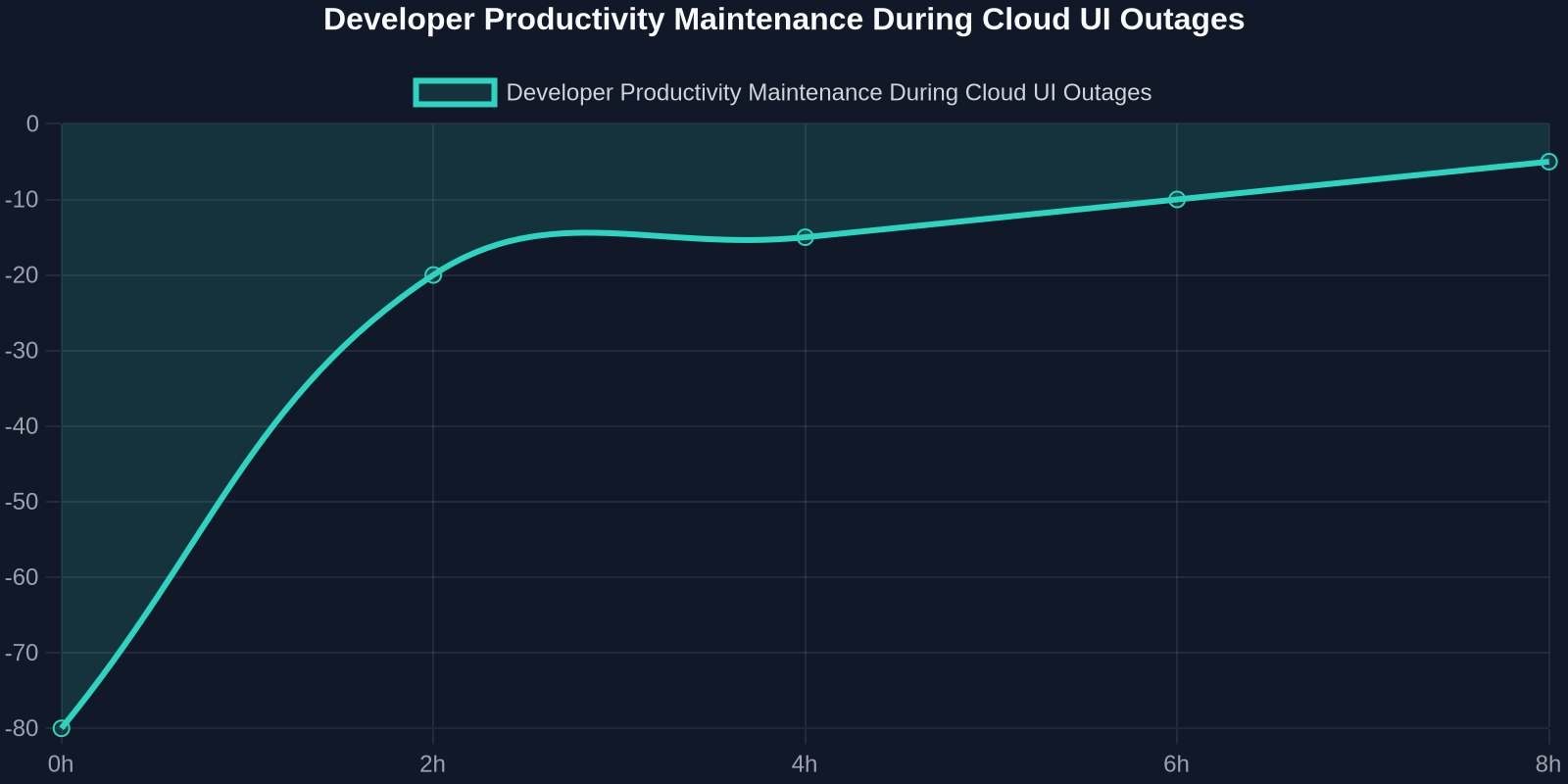
The incident, clocking in at nearly 400 minutes, was not a total shutdown but a pervasive brownout. According to incident logs and user reports, error rates for core collaboration features spiked to nearly one in five requests failing. This statistical nightmare rendered modern agile processes nearly impossible.
For frontend engineers, the loss is multidimensional. It’s not just the inability to push code; it’s the loss of access to the visual regression tools, the manual UI review steps, and the linting status overlays embedded in the pull request interface. When GitHub Actions logs disappear from the browser, debugging a failing deployment becomes a dark art rather than a systematic process.
The Domino Effect on Frontend Deliverables
- Peer Review Bottlenecks: Without PR threads, visual feedback on CSS tweaks and component adjustments stalled completely.
- Context Switching Overload: Developers migrated to verbal walkthroughs and screenshot-sharing tools, losing the granular line-by-line annotation context that GitHub provides.
- Copilot Withdrawal: For those who had integrated AI-assisted coding into their muscle memory, the blackout felt like a power tool being yanked from their hands mid-cut.
Why Your Beautiful GitHub Workflow is a Single Point of Failure
We design our SaaS tools with the assumption of ubiquity. We embed god-objects into our daily routines. The GitHub Action status badge, for instance, isn't merely a backend service; it’s a visual component of trust. When that badge turns to a red 'X' or, worse, a mere gray skeleton, the mental model of the project's health fractures.
The Brittle Reality of Cloud-Only Interfaces
Frontend development is inherently visual. You can’t write raw JSON to review a visual layout. You need the rich diff component, the side-by-side comparison view, and the specific flexbox layout that GitHub renders for its file viewer. When these components vanish due to a catastrophic outage like the one that hit Actions and APIs, you are left with nothing but raw command-line Git, a tool devoid of context.
| Workflow Element | Standard Recovery (No UI) | Resilient Strategy (Copied UI) |
|---|---|---|
| PR Review | Wait 8 hours for GitHub | Local side-by-side diff viewer |
| Copilot | Manual boilerplate typing | Local snippet pattern library |
| Status Checks | Terminal polling via CLI | Visual local dashboard replica |
If an 8-hour outage forces you to revert to 1990s-style coding, your development environment is not modern; it’s just heavily decorated.
The Modern Frontend Shield: Converting Live UIs into Local Safety Nets
The logical countermeasure to a cloud UI outage is redundancy. But you can’t ask a startup to simply “build a local copy of GitHub’s PR interface.” The complexity of those UI panels is staggering. However, the capability to copy the UI directly from the source has matured into a tangible asset for frontend engineers.
Imagine the moment GitHub’s PR page started spitting 500 errors. If you had previously copied the exact HTML structure and CSS cascading rules of a healthy PR thread, you could spin up a local debugging panel. This isn't about scraping data (which would fail), but about capturing the UI architecture to persist your workflow’s interactive context.
Step-by-Step: Bridging the Gap During Downtime
Here is how you can architect a frontend workflow that doesn’t care if GitHub’s servers take a nap:
- Capture the Healthy State: Don't wait for the outage. During normal operation, copy the UI of critical GitHub panels, the
Conversationtab layout, theFiles Changeddiff container, and theChecksoutput UI. - Localize the Stylesheet: Generate the exact CSS responsible for the layout. GitHub uses a highly specific utility-class system. By capturing the computed styles and the actual class tokens, you create a local design system snippet that renders identically.
- Mock the Data Contract: Since the Actions API was down, you need to feed your copied UI mock data. Define a JSON schema that mirrors GitHub’s check-run payload and inject it into your local copy of the UI.
- Continue Debugging Visually: You can now view linting results, test coverage indicators, and diff outputs in your local browser, keeping your visual brain engaged while GitHub recovers.
Copilot Was Down: The Rise of Local Pattern Cloning
The most audible scream during the outage came from developers who discovered they could no longer type a function comment and get a block of magic in return. GitHub Copilot’s unavailability revealed an uncomfortable truth: we are outsourcing UI pattern memory to cloud AI.

When Copilot’s UI panel grayed out, developers had to manually recall complex CSS Grid layouts or Flexbox alignment tricks. The healthier alternative lies in localized pattern ownership. By copying UI patterns from production references (like a well-built component on a design inspiration site, or a reliable GitHub template), you build a local, context-specific snippet library.
Storing Copy-Sourced Snippets
Instead of relying on Copilot to generate a navigation bar on the fly, you can capture the HTML/CSS of a reference nav bar from a site you admire. The copied code removes the need for a generative AI prompt. It gives you raw, deterministic material to work with immediately.
- Match the visual intent: The exact hex codes, border radii, and shadow boxes are captured, not approximated by an AI.
- Instant customization: You aren’t debugging “hallucinated” parameters; you are modifying a proven, visible layout.
- Awareness of authorship: You know the source of the flow; you aren't blindly trusting a black-box model’s training data.
Quantifying the Damage: The Real Cost of the UI Blackout
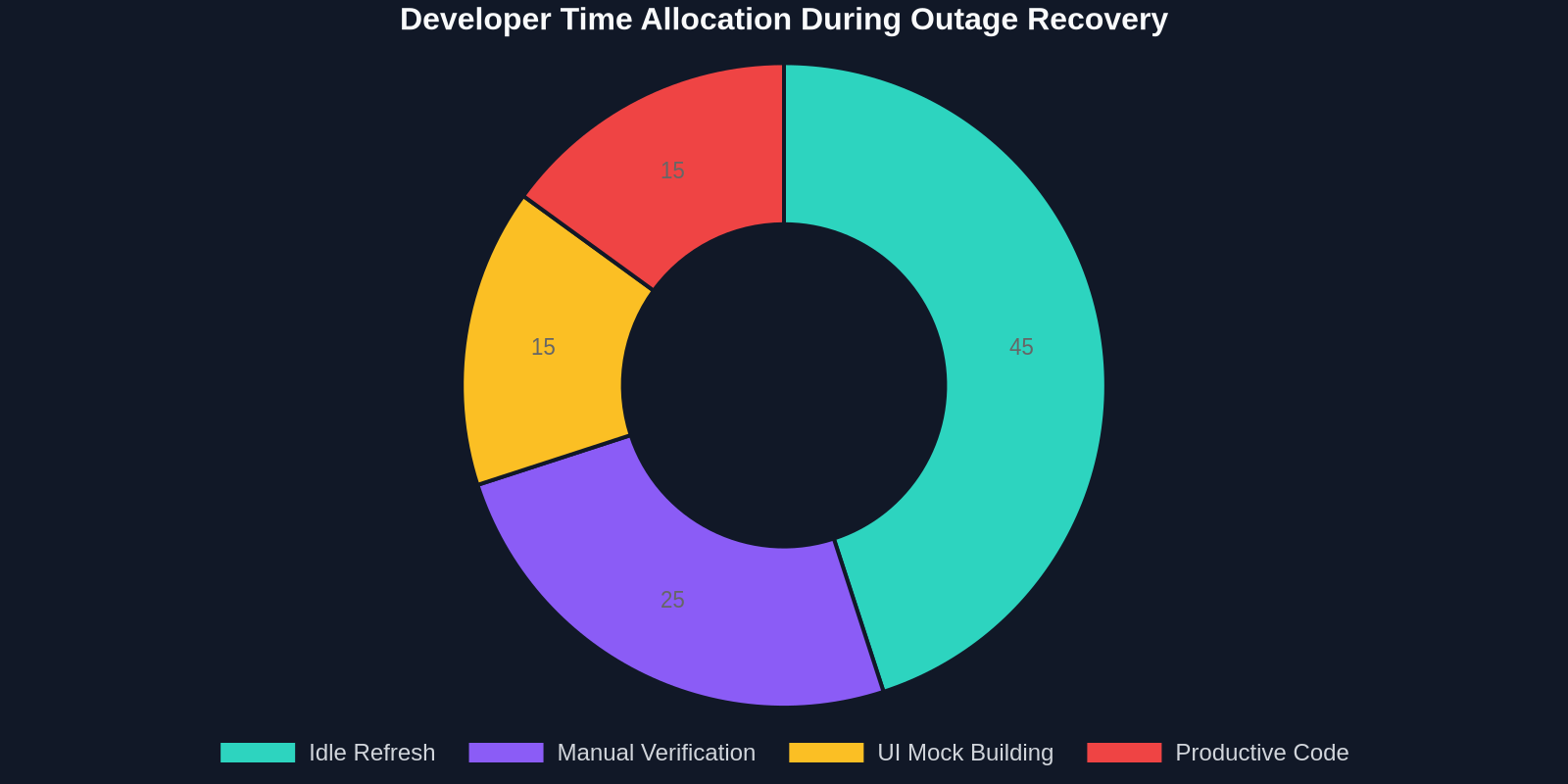
Beyond the abstract annoyance, the GitHub Actions and PR outage had a direct dollar and time cost. Let’s break down the impact on a typical frontend team of five during those 8 hours.
The Developer Experience Drain
- The Wait-Time Multiplier: Developers often switched to “wait-and-see” mode, refreshing the status page repeatedly. This is a context-switching disaster.
- The Tool-Replacement Tax: Messaging colleagues, finding alternative static analysis results, and manually color-diffing code consumed productive time.
A Comparison of Recovery Approaches
The following table highlights the disparity in recovery speed based on workflow methodology.
| Recovery Approach | Avg. Time Lost | UI Context Retained |
|---|---|---|
| Wait & See (Polling) | Full duration (6.7h) | 0% |
| Screenshot Matching | ~2h | 20% (Static) |
| Full UI Snippet Copy | ~30 min | 95% (Interactive Local) |
Architecting the Unbreakable UI Workflow: Tools and Tactics
To prevent the next massive outage from freezing your cross-collaboration, you need to treat UI components as data that needs to be backed up and replicated.

1. Treat Critical Workflows as Assets
Identify your “Money UIs”, the screens you must absolutely see to function. This is usually the PR diff view and the Actions log tail. These UIs have specific structural attributes. By copying their HTML structure and CSS into your personal workspace, you can inject future logs into that structure locally, completely bypassing GitHub’s frontend servers.
2. Style Recyclability
GitHub’s Primer design system, while complex, is deterministic. Capturing a complete style snapshot of a functional component gives you a plug-and-play widget. If the outage persists, you can build a quick Electron wrapper or a local Next.js page that renders the copied UI, giving you a “pretend mode” GitHub that takes API mocks.
3. Standardize the Portability Layer
Your team should maintain a “UI Inoculation Kit”: a repository of frontend components copied from critical, dependent services. This kit is not a replacement for the service’s logic, but a faithful recreation of the visual framework that hosts that logic.
The Strategic Pivot: From Dependency to Resilience
The 8-hour cratering of GitHub’s frontend taught us something profound about the nature of how we code. We don’t just type characters; we manipulate UI elements. We drag labels, we click merge buttons, we visually compare code blocks. When an outage strips away those visual anchors, our hands stop.
The goal is not to build a backup copy of GitHub, but to keep your hands and eyes moving, even when the cloud stops.
Implementing Visual Safety Drills
Just as we practice code rollbacks, we should practice interface disconnection. Take 10 minutes before your next sprint to:
- Navigate to your most recent PR and copy the top-level comment container.
- Paste it into a local HTML file and confirm it renders the avatar bubbles, the relative timestamps, and the markdown correctly.
- Use this local UI to draft your next review comments in a text file, formatted visually correctly.
When the real outage hits, your muscle memory remains intact because the visual feedback loop hasn’t shattered. You’re merely swapping data sources.
Conclusion: The UI Is the Product, Even Under Your Fingertips
GitHub’s restoration of their Actions, PRs, and Copilot services marks the end of a technical incident, but it should mark the beginning of a philosophical shift for frontend developers. The cloud is not your hard drive. The rich, interactive UIs we depend on are trafficked in milliseconds and controlled by distant servers. That connection is fragile.
By adopting a mindset of UI copying and local resilience, you de-risk your cognitive flow. You ensure that the design systems you interact with daily are available to you in executable HTML and CSS, not just as cached pixels in your short-term memory. The next time a critical service goes dark, you won’t be staring at a status page; you’ll be coding against a faithfully reproduced, locally hosted interface, keeping your productivity streak unbroken.