

Browser Extension Overload: Why Dormant Add-ons Are a Growing Security Crisis
We treat browser extensions like a junk drawer. One day they are indispensable productivity boosters that capture UI inspiration instantly, the next they are forgotten bloatware sitting silently above the address bar. But unlike a dusty kitchen drawer, an unmaintained extension doesn't just take up space. It has read-and-write access to your Document Object Model, your clipboard, and often your browsing history. When you ignore that neglected icon for months, you aren’t just being messy; you are leaving an authenticated backdoor open in every tab you visit.
The modern web developer’s workflow depends on specialized tooling, React DevTools, color pickers, CSS copiers, and AI assistants, but that same dependency creates a massive attack surface. As the market floods with lightweight copycat extensions promising to “supercharge” your UI workflow, a hard truth emerges: more extensions do not equal more power. They equal more risk.
The Silent Permissions Creep You Ignore Every Update
Permissions drift is the technical equivalent of boiling a frog. When you install a simple CSS inspector, it might initially request access to “active tab” data. Six months later, after an auto-update, that same extension can suddenly read all data on developer-documentation sites you visit, and perhaps sites you don’t. Browser vendors have improved permission warnings, but they rely on users actually reading update prompts. Most of us click “Accept” with the same muscle memory we use to close cookie banners.
Legitimate extensions get acquired by malicious holding companies specifically to exploit this trust. The original developer sold their user base, and overnight, the update pipeline pushes out a data scraper disguised as your favorite JSON formatter. If you aren’t actively monitoring an extension’s changelog and permission history, and frankly, nobody has time to read the diffs for fifteen different utility plugins, you are placing blind trust in a supply chain you can’t audit.
How Zombie Extensions Sabotage Your Dev Environment Performance
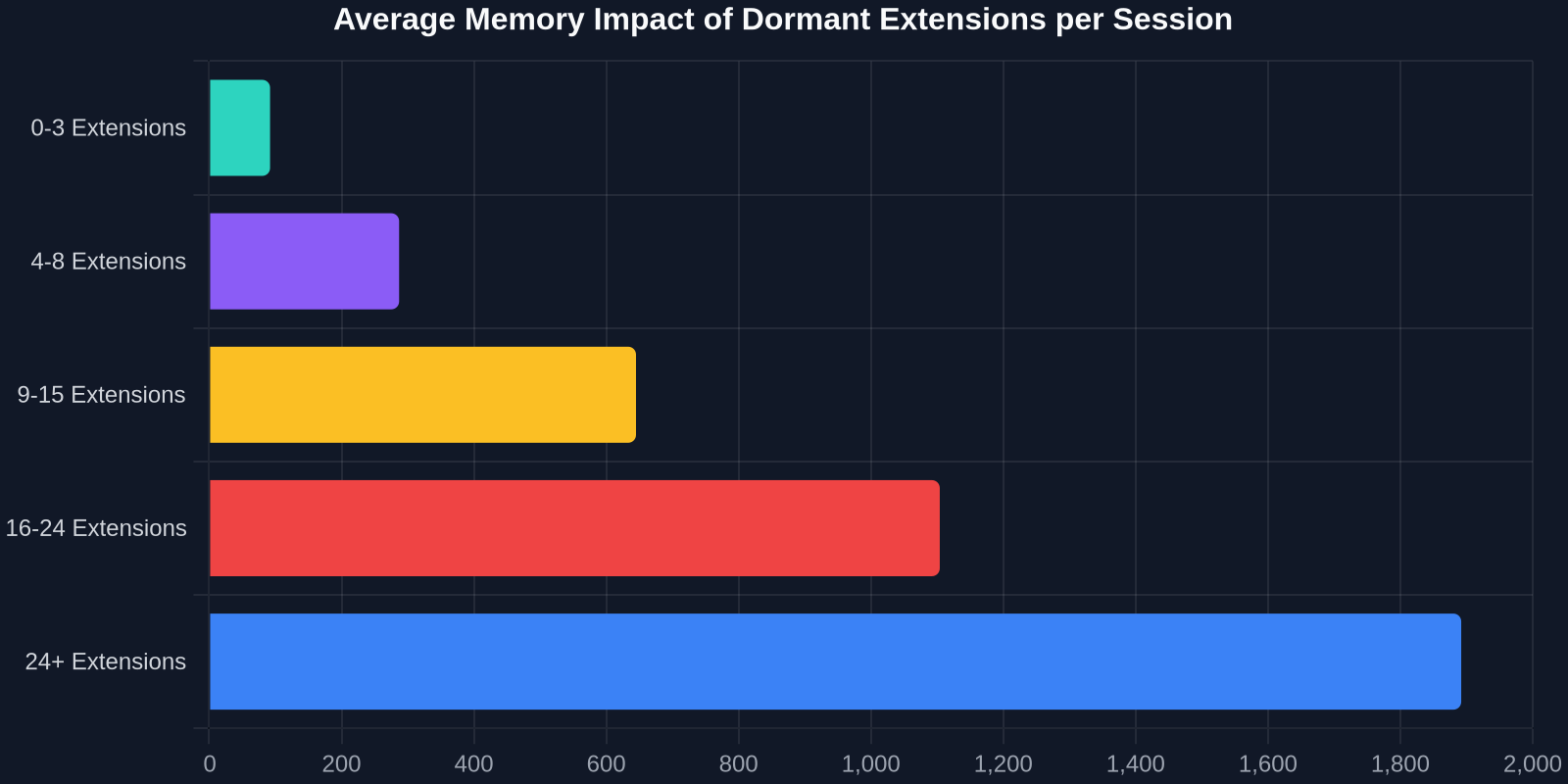
Security risks grab headlines, but performance degradation hits you daily without warning. Modern browsers are multi-process beasts, yet every active extension injects its own memory footprint and JavaScript execution thread. A dormant UI capture tool you haven’t opened in weeks might still be attaching mutation observers to every DOM change on every page, waiting for a “capture hotkey” you forgot you bound.

For a frontend developer debugging memory leaks or race conditions, determining whether a bug originates in your application code or a third-party extension script is a special kind of hell. Those injected content scripts pollute the global scope, override native prototypes, and create asynchronous interference that looks identical to a heap of spaghetti code. Before spending four hours in Chrome DevTools profiling your own React hydration mismatch, you should be auditing whether an unpatched extension is the true culprit.
Identifying Resource Drains Before They Kill Your PageSpeed Score
A practical triage starts with a simple incognito window. Disable all extensions and run a Lighthouse audit. Then re-enable them one by one, rerunning the performance trace each time. You will often discover that a niche utility, perhaps a hyper-specific React prop extractor you installed during a conference talk, is injecting 300ms of blocking JavaScript on every navigation. For a visitor hitting your production site, 300ms of perceived delay is the difference between a conversion and a bounce. For you, it’s debugging in a distorted simulation of reality.
Copying UI Without the Clutter: The Security-First Approach
As frontend developers, our relationship with browser extensions is uniquely intimate. We don’t just use them for ad-blocking; we use them to dissect, copy, and learn from other people’s user interfaces. The ability to grab a perfectly styled pricing grid, a responsive navigation structure, or a complex multi-step form from any live website is a productivity superpower. But historically, this power came bundled with danger. The extension that gives you one-click element copying also has full Document Object Model access, the digital equivalent of handing someone your house keys to borrow a screwdriver.
This is where the industry needs a shift from maximum access to least privilege. The ideal tool should convert that copied UI into clean, portable HTML and CSS without requiring persistent background scripts that track your browsing. It should operate as a surgical scalpel, not an always-running surveillance system. You want the raw HTML structure and the computed styles, nothing more, nothing less. No behavior tracking, no user-agent fingerprinting, no telemetry phoning home to an analytics dashboard you’ve never seen.
"The most dangerous permission in a developer’s browser isn't 'Read and change all data', it's the permission to sit idle and forgotten for two years while receiving silent updates."
Why Manual Inspection Is No Longer Scalable
The purist’s defense is to avoid extension dependency entirely by recreating UI manually. You see a gradient text effect, you open DevTools, you comb through the computed styles, copy the decomposed layers, and spend 45 minutes rebuilding it. This approach is secure indeed, but within a startup timeline demanding rapid iteration, it is an unscalable bottleneck. The middle ground lies in tools that perform a stateless transcription of the chosen element, immediately removing themselves from the execution loop once the copy is complete. No persisting background contexts. No unnecessary bidirectional communication. Just a one-shot, atomic operation that leaves zero traces.
Building a Lean, Auditable Extension Roster
Perimeter defense starts with brutal categorization. Open your browser’s extension management panel, every Chromium browser has chrome://extensions, Firefox offers about:addons, and segment your list into three buckets: Security Critical, Workflow Transient, and Unknown Debt.

Security critical includes password managers, hardware security token handlers, and multi-factor authentication bridges. These stay, but they must be updated manually and verified against source-code repositories when possible. Workflow transient items are your React DevTools, your clipboard managers, and your UI copying utilities. These should be toggled into “On Click” or “On Specific Sites” mode rather than granted blanket “On All Sites” access. Unknown debt is everything else, it gets frozen and scheduled for removal within forty-eight hours unless you document a specific use case.
Implementing Site-Specific Access Controls
Granular host permissions are the most underused security feature in modern browsers. Instead of allowing a UI extraction tool to tolerate reading https://*/*, restrict it to your design-inspiration-collection board or specific production review sites. You can configure this in a Chromium browser by right-clicking an extension icon, selecting “This Can Read and Change Site Data,” and changing the scope from “On All Sites” to “On Click” or a custom list of approved domains.
For developers, this pattern introduces a pleasant friction. When you actually need to copy a hero section from a competitor’s landing page, you consciously grant temporary access. The mental shift from “always on” to “just-in-time privilege” is exactly what zero-trust architecture preaches at the server level, it’s time we apply it to our client-side tooling as well.
| Strategy | Security Level | Workflow Impact | Memory Footprint |
|---|---|---|---|
| Allow All Permissions Unaudited | Critical Risk | Zero Friction | ~1.5GB |
| Manual Click-to-Grant Only | High | Minor Friction | ~400MB |
| Stateless One-Shot Tools | Maximum | Negligible | ~0MB after execution |
| Complete Extension Abstinence | Absolute | Lost Productivity | ~0MB |
The Hidden Lifecycle of a Compromised Developer Tool
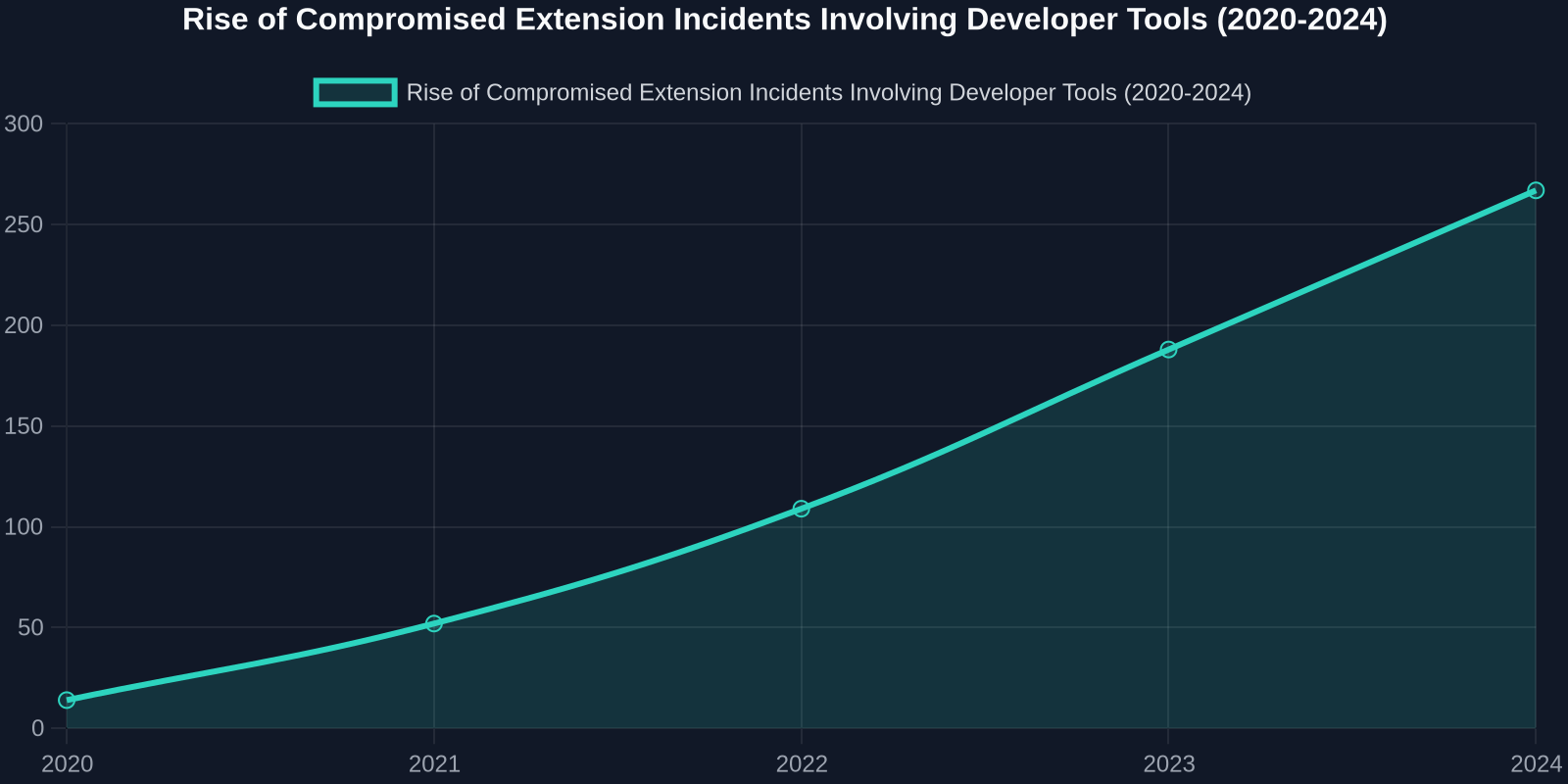
Understanding the anatomy of an extension-based attack clarifies why a spring cleaning must be ruthless. Most developers picture a malicious .crx file being downloaded from a dark-web forum. The reality is far more insidious: a popular, open-source UI utility gets maintenance transferred to a new contributor. The Pull Request looks clean, just dependency bumps and a new “feature” that requires additional network access. The auto-update rolls out to 80,000 developers silently during a Monday morning standup. By lunchtime, the extension is exfiltrating developer console logs and private repository URLs to a command-and-control server.
Beyond Malware: Data Licensing Traps in Extension EULAs
A less stealthy but equally dangerous trend is the “data licensing pivot.” An extension you installed two years ago to grab specific HTML element styles updates its End User License Agreement. Buried in section 12.4 is a grant: “You provide us a royalty-free, perpetual license to any UI patterns, code snippets, or creative work accessed or processed through our service.” Legal and rarely enforced in court, but technically it grants a startup the right to feed your company’s unlaunched product UI into their AI training set. For a frontend engineer working on a stealth-mode SaaS, this is an intellectual property catastrophe waiting to happen.
"Uninstalling an extension isn't admitting you made a bad install two years ago, it's acknowledging that software rotting is inevitable."
Designing a UI Extraction Workflow That Respects Security Boundaries
So how does a pragmatic frontend developer reconcile the need for rapid UI prototyping with the imperative to lock down their browser? The solution is decoupling “viewing” from “owning.” You don’t need a heavyweight extension that persists, syncs to a cloud account, and maintains a background heartbeat. You need a stateless transformer: select an element, receive clean, production-grade HTML and CSS, and close the session.

This atomic workflow aligns perfectly with modern DevSecOps principles. A tool that converts any UI on any site into reusable code, operating without a persistent background process, eliminates the entire class of “extension left open overnight” vulnerabilities. The code you receive is fully portable, stripped of vendor-specific dependencies, and ready to paste into a React component or a Svelte template without dragging along event listeners, telemetry, or tracking beacons. You gain the efficiency of element copying without becoming a node in someone else’s data pipeline.
The Developer’s 30-Day Digital Detox Protocol
Turning this philosophy into a repeatable habit removes the emotional resistance to deleting “potentially useful someday” extensions. Follow this rolling thirty-day protocol adapted from endpoint security frameworks:
- Day 1–3: Complete Audit. Export a list of all extensions, versions, and granted permissions using the management API. Tag each as critical, transient, or unknown debt. Disable all transient items by default.
- Day 4–10: Permission Minimization. For every critical extension, manually reduce host permissions to a specific allowlist. If an extension cannot function without “All Sites,” switch to competing tools.
- Day 11–21: Replace Bloat with Precision. Identify the 3–4 overlapping UI utility extensions. Consolidate them into a single, security-focused solution that performs HTML/CSS extraction as a one-shot action without persistent monitoring.
- Day 22–30: Establish Zero-Trust Habits. Implement a recurring monthly calendar event titled “Browser Perimeter Review.” Spend ten minutes verifying no extension has auto-updated into a new permission scope.
This protocol isn’t paranoia, it’s professional hygiene. The same developers who carefully manage package.json dependencies with automated vulnerability scanners rarely apply the same rigor to the browser extensions reading their build logs.
The Future Is Temporary Access Tokens, Not Persistent Background Scripts
Browser vendors are gradually pushing Manifest V3, emphasizing transient service workers over long-lived background pages. This architectural shift proves the industry recognizes the danger of persistent extension execution. But developer tools must lead this charge by design, not just compliance. A UI extraction tool should wake up only when you explicitly invoke it, process exactly the structural and stylistic data of your selected element, output idiomatic code that respects your existing design system tokens, and terminate without leaving anything behind.
Next time you consider installing a “quick little extension” that promises to speed up your development workflow by 10%, ask yourself: Does this tool demand a permanent slot in my browser’s trusted computing base, or can it achieve the same result as an ephemeral utility? Nine times out of ten, the functionality you need can be delivered without the background surveillance tax. And in the one case where it cannot, treat it like a root certificate: manually audited, actively monitored, and ruthlessly disposable the moment it outlives its specific purpose.
A clean browser is a secure browser. A minimal extension roster is a fast browser. And a single, well-designed tool that converts any UI into clean code, without adding to your security debt, is a productive browser. Spring cleaning season shouldn’t be a yearly guilt trip triggered by a tech blog headline. It should be a perpetual, zero-trust mindset applied to the software we let into our closest development perimeter.