
The software around it: its tools, instructions, memory, runtime and ways of interacting with other systems can substantially change what the same model is able to do.
In web design, we are witnessing a fascinating divergence. On one side, pure automation promises to generate entire websites from a single prompt. On the other, a new breed of "craft-first" tools is emerging, prioritizing developer intent, precision, and the granular control that professional frontend engineers demand. This isn't a rejection of AI; it's an evolution beyond the black box.
The recent surge in AI-powered builders has solved a specific problem: speed to a prototype. But for production-grade interfaces, the gap between a generated first draft and a shippable, pixel-perfect component remains vast. The tool highlighted by Creative Bloq directly addresses this gap, arguing that the power isn't just in the model, but in the software that surrounds it.
The Context Conundrum: Why Pure AI Generation Falls Short
When we prompt an AI to "build a modern pricing table," it often delivers a generic, CSS-flexbox interpretation that lacks the specific design tokens, grid subleties, and interaction states of a hand-crafted interface. The missing ingredient is context. The model has no memory of your existing design system, no understanding of your team's naming conventions, and no adherence to your specific accessibility standards.
This is the core thesis of the craft-first movement. It's not about making the AI generate more pixels, but about creating an environment where the developer can inject their specific constraints, brand logic, and structural preferences before the generation happens. The result is code that doesn't just look right but feels right within the existing codebase.
The Hidden Cost of Automated Code
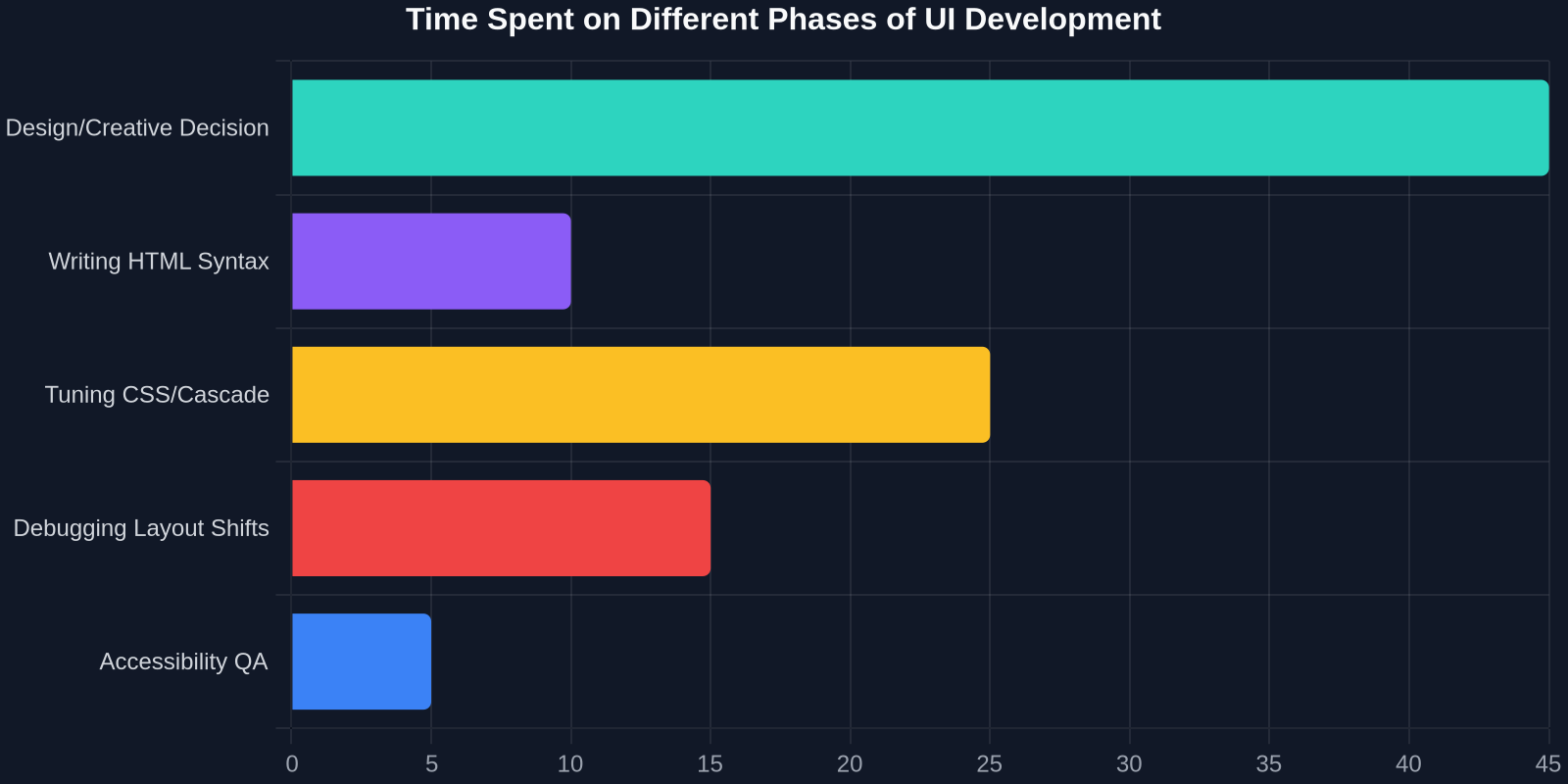
Developers often celebrate the initial speed burst but dread the "refactoring hour." Code vomited by a general-purpose AI often lacks semantic HTML structure, creates deeply nested CSS specificity wars, and ignores flexible layout paradigms like Container Queries or Logical Properties. The time saved in generation is frequently lost in debugging.
Designing the system around the user's craft isn't about simpler interfaces; it's about creating a bridge between human intent and machine execution that respects the developer's existing mental model.
The Shift from Generation to Composition
The modern craft tool doesn't ask you to start from a blank text field. Instead, it integrates into the browser, allowing you to analyze existing code, extract design tokens, and manipulate the Document Object Model (DOM) with surgical precision. It treats existing websites not as off-limits territory, but as a rich material palette for learning and inspiration.

This shift represents a major workflow upgrade. Instead of fighting "responsive" breakpoints in a 10,000-line CSS file, developers can visually manipulate spacing, type scales, and color variables directly on rendered components, while the tool ensures the underlying code remains clean, composable, and scalable.
Visual Manipulation, Code Integrity
The key differentiator here is idempotency of style updates. When a craft-focused tool adjusts a component's border radius, it doesn't inject a flat style attribute with border-radius: 8px !important. Instead, it maps that change to the correct CSS custom property (--card-radius: 0.5rem) within the matching layer of the cascade. This preserves the architectural integrity of the design system.
Integrating Live Data and Real-World Constraints
A design is not truly a design until it interfaces with reality. The latest advancements in craft tools, as seen with integrations into platforms like Parallel, break the mold of static prototyping. You can now connect a live, browser-extracted component directly to dynamic data sources without breaking the UI.
You can now connect your Lovable app to Parallel to search the live web. This functionality extends far beyond simple API calls; it allows a UI element to be a living, breathing part of the internet. Use it for price monitors, lead scrapers, and research tools built on live web data.
From Static Scalpel to Dynamic Stethoscope
Imagine a dashboard widget that monitors competitor pricing. A pure design tool would mock this up with a static table. A craft-first tool allows you to bind the scraped live data directly to the table rows while maintaining the complex nth-child hover effects and column alignment you perfected manually. If the live data returns a null value, the tool should ideally provide utility classes to handle @empty state without JavaScript hacks.
The Runtime Revival: Mastering the Cascade
The "C" in CSS, the Cascade, is often the first victim of automation. AI generators often flatten it out of fear, resulting in inline styles or highly specific flat selectors. Craft-first tools are reviving the mastery of the cascade by actively surfacing inheritance and specificity to the developer.

By visualizing the computed styles life-cycle, developers can understand why a font isn't loading on a button: is it a missing global token? Is it a shadow-DOM encapsulation barrier? Is it a specificity override from a sibling rule? This debugging layer transforms CSS from a black box into a transparent, traceable system.
Component-Level Debugging
Modern browser DevTools are powerful, but they aren't tailored to the component architecture of frameworks like React or Vue. A specialized craft tool can display props, context, and the resulting applied CSS in a single pane, closing the mental loop between a state change in JavaScript and a visual update on screen.
Craft Does Not Mean Manual: The Role of Assisted Precision
It's crucial to dismantle the false dichotomy that "craft" means doing everything by hand. Craft-first tools are deeply automated, they just automate the right things. They automate the extraction of tokens, the conversion of pixel values to relative rem units, and the generation of gap utilities for consistent vertical rhythm. They do not automate the decision of what the visual rhythm should be.
This preservation of intent is the secret sauce. If a developer sets a box shadow to create a specific depth illusion, the tool should never override that decision in subsequent edits unless explicitly asked. This contrasts sharply with "regenerative AI," where asking the bot to slightly widen a card might reset your carefully tuned shadow.
Tokenization as the Source of Truth
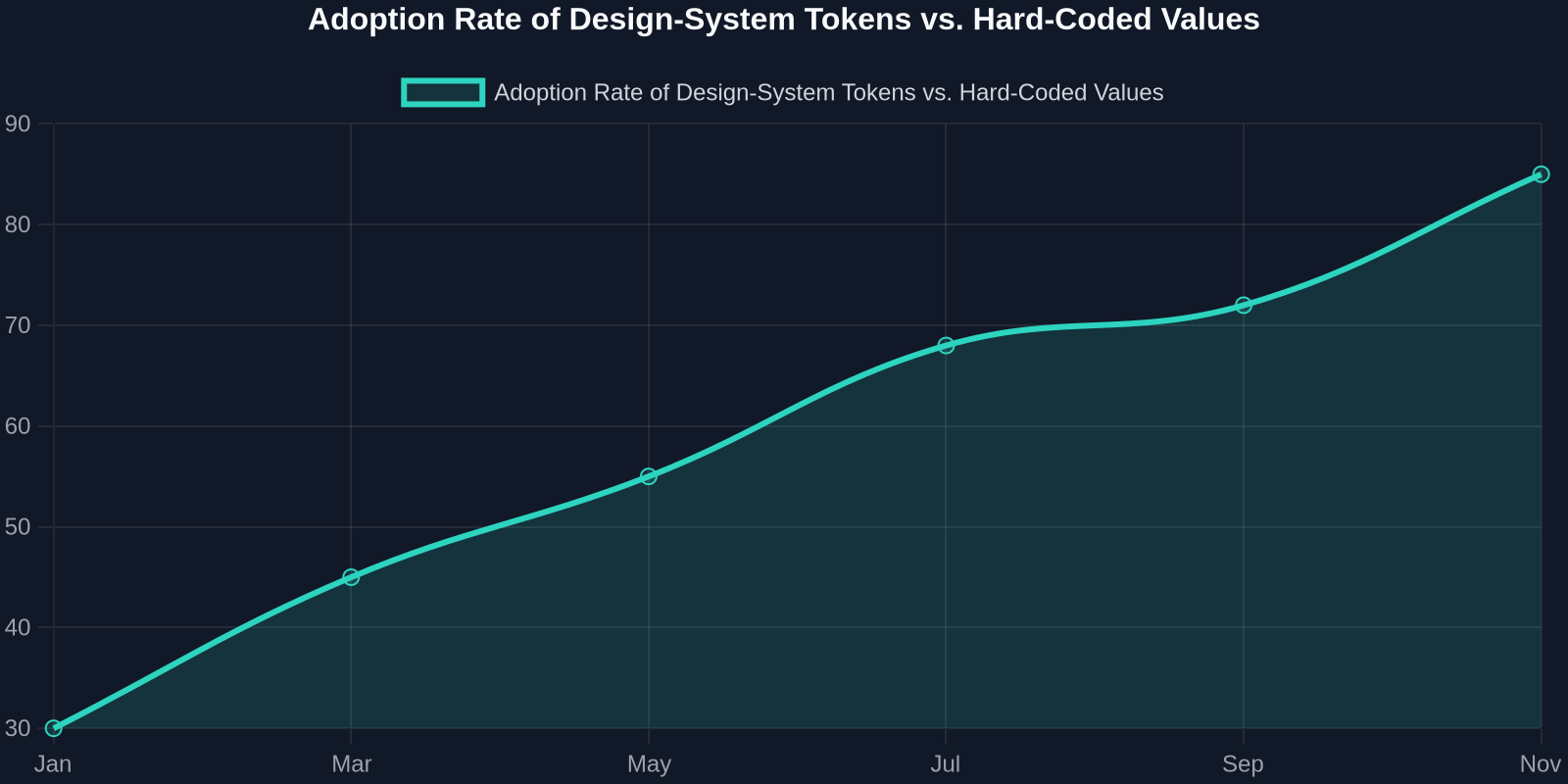
A robust craft workflow normalizes everything into tokens. Colors become var(--primary-500), spacing becomes spacing.m instead of 12px, and type scales are locked to mathematical progressions rather than random pseudo-pixel values. This rigid adherence to a flexible token system is difficult to maintain with pure prompt engineering but becomes second nature when the tooling enforces it visually.
| Approach | Initial Code Quality | Long-Term Maintainability | Design System Adherence |
|---|---|---|---|
| Prompt-to-Site Generators | Variable (often inline styles) | Low (requent rebasing hard) | Non-existent |
| Drag-and-Drop Builders | Presentational (div-soup) | Medium (vendor lock-in risk) | Proprietary |
| Craft-First Tools (DivMagic) | Semantic & Composable | High (framework-agnostic CSS) | Enforced via visual token picking |
Practical Workflow: Extracting and Refining a Hero Section
Let's walk through a practical, zero-fluff workflow using a craft-first browser extension like DivMagic. You aren't starting from a Figma file; you're taking inspiration from a live, complex site that implemented a brilliant CSS Grid animation.

- Selective Inspection: Instead of "screenshot cloning," you enter a visual inspection mode. You hover over the complex grid element, and the tool highlights the exact DOM subtree responsible for the layout.
- Contextual Extraction: You trigger a copy, but instead of raw CSS IDs and zombie classes, the tool pre-processes the output using heuristic cleanup. It retains the
display: gridandgrid-template-areasbut abstractifies the class names to match your BEM or utility convention. - Live Environment Translation: You paste the code, and the tool watches the render. It detects that the original site used a specific CSS custom media query for the laptop breakpoint. It immediately offers to translate this into standard
min-widthqueries that match your local_breakpoints.scssfile. - Refinement Over Regeneration: You decide the margin after the heading is too tight. Using sliders connected to your spacing scale, you adjust the
--flow-spacevariable. The code doesn't bloat; a single token updates across all responsive contexts.
The Human-in-the-Loop Quality Assurance
For frontend developers, quality assurance isn't just about "no 404 errors." It's about repaint performance in the rendering pipeline. It's about avoiding cumulative layout shift (CLS). AI generators often fail here because they don't understand the cost of animating the height property versus a transform.
Craft tools excel because they keep the human in the loop for these performance decisions. If you try to animate a width, a smart tool might issue a soft warning: "You are animating a layout-triggering property. Consider using scale() for compositor-only animation." This educational layer upskills the developer while they build.
Building a Living Design System
A design system is not a static PDF or a Figma library. It is the code in production. Craft-first tools recognize this by letting the live environment be the source of truth. If a button variant exists only in the production CSS bundle, a craft-first extension like DivMagic can extract not just the element, but its entire contextual style logic, effectively reverse-engineering the @layer architecture for an engineering deep-dive.
Beyond Efficiency: The Joy of Building
There is a distinct psychological joy in "molding" a user interface. When a tool strips away the tedious syntax lookup and the hex-to-oklch conversion math, but leaves the agency of design choices squarely with the developer, it unlocks a state of flow. It returns web design to a pursuit of proportion, spacing, and typographic rhythm, rather than a syntax-wrangling chore.
When the tooling handles the friction of the browser's rendering engine, the developer is free to focus entirely on the craft: the negative space, the visual hierarchy, and the emotional response a color gradient evokes.
Choosing Your Weapon: What to Look For in a Craft-First Tool
When evaluating a tool that promises to support your "craft," don't just look at the output. Interrogate its process. Does it respect your existing codebase, or does it demand a greenfield canvas? Can it interact with authenticated dashboards and live DOM states?
Look for tools that are browser-native extensions (like DivMagic) over external apps. The in-browser context allows them to see the resolved Web Fonts, the padding induced by zoom, and the complex stacking contexts that an external canvas simply cannot capture. If a tool asks you to screenshot a website and wait for a build, you've lost the battle for craft. True craft happens in real-time, against live code.
The future of web design isn't about renting interface generation to the highest-bidding model provider. It's about arming the developer with a sharper scalpel. It's the move from "automation" to "acceleration." It keeps the developer at the apex of the creative process, making the leap from "code monkey" to "design engineer," where the code serves the vision, not the other way around.