What Dev Machine Guard’s Browser Extension Inventory Means for Your Developer Workflow
Every developer’s browser runs a constellation of extensions, debuggers, screen recorders, UI inspectors, password managers, and a dozen more. Until now, most organisations had no systematic way to catalogue these extensions on developer machines, leaving blind spots that ranged from productivity drains to full‑blown supply chain risks. StepSecurity’s recent addition of browser extension inventory to Dev Machine Guard changes that calculus. In this post, we unpack what that means for your daily workflow, why managing extensions matters more than ever, and how smart tooling like DivMagic fits into a modern, secure development setup.
The announcement caught our attention because it moves browser extensions from an invisible layer of the development stack to a first‑class element of machine posture. Whether you’re building a SaaS dashboard, debugging a WebSocket connection, or copying a pixel‑perfect UI component for inspiration, extensions are the silent workhorses, and occasionally the silent risk vectors. Let’s dive into what the new inventory capability delivers and why every frontend team should care.
Why Browser Extensions Became the Unmanaged Frontier
Modern developer machines are heavily instrumented. VSCode extensions are managed by.editorconfig files, npm packages get audit scans in CI, and cloud access policies are enforced by IAM. Yet the browser, the single application where developers spend most of their day, has remained largely ungoverned. StepSecurity’s blog post explains that Dev Machine Guard now lists every installed browser extension across Edge, Chrome, and Firefox on a developer’s machine, alongside critical metadata such as permissions, version, and whether the extension originates from the official store or was sideloaded.
This unmanaged status was tolerable when development browsers were sandboxed from production data. But today, with micro‑frontend architectures, Next.js hot reload hitting staging APIs, and developers routinely logged into internal dashboards, the browser’s attack surface is vast. The new inventory feature is not just a security nicety; it’s a data‑awareness layer that many teams didn’t know they needed.
The Data That Dev Machine Guard Surfaces
From the blog, the key attributes collected for each extension include:
- Extension ID and name – essential for matching against known‑vulnerability databases.
- Source – official Chrome Web Store, Mozilla Add‑ons, or sideloaded (which is an immediate red flag).
- Permissions – such as
tabs,cookies,storage, orwebRequestthat could leak sensitive headers. - Version – outdated versions often contain unpatched CVEs.
- Install method – user‑installed vs. enterprise‑deployed.
By inventorying these attributes, security teams can apply the same posture‑management logic they use for system packages to the browser. A policy could, for instance, flag any extension that has debugger permission and is not explicitly approved for front‑end debugging. Or automatically block extensions that have not been updated in 12 months.
How the Inventory Capability Changes the Developer Experience
At first glance, inventorying what’s essentially your personal toolkit might feel intrusive. “I need my React Developer Tools, Lighthouse, and DivMagic to do my job,” a developer might protest. And they’d be right, productivity tools are not optional. The goal here isn’t to strip developers of their favourite extensions; it’s to create a shared vocabulary between development and security teams.

From Shadow IT to Approved Toolchain
The inventory transforms “Shadow IT” in the browser into a catalogued asset list. Once a list exists, you can:
- Build whitelists for each role: frontend devs need DivMagic, Redux DevTools, and Wappalyzer; backend devs may only need Postman Interceptor.
- Detect anomalies: a developer suddenly running a crypto wallet extension on a corporate laptop may warrant a conversation.
- Automate compliance: if your SOC 2 controls require approved software lists, Dev Machine Guard now includes browsers.
This process seldom results in friction because most developers already suspect they have too many extensions. The data backs it up: with each extension adding memory, potential conflicts, and rendering overhead, a regular spring cleaning improves overall browser performance.
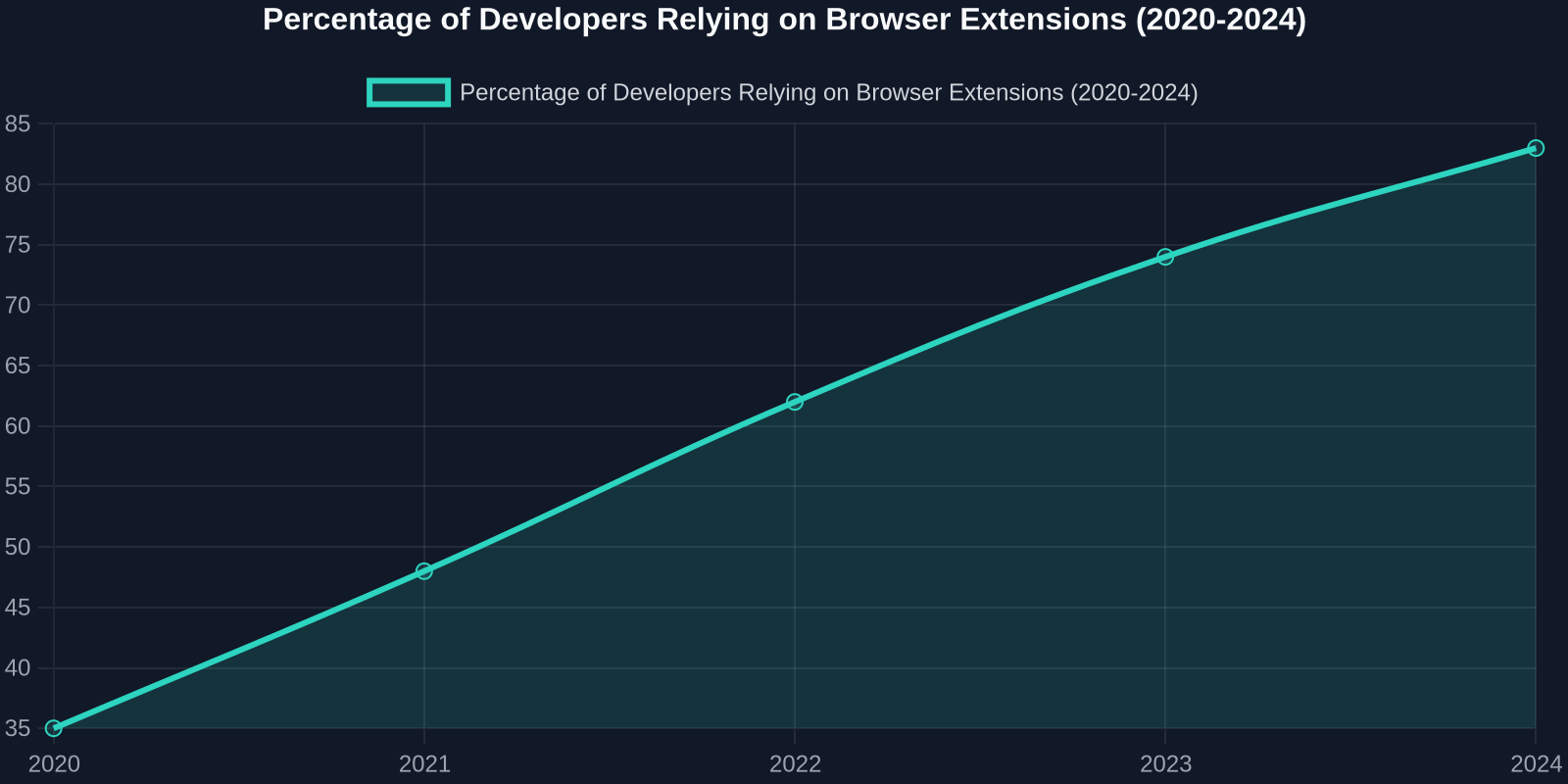
The chart above illustrates a steady climb in extension dependency over the past five years. As the number grows, so does the administrative burden of vetting each one. An automated inventory removes the guesswork.
Connecting Extension Inventory to SSDF and Supply‑Chain Integrity
The software supply chain is no longer limited to package.json and container registries. Browser extensions, even those installed from an official store, can embed telemetry or modify network requests. The US Executive Order on Improving the Nation’s Cybersecurity explicitly pushes for a software bill of materials (SBOM). Dev Machine Guard is, in effect, delivering an SBOM for the browser runtime.
For open‑source maintainers and agencies working with government clients, having an automated inventory of browser extensions is a tangible step towards demonstrating secure development practices. It ties directly into NIST SP 800‑218 (SSDF) task “Analyse the Software” and can be referenced in security questionnaires.
Why Frontend Developers Should Embrace Extension Transparency
Frontend work is uniquely extension‑intensive. A typical frontend developer’s browser is a canvas for testing, inspecting, and augmenting web applications. This specialised toolchain, however, is also what makes it attractive to attackers, compromising a developer’s browser can yield source maps, API keys in local storage, and session tokens. Let’s look at the most common categories of extensions used and how transparency benefits each.
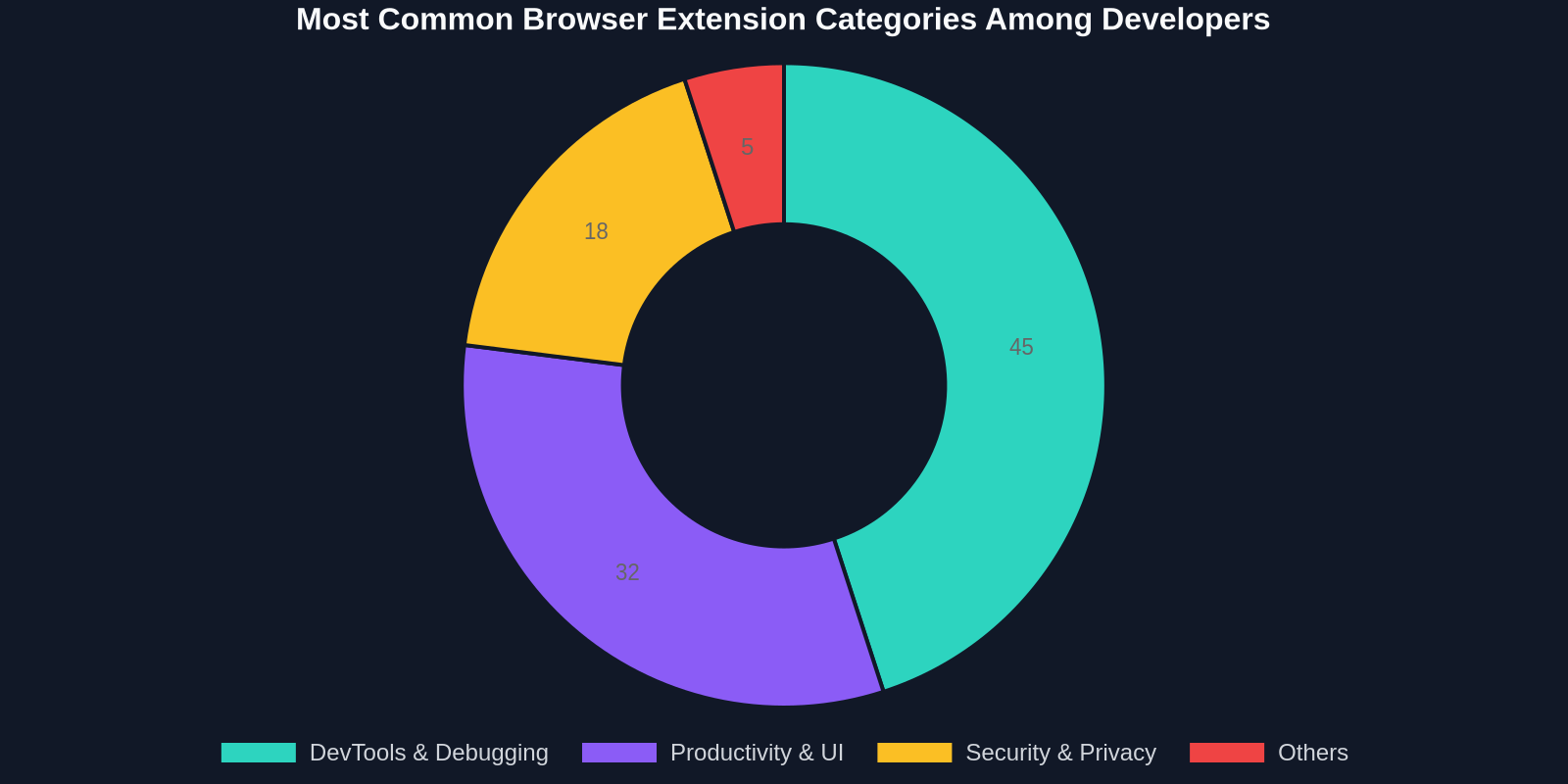
DevTools & Debugging extensions dominate, followed by productivity helpers (like DivMagic) and security tools. Each category carries a distinct risk/reward profile.
DevTools and Debuggers: Powerful but Permission‑Heavy
Extensions like React Developer Tools or Redux DevTools require deep access to the DOM and, in some modes, access to file URLs. The inventory lets you verify that:
- The extension is from a trusted publisher (often Facebook/Google).
- No untrusted debugger is active during sensitive sessions (e.g., a banking‑related internal tool).
- Only the intended debuggers are running when accessing production‑like environments.
Productivity Extensions: Time‑Savers That Must Stay Auditable
This is where DivMagic shines. DivMagic lets developers copy any UI from any website directly into their own projects, turning hours of recreating designs into seconds. It’s a prime example of a productivity extension that frontend teams can’t imagine living without.
But because it interacts with the page’s CSS and HTML, a security‑conscious team might want to ensure that:
- Only the official DivMagic extension is in use, not a copycat that exfiltrates code.
- The extension’s permissions (e.g.,
storage,activeTab) are well‑understood and aligned with company policy. - Any enterprise‑specific configuration (like whitelisted domains) is documented.
With an inventory in place, the security team can quickly mark DivMagic as an approved extension, grant it an exception from any blanket “no‑UI‑scraping” alarms, and move on. That’s a much healthier dynamic than developers hiding their tools or, worse, being blocked from using them.
Security & Privacy Extensions: The Irony of Overlap
Ad blockers, VPNs, and privacy‑oriented extensions are often self‑installed by developers who care about their digital hygiene. Yet some of these extensions can interfere with application testing (e.g., blocking analytics calls that the product team needs to monitor). The inventory can uncover conflicting extensions and prompt a conversation about which ones are mission‑critical.
The DivMagic Angle: Turning Controlled Inventory into a Workflow Advantage
DivMagic’s mission, simplifying UI development by letting you copy and adapt designs instantly, relies on a stable, trusted presence in your browser. When an organisation adopts browser extension inventory, DivMagic users gain:
- Official approval status: rather than operating in the shadows, the extension becomes part of the documented toolchain, often pre‑installed via group policy for new hires.
- Version‑aware collaboration: the inventory can highlight that a teammate is running an outdated DivMagic version; updating ensures they get the latest sites supported and bug fixes.
- Audit trails: in regulated industries, being able to show that only the vetted DivMagic version was used during a sprint satisfies auditors.

“Extension inventories turn an unspoken toolkit into a strategic asset, developers get the tools they love, and organisations get the controls they need.”
This is the mature evolution of browser extension management. It echoes the trajectory of text editors and IDEs, years ago, IT would lock down everything; now, most provide approved lists and let developers choose. The browser extension catalogue will follow the same path.
Practical Steps to Adopt Browser Extension Inventory Today
If you’re intrigued by StepSecurity’s announcement and want to bring extension visibility into your own team, here is a concrete action plan:
-
Run a pilot with Dev Machine Guard. If you already use StepSecurity for CI‑level supply chain security, enabling the extension inventory is straightforward. If not, the open‑source Dev Machine Guard can be run locally to generate a one‑off report for initial assessment.
-
Categorise, don’t criminalise. Sort the discovered extensions into three buckets: Approved (vetted and allowed), Review (unknown extensions that may be legitimate), and Block (known‑malicious or undesirable, like crypto miners or unapproved remote access tools).
-
Engage developers early. Share the inventory with team leads before any enforcement. Ask them to flag any “Review” extensions that are actually essential. This avoids the knee‑jerk “IT is spying on us” reaction and surfaces genuine needs.
-
Automate the feedback loop. Once approval lists are defined, set up notifications when new extensions appear. This closes the gap and maintains an evergreen inventory without requiring manual scrums.
-
Integrate with MDM or RMM. For larger organisations, pushing the inventory data into your existing mobile device management or remote monitoring solution brings browsers under the same compliance umbrella as laptops and servers.
How DivMagic Fits Into the Approved Toolchain
When you’re building the approved list, DivMagic is a prime candidate for the “Productivity & UI” bucket. Its permissions, activeTab, storage, and contextMenus, are minimal and well‑scoped. It doesn’t require broad host permissions, and all processing happens locally. By adding it to your approved extension catalog, you’re giving your frontend team a sanctioned superpower.
Beyond Inventory: What’s Next for Browser‑Aware Security
StepSecurity’s move is part of a broader trend where the browser is treated as a critical endpoint. Future iterations will likely include:
- Real‑time permission anomaly detection: flagging when an extension suddenly requests new permissions after an update.
- Extension‑level network policy: restricting extension‑initiated requests to safe domains.
- Integration with code‑signing certificates: verifying that an extension’s publisher certificate is valid and has not been revoked.

For DivMagic users, these advancements mean an even safer environment. As the ecosystem matures, the days of “install and forget” are ending, and that’s a net positive for everyone who cares about code quality and security.
“The browser is the new operating system for knowledge workers. It’s time we managed it with the same rigour we apply to the underlying OS.”
Conclusion: Embrace the Visibility, Empower the Developer
Dev Machine Guard’s extension inventory is more than a feature update, it’s a mindset shift. By bringing transparency to the browser layer, it enables teams to have fact‑based conversations about tools, reduce risk, and boost productivity simultaneously. Frontend developers stand to benefit the most: their essential extensions like DivMagic can be officially sanctioned, outdated plugins purged, and the whole development workflow made faster and more secure.
If you haven’t yet evaluated a UI copying tool for your team, now is the perfect time. With an inventory ensuring only vetted extensions run, you can confidently adopt DivMagic and watch the hours spent on pixel‑pushing evaporate. And for security champions, the extension inventory gives you the visibility to say “yes” to developer tools without losing sleep.
Ready to bring UI superpowers to your browser while staying within the guardrails? Try DivMagic and make it the first approved addition to your new extension inventory.