The Future of Frontend: 2026 Trends Every Developer Must Know
The frontend landscape has never moved faster. What worked in 2024 is already being replaced by more efficient, more intelligent ways to build user interfaces. As we look toward 2026, several powerful trends are converging, server-side rendering is making a comeback, AI is automating the tedious parts of our workflow, and WebAssembly is finally delivering near-native performance in the browser. Whether you're a seasoned engineer or just starting out, understanding these shifts is key to building faster, more beautiful, and more maintainable web apps.
In this deep dive, we’ll unpack the trends that matter most, backed by data, real-world use cases, and practical code. By the end, you’ll have a clear roadmap for where to invest your learning and your toolchain.
1. The Server‑First Renaissance
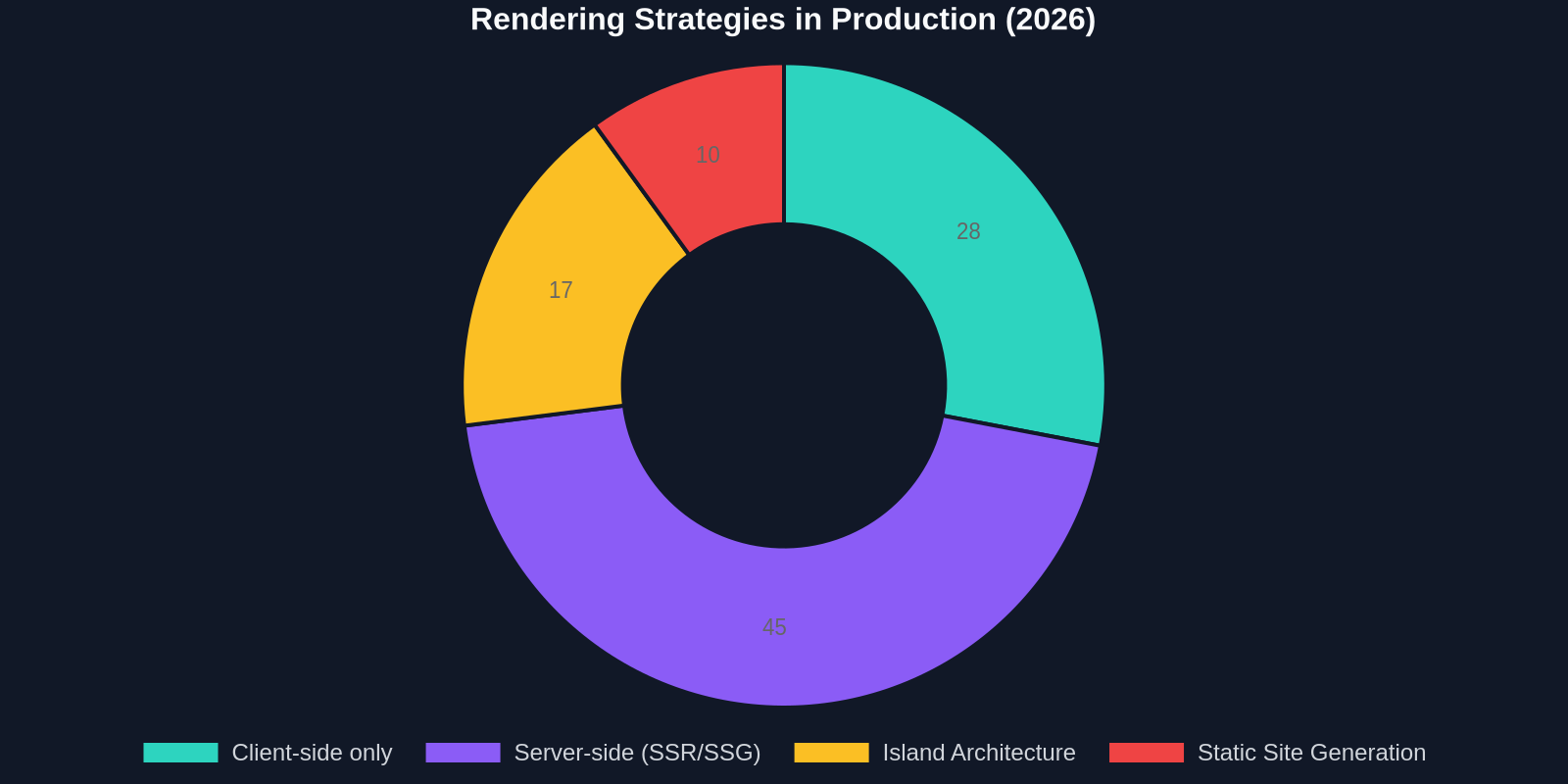
Client‑side JavaScript frameworks gave us incredible interactivity, but they also created a performance bottleneck. Long initial loads, SEO nightmares, and heavy bundles pushed the pendulum back toward the server. Enter React Server Components, Next.js App Router, SvelteKit, and even a rejuvenated ASP.NET Core, all betting on “rendering on the server, shipping minimal JavaScript.” The mantra is simple: compute where the data lives, and only send the HTML and tiny islands of interactivity to the browser.
Frameworks like Next.js 15 and Astro 5 make this pattern a first‑class citizen. Astro even promotes “zero JavaScript by default,” hydrating components only when a user interacts. This drastically reduces Time to Interactive (TTI) and improves Core Web Vitals, a critical factor for SEO in 2026, where Google’s page experience signals carry more weight than ever.
Code Example: Next.js Server Component
// app/posts/page.jsx
export default async function PostsPage() {
const posts = await fetch('https://api.example.com/posts', { next: { revalidate: 60 } });
const data = await posts.json();
return (
<ul>
{data.map(post => (
<li key={post.id}>{post.title}</li>
))}
</ul>
);
}
Notice: no client‑side JavaScript is shipped for this component. The entire list is rendered on the server and streamed to the browser.
2. AI Co‑pilots Reshape the Developer Experience
GitHub Copilot was just the beginning. In 2026, AI is deeply integrated into every stage of frontend work, from generating entire UI components from a screenshot to writing tests and even refactoring legacy code. Tools like v0.dev, Cursor, and the latest versions of Copilot understand your project context and can scaffold a complete dashboard with just a description.
But it’s not only about generating code. AI now helps with accessibility audits, identifies performance bottlenecks, and suggests semantic HTML improvements on the fly. This shift means that developers spend less time on boilerplate and more on crafting unique user experiences and fine‑tuning business logic.
Many teams are pairing these tools with a “copy any UI” workflow, snapping a reference design from the web and instantly converting it into clean, production-ready code. DivMagic fits perfectly into this pipeline: you can copy any UI element from any website, paste it into your IDE, and then let an AI assistant adapt it to your project’s design system and framework conventions.
3. Design Systems Become the Product Backbone
Once a nice‑to‑have, design systems are now the operational core of mature frontend teams. In 2026, they are not just a Figma file and a component library; they are fully automated, token‑based systems that sync between design and code in real time. Variables, color modes, spacing scales, and typography ramp are defined once and pushed everywhere, web, mobile, and beyond.
“A design system is not a project, it’s a product serving products.” – Nathan Curtis
Modern tools like Style Dictionary, Design Tokens Community Group (DTCG) spec, and integrations with Figma Variables allow a single source of truth. When a designer updates a token, the change ripples into the codebase automatically, preventing the drift that plagues so many projects.
Example: CSS Custom Properties from Design Tokens
:root {
--color-primary: #3b82f6;
--color-primary-hover: #2563eb;
--spacing-md: 1rem;
--font-size-base: 16px;
}
This consistency is vital when copying UI elements across projects. With DivMagic, you can grab a button or a card from any website, and the tool preserves its styling, making it easy to map those styles into your existing design tokens for a seamless blend.
4. WebAssembly Matures for Heavy Lifting
WebAssembly (Wasm) is no longer an experiment, it’s production‑ready and increasingly used for performance‑critical tasks. Image/video editing, data visualization, cryptography, and even entire game engines now run at near‑native speed in the browser, thanks to Wasm. In 2026, languages like Rust and Go are the most common compilers to Wasm, and tooling like wasm‑pack and Emscripten have become streamlined.
The combination of Wasm with server‑side rendering is particularly powerful: you can offload compute‑heavy transformations to a Wasm module that runs both on the server (for rendering) and on the client (for interaction), keeping the experience smooth.
5. Micro Frontends Enter the Mainstream
Large‑scale applications demand distributed ownership, and micro frontends provide a way for independent teams to ship features autonomously. Technologies like Module Federation (Webpack/Rspack), single‑spa, and even web components are now mature enough to handle complex routing, shared dependencies, and seamless composition. In 2026, the community has converged on a “backend‑for‑frontend” (BFF) pattern with fragment‑based composition via edge functions.
| Approach | Initial Load | Team Autonomy | SEO Support |
|---|---|---|---|
| Monolith SPA | Slow | Low | Poor |
| Module Federation | Optimized | High | Good |
| Edge‑Side Includes | Fast | Highest | Excellent |
The biggest wins come when you combine micro frontends with server‑first rendering. You can compose pages from independently deployed fragments on the edge, each owned by a different team, yet the user sees a unified, fast‑loading page.
6. The Evolving Role of CSS
CSS has quietly become a full‑featured design language. Container queries, cascade layers, parent selectors (:has()), and robust viewport units (svh, dvh) give developers unprecedented control without extra scripts or library overhead. In 2026, many teams are dropping utility‑first frameworks unless truly needed, because the platform itself now solves most layout problems elegantly.

Pair these native capabilities with DivMagic‘s precise CSS copying, and you can easily deconstruct any UI pattern you admire, understand its spacing, typography, and responsiveness, then refactor it using your own design tokens and modern CSS techniques.
7. Observability and Performance in One View
Frontend performance is no longer just about Lighthouse scores. With tools like Web Vitals extended, real‑user monitoring (RUM), and the new Long Animation Frame API, teams can pinpoint jank and layout shifts at the component level. In 2026, frameworks are shipping built‑in metrics that expose exactly which component caused a layout shift or a hydration delay.
AI‑driven monitoring platforms correlate these signals with user satisfaction, automatically proposing code‑level fixes. This observability‑first mindset ensures that performance is not an afterthought but a continuous metric embedded in your CI/CD pipeline.
8. The Growing Importance of Accessibility (A11y)
Legal requirements and ethical responsibility are pushing accessibility from “optional” to mandatory. The European Accessibility Act (EAA) and updated WCAG 3.0 guidelines mean that frontend engineers must verify color contrast, keyboard navigation, and screen‑reader compatibility at every release. Automated testing tools like Axe, Pa11y, and Lighthouse CI now integrate into pull requests, blocking merges if a11y regressions are found.
“Accessibility solves for the few, but improves the experience for everyone.”
When you copy a UI component from an external source, it’s crucial to check that it doesn’t introduce inaccessible patterns. DivMagic captures the semantic structure, but an extra audit step ensures that the resulting code meets WCAG AA at minimum.
How to Stay Ahead
The trends are clear: invest in the server, embrace AI augmentation, strengthen your design system foundations, and never stop optimizing for the user. Tools that speed up the mundane, like extracting UI directly from the browser, let you focus on what truly matters: creating exceptional, high‑performance interfaces that delight users.
Ready to accelerate your UI workflow? Try DivMagic to copy any UI from any website into clean, reusable code, bridging the gap between inspiration and implementation.