How to Build Modern UI Components Using CSS Generators
Frontend development has entered an era where visual consistency and speed are no longer optional, they are competitive advantages. Yet many developers still spend hours hand-crafting box-shadows, gradients, and responsive grids that could be generated in minutes. CSS generators have matured into reliable, professional-grade tools that export clean, standards-compliant code. In this guide, you’ll learn how to build modern UI components using CSS generators, integrate them into a scalable workflow, and avoid common pitfalls.
The modern UI landscape rewards teams that can ship polished components quickly. Whether you work in a startup iterating on a Sass-based design system or an enterprise team maintaining a multi-brand component library, CSS generators eliminate the most repetitive parts of styling. Tools like gradient editors, shadow builders, and flexbox playgrounds let you visually tune values and copy production-ready CSS in one click.
Why CSS Generators Are Revolutionizing Frontend Workflows
Traditional CSS authoring is powerful but inefficient for common visual patterns. You often write the same box-shadow syntax from memory, tweak border-radius values across breakpoints, and debug spacing inconsistencies manually. CSS generators solve three core problems:
- Speed: Visual controls let you experiment in real time instead of refreshing the browser after each rule change.
- Consistency: Generated code follows predictable structures and naming conventions, reducing accidental deviations.
- Learning: Developers can inspect the output to understand how complex properties like backdrop-filter or cubic-bezier easing work.
The impact is measurable. Across common UI tasks, generator-assisted workflows outperform manual coding in both time and quality, especially for visual-heavy elements.
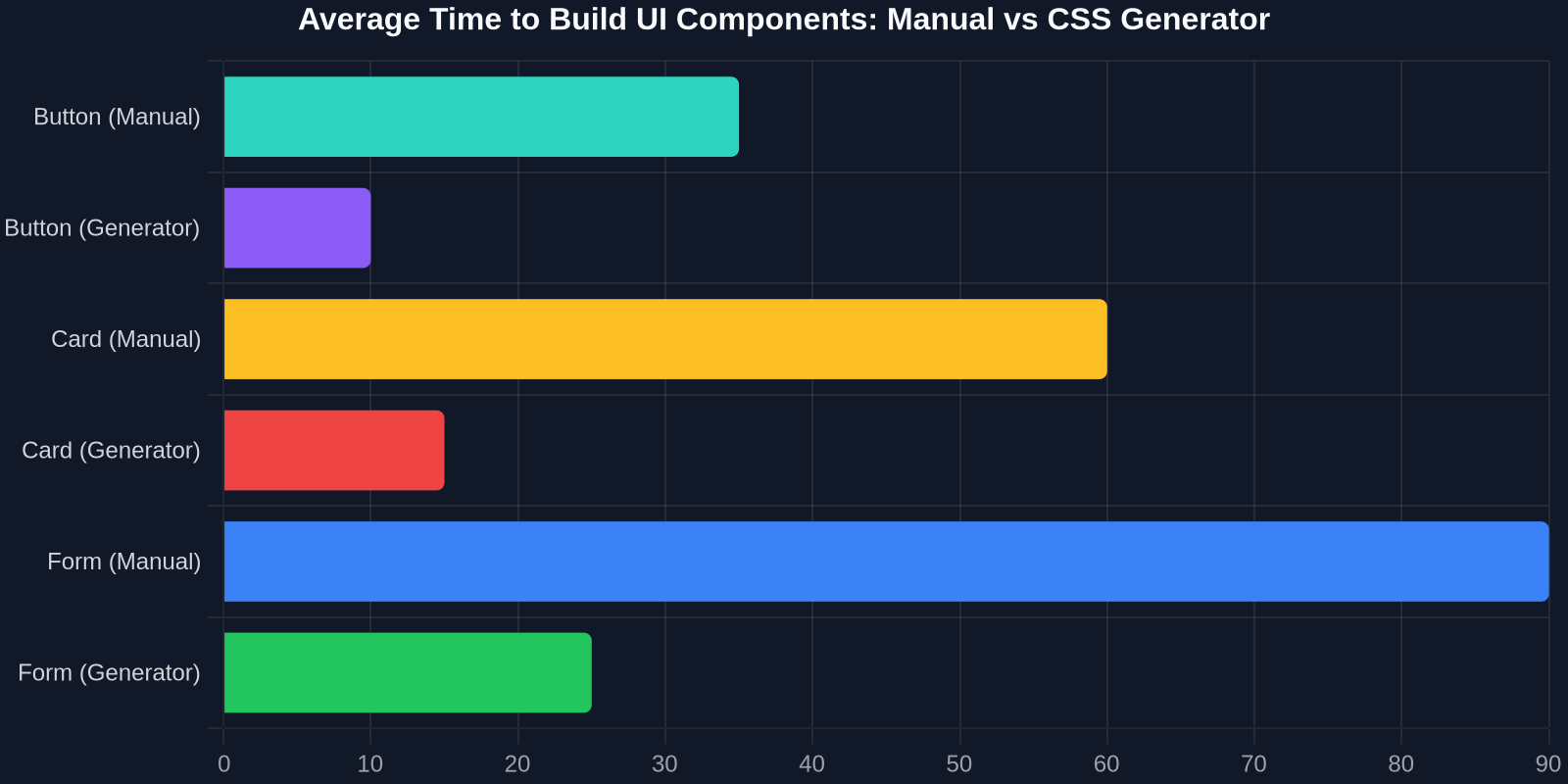
While manual coding remains essential for complex, non-standard layouts, the majority of routine styling can be automated without sacrificing quality.
Types of CSS Generators Every Frontend Developer Should Know
Not all generators are created equal. Understanding the categories helps you choose the right tool for each task.

Gradient and Background Generators
Gradient generators, such as CSS Gradient and uiGradients, let you pick colors, angles, and stops visually. They output linear-gradient, radial-gradient, and conic-gradient functions with correct syntax. These tools are invaluable for creating modern hero sections, buttons, and subtle surface textures.
Example output from a typical gradient generator:
.hero {
  background: linear-gradient(135deg, #667eea 0%, #764ba2 100%);
}
Instead of guessing angular values or color interpolation, you can experiment with multiple stops and export the exact code.
Box Shadow and Border Radius Generators
Box-shadow is one of the most error-prone CSS properties. The syntax requires horizontal offset, vertical offset, blur radius, spread radius, and color, often with multiple comma-separated layers. Generators like CSSmatic and Neumorphism.io provide sliders for each parameter and preview the result in real time.
.card {
  box-shadow: 0 20px 40px rgba(0, 0, 0, 0.12), 0 6px 12px rgba(0, 0, 0, 0.08);
  border-radius: 16px;
}
Paired with border-radius generators, you can achieve soft, layered elevation that feels modern without trial and error.
Flexbox and Grid Layout Generators
Layout generators address the most common flexbox and grid configurations: centering, equal-height columns, responsive card grids, and holy-grail layouts. Tools like CSS Grid Generator and Flexbox Playground let you drag items, set gaps, and define alignment, then copy the resulting container and item rules.
.grid {
  display: grid;
  grid-template-columns: repeat(auto-fit, minmax(280px, 1fr));
  gap: 24px;
}
These generators are particularly useful for developers who understand layout principles but want a faster starting point for common patterns.
Animation and Transition Generators
Animations often require manual timing functions and keyframe definitions. Generators like Animista and Keyframes.app let you choose from a library of pre-built animations, fade, slide, bounce, rotate, and customize duration, delay, easing, and iteration counts.
.fade-in {
  animation: fadeIn 0.6s cubic-bezier(0.25, 0.46, 0.45, 0.94) both;
}

@keyframes fadeIn {
  from { opacity: 0; transform: translateY(12px); }
  to { opacity: 1; transform: translateY(0); }
}
Using these tools, you can add motion to components without writing keyframe math from scratch.
Step-by-Step: Building a Modern Card Component with CSS Generators
Let’s apply these tools to a realistic example. We’ll build a responsive pricing card with a gradient header, layered shadow, subtle border radius, and a hover animation, all using generator outputs.
Step 1: Define the HTML Structure
<div class='pricing-card'>
  <div class='pricing-card__header'>
    <h3>Pro Plan</h3>
    <span class='price'>$29/mo</span>
  </div>
  <ul class='features'>
    <li>Unlimited projects</li>
    <li>Advanced analytics</li>
    <li>Priority support</li>
  </ul>
  <button class='cta'>Get Started</button>
</div>
Step 2: Generate the Gradient Header
Use a gradient generator to choose two brand colors and set the angle to 135 degrees. Copy the output and assign it to the header.
.pricing-card__header {
  background: linear-gradient(135deg, #4f46e5 0%, #7c3aed 100%);
  padding: 32px 24px;
  border-radius: 16px 16px 0 0;
}
Step 3: Generate the Layered Box Shadow
In a shadow generator, set the first layer to a large, soft shadow and the second to a tighter, darker one. Copy the resulting box-shadow declaration.
.pricing-card {
  background: #ffffff;
  border-radius: 16px;
  box-shadow: 0 24px 48px rgba(17, 24, 39, 0.12), 0 6px 12px rgba(17, 24, 39, 0.08);
  transition: transform 0.3s ease, box-shadow 0.3s ease;
}
Step 4: Add Hover Animation from a Generator
Using an animation generator, select a subtle lift effect with a cubic-bezier easing. Add the hover state.
.pricing-card:hover {
  transform: translateY(-8px);
  box-shadow: 0 32px 64px rgba(17, 24, 39, 0.16), 0 8px 16px rgba(17, 24, 39, 0.10);
}
Step 5: Use a Flexbox Generator for the Card Body
For the features list and button spacing, generate a flex column layout with gap and centering.
.pricing-card {
  display: flex;
  flex-direction: column;
  gap: 20px;
  padding: 24px;
}

.features {
  display: flex;
  flex-direction: column;
  gap: 12px;
  list-style: none;
  padding: 0;
}
The result is a production-quality card built in minutes, not hours. You retain full control over the final CSS because generators output editable, human-readable code.
Comparing Manual CSS vs. Generator-Assisted Workflow
The table below summarizes typical outcomes for building a modern UI card component from scratch using different approaches.

| Approach | Time | Quality |
|---|---|---|
| Manual CSS coding | 4 hours | Variable, depends on skill |
| Using CSS generators | 45 min | High consistency, predictable |
| Copying from live sites with DivMagic | 10 min | Production-ready, real-world tested |
The time difference is significant, but the quality benefits are equally important. Generator-assisted workflows produce idiomatic CSS that aligns with current best practices, while manual coding can drift into over-specific selectors or inconsistent spacing.
How to Integrate CSS Generators into Your Existing Development Stack
Generators are most powerful when treated as part of a larger design system, not as one-off utilities. Here’s a practical integration strategy:
- Define design tokens first: colors, spacing scale, typography, and border radii.
- Use generators to explore variations within those tokens.
- Extract the generated CSS into custom properties or utility classes.
- Store components in a version-controlled pattern library.
Example design token setup:
:root {
  --color-primary: #4f46e5;
  --color-primary-strong: #7c3aed;
  --space-4: 16px;
  --space-6: 24px;
  --radius-card: 16px;
  --shadow-card: 0 24px 48px rgba(17, 24, 39, 0.12);
}
When using DivMagic’s browser extension, you can inspect live UI components and extract their exact CSS values, including gradients, shadows, and spacing, then map those values into your token system. This bridges the gap between visual inspiration and production code.
Great developers don’t hand-write every shadow and gradient, they automate the repetitive 80% and focus on the unique 20%.
Copying Real-World UI Patterns with Browser Extensions
While generators help you create new styles, they don’t solve the problem of matching an existing design you admire. That’s where a tool like DivMagic becomes essential. It lets you click on any element of any website and copy its computed CSS, including inherited styles, pseudo-element effects, and responsive rules.

This capability transforms your browser into a design reference library. Instead of manually inspecting a button’s shadow, gradient, or hover transition, you can capture the full component style in one step and then reuse it in your own projects.
Combining DivMagic with traditional CSS generators gives you the best of both worlds: inspiration from real, shipped interfaces and the ability to generate fresh variations programmatically.
DivMagic turns any live website into a reusable UI pattern library in one click, so you never start from a blank stylesheet again.
Pro Tips for Maintaining Generated CSS at Scale
Generated CSS is not a silver bullet. As your component library grows, you need to manage the output carefully. Here are proven practices:
- Convert all generated literal values to CSS custom properties.
- Group related generated rules into component-scoped files.
- Remove unnecessary vendor prefixes unless your browser support policy requires them.
- Document which generator settings produced each component for reproducibility.
- Run automated linting (Stylelint) to catch specificity and formatting issues.
Common Pitfalls and How to Avoid Them
Even with powerful generators, developers fall into predictable traps. Awareness is the first line of defense.
Over-reliance on Generated Values Without Understanding
You should never use a generator you don’t understand. If you copy a cubic-bezier value without knowing what it does, debugging later becomes harder. Take a moment to learn what each property controls.
Ignoring Accessibility
A beautiful button with low contrast is still a failure. Many generators don’t check WCAG contrast ratios by default. Always verify accessible color combinations using accessibility tools.
Copying Code Without Refactoring
Generated code often includes redundant or non-semantic class names. Refactor variable names to match your design system before shipping.
Forgetting Responsiveness
A shadow that looks great on desktop may feel heavy on mobile. Use media queries or clamp() to scale generated values adaptively.
The Future of CSS Generators in Modern UI Development
The next wave of CSS generators is moving toward AI-assisted design-to-code workflows. Tools are emerging that can generate complete component styles from natural language descriptions, integrate with browser inspection APIs to capture real-world UI, and output code in multiple frameworks.
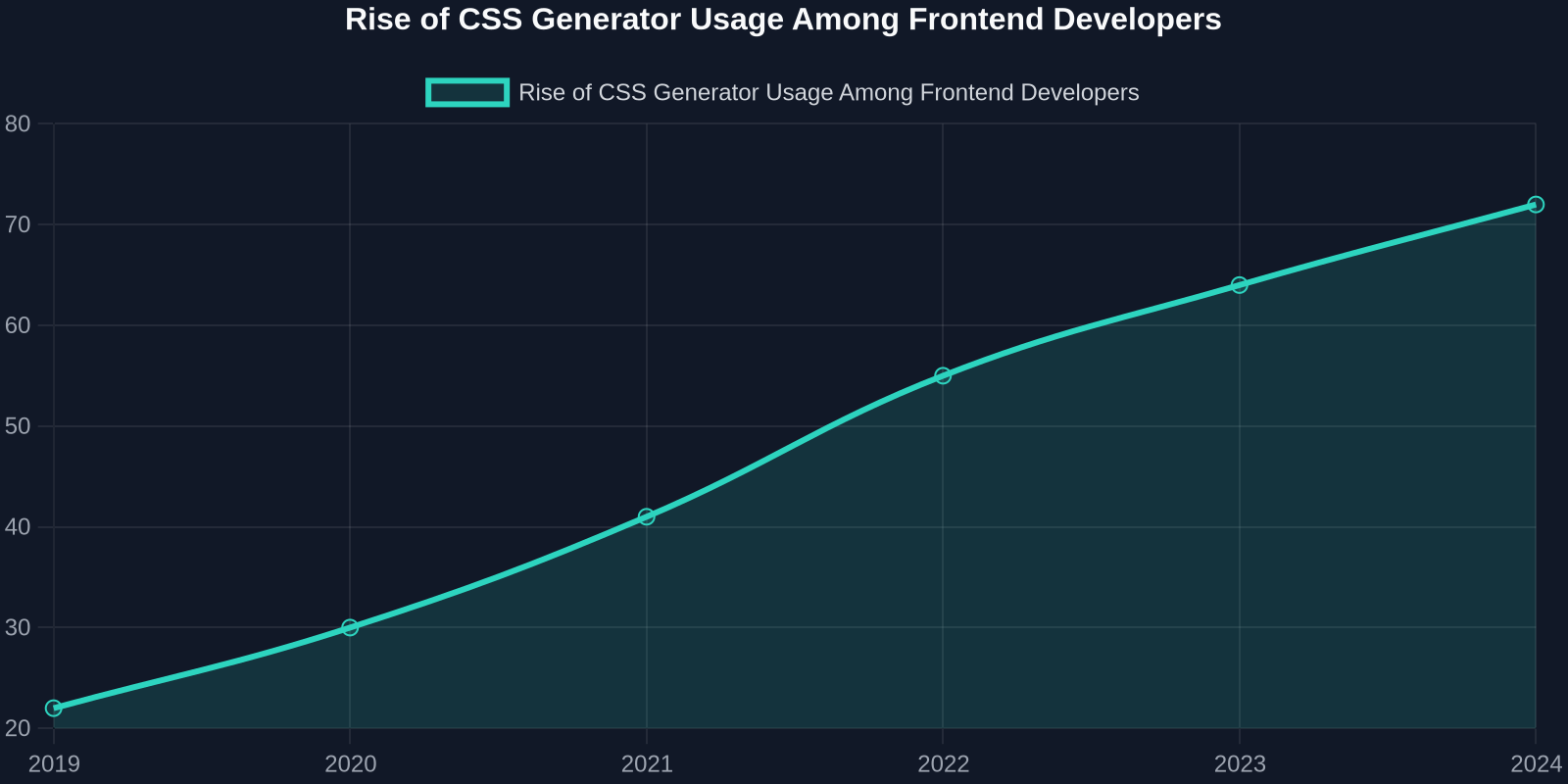
As adoption grows, the role of the frontend developer shifts from typing CSS syntax to curating design systems. The generator becomes a creative partner, handling the mechanical output while you focus on architecture, accessibility, and user experience.
DivMagic sits at the intersection of this trend. By combining real-world CSS extraction with a seamless browser extension experience, it eliminates the most tedious parts of UI development, so you can ship faster without sacrificing quality.
Conclusion
CSS generators have transformed how modern UI components are built. They reduce time, improve consistency, and lower the barrier to sophisticated visual effects. By integrating them into a design token workflow and using browser extensions like DivMagic to capture real-world patterns, you can cut component development time from hours to minutes.
The key is to treat generators as productivity tools, not replacements for understanding CSS. Review their output, refactor for your context, and keep accessibility in mind. Start with small components, measure the time saved, and expand your workflow from there.
Ready to accelerate your UI development? Try combining your favorite CSS generator with DivMagic’s one-click component copying to see how much faster you can build polished interfaces.