The browsing landscape is undergoing a tectonic shift, and if you are a frontend developer, UI engineer, or simply a power user who values a clean, performant web, the tremors are impossible to ignore. The news that Microsoft Edge is about to lose uBlock Origin permanently isn't just another tech headline; it marks the definitive closing of a chapter on the Manifest V2 extension platform. This transition, driven primarily by Google’s Chromium project, the foundation upon which Edge, Opera, Brave, and many others are built, redefines how browsers interact with network requests, potentially impacting not just ad blocking but a whole ecosystem of privacy, security, and developer tools.
For years, we have relied on high-fidelity content blockers to sculpt the internet into a usable, fast, and private space. As frontend developers, we often used these tools to debug, filter noise, and inspect payloads without the distraction of invasive tracking scripts. The deprecation of the APIs that made tools like uBlock Origin possible forces us to rethink our toolchain. But it also opens up a conversation about what the "new web" looks like under the Manifest V3 (MV3) regime and how tools like DivMagic fit into a workflow that prioritizes clean extraction of UI components from a cluttered web.
The Technical Breakup: Manifest V2 vs. Manifest V3
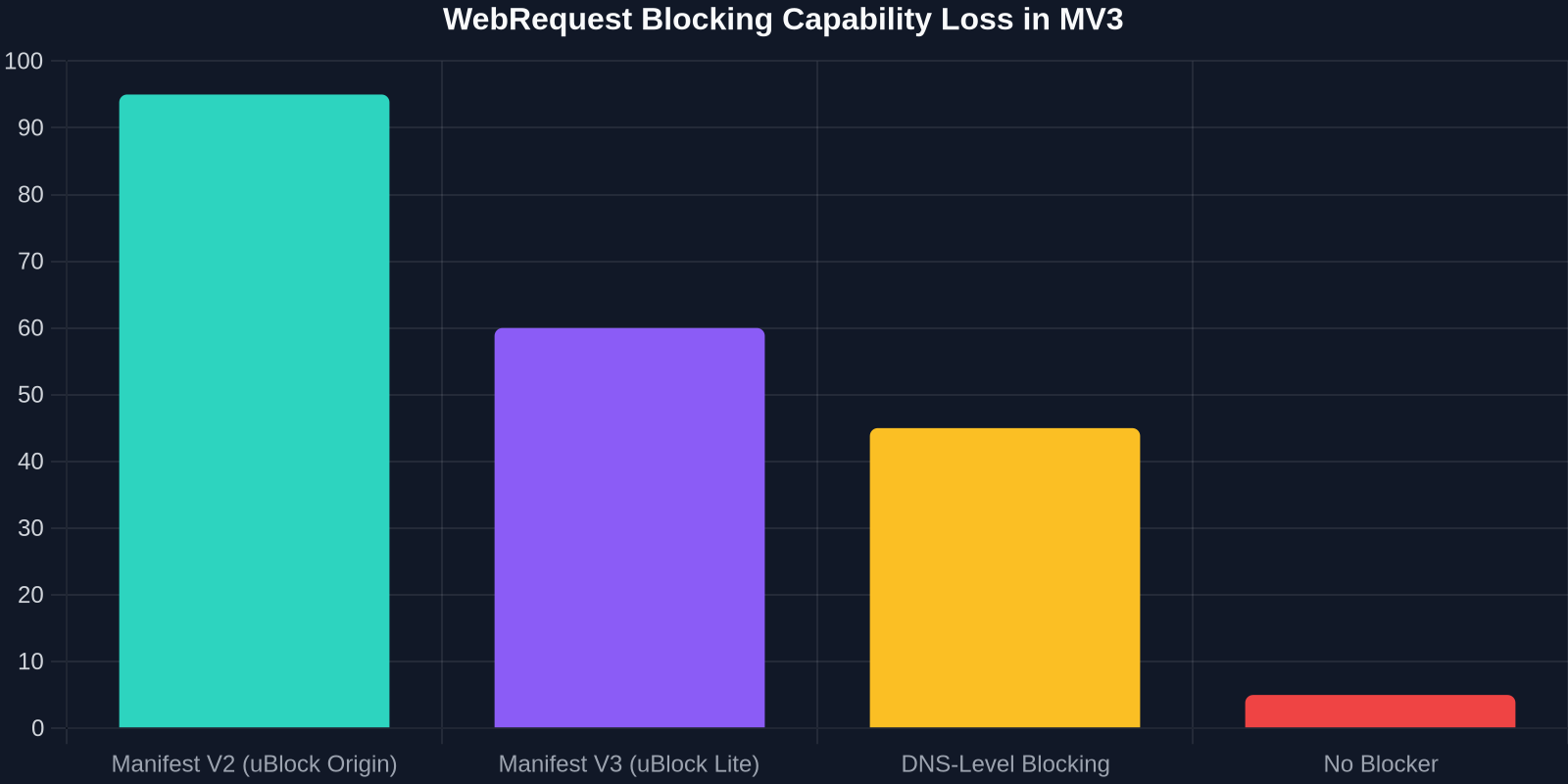
To understand the gravity of the situation, we must look under the hood at the manifest.json files that govern browser extensions. The transition from Manifest V2 to Manifest V3 is not a minor version bump; it is a fundamental rewrite of the extension API surface, heavily restricting the webRequest API in favor of the declarativeNetRequest (DNR) API.
The most devastating blow for complex content blockers is the shift from programmatic, dynamic filtering to static, declarative rules. In Manifest V2, an extension like uBlock Origin could intercept a network request in real-time, run custom logic, and decide whether to block, redirect, or modify it dynamically.
The core conflict is philosophical and technical: MV3 moves the filtering logic from the extension (JavaScript) to the browser (native code). While this limits the attack surface for malicious extensions, it also severely limits the complexity of filtering rules available to privacy tools.
Under MV3, extensions use declarativeNetRequest, which forces developers to pre-define a static set of rules. The browser processes these rules natively without giving the extension access to the raw request data. The initial limit on these rules was a paltry 30,000 dynamic rules, though Google later bumped it to 330,000 static rules to appease critics. While this sounds ample, uBlock Origin’s default filter lists often require hundreds of thousands of rules, and power users who enable multiple regional and annoyance filters could easily exceed even the newer, higher limits.
The Specific Threat to Edge Users
Microsoft Edge, having migrated to the Chromium engine in 2020, is intrinsically tied to these upstream decisions. "The most popular one, uBlock Origin, was permanently disabled last summer because of this. And that's why Edge and Opera and a lot of browsers just can't use ..." the old technology anymore. The rollout has been gradual but unyielding. Edge now actively scans for Manifest V2 extensions and flags them as outdated, eventually disabling them without a user override.
Once a haven for users fleeing Chrome’s privacy overreach, Edge now finds itself enforcing the exact architectural limitations it once promised to mitigate. The death of uBlock Origin on Edge isn't a policy choice by Microsoft to antagonize their users; it’s a maintenance burden decision. Maintaining a divergent webRequest codebase in a Chromium fork is a nightmare for security patching, which brings us to the next critical point.
The Security Paradox: Locking the Gate but Leaving the Window Open
The justification for Manifest V3 has always been security. By preventing extensions from seeing all your browsing data, the browser limits the damage a compromised extension can do. It's a valid concern. However, the timing creates a jarring cognitive dissonance, especially regarding Microsoft’s handling of memory.

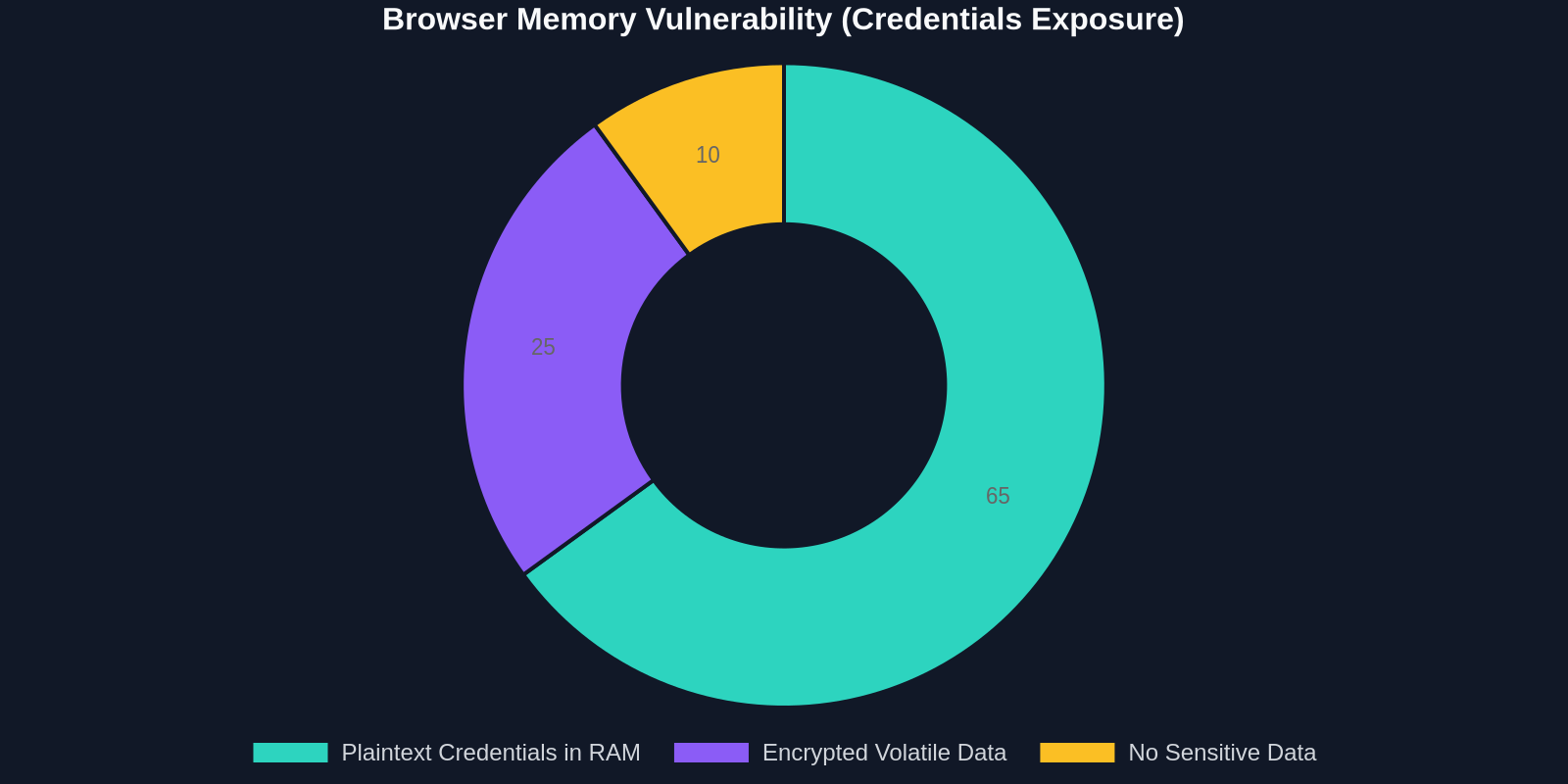
Storing secrets in clear text within Random Access Memory (RAM) is a critical lapse in a defense-in-depth strategy. The mechanism allows a rogue process or simply a poorly sandboxed tab to read authentication tokens and master passwords from the browser's memory dump. If an attacker has local execution, they don't need to bypass an extension's encrypted storage; they can simply ask the operating system for the browser's working memory.
If you are a developer storing API keys in localStorage or session state, this is your reminder that the RAM is the new goldmine. Encrypting at rest isn't enough if the runtime is transparent.
This creates a bitter irony. The browser is locking down the declarative network layer to prevent extensions from stealing data while the host application itself is hemorrhaging credentials. As developers, we must advocate for full memory encryption and sandboxing, not just siloed extension permissions.
The Rise of the Declarative Ecosystem
As uBlock Origin dies, the ecosystem is bifurcating. We see two distinct survivors:
- uBlock Origin Lite: The official MV3 compliant version by Raymond Hill. It strips out dynamic filtering, scriptlet injection, and cosmetic filtering flexibility in favor of the DNR API. It’s painless but less powerful.
- Complete Browser Forks: Browsers like Brave have promised to maintain MV2 support internally via their native "Shields" feature, which isn't an extension but a browser-level module.
The process of navigating this mess is what some pessimists call the "enshitification" of the internet, where platforms degrade service to capture value. "The process of enshitifying the internet began in earnest in 2014, it's just finally reaching its unavoidable climax now," is a sentiment echoing across developer forums. Ads are not just banners anymore; they are 3D-animated, GPU-melting JavaScript bundles that audit browser fingerprinting, battery status, and even mouse movements. Filtering them requires surgical precision that DNR rulesets simply lack.
Impact on Web Development Workflows
For the frontend developer, this isn't just about dodging pop-ups. It’s about performance budgets. Without a hardcore ad-blocker, the average news site pushes 20-40MB of data, mostly JavaScript. This distorts performance profiling. When you are copying UI components or scraping style guides using tools like DivMagic, the layers of ad-zones and tracking pixels poison the DOM. MV3 weakens the tooling that previously cleaned this out, making manual cleanup or smarter extraction tools more vital than ever.
The Unseen History: How We Got Here
To understand the angst, we must remember that the internet wasn't always a hostile billboard. The utility of uBlock Origin wasn't just AdBlock Plus with better performance; it was a swiss army knife. It "unmasks" any attempt to tamper with recorded history, blocks WebRTC leaks, and strips URL tracking parameters dynamically. These are not features that a static ruleset can replicate. Static rules match regex patterns against URLs. Dynamic filters match against the content, the network context, and the execution environment.
Furthermore, the transition wasn't done in a vacuum. It coincides with a broader transformation of the browser from a user agent to a user surveillance agent. The pandemic accelerated the reliance on the browser as the primary work interface. "And now in the middle of pandemic crises, Microsoft comes with “Microsoft Edge” to replace “Internet Explore”. It was done quietly under Microsoft updates." This silent push of Edge into enterprise environments created a massive captive audience that is now being shepherded away from privacy controls.
What Should Frontend Developers Do?
If you live in the browser, as most of us do, you cannot afford to wait for regulators to fix this. You need a pragmatic action plan.
1. Adopt DNS-Level Filtering
Moving the block-layer to DNS (like NextDNS or Pi-hole) bypasses the browser extension APIs entirely. While you lose the ability to do cosmetic filtering (e.g., hiding the blank div left by a blocked ad), you regain control over tracking. This is a solid first line of defense.
2. Switch to "Developer Mode" Extensions or Forks
Brave’s Shields approach is currently the gold standard. It implements ad-blocking at the browser core level using Rust, making it faster and immune to MV3 deprecation. For Edge loyalists, the alternative is loading uBlock Origin Lite packaged as an unpacked extension, but this is a cat-and-mouse game.
For professional environments where you need to copy 100% clean UI components, relying solely on browser-level blocking often breaks layout flows. Use a specialized utility like DivMagic that intelligently extracts sections and ignores ad containers during the copy process.
3. The Developer's Toolkit: Beyond the Block
Given that browsers are becoming leaky vessels where passwords sit in plaintext RAM, and environments are polluted with tracking garbage, the logical step for a UI engineer is to isolate and capture value quickly. The concept of "Save as Copy" or "Copy to Clipboard" tools that extract CSS/HTML has exploded. The goal is to get the UI data and leave the toxic web context immediately.
This is where a dedicated extraction tool becomes an essential professional device. Instead of wading through a network tab filled with tracked requests, a developer can target a section and grab its Tailwind or plain CSS directly. It eliminates the noise that the dying ad-blockers used to filter.
The Password Blunder and the Bigger Security Picture
We touched on the plaintext password scandal, but it deserves a deeper dive. Developers are often sloppy with credential storage because they assume the OS protects memory. "Microsoft Edge stores your passwords in plaintext RAM...", this isn't a bug; it's an architectural concession to speed. To auto-fill a password instantly, the browser must decrypt the database into memory. The question is, how long does it live there?
This "blunder" raises a bigger question about trust boundary erosion. While we mourn uBlock Origin, attackers are exploiting WebUSB, WebBluetooth, and opaque renderer processes that don't care about Manifest versions. The CPU cost of decrypting media and rendering frames means sensitive strings often live in buffer caches far too long.
The Illusion of Privacy
"Using Privacy Tools could help a great deal. Browsers like Brave or extensions like uBlock Origin to block these trackers before they even touch your device." This is the golden rule, and it's slipping away. The MV3 transition was supposed to protect us from extensions reading our passwords, but it still happens through the browser’s own carelessness. It feels like locking the screen door while the back window is wide open.
The ultimate irony is that as we lose these tools, the internet becomes a darker pattern of deceptive designs. Click-jacking, fake download buttons, and crypto-miners thrive in the ad ecosystem. Frontend devs building legitimate products suffer because users become conditioned to distrust all UI.
The Broader Ecosystem Shift
We are seeing a divergence. Safari has its own ad-blocking framework, relatively stable. Firefox retains full support for the webRequest API in their Extended Support Release (ESR) and mainstream versions, promising not to cripple ad-blockers. This makes Firefox a sudden magnet for the privacy-conscious technical class. However, for system resources and integration with Microsoft 365, Edge remains the corporate standard.
This corporate lock-in is the leverage. "Cancel the cards or report them lost. Or, if you don't pay the bill they will cancel it...", the same logic applies to enterprise software. As long as enterprises pay for Microsoft 365, they will use Edge, and they will have to swallow the MV3 pill.
A Developer-Centric Comparison: DIY Filtering vs. Extraction
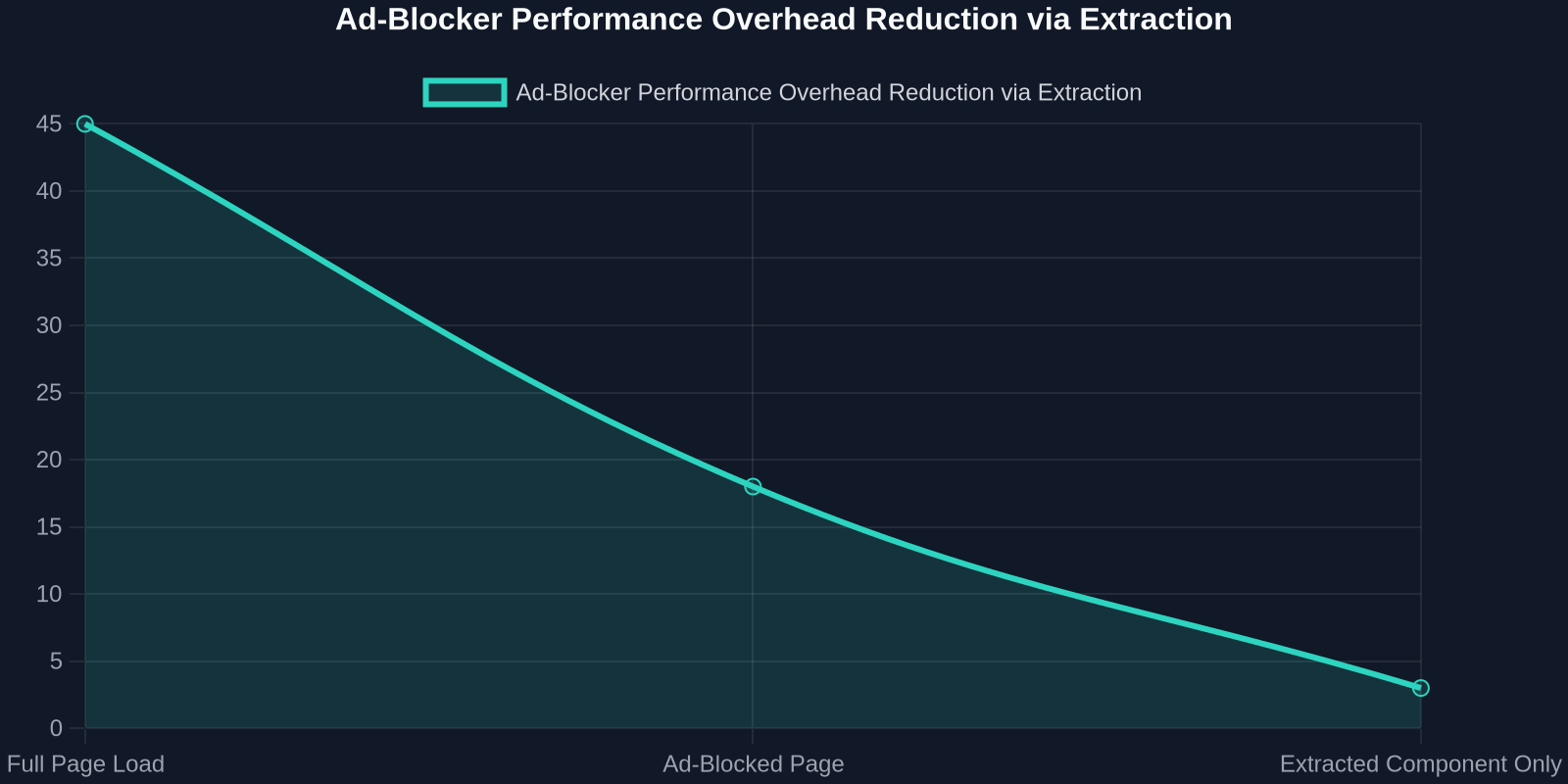
Instead of fighting the browser to de-clutter the web, a shift in strategy is occurring. Why spend compute cycles blocking 70% of a page’s scripts when you can just extract the 5% you need?
The comparison table highlights a shift in mindset. As developers, we often tried to fix the entire world (blocking all ads) when we really just needed to fix our own output (clean code). The broader internet continues its descent into surveillance capitalism, but the UI elements, the buttons, the gradients, the typography scales, remain valuable and isolated.
The "pandemic" switch to Edge as a forced update strategy, while frustrating, cemented a rigid architecture. It closed the door on the customizable web of the 2010s and opened the door to a managed web. For the next few years, coping mechanisms will involve curation rather than brute-force blocking.
Conclusion: Adapting to the Corporate Web
The disappearance of uBlock Origin from Microsoft Edge is a milestone in the internet's maturation into a controlled, managed, and monetized platform. The technical nuances of the declarative Net Request API, while secure in theory, have broken the back of the power user’s most essential tool.
The silver lining for developers lies in the evolution of the toolset. A workflow that prioritizes extraction, isolation, and curation over filtering is the path of least resistance. The security landscape demands that we trust no single process, from the RAM management of our Chromium binary to the network requests of our advertisement scripts.
We are entering a world where you don't clean the house, you just take the good furniture and leave. And in that context, having a precision tool that can snatch UI code in one click becomes less of a luxury and more of a survival tactic in a cluttered web. The new strategy is not to block; it's to extract and ignore. The sooner developers accept the death of the old web, the faster they can build on the ruins of the tracking empires.