The ClickFix Malware: How Fake Browser Extensions Compromise Developer Workflows
Browser extensions have become indispensable for frontend developers. They analyze designs, inspect layouts, and automate repetitive tasks. But this reliance also opens a dangerous attack vector, malicious extensions that look legitimate but are actually spyware, ransomware, or data stealers.
A recent report by Kaspersky Labs details a sophisticated campaign called ClickFix. This malware doesn't target the average user; it specifically baits developers and power users by mimicking trusted extension install prompts. Understanding ClickFix is critical for every developer who values both productivity and security.
What Is ClickFix Malware?
ClickFix is a social engineering‑driven malware that tricks victims into installing malicious browser extensions. The attack begins with a compromised website that displays a fake dialog box, often styled exactly like a Chrome or Edge extension permission prompt. The message warns about a “missing plugin,” “outdated driver,” or “security certificate error” and asks the user to click “Install Extension” to fix the issue.
Once the user clicks, a malicious extension is loaded from a seemingly reputable source, often through a hidden redirect. The extension then gains broad permissions: reading all website data, accessing cookies, capturing keystrokes, and even exfiltrating local files via file:// access.
The ClickFix attackers specifically target developer forums, GitHub issues, and npm package documentation pages to spread the malicious prompts. They know developers are conditioned to trust extension install flows.
How ClickFix Targets Developers Specifically
Developers are prime targets because they have elevated system access and work with sensitive assets (API keys, authentication tokens, production credentials). ClickFix exploits this by:

- Contextual lures: A prompt appears on a code playground (e.g., CodePen, JSFiddle) claiming a “React DevTools update required” or “Vue.js debugger missing.” The developer, wanting to continue debugging, clicks without thinking.
- Fake error pages: When a local development server (localhost) loads, a fake SSL warning pops up, urging the developer to “install the local security certificate extension”, which is actually the malware.
- Phishing via clone sites: The attacker clones popular extension pages (like a known color picker or JSON formatter) and injects the malicious payload. The fake page looks pixel‑identical to the real one.
The Technical Anatomy of a ClickFix Attack
Let's break down what happens after the extension is installed. The malicious extension typically contains a manifest.json with permissions like <all_urls>, webRequest, cookies, and storage. It may also include native messaging capabilities to interact with external scripts.
\{
  "name": "React DevTools Essential",
  "version": "1.0.0",
  "permissions": [
    "<all_urls>",
    "webRequest",
    "webRequestBlocking",
    "cookies",
    "storage"
  ],
  "background": \{
    "scripts": ["payload.js"],
    "persistent": true
  \}
\}
The background script then:
- Monitors all HTTP requests to steal API keys, tokens, and form data.
- Injects a script into every page to capture keystrokes and clipboard content.
- Periodically sends exfiltrated data to a command‑and‑control server.
- Uses JavaScript obfuscation to evade detection by security scanners.
Many of the compromised extensions pass the Chrome Web Store review process because they hide malicious code in obfuscated modules that are loaded only after a post‑install server ping.
Real‑World Impact: Why Developers Need to Care
For a frontend developer, a compromised extension can mean:

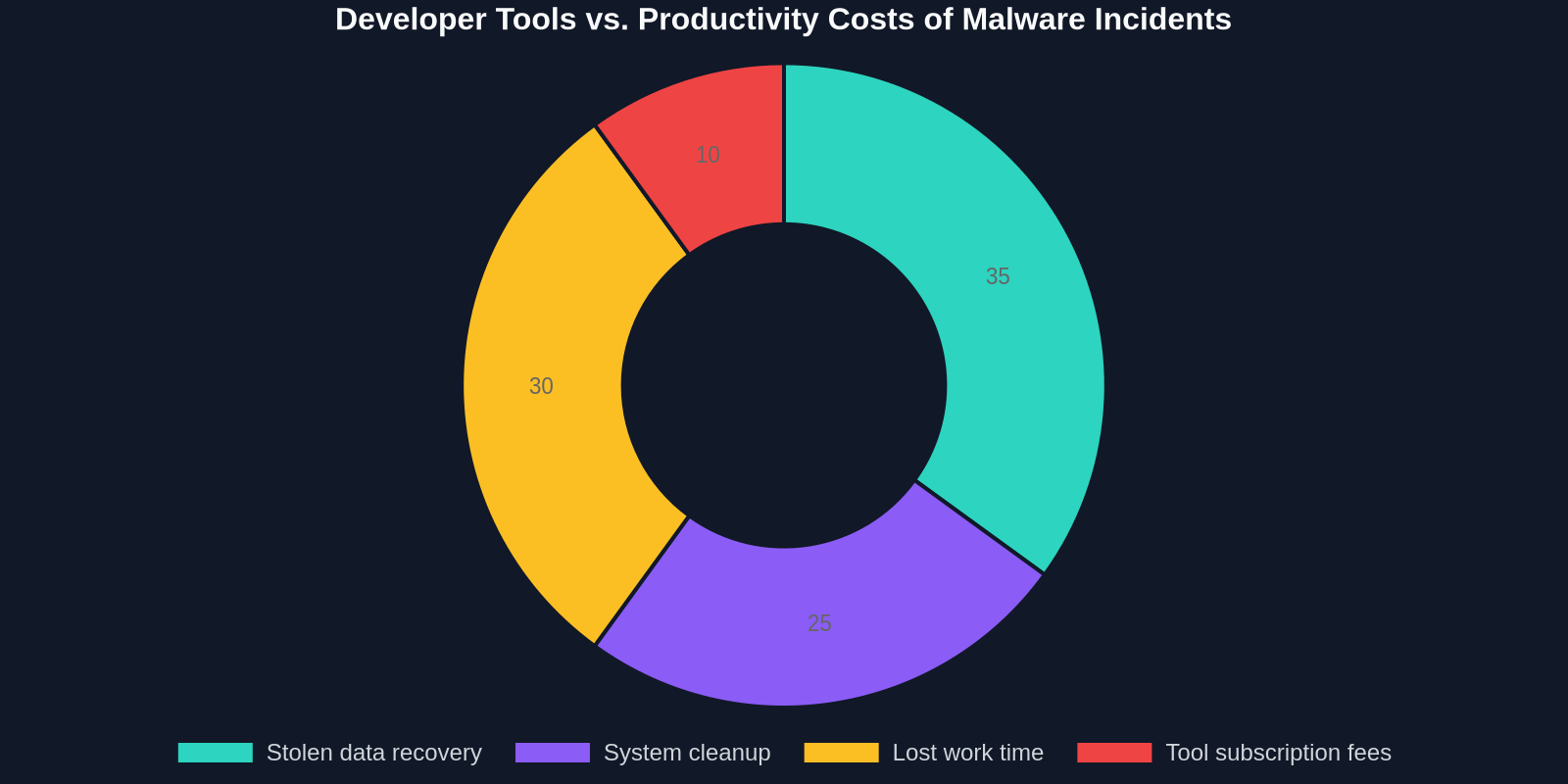
- Stolen credentials: Access to production databases, CI/CD pipelines, and cloud consoles.
- Data leakage: Client designs, proprietary code, and internal documentation.
- Supply chain risk: If the extension has access to npm or git repositories, it can alter package files or commit malicious code.
- Reputation damage: A breach traced back to a developer's compromised machine can harm career prospects and team trust.
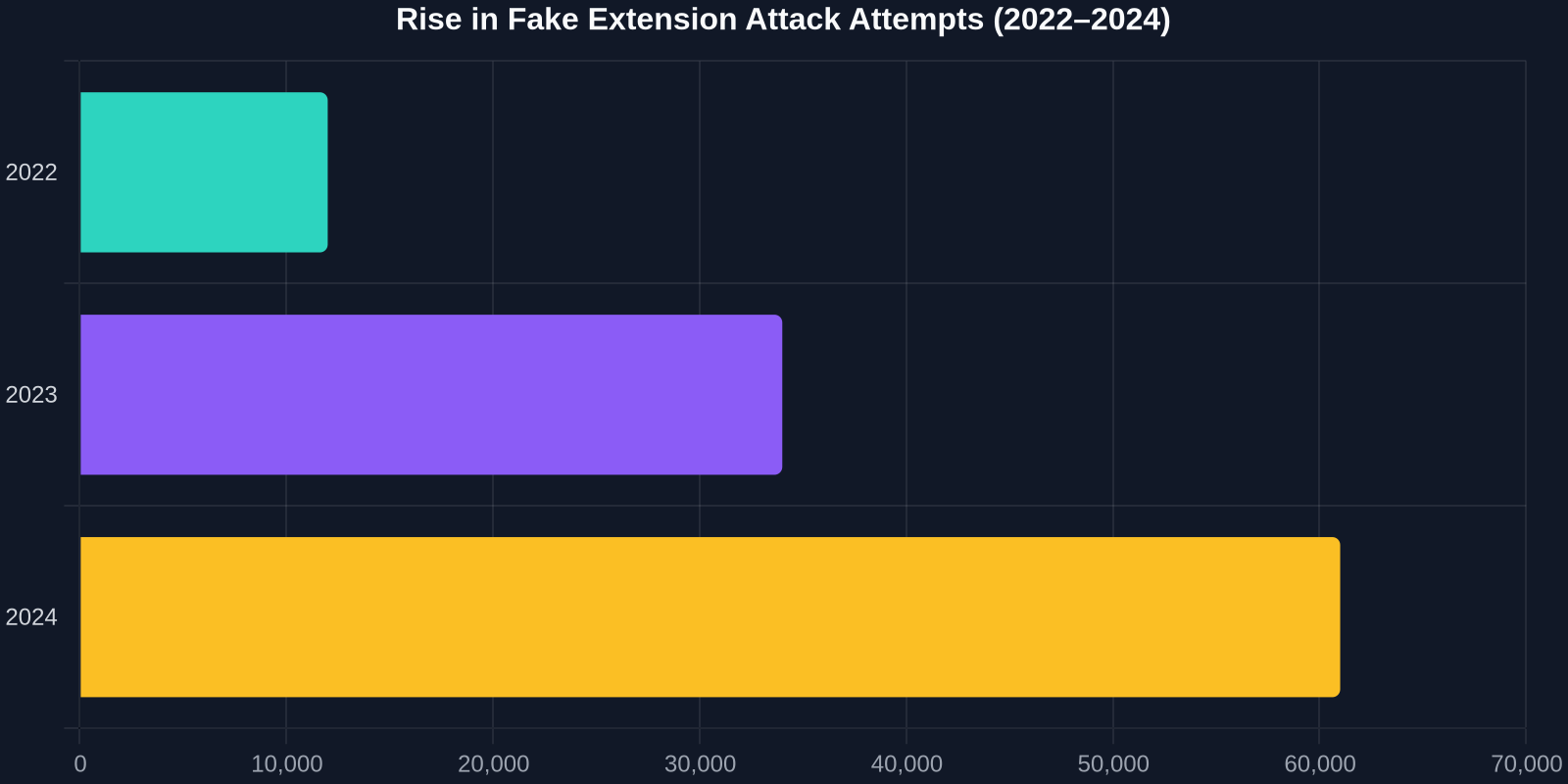
The frequency of these attacks is rising. According to Kaspersky, ClickFix variants have been responsible for more than 40,000 confirmed infections in just the last six months, with a disproportionate number of victims being software engineers.
How DivMagic Breaks the Attack Chain
DivMagic is a trusted browser extension built specifically for frontend developers, and its architecture inherently avoids the dangers of ClickFix and similar malware:
- No deceptive install prompts: DivMagic is only installable from the official Chrome Web Store and verified Microsoft Edge Add‑ons. It never uses fake “update required” dialogs.
- Minimal permissions: DivMagic requests only the permissions needed to copy CSS from websites, no
<all_urls>, nocookies, nowebRequest. You can inspect the source on GitHub to confirm. - Active maintainer community: The extension is open‑source and regularly audited. Issues are transparently tracked on GitHub.
- No external server calls: All copied code is processed locally in your browser. No data ever leaves your machine.
Before installing any extension, always check its permissions, star count, and recent update date. DivMagic's transparent development model makes it easy to trust.
, cookies, webRequest", "Minimal, only clipboard & activeTab"], ["Install source", "Fake popup, repackaged CRX", "Official Chrome Web Store / Edge Add‑ons"], ["Open‑source", "Usually closed or cloned", "Yes, auditable on GitHub"], ["Data exfiltration", "Sends keystrokes, cookies, tokens", "None, everything runs locally"], ["Update process", "Silent via remote server", "Via official store with review"] ]} />
Best Practices to Avoid ClickFix and Similar Threats
- Verify the extension ID: Match the store ID with the developer's official website. Chrome Web Store IDs are unique, bookmark them.
- Use the “Only allow from store” policy: In managed environments (office), enforce a policy that blocks side‑loaded extensions.
- Scrutinize permission warnings: If a color picker asks for
<all_urls>andcookies, that's a red flag. - Keep extensions up‑to‑date: Outdated extensions may contain known vulnerabilities. But only update from the official store, never via popup warnings.
- Use a trusted set of tools: Stick to well‑known extensions like DivMagic, React DevTools (official), and Lighthouse. Vet any new tool before installing.
- Educate your team: Run a security workshop demoing ClickFix. Show how a fake dialog box looks identical to a legitimate one.
“The most dangerous security holes aren't in your code, they're in the tools you trust without thinking.”, Adapted from security researcher Brian Krebs
Conclusion
Browser extensions are the Swiss Army knife of frontend development, but every new tool adds a potential entry point for malware. ClickFix is a stark reminder that cybercriminals are adapting their social engineering to target developers specifically. By staying informed, verifying sources, and choosing transparent, permission‑minimal tools like DivMagic, you can protect your workflow and your career.
Next time a popup asks you to install an “essential security extension,” stop, inspect, and think, it just might save you from becoming a ClickFix statistic.