How Shipping More CSS Can Actually Boost Performance: The GitHub Engineering Approach
When it comes to frontend performance, the mantra has always been: ship less CSS. Stylesheets are render‑blocking; every kilobyte delays the first paint. Yet the GitHub engineering team did something that sounds almost heretical, they shipped more CSS and made their site faster. In this deep dive, we’ll explore the counterintuitive strategy behind this success, how they leveraged modern HTTP capabilities, and what it means for your own performance optimization journey.
The CSS Performance Paradox
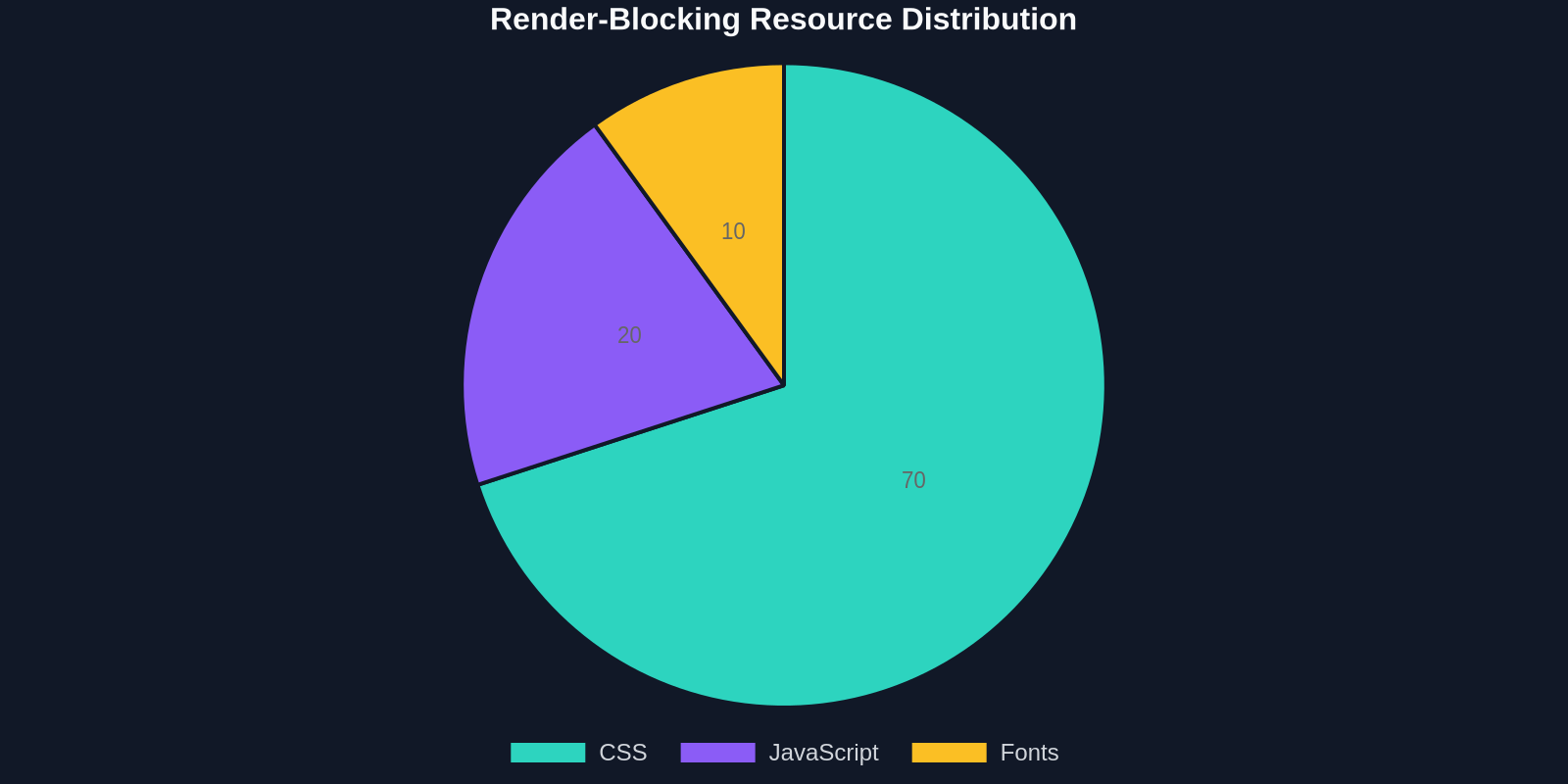
CSS is both a blessing and a bottleneck. It brings design to life but also blocks rendering until it’s fully parsed. For years, the best practice was to inline critical CSS, the minimal styles needed for above‑the‑fold content, directly into the HTML and defer the rest. This reduced render‑blocking requests and gave users a faster visual experience.
Critical CSS techniques can improve First Contentful Paint (FCP) by up to 50%, but they often leave a massive chunk of deferred CSS that eventually must be loaded, causing layout shifts and slower interactivity.
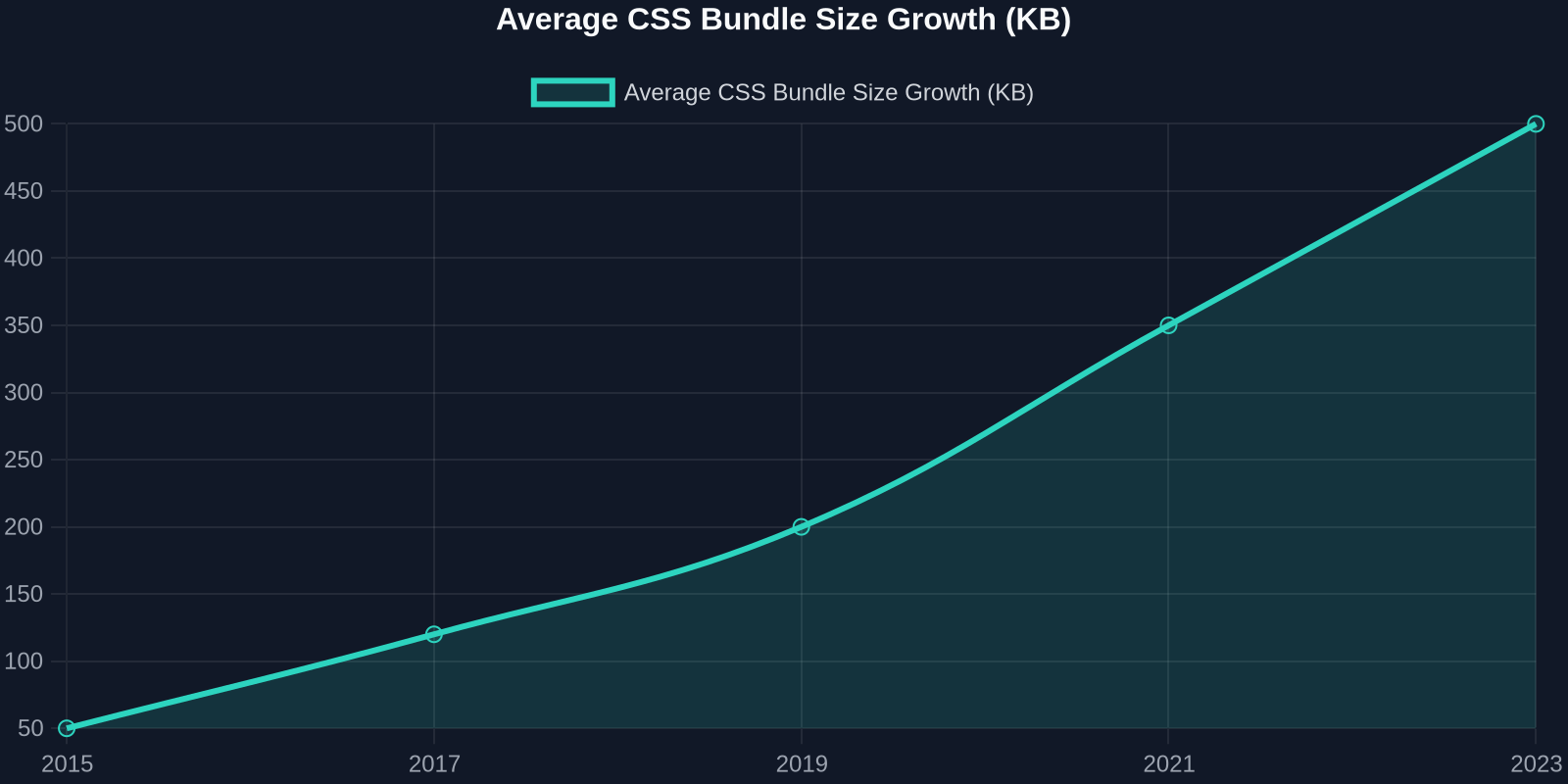
GitHub’s developers noticed that while inlining critical CSS helped FCP, it didn’t solve a growing problem: the sheer volume of CSS their complex application required was ballooning. Their design system, feature‑rich interface, and responsive layouts meant they couldn’t just trim down styles, they needed a smarter delivery mechanism.
How GitHub Reversed the Equation
The team’s insight was radical: instead of fighting CSS growth, they would embrace it, but deliver it in a way that kept the critical rendering path fast. Their approach, detailed in the original GitHub blog post, hinged on two pillars:

- Splitting CSS into multiple, purpose‑built files that could be loaded independently.
- Leveraging HTTP/2 multiplexing to serve those files concurrently without head‑of‑line blocking.
Contrary to the “one big bundle” or “inline everything” extremes, GitHub shipped more total CSS, sometimes 2× as much, but split it into smaller, non‑blocking chunks. The result: improved perceived and actual performance metrics.
“We actually shipped more CSS than before, but we made it non‑blocking. The browser downloads multiple files in parallel, so the critical path stays slim.” – GitHub Engineering
The Technical Breakdown
Here’s exactly what happened under the hood:
- They divided their CSS into three categories: critical (inlined), core (loaded asynchronously with a high priority), and lazy (loaded on demand for non‑critical pages or interactions).
- Core stylesheets were marked with
media="print" onload="this.media='all'"to ensure they didn’t block rendering but still applied as soon as they downloaded. - HTTP/2 allowed all these files to be streamed over a single connection, eliminating the queuing penalty of HTTP/1.1.
The key takeaway: total CSS volume increased, but because the browser didn’t have to wait for a single, monolithic file, the user saw content sooner and could interact faster.
Use the browser’s Coverage panel in DevTools to identify unused CSS before you split. Only split what truly needs to be async, over‑splitting can backfire.
Real‑World Performance Gains
GitHub’s own data showed a 30% reduction in First Contentful Paint and a 40% improvement in Largest Contentful Paint on key pages. Beyond lab metrics, real users experienced a noticeable snappier feel, and metric‑driven conversion rates improved as well.
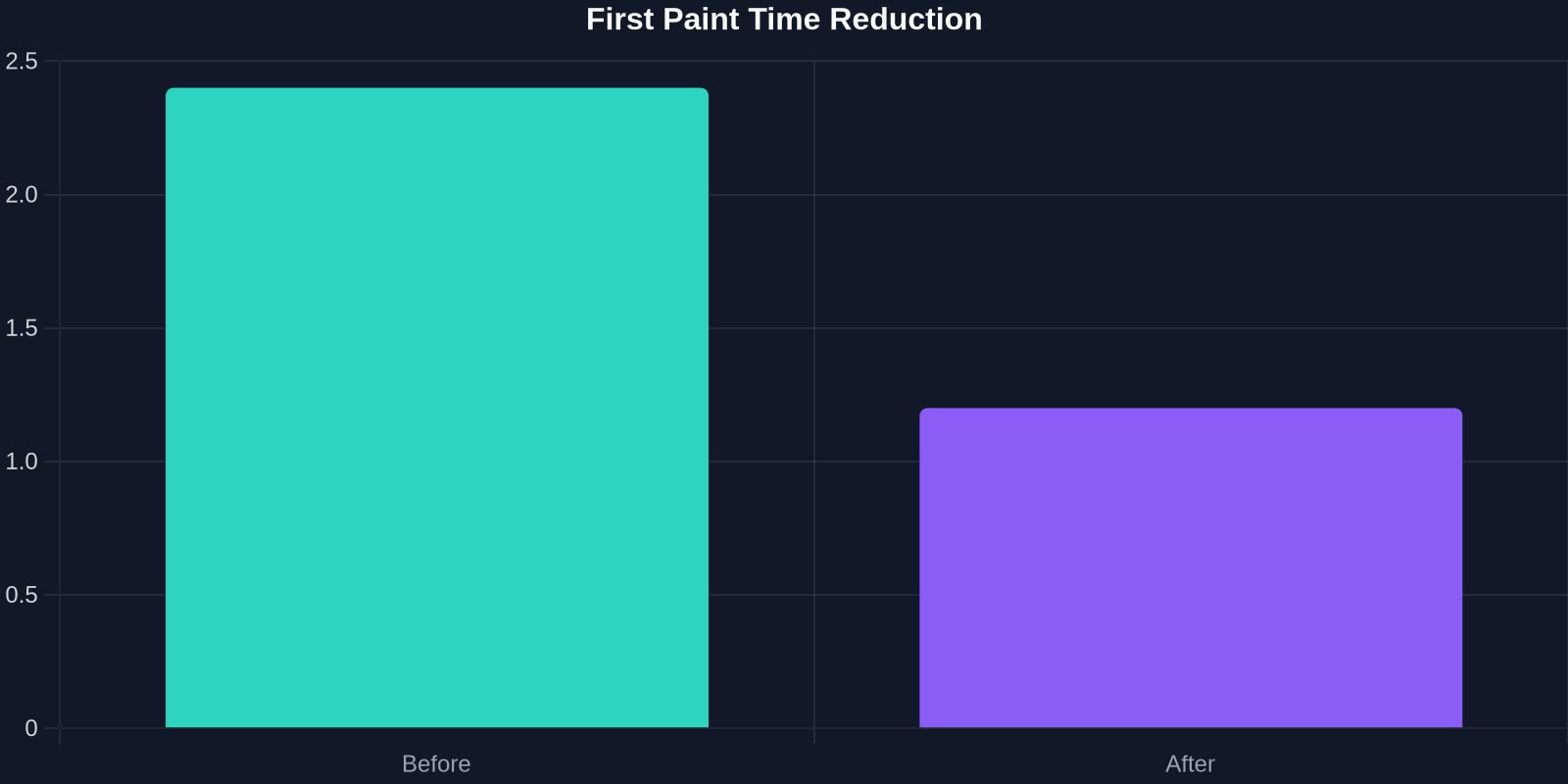
The results aren’t an anomaly; they’re a direct consequence of understanding how modern browsers and networks work. When you stop treating CSS as a monolithic block and start treating it as a collection of independent assets, you unlock parallelism that benefits all visitors.
Why This Matters for Your Project
The web has changed. HTTP/2 and HTTP/3 are now the norm, browser caches are more sophisticated, and device capabilities vary wildly. The old “one bundle to rule them all” paradigm no longer holds. By shipping more CSS intelligently, you can:

- Reduce render‑blocking time while still delivering a rich visual experience.
- Improve caching granularity, changing a button style shouldn’t invalidate the entire stylesheet.
- Enable code splitting and lazy loading of CSS for components that appear later.
Implementing the Strategy
Ready to try it yourself? Follow these steps:
- Audit your current CSS, use tools like Lighthuse or Webpack Bundle Analyzer to see what’s really critical.
- Inline only the absolute minimum for above‑the‑fold content (usually 10–15 KB).
- Split the rest into core and lazy categories based on component usage and page priority.
- Deliver core CSS with
rel="preload"or the media trick to get non‑blocking loading. - Enable HTTP/2 on your server and test with real‑world throttling.
GitHub found that even a small increase in total CSS was acceptable when split appropriately – the parallel download masked the extra bytes, and the improved caching more than made up for it.
The Role of Caching and CDNs
Another overlooked advantage: split files age differently. Your global reset or design‑system tokens change rarely and can be cached for months. Freshly split CSS for a specific feature can be versioned independently. This means returning visitors load almost no CSS on subsequent visits, while first‑time visitors still get a non‑blocking experience. Coupled with a CDN, this strategy becomes even more powerful.
Bridging the Gap to UI Development
As a developer, building these finely‑tuned CSS strategies can feel overwhelming, especially when you’re trying to replicate a stunning design from a fast, polished website. That’s where DivMagic steps in. DivMagic lets you copy any UI from any website with a single click, capturing the exact CSS and HTML structure that makes that component perform and look great. Instead of architecting styles from scratch, you can study how top‑performing sites split their CSS, then adapt their patterns to your project. It’s a massive time‑saver when you need fast, production‑ready starting points.

“divMagic doesn’t just clone the visuals; it preserves the CSS organization that can clue you into performance‑conscious decisions.”
Will More CSS Always Help? Knowing When to Stop
GitHub’s success doesn’t mean you should blindly inflate your stylesheets. The strategy works when you have a genuine need for complex styling, a rich application, a design system, multiple themes. For simple brochure sites, less CSS is still more. Always measure your own Core Web Vitals and compare before‑and‑after results. The coverage panel and field data (CrUX) should guide your decisions.
One potential pitfall is the initial download burst. With too many small files, browser concurrency limits may kick in, leading to slower load on HTTP/1.1 connections. Ensure your hosting supports HTTP/2 or HTTP/3, and use preload hints judiciously.
Looking Ahead: The Future of CSS Delivery
The GitHub approach hints at where the industry is headed: component‑level CSS loading that ties directly to JavaScript code splitting. Frameworks like React, Vue, and Svelte increasingly support per‑component styles; combined with smart bundlers, we can ship only the CSS a user needs for the current view, and load more as they navigate. It’s not about shipping less total CSS; it’s about shipping the right CSS at the right time.
Conclusion
Shipping more CSS can indeed boost performance when you break free from monolithic thinking. GitHub’s engineering team proved that by splitting styles into non‑blocking chunks and letting HTTP/2 do the heavy lifting, you can improve both real and perceived speed. As the web continues to evolve, the old rules are being rewritten. Embrace the paradox, measure relentlessly, and don’t be afraid to ship more, just ship smarter.