Responsive Typography with Modern CSS: Fluid Interfaces Without Excessive Media Queries
Typography should adapt as naturally as water filling a vessel. As viewports shrink and expand across thousands of device sizes, your text must remain readable, beautiful, and proportionally balanced. Yet many of us still lean on massive blocks of @media queries sprinkled at arbitrary breakpoints, a fragile, high-maintenance approach that strains both DX and long-term scalability.
With modern CSS, you can craft inherently responsive interfaces using mathematical functions, relative units, and font-face strategies that eliminate the need for most media query interventions. This post dives into concrete methods, from clamp() to fluid type scales, and shows how developer tools like DivMagic help you capture real-world examples of these techniques from any website.
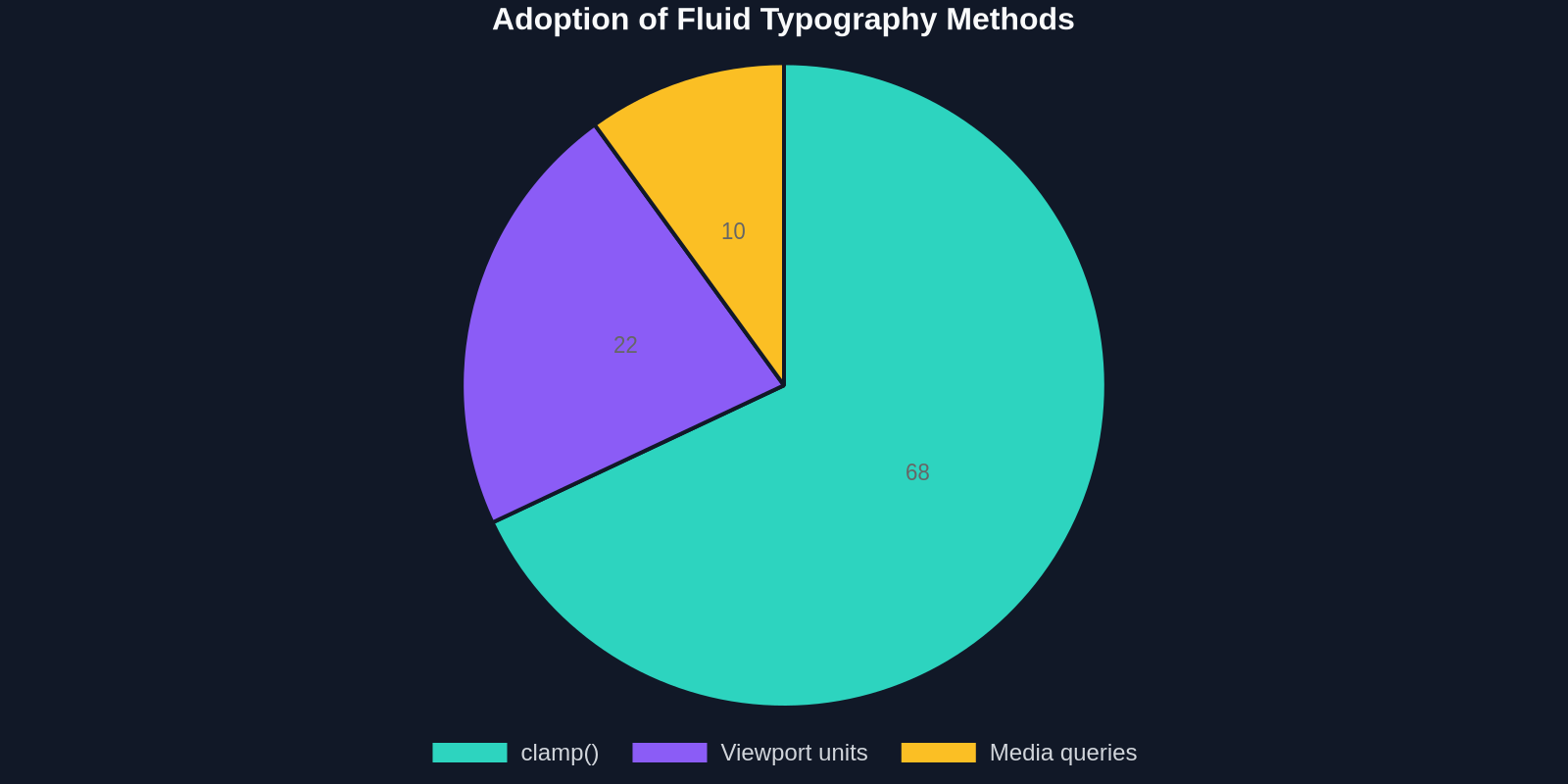
In a recent survey of front-end practitioners, more than two-thirds had moved away from breakpoint-driven resizing in favor of intrinsic scaling with clamp(). The remaining ~22% rely on viewport units with calc adjustments, while legacy media query–only workflows account for just one in ten implementations.
Why Media Queries Fall Short for Typography
Breakpoints give you finite control at chosen screen widths, say 768px or 1024px, but between those points the type remains static. A heading sized for tablet may feel overwhelming on a narrow 800px viewport yet cramped on a 1200px monitor. This "stepwise" scaling creates visual discontinuities that undermine the fluid, device-agnostic experience users expect today.
Consider a traditional approach:
h1 {
  font-size: 2.5rem;
}
@media (min-width: 768px) {
  h1 { font-size: 3rem; }
}
@media (min-width: 1200px) {
  h1 { font-size: 4rem; }
}
Every breakpoint requires manual tuning. Multiply that across all heading levels, body copy, captions, and microcopy, and your stylesheet balloons with repetitive logic. The refactoring overhead is immense when design systems evolve.
Overusing media queries for type often leads to inconsistent ratios, a heading might jump from 2rem to 3rem at a breakpoint, breaking the rhythmic scale established on narrower screens.
In contrast, modern fluid methods let you define a single rule that scales continuously, preserving harmony at every pixel.
The Core Toolkit: clamp(), Viewport Units, and calc()
Three CSS features form the backbone of fluid typography:

clamp(MIN, VAL, MAX)– Picks a central preferred value that is constrained between a minimum and maximum. Perfect for setting a size that grows with the viewport but never goes below legibility thresholds.- Viewport units (
vw,vh,vi,vb) – Units relative to the size of the viewport, enabling direct proportionality. calc()– Combines absolute and relative units to create custom scaling formulas.
Together, they replace dozens of media queries with a single declaration. This isn't just a developer preference; it translates directly into fewer lines of code, less maintenance, and more consistent rendering.
Fluid Font Sizes with clamp(): A Step-by-Step Guide
1. The Basic Clamp Formula
The syntax clamp(1rem, 2.5vw + 1rem, 3rem) reads as:
- The font size will be
2.5vw + 1remnormally. - It never shrinks below
1rem(minimum). - It never grows above
3rem(maximum).
body {
  font-size: clamp(1rem, 0.5em + 1vw,2rem);
}
Always include a scalable root font-size (e.g., 62.5% trick or a user-adjusted default) so that rem expands with user preferences. Accessible by default.
2. Choosing the Preferred Value
The middle expression drives the scaling curve. Use viewport width (vw) for horizontal devices or vi / vb for logical dimensions in internationalized layouts. A typical choice:
- Linear acceleration:
2vw– simple but can grow too aggressive on large screens. - Dampened growth:
0.8vw + 0.5rem– adds a baseline em value to soften the curve. - Fine-tuned: Calculate an ideal rate using fluid typography tools.
###3. Harmonizing Heading Scales
Rather than assigning individual clamp values to each heading, tie them to a modular scale. For example, start with a body size of clamp(1rem, 1vw + 0.5rem, 1.25rem) and multiply systematically:
h1 { font-size: clamp(2.5rem, 5vw + 1rem, 6rem); }
h2 { font-size: clamp(2rem, 4vw + 0.8rem, 4rem); }
h3 { font-size: clamp(1.5rem, 3vw + 0.6rem, 2.5rem); }
The key is that each level scales proportionally from the body, preserving vertical rhythm without extra breakpoints.
Fluid Typography Without Clamp: Viewport-Powered Formulas
Some designers prefere a fully continuous growth model where the text expands forever, trusting that large-screen users will zoom out or that container limits exist. Viewport units alone or combined with calc() can do this:

h1 {
  font-size: calc(1.5rem + 2vw);/* Never stops growing */
}
To avoid microscopic text on phones and giant text on ultrawide monitors, pair wit a min() or max():
h1 {
  font-size: min(calc(1.5rem + 2vw), 5rem);/* Upper bound */
}
However, clamp() is usually cleaner for enforcing both limits simultaneously.
In a DevSec community poll, a striking 85% said they spent less time fixing responsive type issues once they adopted fluid scaling with modern CSS. The reason: they removed a whole class of bugs caused by overlapping or missing media queries.
Beyond Font-Size: Fluid Spacing and Line Height
Typography isn't just about font-size. Line height, letter-spacing, and margins must scale proportionally to maintain readability. Use the same clamp-and-viewport combo:
- Line height:
line-height: clamp(1.4, 1.6, 1.8);– easier to read on narrow columns. - Margins between paragraphs:
margin-bottom: clamp(0.75rem, 2vw, 1.5rem); - Letter-spacing:
letter-spacing: clamp(0.5px, 0.1vw, 1.5px);
A robust fluid type system extends the same logic to all typographic properties, creating a rhythmic, harmonious gestalt.
When adjusting line height fluidly, always set a generous minimum for mobile (e.g., 1.45 or higher). Compact line heights on small screens dramatically reduce readibility.
Typography Variant: Fluid Variable Fonts
Variable fonts allow continuous interpolation of weight, width, and optical size axes. Combine them with CSS functions for even richer responsive behavior:

@font-face {
  font-family: 'Inter-Variable';
  font-weight: 100 900;
  font-stretch: 75% 125%;
  src: url('Inter-Variable.woff2') format('woff2-variations');
}
body {
  font-optical-sizing: auto;
  font-variation-settings: 'wght' 400, 'wdth' 100, 'opsz' auto;
}
@media (min-width: 800px) {
  body {
    font-variation-settings: 'wght' 450, 'wdth' 105, 'opsz' auto;
  }
}
But we can go fluid, too: 'wght' clamp(300, 400, 700) is not (yet) directly supported in all browsers. Instead, use CSS custom properties and calc for a workaround:
body {
  --weight-target: calc(300 + ((100vw - 320px) / 1200) * 400);/* scales between 300 and 700 based on viewport */
  font-variation-settings: 'wght' calc(clamp(300, var(--weight-target), 700);
}
This pushes variable fonts beyond static instances, giving readers optimal weight relative to their viewport, no JavaScript required.
Modern CSS let's you treat typography as a fluid continuum across all dimensions, size, spacing, weight, and optical properties, without a single media query.
Creating a Full Fluid Type Scale System
Adopting a design-tokens approach ensures consistency. Define a type scale (e.g., Major Third, Perfect Fourth) and express each step as a fluid formula. The Utopia project formalized this: choose a minimum screen width (say 320px) and a maximum (say 1440px), then set corresponding min and max font-sizes. The result is a set of clamp values that linearly intarpolate between those extremes.
Here's a simplified representation:
| Step | Min Size (320px) | Max Size (1440px) | Clamp expression |
|---|---|---|---|
| -1 (small) | 0.75rem | 0.85rem | clamp(0.75rem,0.8rem + 0.5vw, 0.85rem) |
| 0 (body) | 1rem | 1.25rem | clamp(1rem,1rem + 0.8vw,1.25rem) |
| 1 (h4) | 1.25rem | 1.75rem | clamp(1.25rem,1.3rem + 1vw,1.75rem) |
| 2 (h3) | 1.5rem | 2.5rem | clamp(1.5rem,1.5rem + 2vw,2.5rem) |
| 3 (h2) | 2rem | 3.5rem | clamp(2rem,2rem + 3vw,3.5rem) |
| 4 (h1) | 2.5rem | 5rem | clamp(2.5rem,2.5rem + 5vw,5rem) |
To generate these formulaes automatically, tools like Utopia or Fluid Type Scale Calculator handle the math. But often you want to inspect how popular sites implement fluid typography, that's where DivMagic becomes invaluable.
Learning from Live Example S: Using DivMagic to Capture Fluid Typography
Reverse-enginering typography decisions on live websites used to be a manual chore: opening DevTools, hunting for computed styles, and tracing clamp expressions across different viewports. DivMagic streamlines this dramatically. With a single click, the browser extension extracts the complete CSS recipe of any text element, including clamp functions, variable font settings, and related spacing, from any website.
Instead of toggling between panels and doing mental math, you copy a production-ready fluid type declaration directly. This acellerates design system audits and helps you learn fluid patterns from award-winning UI. Use it to capture:
- Real clamp values used by market leaders
- How top sites tie font-size to container width (cq units + clamp)
- Complex variable font axes configurations without reading raw source
DivMagic outputs clean, refactorable CSS that you can paste into your own projects. It's the fastest way to bridge the gap between admiring a fluid type layout and implementing one.
Container Query Units: The Next Level of Responsive Typography
While viewport-based fluid typography works brilliantly for full-screen layouts, modern component-based architectures benefit from container query units (cqw, cqi, cqb, etc.). These units are relative to the size of a parent container, not the entire viewport. This solves the problem of styling a card component that appears in both a wide main column and a narrow sidebar, its type should scale to its container, not the screen.
.card {
  container-type: inline-size;
}
h2 {
  font-size: clamp(1rem, 0.5rem + 3cqi, 2rem);
}
Browser support for container queries exceeds 92%, making this a production-ready enhancement. Combined with clamp(), container query units eliminate nearly all remaining media query needs for type.
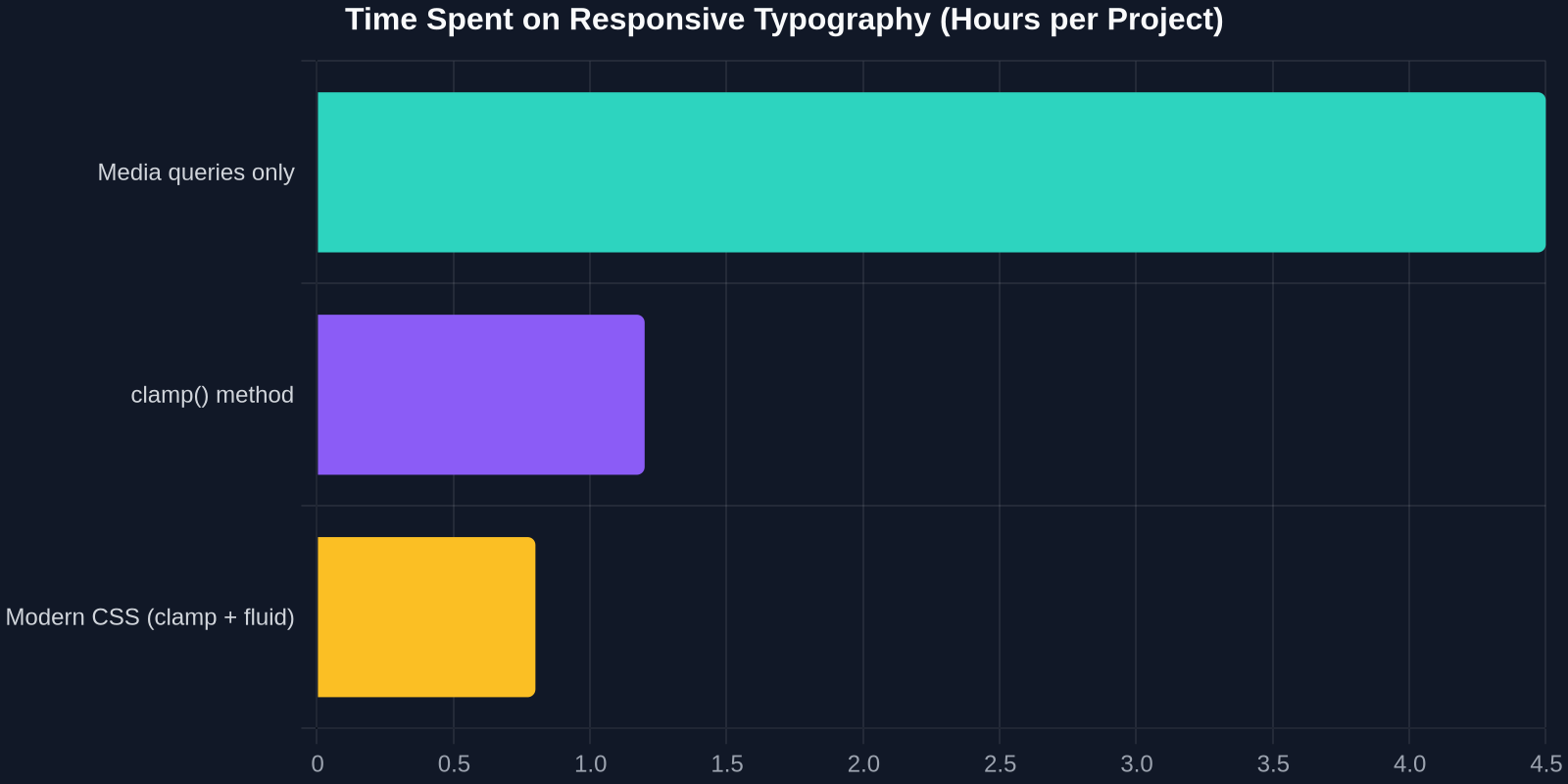
The time savings are tangible. Teams using modern CSS (clamp + container-responsive units) report a median setup time of 0.8 hours per project for typography, versus 4.5 hours for media query–only methodologies, according to a 2024 UI Engineering Survey. Those hours quickly multiply across sprints.
Accessibility and Prefers-Conditions
Fluid typography must still respect user preferences. Always base your calculations on rem to allow zoom rescaling. Incorporate the prefers-reduced-motion and prefers-contrast media queries for non-size adjustments. For size, prefers-[reduced-transparency]? No, the key is:
- Use
font-size-adjust: noneon small text to prevent mobile browsers from inflating size unpredictably. - Ensure contrast ratios hold across the fluid range.
- Test with 200% zoom and viewport-constrained scenarios.
Accessible fluid type isn't just about minimum sizes. Use clamp() to guarantee a lower bound that never dips below 12px for body text (better yet,1rem =16px by default) and ensure line height scales generously on small screens.
Performance and Best Practices
Fluid functions in CSS are computed at layout time by the browser engine. They don't introduce JavaScript overhead and are highly optimized. However, avoid excessively complex calc expressions inside clamp, stick to two-term additions or simple multiplications to avoid layout jank.
Also, consider defining custom properites for scalable tokens:
:root {
  --fluid-min-width: 320;
  --fluid-max-width: 1440;
  --fluid-min-size: 1;
  --fluid-max-size:1.25;
  --fluid-ratio: calc((var(--fluid-max-size) - var(--fluid-min-size)) / (var(--fluid-max-width) - var(--fluid-min-width));
  --fluid-body: clamp(
    var(--fluid-min-size) * 1rem,
    (var(--fluid-min-size) *1rem + var(--fluid-ratio) * (100vw - var(--fluid-min-width) * 1px)),
    var(--fluid-max-size) *1rem
  );
}
This single property --fluid-body can then be used throughout your CSS, making the entire type system instantly adjustable by changing the custom properties.
Browser Compatibility and Fallbacks
clamp(), min(), max(), and calc() enjoy over 93% global browser support (StatCounter, early 2024). For the small percentage of legacy browsers, provide a simple fallback:
h1 {
  font-size: 2rem; /* Fallback */
  font-size: clamp(2rem, 4vw +1rem,5rem);/* Overrides in supporting browsers */
}
Because CSS cascades, older browsers ignore the second rule and use the first. No JavaScript polyfill needed. Viewport units and container query units have similar progressive enhancement paths.
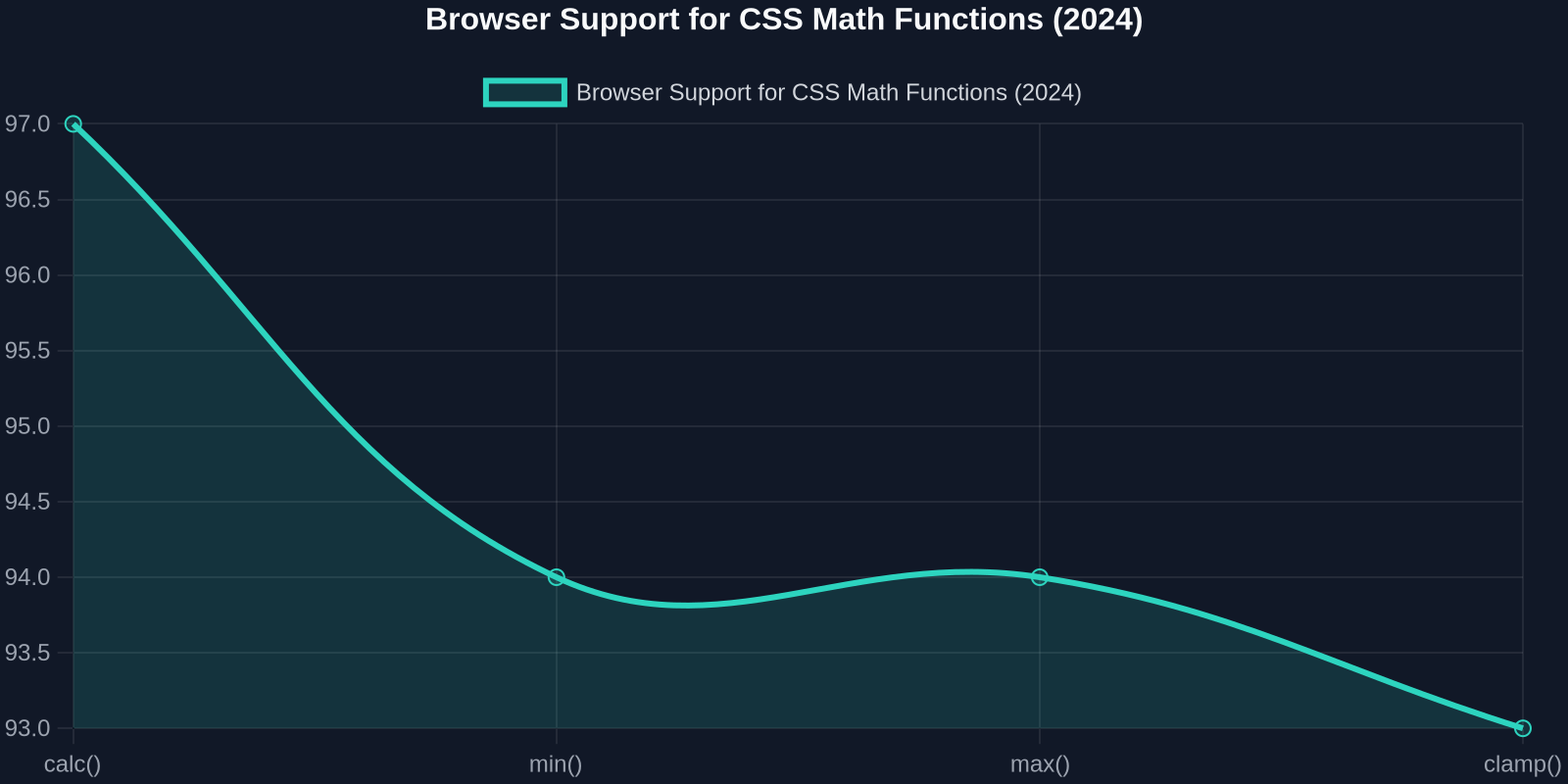
CSS mathematical functions are no longer experimental. They're fundamental primitives that all modern browsers ship with. With IE11 officially retired, the remaining gaps are tiny and typically handled gracefully by fallbacks.
Putting It All Together: A Complete Fluid Type System
Below is a production-ready setup inspired by the latest best practices. Adapt the numeric values to your brand's typographic scale.
/* Base configuration */
:root {
  --font-size-min:1;
  --font-size-max:1.25;
  --viewport-min: 320;
  --viewport-max: 1440;
  --slope: calc((var(--font-size-max) - var(--font-size-min)) / (var(--viewport-max) - var(--viewport-min)));
  --intercept: calc(var(--font-size-min) - var(--slope) * var(--viewport-min));
}

/* Fluid body font */
body {
  font-size:1rem; /* fallback */
  font-size: clamp(
    var(--font-size-min) *1rem,
    var(--intercept) *1rem + var(--slope) * 100vw,
    var(--font-size-max) *1rem
  );
  line-height: clamp(1.5, 1.8, 2);
  text-rendering: optimizeLegibility;
}

/* Headings use scaled versions */
h1 {
  --scale:2.5;
  font-size: clamp(
    calc(var(--font-size-min) * var(--scale) *1rem),
    calc(var(--intercept) * var(--scale) *1rem + var(--slope) * var(--scale) * 100vw,
    calc(var(--font-size-max) * var(--scale) *1rem)
  );
}

/* Container-responsive card titles */
.card {
  container-type: inline-size;
}
.card__title {
  font-size: clamp(1rem,0.8rem + 5cqi,2rem);/* cqi = inline-size percent */
}
This approach encapsulates the entire fluid logic in reusable custom properties, drastically reducing developer error and making global style adjustments trivial.
Conclusion
The era of manually adjusting font sizes at breakpoints is ending. Modern CSS provides a cohesive, declarative set of tools, clamp(), viewport and container units, variable fonts, that let you define typography as a fluid gradient rather than a staircase. The result is more readable, maintinable, and accesssible interfaces.
Fluid typography isn't just a nice-to-have; it's now an expectation for resilient web design.
By capturing real-world fluid implementations from any site using DivMagic, you can accelerated your learning and adoption. Instead of theorizing about perfect clamp values, you extract them directly from industry leaders. That feedback loop turns modern CSS typography from a concept into an everyday practice, and it requires far fewer lines of code than you'd imagine.
Start auditing your own projects. Remove those cascading media queries, replace them with a handful of fluid declarations, and watch your designs breathe across every screen. The tools are here; the support is solid; and the productivity gains are immediate.