How ChatGPT's Chrome Extension Tab Reading Feature Will Transform Your Workflow: A Frontend Developer's Guide
Let's be honest, context switching is the silent killer of developer productivity. You're knee-deep in a React component, toggling between a design reference, Stack Overflow, your issue tracker, and some half-finished documentation. Each tab holds a critical piece of the puzzle, but no tool has ever been able to see the whole picture at once. Until now.
OpenAI's updated ChatGPT Chrome extension can now read your open browser tabs. This isn't just a minor feature update; it's a fundamental shift in how frontend developers and web designers can interact with their working context. Since its quiet rollout in the Side Chat panel, the capability has moved from a limited convenience to a workflow powerhouse, especially when paired with the latest extension version 4.0.5.
For professionals who spend their days staring at UIs, inspecting elements, and copying snippets, understanding this feature is as important as learning a new CSS layout module. Here's your deep technical dive into what the update really does, why it matters for UI work, and how you can immediately put it to use alongside tools like DivMagic to build a semi-automated design-to-code pipeline.
The New Frontier: Your Browser as an AI-Readable Dataset
Before we get into workflows, we need to understand the mechanics. The extension's agentic AI capability isn't just passively reading text. It's taking control of the browser, opening tabs, reading their content, and synthesizing information across them, to accomplish a goal you specify.
This is a dramatic leap from the clipboard-based flow we've all been stuck with. For a frontend developer, the "tabs" aren't usually prose; they're documentation pages, component libraries, CSS frameworks, and live design mockups. Teaching an AI to "see" all of that simultaneously is the first step toward a truly assistive development environment.
Version 4.0.5: The Hard Requirement
To use these advanced features, you need to be on the latest release. OpenAI has been explicit about this:
"Please update our Chrome or Firefox extension to the latest version, v4.0.5 (by removing our extension and adding it back) for everything to work as expected."
The nuclear option, remove and re-add, suggests significant architectural changes under the hood. This isn't a simple hotfix. It's likely tied to new permissions for tab management, more robust background scripts, and the agentic control layer. If you've been scratching your head wondering why the feature "isn't working" on an auto-updated extension, a clean install is your answer.
Why Frontend Development Is Uniquely Positioned to Win
Frontend development is an information-gathering profession disguised as a coding discipline. Most "hard" problems aren't algorithmic; they're about finding the right snippet, matching a design token, or understanding an obscure framework's API. Our browser tabs are literal maps of our current cognitive load.

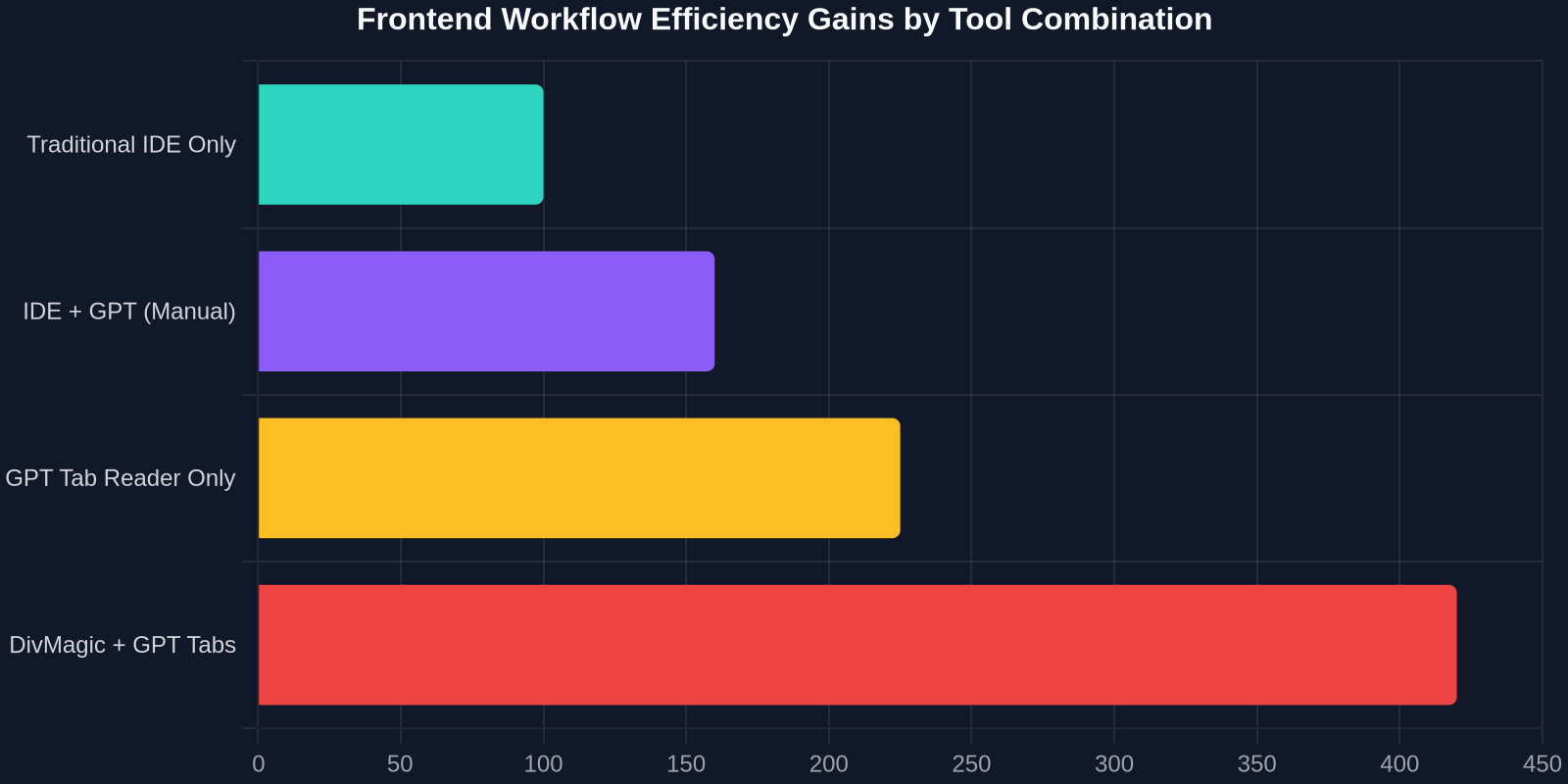
This stat might sting, but it illuminates why a tab-reading AI is so disruptive for us specifically. Every minute you spend manually correlating information between tabs is now a minute an AI can reclaim.
The Old Way: Five Tabs, One Brain
The standard "implement a new feature" loop looks like this:
- Tab 1: Jira or Linear ticket with specifications.
- Tab 2: Figma prototype or a live website you're using as a design reference.
- Tab 3: Storybook or component library documentation.
- Tab 4: Stack Overflow/forum thread for a related bug.
- Tab 5: Your actual localhost running the broken code.
You, the human, are the integration layer. You read the ticket, glance at the design, check the component props, apply the bug fix, and then test. ChatGPT's tab reader collapses this by letting the AI act as the integration layer. You instruct, "Read my ticket in Tab 1, look at the button component in the reference site on Tab 2, and check our component library docs in Tab 3 to give me a fully typed React component that matches." The AI can now do the correlation, not just the generation.
A Practical Workflow: Supplementing, Not Replacing, Your UI Toolkit
There's a subtle but crucial point here: this feature works best when paired with specialized UI tools. Reading tabs is powerful, but the AI's understanding of visual intent is still language-based. It can interpret text about design, but it can't "see" a gradient or a box-shadow the way you do. That's where a tool like DivMagic, a browser extension that lets you copy any UI from any website directly into your codebase as precise HTML and CSS, becomes the perfect complement.
Scenario: Replicating a Complex Component from a Competitor's Site
Imagine you need to build a pricing table that matches a design you saw on a SaaS competitor's site. Your tabs are: the competitor's live pricing page, your own style guide documentation, and your project's React component structure.
Here's the semi-automated developer flow:
- Step 1 (DivMagic): On the competitor's pricing page, use DivMagic to copy the exact UI element, the card, its grid, the toggle, the typography. The extension converts the visual UI into clean, copy-paste-ready HTML and CSS in one click. You now have a faithful representation of the visual design in your codebase.
- Step 2 (ChatGPT Tab Reader): With your style guide docs open in another tab and the raw CSS and HTML you just copied now in your code editor, ask ChatGPT's Chrome extension: "Read our style guide in the left tab and this copied component code. Replace all colors and fonts with our design tokens and convert the HTML to a JSX component."
- Step 3 (You): Review the output. You've effectively leveraged AI to do the manual translation work between a visual source and your codebase, accelerating a process that could take hours into minutes.
This isn't about replacing your skills. It's about removing the tedious translation step where you manually write CSS to match something you're already looking at. The AI reads the tabs, understands the relationship, and you focus on architecture and polish.
The Agentic AI Component: Multi-Tab Choreography
The "agentic" part deserves a closer look. This isn't just "read my tabs." The AI agent can open new browser tabs, navigate to specific URLs, and perform actions to fulfill a high-level goal. For a non-developer, this might mean "find the best flight deals" by opening Kayak, Google Flights, and Expedia. For us, it's a research and setup assistant.

| Approach | Manual Developer Time | AI Quality | Context Integration |
|---|---|---|---|
| Pure ChatGPT (no tabs) | 2–3 hours (manually pasting docs) | High but generic | None, you copy/paste each tab |
| ChatGPT Tab Reader | 30 minutes (describe goal, AI reads tabs) | High and context-aware | Reads all open tabs automatically |
| DivMagic + GPT Tab Reader | 15 minutes (copy UI, AI adapts to codebase) | Very high and visually precise | Reads style guides and copied UI code in tabs |
The numbers speak for themselves. Manually implementing a design component is a multi-hour affair. AI alone can speed it up but you're still the bottleneck for context. The combined workflow puts you in a pure review and refinement role, which is where your expertise is most valuable anyway.
How the Agent Learns Your Environment
The Chrome extension operates with a permission model that grants it access to your open tabs and the ability to open new ones. This makes the concept of a "workspace" tangible for an LLM. You can direct it to your project's documentation site, your CI/CD status page, and your live error logs, then issue a compound instruction like, "Check if any of the recent API changes documented in Tab 2 are causing the production errors in Tab 3, and draft a PR description summarizing the fix." The agent can synthesize a response that you'd otherwise need to painstakingly assemble yourself.
From Tab Reading to UI Mastery: The Frontend Toolchain Evolution
Let's zoom out. For years, the frontend toolchain has been bifurcated: you have your creation tools (IDE, terminal, Figma) and your reference/investigation tools (browser, DevTools, documentation tabs). The two categories rarely spoke to each other. AI is now bridging that gap in two distinct but complementary ways:
- Cognitive AI (ChatGPT): Understands language, documentation, code context, and can now read the full state of your reference environment (tabs). It's your thinking partner.
- Visual Extraction AI (DivMagic): Understands the DOM, CSS cascade, and visual appearance of any website. It's your precise eyes and hands for UI copying, turning any lived-in web UI directly into editable code without manual inspection.
"The future frontend developer doesn't manually convert designs into code. They curate references, apply AI extraction and adaptation, and focus on the unique interaction logic that no tool can invent."
Take the official UN Document System (ODS) website as an abstract example. It's a complex, multi-document web application with a specific UI for batch downloading using Chrome. A developer tasked with building a similar document management tool doesn't start from scratch. You'd use DivMagic to copy the UI patterns, the document checkbox lists, the batch download buttons, the status indicators, directly from ODS. Then, you'd pull up your project's design system and localization docs in two separate tabs, and let ChatGPT's tab reader propose adaptations that fit your specific stack. The "design" phase becomes a curation and engineering phase.
Practical TypeScript and React Integration
Reading tabs is not just about gathering information; it's about acting on it in code. Let's look at a concrete scenario where ChatGPT's tab reader interacts with a component you've extracted from a live site.
Assume you used DivMagic to copy a pricing toggle from a well-known SaaS product. You now have raw HTML and CSS. Your goal is to make it a production-ready React component with TypeScript.
Your tabs are:
- Tab A: Your internal React architecture decision records (ADR) that explain naming conventions and state management patterns.
- Tab B: The raw copied HTML/CSS code in a GitHub Gist.
- Tab C: The live site of the SaaS product for visual reference.
Your prompt to the ChatGPT extension: "Read the ADR in Tab A for our component patterns. Read the HTML/CSS in Tab B. Create a React functional component with TypeScript that implements this pricing toggle. Use our naming conventions, add proper accessibility attributes, and write a Jest test for the toggle state."
The AI can now see all the moving pieces. It's not guessing your coding standards or missing design details. The improvement in output quality from context-rich instructions is staggering.
Data-Driven Development: Reading Your Own Analytics
Frontend development is increasingly KPI-driven. You're often asked to optimize a UI based on analytics or A/B test results. Imagine having your Google Analytics page, your feature flag dashboard, and your current component code all open in tabs. Then you prompt: "According to the analytics in Tab 1, the checkout button variant B has a 4% lower conversion. Read the feature flag config in Tab 2 to see how it's targeted, and suggest code changes in the component from Tab 3 to revert to the control variant while logging an event for debugging."
This kind of multi-source reasoning is exactly what a tab-aware AI excels at. It turns the browser from a passive reading device into an active command center where the AI orchestrates your engineering resources.
The Subtle Art of Teaching an AI Your Design System
One of the most underrated uses of the tab reader is "onboarding" the AI to your company's specific design system. Most developers spend weeks internalizing token names, breakpoint values, and component APIs. You can dramatically shorten the "AI familiarization" cycle.
Open your design system's Storybook, your Tailwind config file, and your component contribution guidelines in three tabs. Ask ChatGPT's extension to read and remember them for the current session. Then, for every subsequent UI task, you simply remind it: "Use our design tokens and patterns you read from Storybook." The AI acts as a team member who has already done the onboarding reading, not a new hire who needs every rule repeated.
Qualitative Measurement: The GEO Optimizer Parallel
We're entering an era where AI discoverability and visibility are quantified, much like SEO was born from search engines. Tools like GEO Optimizer now measure how visible a website is to AI answer engines (ChatGPT, Perplexity, Google AI Overviews) on a 0–100 scale. Similarly, as a frontend developer, your "visibility" to your own AI tools matters. If your design system docs are well-structured and tab-accessible, the AI can leverage them better. You're essentially optimizing your internal developer content for machine readability, a concept that will only grow in importance.
Comparing AI Copilot Environments: What the Tab Reader Unlocks
It's useful to contrast this browser-integrated AI experience with IDE-centric tools like Devin Desktop, which includes a full IDE with syntax highlighting, autocomplete, and debugging tools. Devin represents the "AI in the editor" philosophy. ChatGPT's tab reader represents "AI in the context layer." The two are not competitors; they're layers of a complete AI-assisted stack.
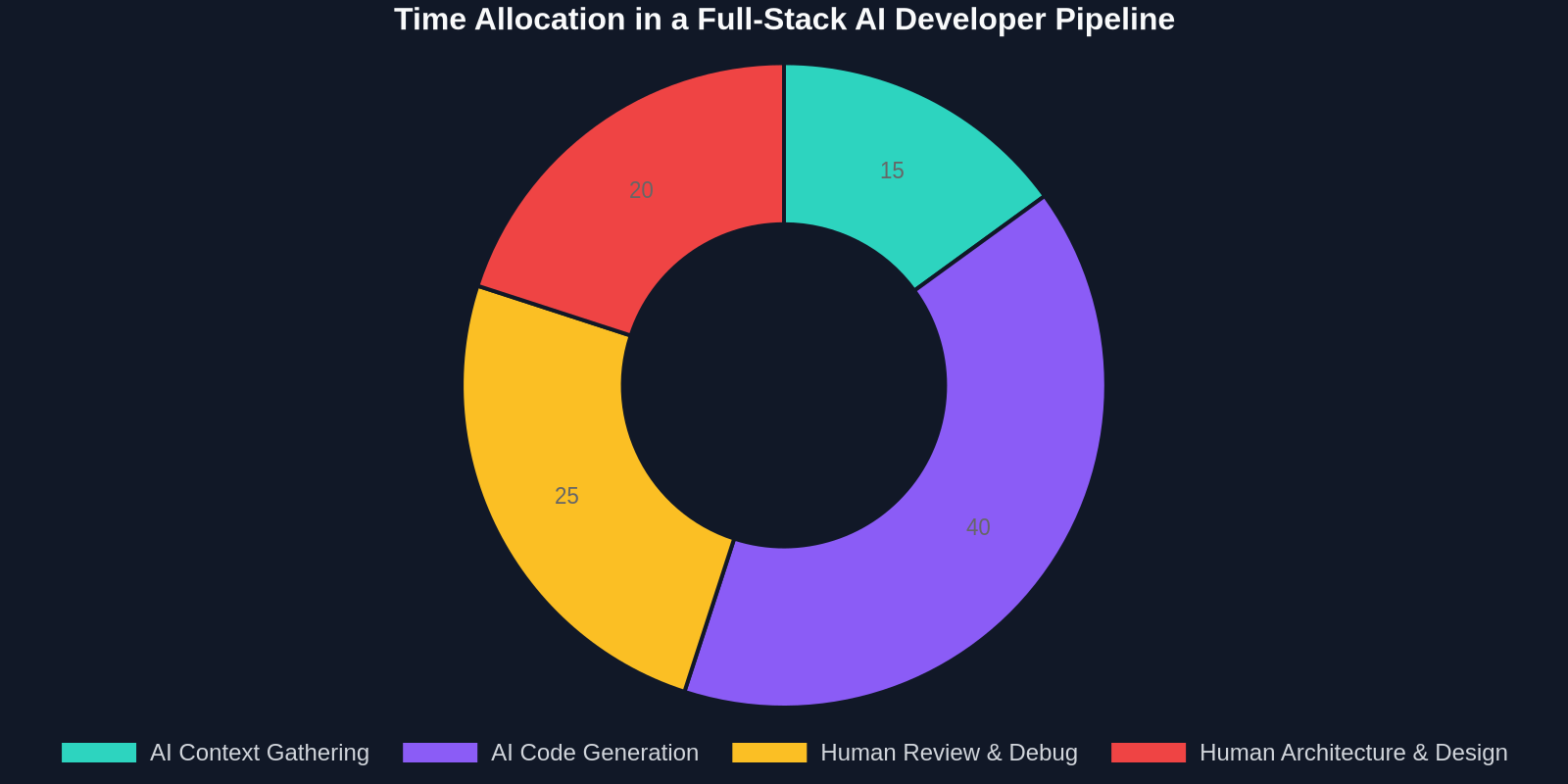
An IDE AI can generate code given a well-defined inline prompt. But who defines that prompt? You, after you've synthesized the tabs. The browser AI can do the synthesis step itself, then output the refined prompt or even the code directly. Integrating both, browser AI for context synthesis, IDE AI for code generation, is the emerging "full-stack AI" workflow.
The Claude and ChatGPT communities are already buzzing about this. Subreddits like Claude Code are filled with developers testing multi-tool pipelines: "I used the Claude Chrome extension to read my design tokens, then passed the output to Cursor to generate the component, and now I'm back in ChatGPT to debug the tests." The tab reader is the first link in a chain that starts with messy, distributed information and ends with a shipped feature.
Security, Privacy, and Taming the Agent
A critical nuance for professional developers: you must be mindful of what's in your open tabs. The extension can read them. That "internal-only" dashboard tab with API keys in the query string, the customer PII in your support ticket, the confidential acquisition memo in a Google Doc, all are potentially readable by the AI.
Best practices:
- Use session-based prompts: "Ignore my banking and personal email tabs, only read the tabs related to our React documentation." Even better, close sensitive tabs before invoking the agentic features.
- Treat the AI session like a screen share: if you wouldn't show it to a coworker looking over your shoulder, don't let the AI read it.
- Leverage the agent's goal-oriented design: you give it a specific task, so it won't randomly browse your tabs. The risk is more about over-permissive goal descriptions.
The Tip of the Iceberg
This Chrome extension update is fundamentally about context density. For years, we've fed AI tools sparse, single-threaded prompts. We'd type out a bug, paste a snippet, and hope the AI's general knowledge filled in the gaps. Now, the AI can ingest the full, messy, tab-strewn reality of a developer's working session and produce outputs that are contextually grounded, not just syntactically correct.
The meta-skill for frontend developers in 2026 and beyond won't be writing flawless CSS from memory. It will be orchestrating the dance between visual extraction tools, design documentation, code repositories, and AI agents that can read and integrate them all. The ChatGPT Chrome extension with its tab-reading and agentic capabilities is the conductor's baton you've been waiting for.
So update to version 4.0.5. Remove and re-add the extension if you must. Open your component library, your reference designs, and your codebase in parallel. Then, tell the AI what you want to build and watch as the fragmented context of your tabs coalesces into a coherent component. The future of frontend development is a collaboration between you, your browser tabs, and an AI that finally understands the whole picture.