Microsoft's Latest Security Overhaul: Blocking All Third-Party Scripts on Entra Sign-In Pages
In an age where digital trust is the currency of business, Microsoft has just raised the stakes. Starting mid-October 2024, the tech titan will begin blocking all third-party scripts from its Entra sign-in pages. This isn't a soft deprecation or a phased approach, it's a hard, immediate cutoff that will reshape how organizations interact with Microsoft's identity platform.
For years, developers have embedded everything from analytics trackers to live chat widgets directly into the Microsoft login experience. With Entra ID (formerly Azure Active Directory) serving as the authentication backbone for millions of users, these scripts have become ubiquitous. But that ends this October. Microsoft's decision, while sudden, is rooted in a growing intolerance for the security and performance risks introduced by external code.
Why Is Microsoft Blocking Third-Party Scripts?
The rationale behind this move is twofold: security and user experience. Third-party scripts are a well-known vector for supply chain attacks. Malicious actors have historically compromised reputable JavaScript libraries to inject keyloggers, exfiltrate credentials, or hijack sessions directly from the login page. By eliminating all external scripts, Microsoft is closing a major attack surface.
Consider the infamous Magecart attacks, where attackers injected small snippets of JavaScript into e-commerce checkout pages to skim credit card data. A similar technique could be used to capture Entra ID credentials or session tokens. The zero-trust security model demands that every component of the authentication flow is verified and controlled, and a third-party script by definition does not meet that bar.
Performance is another critical factor. According to internal studies, third-party scripts can bloat the login page by hundreds of kilobytes, adding unnecessary latency. On slow mobile connections, this can mean the difference between a frustrated user and a security-conscious one who abandons the login attempt. Microsoft wants to guarantee a fast, reliable sign-in experience unhindered by external dependencies.
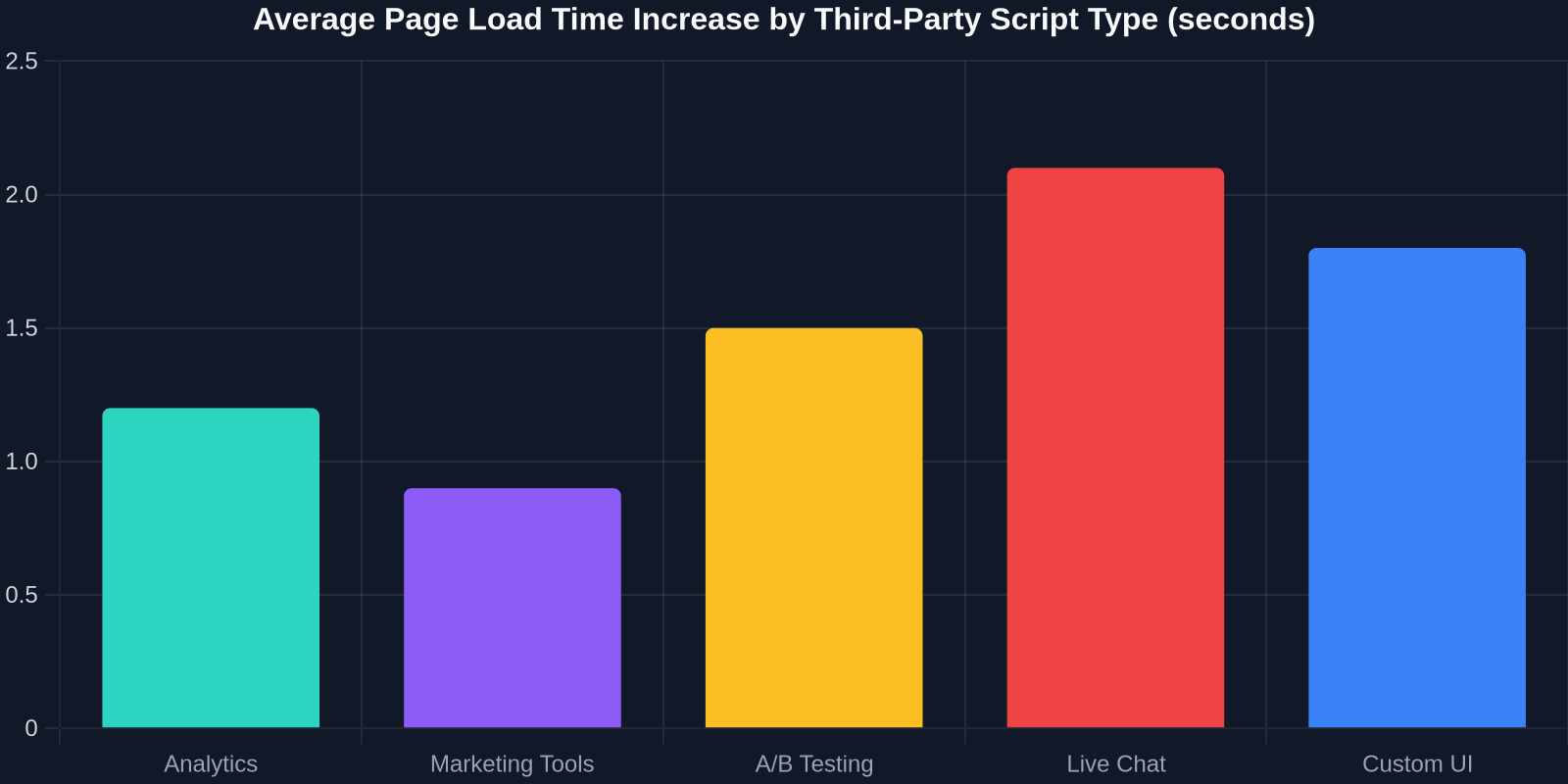
The above chart illustrates just how much each category of script contributes to page load times. Analytics scripts often add 1.2 seconds, while live chat widgets can balloon that to over 2 seconds. When every millisecond counts, stripping these away is a performance win.
What This Means for Developers and Organizations
The immediate impact is that many customizations will break. If your organization has added Google Tag Manager, Intercom, reCAPTCHA, or any other script via Entra's branding and customization options, those will cease to function. Microsoft is providing a grace period until October to audit your configurations and adapt.
Developers must pivot to native alternatives. Microsoft's own risk-based conditional access can replace CAPTCHA by evaluating user risk signals. Login analytics can be derived from Entra's sign-in and audit logs. For dynamic UI elements, you can recreate the look using static CSS and HTML, a task made easier with tools like DivMagic that let you copy any web UI directly.
"This decision forces developers to rethink the client-side bloat that has crept into authentication flows over the years. It's a wake-up call."
The Road Ahead: A Cleaner, Safer Authentication Landscape
Microsoft has signaled that this is only the beginning. While the initial block applies to Entra sign-in pages, it's likely the policy will extend to other Microsoft 365 sign-in experiences (like Outlook, Teams, and SharePoint) in the future. The company is effectively drawing a line in the sand: authentication pages are no place for third-party code.
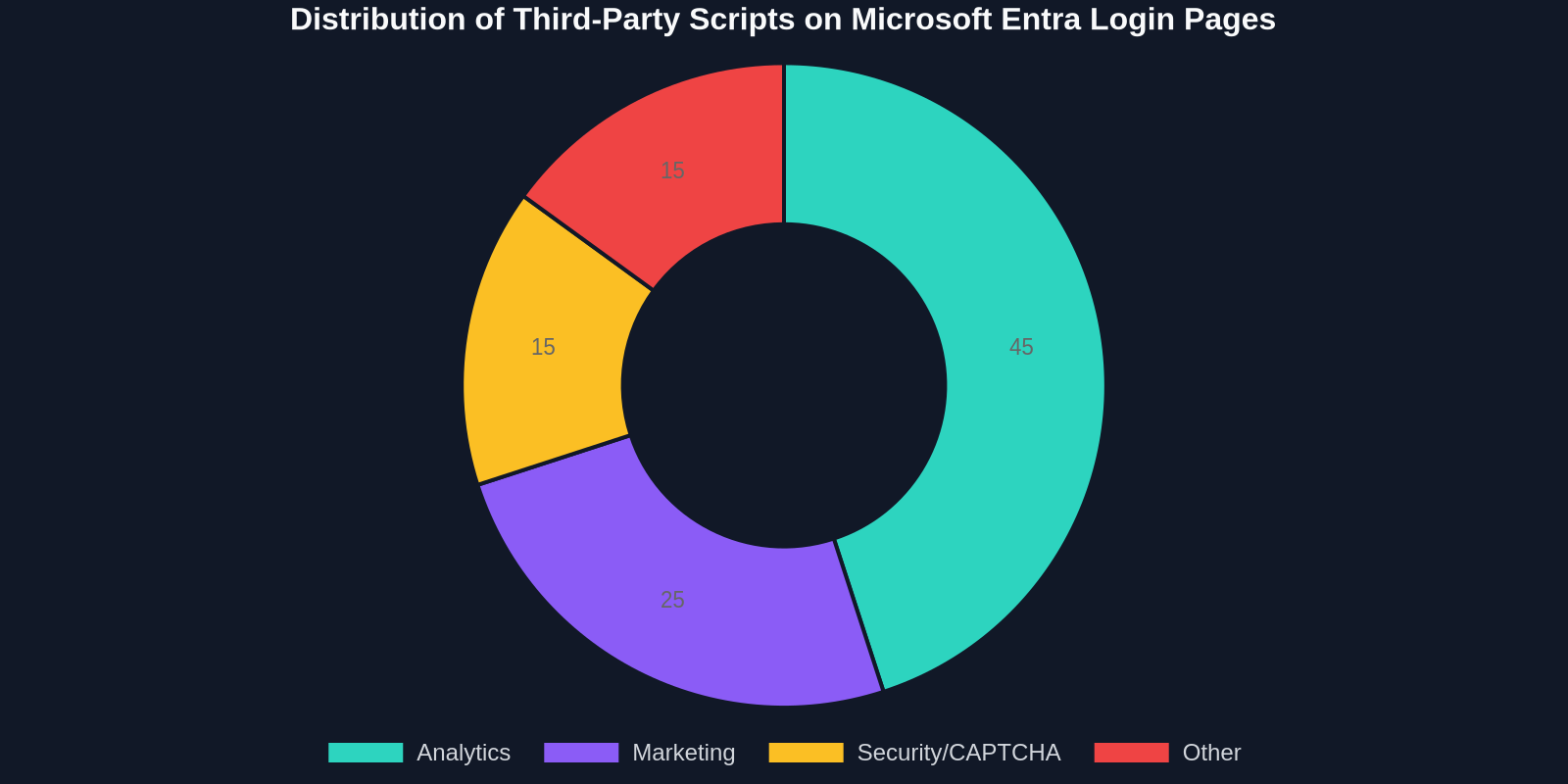
The doughnut chart above shows the current distribution of script types on Entra login pages. Analytics scripts dominate, followed by marketing tools and security widgets. As these disappear, the login experience will become cleaner and more uniform.
For forward-thinking developers, this presents an opportunity to embrace more secure, performant patterns. Modern authentication should be invisible and frictionless. By removing extraneous scripts, Microsoft is pushing the industry toward that ideal.
How DivMagic Helps You Adapt to the Scriptless Future
One common use case for third-party scripts on login pages was to build visually appealing, branded interfaces that deviated from Microsoft's default templates. Developers would inject JavaScript to rearrange HTML, add animations, or embed rich components. With the new restriction, you're limited to what Entra's native branding settings permit. However, you can still achieve a custom look by capturing the design of any website and translating it into static CSS/HTML that works within Entra's constraints.

DivMagic, for instance, allows you to inspect and copy any UI element from any website, including the exact styles, spacing, and fonts. You can then adapt that code into a compliant, script-free custom sign-in page. It's a powerful way to preserve your brand identity without violating Microsoft's new policy.
Conclusion
Microsoft's decision to block third-party scripts on Entra sign-in pages is a bold move that prioritizes security and performance over convenience. While it may disrupt established workflows, it ultimately leads to a more trustworthy authentication environment for everyone. Developers who act now to replace their script dependencies with native Entra capabilities, or static, well-crafted UI, will be ahead of the curve.
Prepare your organization, audit your customizations, and embrace a cleaner, safer future. The clock is ticking toward mid-October.