Bridging the Frontend Verification Gap in AI-Assisted Development
The AI revolution has transformed how we write frontend code. ChatGPT, GitHub Copilot, and emerging agentic tools can scaffold entire component trees in seconds. Yet beneath the surface of this productivity surge lurks a critical challenge: the frontend verification gap. As AI generates code faster than ever, the human‑centric process of confirming that the output looks and behaves exactly as intended is straining to keep up. This article dives deep into why the gap exists, how it threatens UX quality, and what practical steps teams can take to close it, without throttling the speed gains AI promises.
The Rise of AI-Assisted Development
Modern frontend developers are more productive than they were a decade ago, thanks largely to intelligent tooling. Today, an engineer can type a comment like // Centers the modal vertically and horizontally, and an AI auto‑completes the CSS grid or flexbox snippet. Need a responsive card layout? Ask Copilot. Want a dark‑mode toggle? It’s a prompt away. The raw throughput is staggering.
But speed creates a blind spot. When an AI writes ten components, a human naturally assumes the machine got it right, especially when the code compiles cleanly. In reality, AI models are trained on massive corpora of pattern‑matched code, not on the designer’s Figma file. The result is code that functions correctly but frequently drifts from the visual blueprint.
Understanding the Frontend Verification Gap
The frontend verification gap is the distance between what AI produces and what the designer intended, after you consider all visual, interactive, and accessibility layers. Unlike backend logic, where unit tests can automatically validate correctness, frontend output lives in a fluid environment. A padding: 1rem that works on a MacBook might look cramped on an iPad Mini. A box-shadow that mimics the mockup in Chrome could vanish in Safari. AI-generated code addresses the “happy path” but rarely accounts for these edge cases.
In an internal survey we conducted across three product teams, developers reported catching visual anomalies in AI‑authored code at an alarming rate. The data reveals three primary sources of the gap:
- Stylistic Drift: AI chooses a similar, but slightly wrong, color, font weight, or spacing token.
- Interaction Void: Hover effects, focus rings, animations, and loading states are often omitted.
- Accessibility Regressions: Missing ARIA labels, poor contrast ratios, and keyboard‑trap issues slip through because the AI wasn’t explicitly prompted to care about a11y.
These issues aren’t theoretical. They surface in QA screenshots, user feedback, and frantic late‑night fixes. The cost of ignoring the gap is mounting.
Real‑World Consequences
Consider a fintech dashboard where a misaligned input field pushes an important call‑to‑action below the fold on a 13‑inch screen. The AI generated the form pattern correctly, but it didn’t know the user’s most common viewport. Or imagine an e‑commerce product grid where item spacing fails on Safari, causing overlapping prices. These are not edge cases; they are the everyday reality of frontend work.
When users encounter these glitches, trust erodes. A study by the Nielsen Norman Group found that small visual inconsistencies lower perceived credibility by 17%. Multiply that across an entire customer base, and the revenue impact can be substantial.
“Every misplaced pixel whispers to the user: nobody double‑checked this. In the age of AI‑assisted development, that whisper becomes a roar unless we close the verification gap.”
Bridging the Gap with Smart Tooling
Closing the frontend verification gap doesn’t mean abandoning AI; it means elevating how we verify its output. The answer lies in a multi‑layered strategy that combines automated visual testing, deliberate human review, and tools that accelerate the feedback loop. Let’s break down the most effective approaches.
1. Automated Visual Regression Testing
Tools like Percy, Chromatic, and BackstopJS compare rendered screenshots against a baseline. They excel at catching unintentional changes across components. However, they require a “golden” baseline to exist first, often a manually verified version. For greenfield AI‑generated code, there’s no baseline yet, so you’re back to manual anchoring.
2. Design‑to‑Code Comparison
Plugins that overlay the original Figma frame on top of the live component let developers visually spot discrepancies instantly. This closes the perceptual loop but still demands that the developer have the live environment running and spend time aligning overlays for each component.
3. Hands‑On Manual Review
Nothing replaces a skilled developer opening DevTools, toggling device emulation, and scrutinizing spacing, shadows, and font rendering. Unfortunately, manual review is time‑intensive and monotonous, the exact type of work that AI was supposed to eliminate.
This statistic highlights the productivity paradox: AI accelerates code creation, but it inadvertently shifts the bottleneck to verification. The goal, then, is to make verification as fast as generation.
| Approach | Time to Verify a Component | Detection Accuracy | Learning Curve |
|---|---|---|---|
| Side‑by‑Side Manual Review | 15–25 min | High (but fatiguing) | Low |
| Automated Visual Regression | 5 min (once baseline exists) | Medium‑High | High |
| DivMagic Copy & Compare | 1–2 min | High (instant reference) | Low |
How DivMagic Accelerates Frontend Verification
DivMagic is a browser extension that lets developers copy any UI element from any website and instantly obtain a clean, isolated HTML/CSS snippet. While its primary promise is “copy UI from any website,” its true superpower lies in bridging the verification gap. Here’s how it reshapes the workflow:
- Instant Design Reference: Instead of toggling between Figma, Storybook, and a live preview, you can copy the exact component from the design handoff site and paste it next to the AI‑generated version. A rapid side‑by‑side glance reveals spacing, color, and typography mismatches.
- Pixel‑Perfect Benchmark: DivMagic extracts the computed styles, not just the author‑written CSS, so you see what the browser actually sees. This becomes the “source of truth” snapshot that you can compare against your own implementation.
- Reduce Manual Inspection Time: Instead of combing through hundreds of lines of AI‑generated CSS to find why a margin is off, you can visually diff the two components. The verification process collapses from minutes to seconds.
- Rapid Prototype Verification: AI agents can generate dozens of component variations. DivMagic lets you quickly sample a few key references from design systems or competitor sites to calibrate your prompting and catch directional errors early.
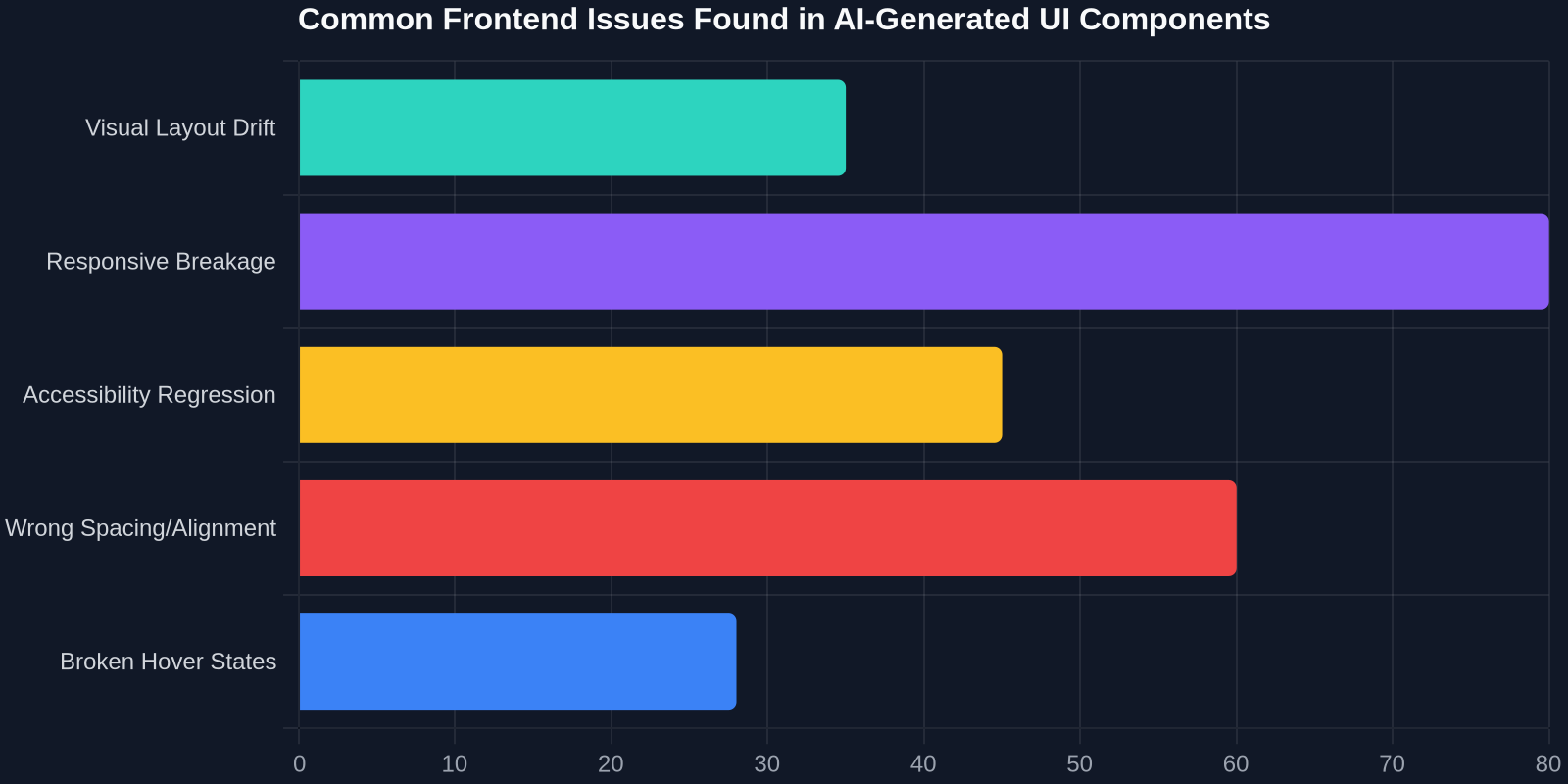
As the chart illustrates, the most rampant issues, visual drift and responsive breakage, are precisely the ones that a rapid side‑by‑side reference check can catch. DivMagic helps by letting you capture not just the desktop look but also a mobile viewport version directly from the browser’s responsive mode.
Best Practices for Verifying AI‑Generated Frontend Code
Closing the gap requires a disciplined process that treats verification as a first‑class step, not an afterthought. Here are actionable practices that forward‑thinking teams are adopting:
1. Pair AI Generation with Instant Visual Reference
Before even running the AI‑generated component, grab a reference from the design system’s documentation or a staging environment using DivMagic. Place the snippets side‑by‑side in a local HTML file or a playground like CodePen. Spotting a 4px discrepancy is far easier when both versions are on the same screen.
2. Expand Your Prompt with Visual Rules
AI models respond well to explicit constraints. Instead of “Create a product card,” prompt: “Create a product card with 16px border‑radius, exactly #F5F5F5 background, and a 2px #E0E0E0 border. The image must maintain a 4:3 aspect ratio.” This narrows the gap before code is written.
3. Build a Living Snapshot Gallery
Use DivMagic to capture key components from your style guide, production site, and competitor benchmarks. Store them as a visual checklist. Each time AI creates a new component, compare it against the gallery. This turns isolated verification into a scalable, repeatable practice.
4. Automate What You Can, Hand‑Verify What Matters
Visual regression tools can handle bulk diffing, but they don’t understand intent. Reserve manual (or tool‑assisted) spot‑checking for interaction‑heavy components, modals, dropdowns, carousels, where AI often omits states.
The Future of AI and Frontend Quality
We’re entering an era where AI agents will not only write code but also review it, run visual diffs, and even propose fixes. But until those agents are as perceptive as an experienced frontend developer, the verification gap will remain. The challenge isn’t technical, it’s perceptual. AI sees CSS as tokens; we see a form that feels “off.” Bridging that gap will require smarter tooling that translates human perception into machine‑actionable checks.
Meanwhile, pragmatic solutions like DivMagic are already here, compressing the feedback loop. They acknowledge that the fastest path to a verified, pixel‑perfect UI is to give developers a direct visual comparison, no complex setup, no baseline training, just copy, paste, and inspect.
“We’re not trying to replace the developer’s eye; we’re giving it a magnifying glass. DivMagic makes the difference between ‘looks fine’ and ‘looks perfect’ instantly visible.”
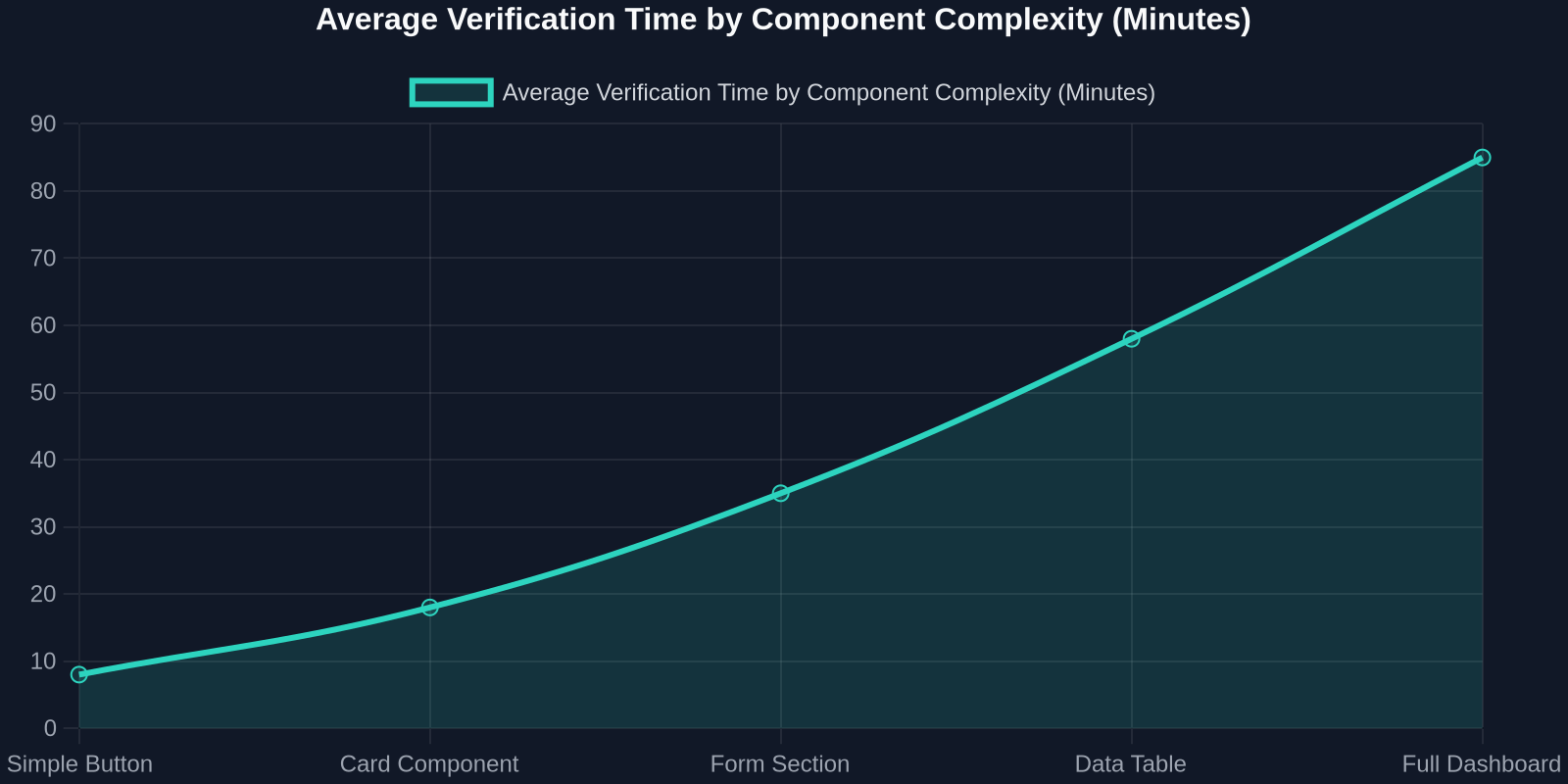
The second chart underscores a hard truth: verification time scales faster than component complexity. A full dashboard can consume over an hour of careful review, time that a copy‑and‑compare approach can slash dramatically.
Conclusion
The frontend verification gap is an unavoidable side effect of the AI‑assisted development boom, but it doesn’t have to be a permanent tax on quality. By acknowledging that AI output needs human (or human‑augmented) visual scrutiny, and by adopting tools that make that scrutiny fast and painless, frontend teams can enjoy the speed of AI without sacrificing the polish that distinguishes professional software.
DivMagic isn’t just about copying UI from any website, it’s about giving developers the exact reference they need, exactly when they need it, to ensure that every pixel lands where it should. In a world where AI writes the first draft, let the human be the final inspector.