Mastering Scrolling Web Design: From Immersive Parallax to Instant UI Conversion
Scrolling is no longer just a way to navigate a page, it's the core heartbeat of modern interactive storytelling. Scrolling web design represents a paradigm shift where vertical movement triggers complex animations, reveals hidden content, and crafts cinematic narratives. For frontend developers, mastering this means blending performant JavaScript, bleeding-edge CSS, and a keen eye for user experience. This ultimate guide dissects the technical anatomy of scrolling web design, from CSS scroll-driven animations to React ecosystems, and shows how tools like DivMagic can transform hours of reverse-engineering into a single click.
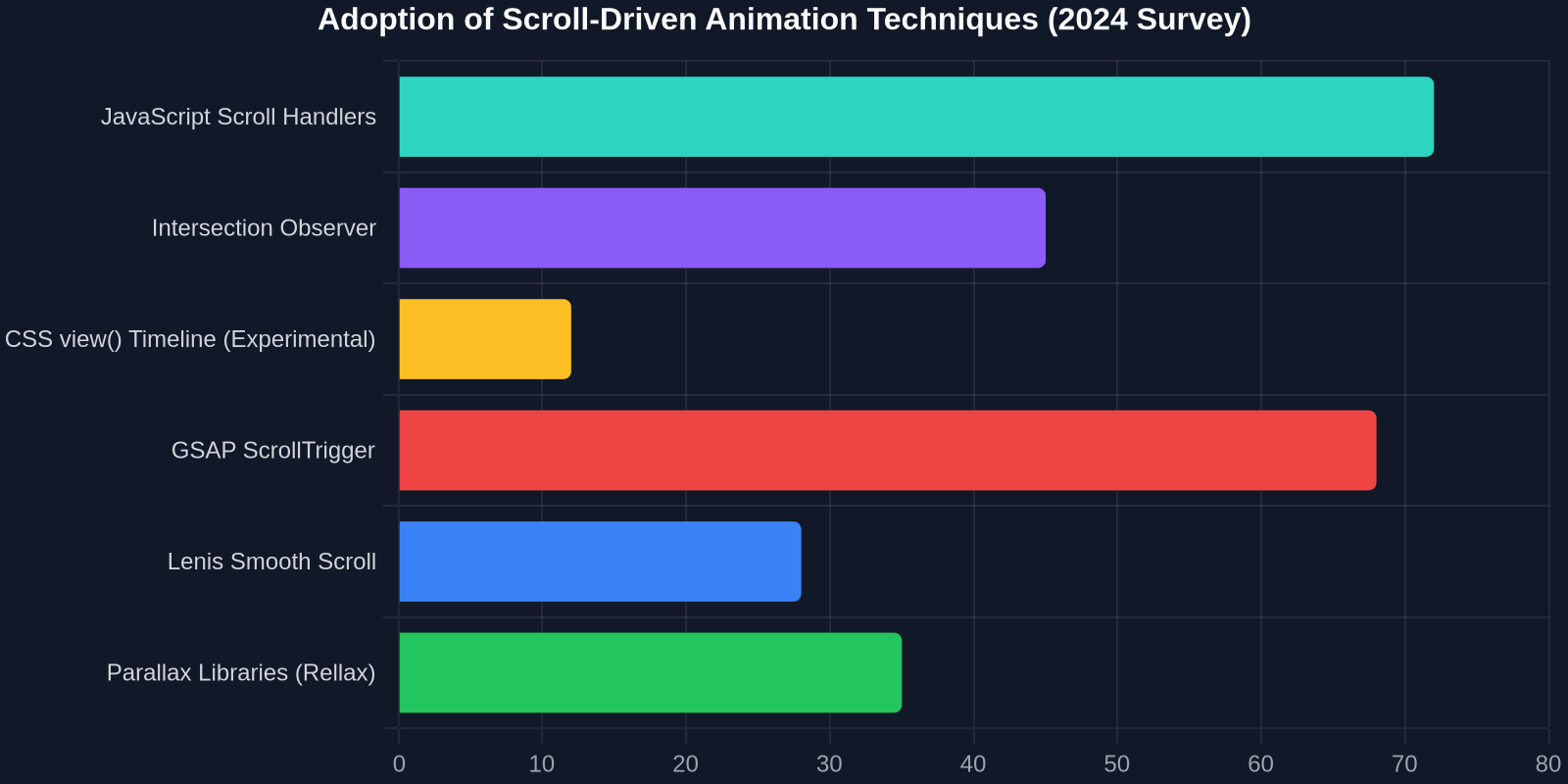
Scrolling interactions now power over 60% of award-winning creative websites, transforming passive browsers into active participants through techniques like parallax, reveal effects, and scroll-triggered video playback.
The Evolution of Scrolling Web Design: From Razzle-Dazzle to Standards
The history of scrolling web design is a journey from hacky jQuery plugins to native browser APIs. Early parallax effects in the 2010s relied on listening to the `window.scrollY` property and manually translating DOM elements. While visually stunning, these methods often caused jank, poor performance on mobile devices, and accessibility nightmares. The modern landscape has matured into a discipline governed by the `Intersection Observer API`, CSS Scroll-Linked Animations, and GPU-accelerated transform properties, allowing smooth 60fps interactions without blocking the main thread.
Parallax Deconstructed: The Three Pillars of Illusion
Parallax remains the poster child of scrolling web design, but developers often conflate its distinct technical implementations. Understanding the difference between Rasterized Parallax (moving a background image at a different speed), Composite Parallax (translating layered DOM nodes in 3D space), and Sticky Parallax (fixing elements until a container scrolls out) is crucial for picking the right tool for the job.
Rasterized parallax uses CSS `background-attachment: fixed`, a seemingly simple property that triggers expensive repaints every frame. Modern best practices avoid this entirely in favor of composite parallax, which uses the `transform: translate3d()` hack to promote elements to their own GPU layer. This ensures that the parallax movement is handled by the compositor thread, leaving the main thread free for JavaScript logic.
The New Standard: CSS Scroll-Driven Animations
The biggest revolution in scrolling web design is the arrival of Scroll-Driven Animations (SDA), finally landing in modern browsers after years of development. This specification introduces the `scroll()` and `view()` progress timelines in CSS, decoupling animation progress from wall-clock time and attaching it to scroll progress. This means you can now animate elements without a single line of JavaScript, dramatically improving performance.
Writing animation-timeline: scroll() lets the browser engine optimize the animation pipeline, dropping frames if the user scrolls too fast but never blocking the main thread.
Diving into the Syntax: Scroll vs. View Timelines
The spec defines two powerful timeline types. The `scroll()` function tracks the scroll offset of an ancestor scroller. The `view()` function tracks the visibility of an element as it crosses the scroller's viewport. This unlocks stunning cover-section reveals, fixed header stylings, and horizontal scroll sections with purely declarative code.
Here is a classic use case: a sticky header that shrinks and gets a dark background as the user scrolls down the hero section. Previously, this required a debounced `scroll` event listener in JS. With SDA, it’s just CSS:
.header \{
  position: sticky;
  top: 0;
  animation: shrink linear forwards;
  animation-timeline: scroll(root block);
  animation-range: 0% 250px;
\}

@keyframes shrink \{
  to \{
    padding: 0.5rem 2rem;
    background: rgba(0,0,0,0.9);
  \}
\}
This paradigm shift puts scrolling web design back into the hands of designers working in CSS without needing to offload logic to a JavaScript library. The available `animation-range` property defines exactly when the animation starts and ends based on scroll distance, giving pinpoint control over visual timing.
Horizontal Scroll Sections and Carousels
Horizontal scrolling containers driven by vertical mouse scroll are a staple of modern brand campaigns. In the past, this required libraries like `GSAP ScrollTrigger` or recalculation of scroll deltas. While GSAP is still the king of complex sequences, simple horizontal galleries can now be driven procedurally using CSS `scroll()` timelines or, more practically, the `Intersection Observer` API to snap slides.
However, for production-grade horizontal scrolling, the HTML structure must be carefully planned. An outer vertical section with `position: sticky` traps the viewport, while the inner content translates horizontally based on scroll progress. Developers must calculate the total scroll width (`innerWidth * number_of_slides`) and dynamically set the outer section height to ensure the user has enough "vertical leash" to complete the horizontal crawl.
// Dynamic height calculation for horizontal scroll section
const stickySections = [...document.querySelectorAll('.sticky-wrap')];

stickySections.forEach(section => {
    const horizontal = section.querySelector('.horizontal-content');
    const totalWidth = horizontal.scrollWidth - window.innerWidth;

    // Give the section the right amount of height to translate the full width
    section.style.height = `${totalWidth}px`;

    window.addEventListener('scroll', () => {
        const offset = section.getBoundingClientRect().top;
        if (offset <= 0 && offset > -totalWidth) {
            horizontal.style.transform = `translate3d(${offset}px, 0, 0)`;
        }
    });
})
Always apply will-change: transform to horizontally scrolled inner containers sparingly. Prefer throttle/requestAnimationFrame loops, as excessive will-change hints can overload GPU memory.
Text Effects and Typography on Scroll
Scrolling web design is not just about moving boxes; it's about fluid typography where letters split, colors shift, and gradients sweep across character strokes. CSS properties like `background-clip: text` combined with moving `background-position: x%` create breathtaking liquid text effects as the user scrolls.
Consider a headline where the text color transitions from a gradient to solid white. By attaching the `background-position` to a scroll-driven animation, the gradient flows over the text in direct response to the user's swipe speed. This level of visual polish, previously achievable only in installations like Apple product pages, is now doable with standard CSS.
Building a Scroll-Triggered Text Reveal
The "Word Reveal" effect, popularized by designmodo, where individual words fade in from the bottom as they scroll into view, is a hallmark of modern elegance. While libraries like `framer-motion` have `whileInView` shortcuts, a custom CSS version using `@keyframes` tied to `view()` timelines looks like this:
.reveal-word \{
  opacity: 0;
  transform: translateY(20px);
  animation: reveal 0.5s linear forwards;
  animation-timeline: view(block 90% 0%);
\}

@keyframes reveal \{
  to \{
    opacity: 1;
    transform: translateY(0);
  \}
\}
The JavaScript Toolkit: GSAP, Lenis, and React-Spring
While CSS is catching up fast, JavaScript libraries still dominate complex scrolling web design pipelines where physics-based easing, pinning, and scrubbing are required. You cannot animate an SVG path's `stroke-dashoffset` across a complex `view()` timeline easily in raw CSS. That’s where tools like GSAP ScrollTrigger and Lenis come in.

GSAP ScrollTrigger: The Undisputed Champion
GSAP is a robust commodity tweening engine. Its `ScrollTrigger` plugin allows developers to "scrub" animations, tying the exact playback frame of a complex shimmering sequence directly to the scroll bar’s position. This is bidirectional, meaning the animation plays forward and backward as the user scrolls up and down, creating a tangible, tactile connection between the finger/wheel and the pixels.
Setting up scrubbing requires defining a `trigger` (the element marking the start), a `start` boundary (e.g., "top center"), and an animation timeline. GSAP then handles all the interpolation math natively, avoiding the jittery behavior of homemade scroll-math functions.
// GSAP 3 ScrollTrigger scrubbing example
import gsap from 'gsap';
import ScrollTrigger from 'gsap/ScrollTrigger';
gsap.registerPlugin(ScrollTrigger);

gsap.to('.animated-cube', \{
  scrollTrigger: \{
    trigger: '.wrapper',
    start: 'top top',
    end: 'bottom center',
    scrub: 1, // Synchronizes animation progress with scroll
    markers: false
  \},
  rotate: 360,
  scale: 1.5,
  duration: 1
\})
Smooth Scrolling with Lenis
Native scrolling on Windows is often choppy due to the underlying OS inertia settings. Lenis by Studio Freight injects a virtualized smooth scroll container (normalizing Wheel, Touch, and Keyboard events) that provides linear interpolation (lerp) smoothing. For scrolling web design where the narrative relies on ultra-smooth 60fps desktop behavior, Lenis is essential. It integrates seamlessly with GSAP ScrollTrigger via a simple adapter.
import Lenis from '@studio-freight/lenis';

const lenis = new Lenis(\{
  duration: 1.2,
  easing: (t) => Math.min(1, 1.001 - Math.pow(2, -10 * t)), // Exponential ease out
  direction: 'vertical',
  smoothWheel: true
\});

function raf(time) \{
  lenis.raf(time);
  requestAnimationFrame(raf);
\}
requestAnimationFrame(raf);
Pairing Lenis with GSAP provides a "Hollywood-grade" scrolling architecture, but developers must disable standard CSS scroll-behavior: smooth to prevent conflicting easing algorithms.
Photo Parallax and Cinematic Opacity Shifts
Designmodo's influence on scrolling web design is evident in the subtle use of photo parallax, where a static hero photo slowly zooms in or out while the text scrolls over it. This "Ken Burns effect" injected directly into scroll behavior adds immense production value without heavy video assets. The secret is scaling the image inversely to the scroll position while maintaining `overflow: hidden` on the container.
More advanced techniques involve opacity shifts: a fixed background image blends from `opacity: 0.3` to `1` as the user scrolls through a dark passage. By converting these visual schemes into a reusable React component or CSS module, developers can avoid reinventing the wheel. However, reverse-engineering stunning scrolling effects found on sites like designmodo is often the biggest time-sink in a developer’s workflow.
Practical Workflow: From Inspiration to Code in Seconds
The typical workflow for a frontend developer practicing scrolling web design involves browsing galleries (like Awwards or designmodo), spotting a gorgeous scroll-reactive footer or text effect, opening DevTools, inspecting DOM structure, auditoring `event listeners`, guessing the CSS logic, and manually recreating it in a local sandbox. This "inspect-and-recreate" loop is a massive drain on creativity and velocity.
“The difference between a good scrolling interface and a great one is often just tweaks to bezier curves and transform origins, details that take hours to extract manually.”
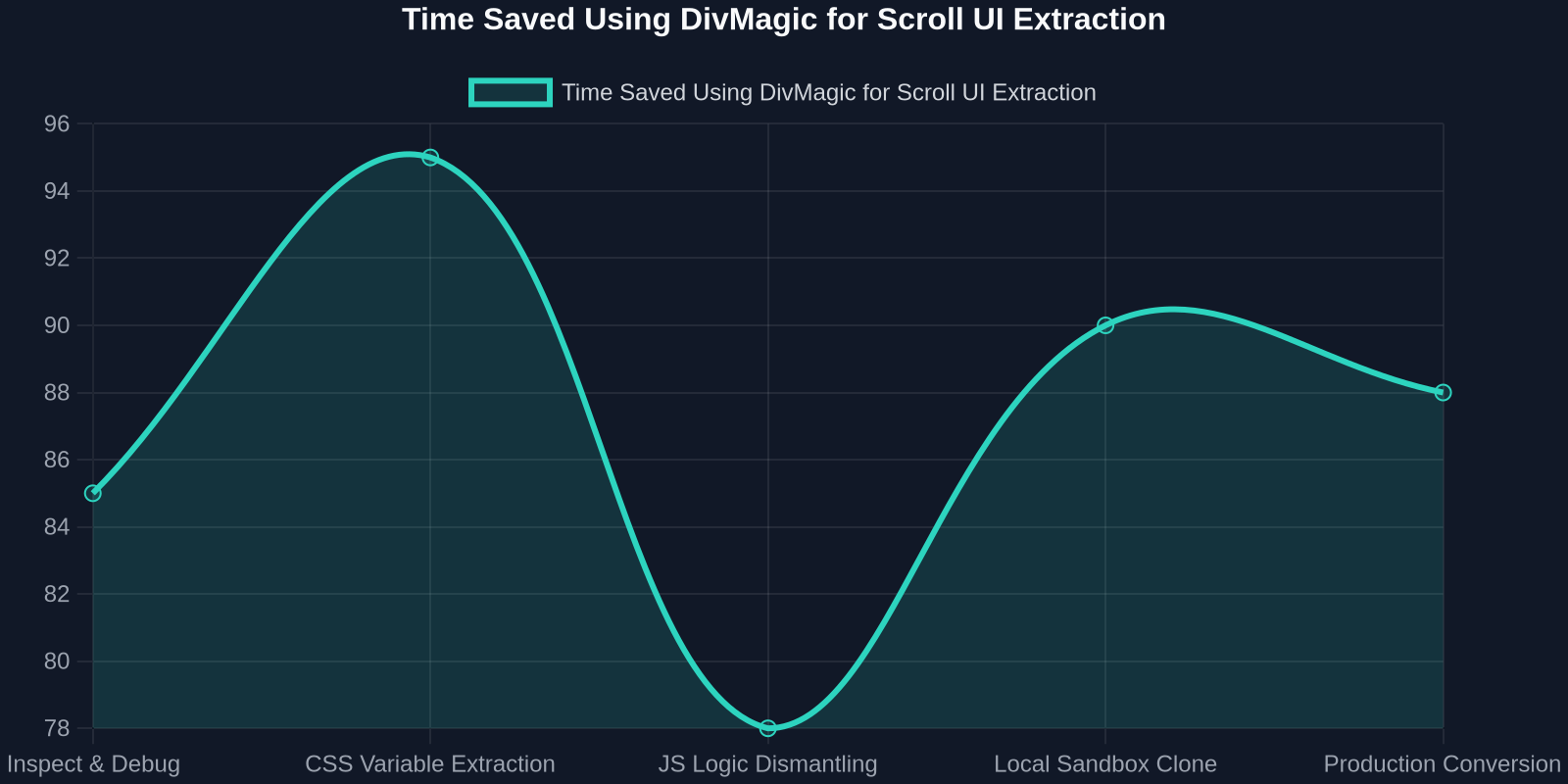
Enter DivMagic, a browser extension engineered precisely for this pain point. Instead of manually untangling the JavaScript inline styles, computed matrices, and CSS custom properties of a stunning scrolling element, DivMagic lets you select any DOM node on a live site and instantly copy its clean, well-structured HTML and CSS.
The Instant Conversion Engine
When working with scroll-driven design, the presentation layer (CSS) often diverges from the static computed styles. DivMagic bridges this gap. It intelligently extracts the effective styles from pixel-perfect scrolling components, converts tailwind utility classes to pure CSS if needed, strips vendor locks, and outputs a production-ready snippet you can paste directly into your project.
Imagine seeing a complex, scroll-triggered pricing tier card on designmodo with internal CSS variable binds like `style="--bg-opacity: 1"` that update on scroll. Rather than spending an hour dissecting how they mapped the intersection ratio to CSS variables, you select the card, let DivMagic grab the base stylized component, and you inject your own scroll-logic on top. You instantly own the hard visual craftsmanship without the reverse-engineering ordeal.
Adapting Copied Elements to Your Scroll Context
Once DivMagic outputs the clean code, integrating it into a React, Vue, or plain HTML scrolling narrative is straightforward. Since the HTML structure is extracted without inheriting the site's complex build constraints, you can wrap the component in your own `` container. If the original element had a `parallax` effect driven by a library, you can strip that JS logic and re-apply it using your own tooling (like a react-spring `useScroll` hook), preserving the visual look while matching your tech stack.
// Integrating a DivMagic-copied component with React Scroll Parallax
import { useScroll, animated } from '@react-spring/web';

function ConvertedUI() {
  const { scrollYProgress } = useScroll();
  const scale = scrollYProgress.to([0, 0.5], [1, 1.2]);

  return (

      {/* Paste DivMagic's extracted clean JSX here */}

        ...


  );
}
Performance Testing and Accessibility in Scrolling Designs
No guide on scrolling web design is complete without a sober look at performance budgets and Web Content Accessibility Guidelines (WCAG). Parallax effects can trigger vestibular disorders, causing nausea for users with motion sensitivity. The modern web requires developers to add a prefers-reduced-motion media query that disables all non-essential scroll-driven animations.
@media (prefers-reduced-motion: reduce) \{
  *,
  *::before,
  *::after \{
    animation-duration: 0.01ms !important;
    animation-iteration-count: 1 !important;
    scroll-behavior: auto !important;
  \}
\}
On the performance side, constantly reading `offsetTop`, `getBoundingClientRect`, or scroll properties in JS triggers forced synchronous layouts (reflows). Dive into Chrome DevTools Performance Monitor and scrub your scroll recordings. If you see punishing spikes of purple (Layout) during smooth scrolls, you need to refactor your JS into `requestAnimationFrame` batches or move all possible transforms to CSS-only timelines.
The Future: Scrolling Without Boundaries
Scrolling web design is bleeding into Augmented Reality previews and WebGPU shaders. We are seeing designs where scrolling through a webpage distorts a canvas fragment shader that renders 3D product mockups. The line between DOM elements and WebGL textures is blurring, driven by scroll position uniforms. Data shows that users increasingly expect a tactile, game-like friction in their browsing.
By mastering the fundamentals, CSS scroll timelines for simple effects, GSAP/Lenis for complex studios, and DivMagic for instant design extraction, developers can future-proof their workflow. The only constant is that beautiful, responsive, scroll-based interfaces will continue to define the premium tier of web experiences.
Conclusion: Design at the Speed of Scroll
Scrolling web design is not a fleeting trend; it's the core interaction model of the internet. Whether you are building a narrative portfolio, a product launch page, or a dynamic dashboard, understanding how to safely and spectacularly manipulate the scroll axis sets you apart. As we've seen, the technical stack ranges from zero-JavaScript CSS magic to raw GSAP scrubbing. But irrespective of the method, obtaining high-fidelity visual components remains the hardest part.
Stop spending your most creative hours buried in Chrome DevTools' "Styles" panel, reconstructing someone else's CSS class hell. Use DivMagic to copy, convert, and customize the finest scrolling web designs directly into your codebase. With the engineering grunt work automated, you can focus on what truly matters, crafting the emotional and narrative logic of your scroll interaction.
The holy grail of scrolling web design is "silky smoothness." This is achieved when UI extraction (DivMagic), scroll orchestration (GSAP/Lenis), and narrative pacing (CSS timelines) work in creative harmony, not engineering conflict.