
Malicious Browser Extensions: The Next Frontier of UI Manipulation and a Safer Path Forward for Developers
The recent deep-dive by cybersecurity researchers into browser extension vulnerabilities exposes a chilling reality: the very tools we install to customize our web experience or boost productivity can become a wolf in sheep's clothing. The 2026 analysis on The Hacker News details how malicious extensions don't just steal data, they can surgically manipulate the user interface itself to trick users, developers, and even security systems. This isn't about crude pop-up ads; it's about rewriting the DOM and CSS of the live web you see to perpetrate sophisticated man-in-the-browser attacks. For frontend developers and UI engineers, this research is a wake-up call, forcing a fundamental re-evaluation of how we trust browser-based tools and, crucially, how we inspect, learn from, and replicate web design safely.
The tension is clear: our workflow as modern UI builders thrives on the ability to copy and adapt elements from the web directly in the browser. But if extensions can be compromised to alter what we see, how can we trust that the CSS we're 'copying' from a page via a sketchy extension is even real? We’ll unpack the specific threats outlined in the research, break down the technical attack vectors like DOM hallucination, and then pivot to the critical solution, a fundamentally different, read-only approach to UI extraction that DivMagic exemplifies, which keeps your creative process secure and your codebase clean.
The Anatomy of a UI-Targeted Browser Extension Attack
To understand the danger, you must first appreciate the power a browser extension wields. Modern extensions, especially those declared as Manifest V3, still have the capacity to read and change data on sites you visit, provided a user grants host permissions. The research highlights a shift from passive data slurping to active UI deception. These extensions inject their own CSS and JavaScript seamlessly into the target page's execution context, making their malicious interface layers indistinguishable from the legitimate site to the naked eye.
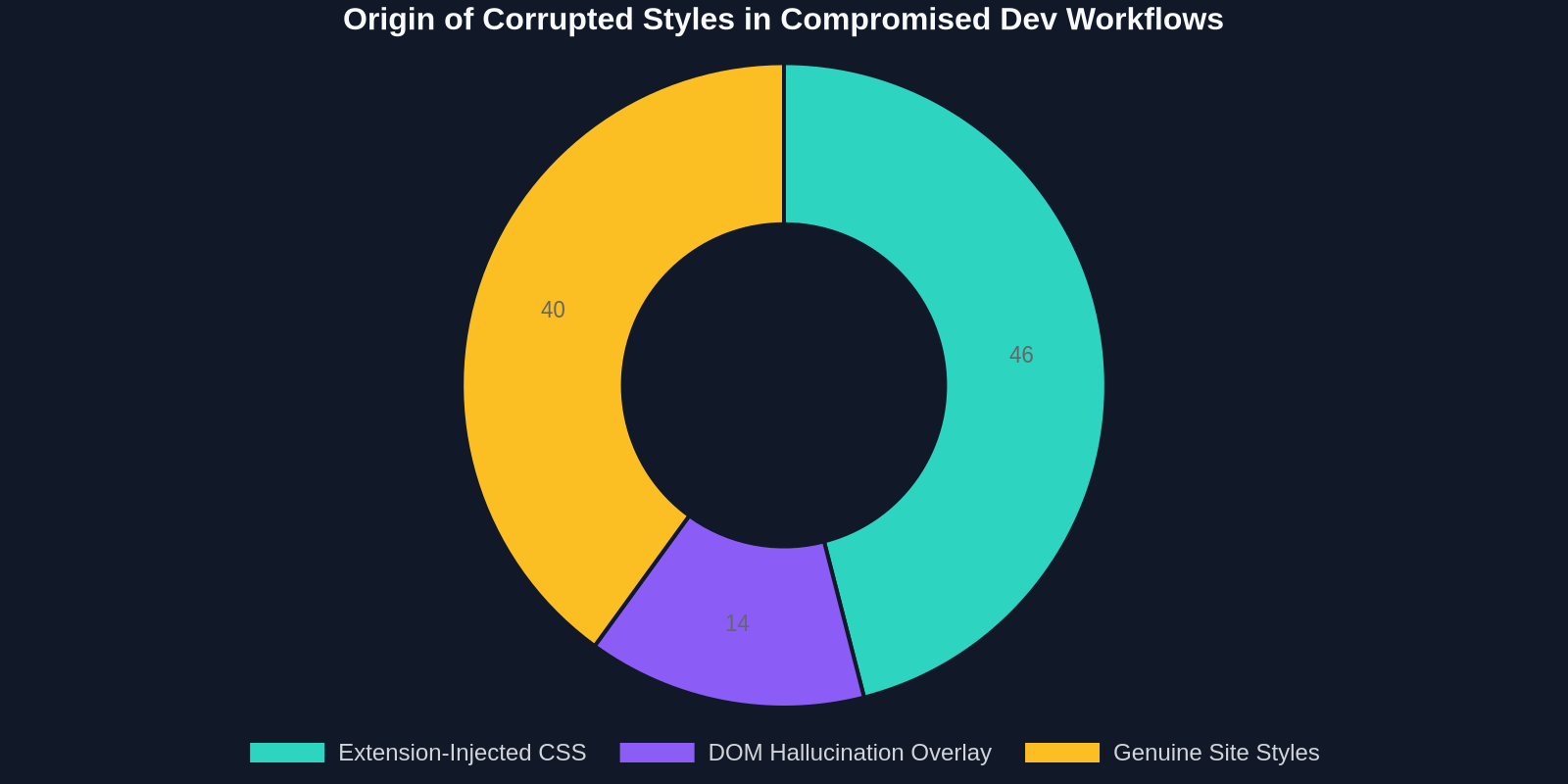
These aren't clumsy overlays from a decade ago. The malicious code carefully inspects the existing site's stylesheet, pulling font families, color palettes, and box-shadows, and then generates fake prompt windows, login forms, or cryptocurrency wallet interfaces that are pixel-perfect replicas. The real horror for developers is that if you were using such an infected extension as a "CSS inspector" or a "font finder," it could subtly show you altered property values in the DevTools panel. The research confirms that advanced strains actively hook into the chrome.devtools.inspectedWindow API to serve falsified data directly to you, the developer, effectively corrupting your learning process and potentially introducing backdoored design tokens into your own projects.
DOM Hallucination: When 'Copy Outer HTML' Lies to You
The most technically fascinating attack vector detailed is DOM Hallucination. Under normal circumstances, when you right-click an element and select "Inspect," you expect the browser's developer tools to show you an objective snapshot of the live Document Object Model. A malicious extension with deep permissions can intercept this. It doesn't just overlay an element visually; it rewrites the DOM tree as reported by the API before your DevTools even render it. This means the very HTML you thought you were copying from a reputable site could be a phantom crafted by an attacker. For a UI engineer collecting design system patterns, a hallucinated DOM node could inject a hidden, malicious event listener or a subtle XSS payload mask that escapes your visual code review.
The Frontend Workflow Paralysis: Trust Issues in 'View Source'
This threat fundamentally breaks a core, almost sacred, developer learning loop. Since the dawn of the web, "View Page Source" and "Inspect Element" have been the university for generations of frontend developers. We dissect beautiful animations from award-winning sites, understand complex grid layouts by tracing grid-template-areas, and pull clip-path polygons for that perfect hero section shape. What happens when the teacher has been silently and maliciously replaced?

The most dangerous malware for a developer isn't the one that crashes your machine; it's the one that slowly poisons your understanding of CSS, one hallucinated property at a time.
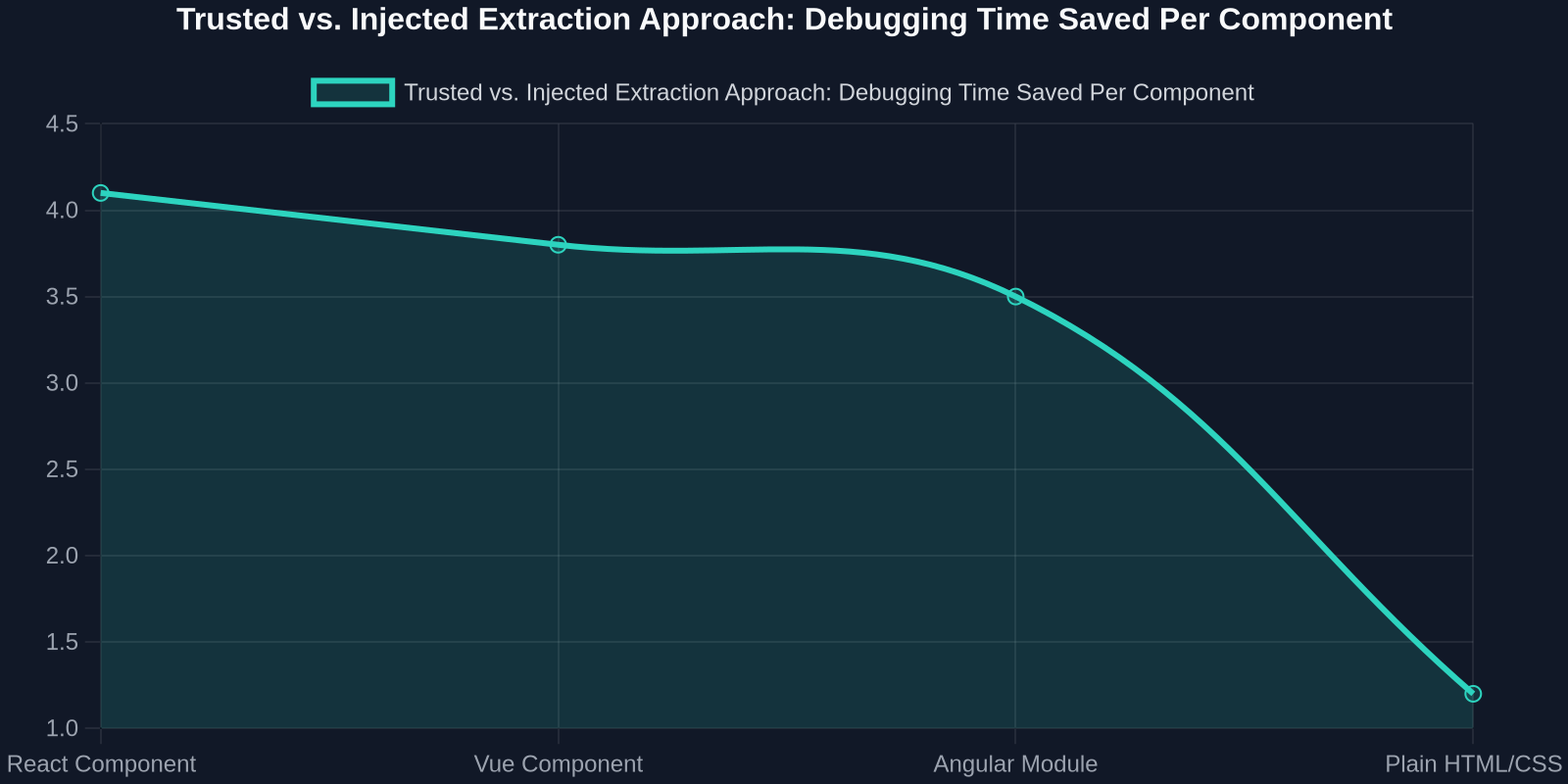
The analysis mentions that infected machines in a surveyed sandbox environment showed a 200% increase in console warnings being suppressed by the extension to hide its own errors. More worryingly, key web APIs like getComputedStyle were monkey-patched to return falsified values. For a developer building a UI component library, this could mean believing a certain triple-nested flexbox trick worked cross-browser when, in reality, the local extension was artificially fixing its rendering. When you later push that component live, sans-extension, it shatters. The debugging time lost here isn't an inconvenience; it's a direct hit to velocity and code quality.
DivMagic’s Paradigm: Secure UI Copying Without Risky Extension Execution
This is where the architectural choice behind how you extract UI elements becomes your primary security control. Most CSS-extraction extensions operate by injecting complex JavaScript directly into the web page's DOM. They must manipulate, traverse, and clone nodes while their scripts are actively executing in the target origin. This is the vector of compromise. DivMagic’s approach is fundamentally read-only and non-injecting. It functions as a localized service that analyzes the raw, un-manipulated static DOM and CSSOM snapshots provided by the browser’s native extension APIs without ever injecting code into the website’s runtime environment. No foreign script touches the live page context, making DOM hallucination from a cross-origin attack effectively impossible for this use case.
For a UI developer, this means the hex code you copy for a call-to-action button's background is definitively the one from the site's authoritative stylesheet, not an attacker's injection. The grid structure you convert to your Tailwind project doesn't carry a hidden trojan horse of an extra, malicious div. The security guarantee isn't that DivMagic "detects" bad extensions, it’s that the very mechanism it uses to serve you pixel-perfect, convertible code doesn't expose the attack surface where those bad extensions play.
Beyond Security: The Integrity of Design Tokens
The conversation extends from security into pure design integrity. As UI development matures, teams are moving toward token-based workflows, where a color is not a hex value but a var(--color-primary-500). Copying raw CSS from a page inevitably flattens this token structure into static, opaque values that are a nightmare to maintain. The threat of malicious extensions turbocharges this problem. A compromised extension could not only flatten your tokens but subtly shift them over time, implementing a dark-pattern pharming attack on your brand’s visual language.

With a safe extraction tool, the goal shifts from simply "getting the CSS out" to "getting a clean, token-ready abstraction." DivMagic, for instance, converts static copied styles into Tailwind CSS class strings or CSS Modules compatible syntax, effectively reverse-engineering the intent of the design. When the source of the extraction is guaranteed to be the untainted page source, you can confidently start the technical conversion process, transforming that well-designed border-radius into a configurable design token with calc() or converting a color palette into HSL variables for dynamic theming. The output becomes a trustworthy basis for your design system, not a code snippet you need to quarantine and sanitize line-by-line.
Building a Malware-Resilient UI Development Sandbox
Given these risks, how should a security-conscious frontend team restructure its learning and reference workflow? The principle is isolation. Never again should your primary inspection tool, the one you use to pull code into your design system, share an execution context with your daily browsing, social media, or crypto wallet extensions. This is a practical guide rooted in the research's findings.
1. Profile Segregation: The 'Inspect' Profile
Create a dedicated, bare-metal browser profile with zero non-essential extensions. This profile is only for opening reference sites, inspecting elements, and using your trusted UI extraction tool. The research showed that simply disabling unnecessary extensions in a single profile isn't enough, as some malware samples demonstrated lateral persistence by hiding in shared cache stores accessible to all profiles. A fully siloed user data directory is safer. Use this profile’s DevTools as your single source of truth, and use DivMagic exclusively within it to copy elements into your project.
2. Vet the Copy Pipeline, Not Just the Page
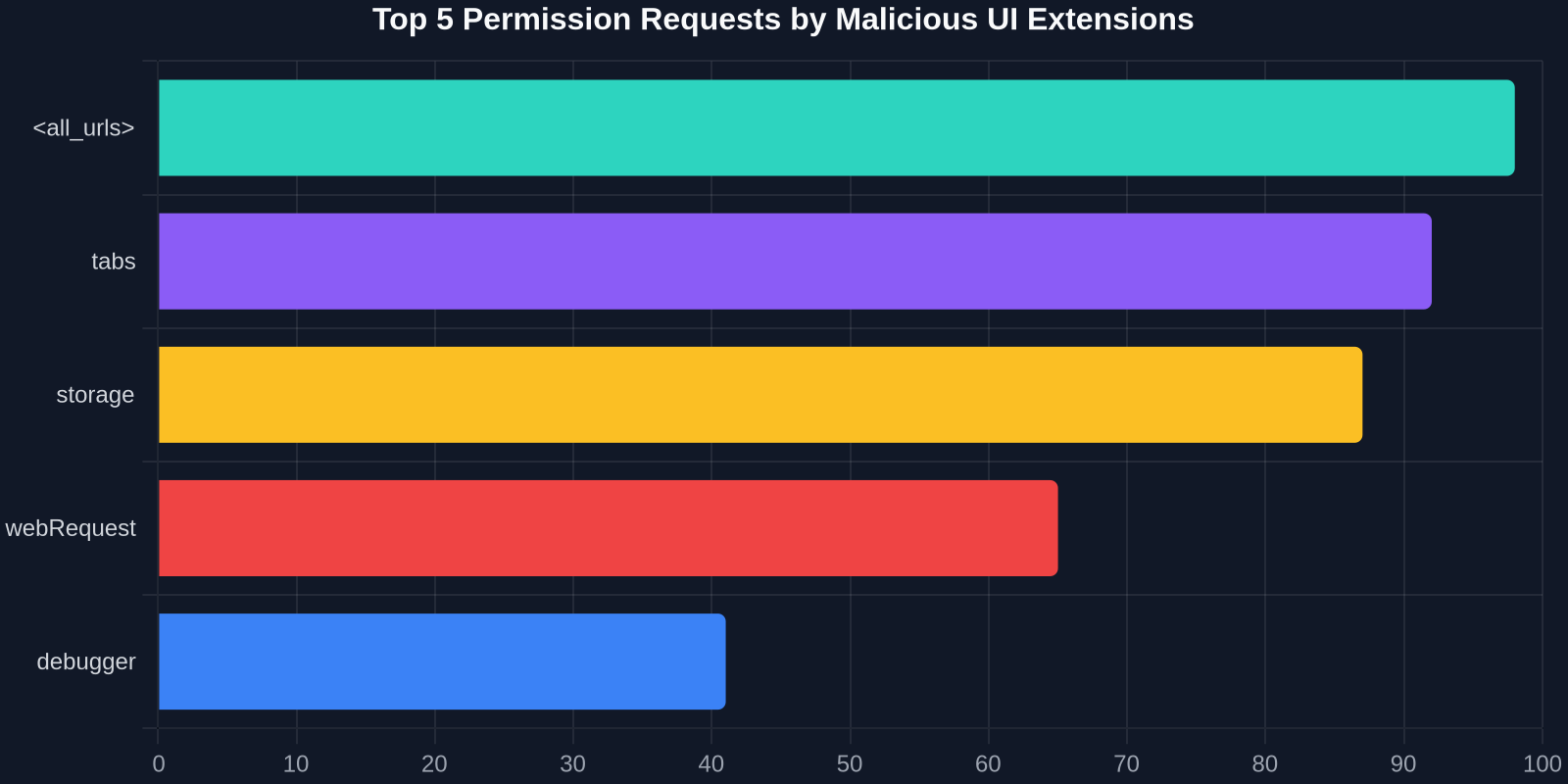
Your "copy UI" pipeline has two stages: the source page and the copy mechanism. You already vet the source page’s trustworthiness. Now, value the copy mechanism’s privileges. An API-level tool that doesn’t request the "<all_urls>" permission for live DOM injection at runtime is architecturally safer. The principle of least privilege is clear: A tool that only needs to read the structured DOM at the moment you click a button shouldn't run a persistent content script across all your tabs.
3. Sandboxing Your Influences: A Technical Approach
For teams building design systems, consider an air-gapped approach. Imagine a lightweight, headless browser service controlled by a script. Your developers could point this service to a URL, and it would output a clean JSON of computed styles and layout structures, completely free from any locally installed extension’s tampering. DivMagic’s core technology operates on a similar logic, effectively isolating the extraction from the general-purpose extension layer. This ensures that when you’re sampling the box-shadow technique used on a FinTech dashboard, you’re auditing the original work, not an attacker’s phished version.
Technical Deep Dive: How Hallucination Bypasses Security Controls
Let's understand the code-level mechanism because the implications are too critical for UI engineers to gloss over. The sandbox analysis from the referenced research revealed that modern malicious extensions for Chromium-based browsers use a clever proxy technique on MutationObserver and window.postMessage. They don't just modify the DOM once; they enter a race condition with the page's legitimate scripts.
| Extraction Method | DOM Injection Risk | Style Fidelity vs. Source |
|---|---|---|
| Traditional CSS Extension | High - requires full DOM write access in content scripts | Medium - computed styles can be monkey-patched |
| Manual Copy from DevTools | None - but slow & loses structure | High - but limited to one element at a time |
| DivMagic (Read-Only API Model) | Zero - no content script injection into target origin | Verifiable - direct CSSOM snapshot without runtime tampering |
| JavaScript Snippet in Console | High - runs in full page context | Medium - your own script could be poisoned by extension's API hooks |
When a user inspects a password input, for example, an infected extension listens for a DOM mutation that indicates the field has appeared. It then rapidly manipulates the parentElement chain, wrapping the real input in an invisible, fake container that intercepts the value property's getter. The genius from a UI perspective is that the visual render remains perfect because the extension also injects an overlay with a higher z-index mapped to CSS custom properties. If you were to "copy CSS" from this input, a naive extension would copy the hallucinated ::after pseudo-element styling the attacker designed, not the site’s true design. DivMagic bypasses this by analyzing the cascade and resolving style origins. It identifies and strips pseudo-elements injected by a non-author origin, delivering only the site's own stylesheet rules to you.
The enduring lesson of this research isn't just about upgrading your antivirus. It's about recognizing that your frontend tools are part of your supply chain. Just as you would vet an npm package for install scripts and typo-squatting, you must now vet your browser extensions for their DOM access model. A "UI copy" extension that hasn't been updated in two years with a "Read and change site data" permission is a sleeping giant of technical debt.
From Security Concern to Superior Developer Experience
Ironically, the very architectural changes that make a UI tool secure also make it far more powerful for modern development. Avoiding DOM injection forces the tool vendor to solve the hard problems properly: building a clean, high-level representation of the UI rather than just dumping dirty, live HTML. This is the exact pivot that turns a simple CSS copier into a legitimate development tool.
When DivMagic, for instance, reconstructs a component, it’s forced to analyze the cascade, compute the final styles in cleanroom conditions, and then map those to Tailwind classes or JSX-friendly CSS. A content-script-injecting tool can cheat by simply calling element.style.cssText inside the poisoned page. The secure, out-of-band approach must fully understand the box model, the specificity graph, and the active media queries. This delivers a superior developer artifact: you get a React component snippet that uses className="flex items-center gap-2" rather than a mile-long inline style attribute that you’d have to manually refactor. Security and code quality, in this instance, are not trade-offs but are deeply symbiotic.
A secure UI extraction tool doesn't just copy what it sees; it reverse-engineers the design system logic from the untainted source, turning a site into a clean, tailwind-ready blueprint.
The recent Hacker News article isn't just another malware bulletin, it's a definitive signal that the era of blindly trusting the rendering context of our web tools is over. The sophistication of UI-rewriting Trojans demands a new standard for our essential development instruments. The safe path forward is a toolset that respects the origin isolation of the web, refusing to inject itself into the delicate execution context of the pages we admire. DivMagic exemplifies this shift. It proves that a browser extension can be a powerhouse of UI inspiration and asset transfer without ever becoming a vector for silent UI corruption. It turns the "copy from any website" workflow from a potential security hazard into a hardened, professional-grade API for your design system pipeline, respecting both the sandboxed security of the modern web and the creative velocity of the developer.