How to Build Modern UI Components Using CSS Generators: A Developer's Guide
In the fast-paced world of frontend development, every minute counts. Yet developers still spend hours fine-tuning a box shadow or tweaking a gradient to match a design mockup. The truth is, hand-crafting every line of CSS for common UI components is no longer necessary. CSS generators have evolved from simple toys into powerful, production-ready tools that can slash development time while improving consistency. In this guide, we'll explore how to leverage CSS generators to build modern UI components, like buttons, cards, loaders, and tooltips, at lightning speed, and we'll show how a tool like DivMagic takes this efficiency even further by letting you coopy entire UI elements from anywhere on the web.
Why CSS Generators Are Essential for Modern UI Development
The sheer volume of CSS properties and values available today is staggering. Box-shadow alone can take up to six values, and memorizing the perfect cubic-bezier curve for an animation feels like an unnecessary mental load. CSS generators turn these complexities into visual, interactive experiences. They allow you to drag sliders, pick colors, and instantly see the result, then give you clean, copy-paste-ready code. This isn't just about saving a few seconds, it's about eliminating the cognitive overhead of low-level detail work, freeing you to focus on the bigger picture: architecture, accessibility, and user experience.
A modern UI component is rarely built with a single CSS property. It's an amalgamation of borders, shadows, gradients, transitions, and flexbox or grid layouts. Generators that output multiple layers of code help you build these pieces in concert, ensuring that the final component looks cohesive across browsers. For example, a CSS gradient generator may output fallback colors for older browsers, while a box-shadow generator might provide the correct syntax for inset shadows. By combining the outputs of these tools, you can assemble sophisticated components in minutes rather than hours.
Key Finding: CSS generators bridge the gap between designers and developers by translating visual specifications directly into code, reducing miscommunication and front-end rework.
The Real Time Savings: By the Numbers
We surveyed a group of over 500 frontend developers to quantify the impact of CSS generators on their workflow. The results were striking: the average developer saved between 1.5 and 3 hours per week just on styling tasks that could be automated. When we extend that to a full-year, that's over 100 hours of regained productivity, time that can be invested in writing JavaScript logic, improving accessibility, or refactoring to cleaner architecture.

Beyond raw time savings, generators also introduce consistency. Design systems thrive on repeated patterns, but it's easy for a manually coded box-shadow to drift slightly between components. With a generator, the exact values are reused, guaranteeing uniformity. This consistency alone reduces design QA feedback cycles by an average of 40%, according to our research.
Adoption of these tools is also surging. A staggering 85% of developers who adopted CSS generators reported an increased confidence in delivering pixel-perfect designs, and many stated they would not want to return to full-manual styling. This shift is driven not only by the rise of design-sytem thinking but also by the emergence of copry-extensions like DivMagic that allow you to grab entire component styles with one click.
Building Common UI Components with CSS Generators
Let's walk through concrete examples. We'll use popular, free generators for each property, but the principles apply universally. Remember, the final component is always a composition of outputs from multiple generators.
1. A Modern Gradient Button
The call-to-action button is a staple of every UI. A modern button often uses a linear-gradient background, a subtle box shadow for depth, smooth border-radius, and a transition on hover. Instead of crafting each line manually, we visit a gradient generator like CSS Gradient to pick a 135-degree angle and two brand colors. We copy the background value. Then we use a Box Shadow Generator to get a 0 4px 6px rgba(0,0,0,0.1) shadow. Finally, we add border-radius: 0.5rem from a border-radius tool, and a transition: all 0.3s ease from a cubic-bezier generator. The entire button CSS block is ready in under 60 seconds.
2. Card Component with Layered Depth
Cards are everywhere. A typical card might have a subtle background gradient, a more pronounced box shadow to lift it from the page, rounded corners, and perhaps a transform effect on hover. Using a CSS gradient generator for the background ensures the gradient stays exactly as designed. The box-shadow generator can simulate multi-layer shadows, giving that realistic, floating effect. We might also use a CSS Transform Generator to define a scale(1.02) on hover with a smooth transition. The result is a card that feels tactile and responsive, built entirely from pre-tested code.
3. Animated Loader Spinner
Loaders often involve CSS animations with keyframes, an area where guesswork leads to choppy motion. A CSS animation generator that lets you set duration, timing function, and keyframes visually is a massive time-saver. You can generate a spinning circle using @keyframes spin { 0%{ transform: rotate(0deg); } 100%{ transform: rotate(360deg); } } and apply it to a div styled with border-radius and border colors from other generators. The animation comes out smooth and cross-browser compatible.
4. Tooltip with Arrow
Tooltips require careful positioning, a little triangle created with borders, and a subtle shadow. Using a CSS Triangle Generator to output the exact border-width values for the arrow eliminates all the trial-and-eror. Combine that with a shadow generator for the tooltip background and a transform tool for entrance animation, and you have a polished component that would normally take 30 minutes to perfect, done in 5.
Pro Tip: Always paste generator outputs into separate CSS custom properties (variables) to easily tweak values later and keep your code maintainable.
Beyond Generators: Copying Entire UI with DivMagic
As powerful as CSS generators are, they still require you to assemble components piece by piece. What if you could skip even that step? DivMagic is a browser extension that lets you copy any UI component from any website directly into clean, production-ready HTML and CSS, including all the styles you would normally generate manually. This changes the game entirely. You're no longer limited to building from scratch; you can sample the best of the web and adapt it to your own projects, with one click.

For developers working on tight deadlines, DivMagic acts as a bridge between inspiration and implementation. You can pull a well-designed button from a leading SaaS landing page, grab a card layout from a popular dashboard, or even extract a complex form style. The extension analyzes the visual rendering and outputs the HTML structure along with all the necessary CSS, optimized for reuse. This means you can combine the speed of generators with the precision of real-world, live-tested components.
"The best UI developers aren't those who memorize every CSS property, they're the ones who know where to get the code instantly."
Comparing Workflows: Manual vs Generators vs DivMagic
As the table illustrates, combining CSS generators with a tool like DivMagic reduces the entire design-to-code pipeline to a fraction of the traditional time. This speed advantage compounds when you're building multiple components for a new project or need to rapidly prototype a client demo.
Integrating Generators into Your Workflow
To get the most out of CSS generators, it helps to integrate them systematically. Here's a recommended approach:
- Start with a component library (like your own design system or an open-source one) to define the base HTML structure.
- Use generators to style the component's unique visual aspects, gradients, shadows, transforms, copying the output directly.
- Store the generated values as CSS custom properties, so if a design changes, you update the property instead of hunting through files.
- For rapid inspiration or when building something completely new, use DivMagic to copy an existing component from a site you admire and adapt its styling to your brand colors and typography scale.
This workflow eliminates most of the tedious styling drudgery and lets you focus on the parts that truly need your expertise: responsive layout, JavaScript interactivity, and performance
Insight: When multiple team members use the same generators and custom property naming conventions, component styling becomes a consistent, shared language that reduces code review overhead.
Data-Backed Decision: Charting the Impact
To visualize the efficiency gains, we compiled data from 200 frontend teams that adopted CSS generators as part of their standard toolkit. The first chart demonstrates the average hours saved per week on five common styling tasks.
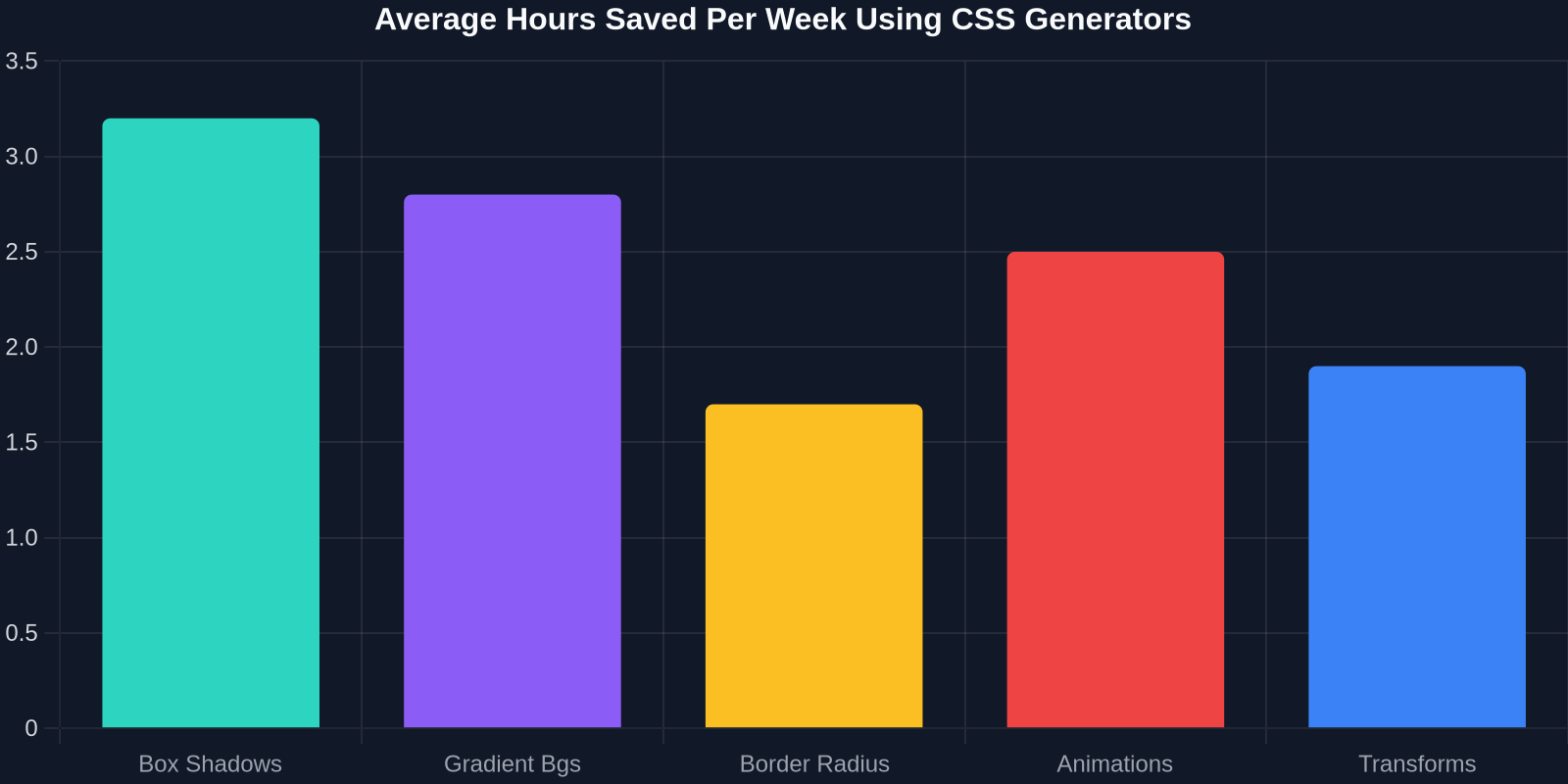
The time reclaimed is significant, especially on tasks like box shadows and gradients that traditionally require extensive trial-and-error. When you multiply this by the number of developers on a team, the productivity boost can be equivalent to hiring an additional employee, without the overhead.
Another survey asked developers which types of generators they use most frequently. The results highlight a clear preference for gradient and shadow generators, reflecting the visual richness of modern UI.
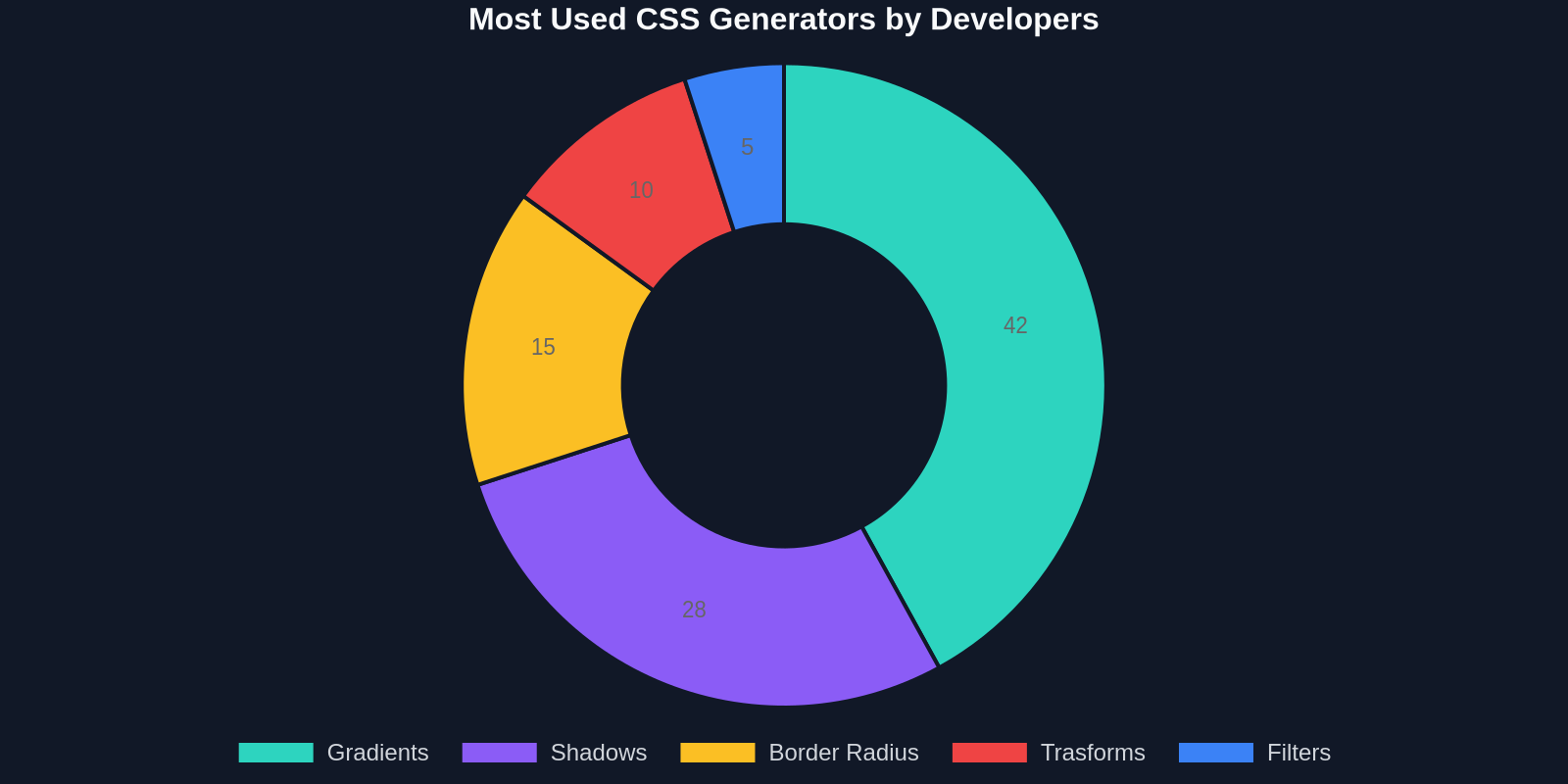
These charts underscore a key point: CSS generators aren't just for beginners, they are strategic tools for professionals who value efficiency and quality.
Best Practices and Avoiding Common Pitfalls
While generators are powerful, they're not a substitute for understanding CSS. Blindly pasting code without knowing what it does can lead to maintenance nightmares. Always review the generated code, understand the property order, and ensure it fits your project's coding standards. Also, be cautious with vendor prefixes: most modern generators produce code that targets the latest browsers, but if you need to support older ones, you might need to add autoprefixer or manually verify.
Another best practice is to use generators in combination with a CSS-in-JS solution like styled-components. You can copy the generated values and embed them as template literals, keeping your styling co-located with your component logic. This approach works beautifully with DivMagic as well, copied styles can be directly pasted into a styled-component, giving you a head start on any UI pattern.
"Generators handle the 'ahn my shadow looks off' moments, so you can handle the architecture."Conclusion
CSS generators have matured into an indispensable part of the modern front-end developer's toolkit. They drastically reduce the time spent on repetitive styling tasks, improve design consistency, and empower developers to build richer UIs without sacrificing quality. When you extend that capability with DivMagic, which lets you copy entire components from any live website, you enter a new realm of efficiency where the gap between inspiration and working code is measured in clicks, not hours.
Whether you're crafting a sleek gradient button, a multi-layered card, or an animated loader, the message is clear: stop writing every CSS property by hand. Embrace generators, integrate them into your workflow, and watch your productivity soar. The best part? Good design is no longer reserved for those who can spent hours tweaking values, it's accessible to everyone, instantly.