
Harness Design for Long-Running Application Development: AI Agents, Frontend Workflows, and the Future of UI Engineering
Anthropic’s engineering team recently published an in-depth exploration of what they call “harness design”, the architectural patterns and tooling that allow AI agents to function reliably over extended periods. This isn’t just about keeping a terminal window open. It’s about building a structured environment where an AI model can plan, execute, observe, and recover across hours or even days of continuous development work. For frontend developers, the implications are profound. A long-running agent that can incrementally build a complex React dashboard, refactor a legacy CSS codebase, or iteratively fine-tune a UI based on user feedback represents a paradigm shift.
But a powerful agent is only as effective as the environment it operates in. This is the core of harness design. Think of it as the scaffolding around a construction site. The agent is the skilled worker, but without stable scaffolding, clear specifications, structured tool access, state management, and error recovery loops, it can’t build a skyscraper. It can barely assemble a shed. In this post, we’ll break down Anthropic’s key findings, translate them into practical frontend workflows, and show how tools like DivMagic, Claude Code, and structured terminal harnesses are already reshaping how we build long-running, production-grade web applications.
Anthropic’s research reveals that the core challenge isn’t model “intelligence” but the agent’s ability to maintain a coherent, executable plan across thousands of sequential tool calls and multiple human check-ins.
The Anatomy of a Development Harness: More Than a Sandbox
When Anthropic engineers talk about a “harness,” they’re referring to a carefully instrumented loop. The agent resides inside a containerized environment, with access to a terminal, a filesystem, and a defined set of tools. It doesn’t just write code; it writes code, runs tests, parses errors, reads logs, and then writes more code. The harness is what holds the state of this ongoing conversation between the model and the system. For a frontend developer, the equivalent might be a Node.js environment with a running dev server, a browser automation tool like Playwright, and a hot-module-replacement pipeline. The harness keeps it all coherent.
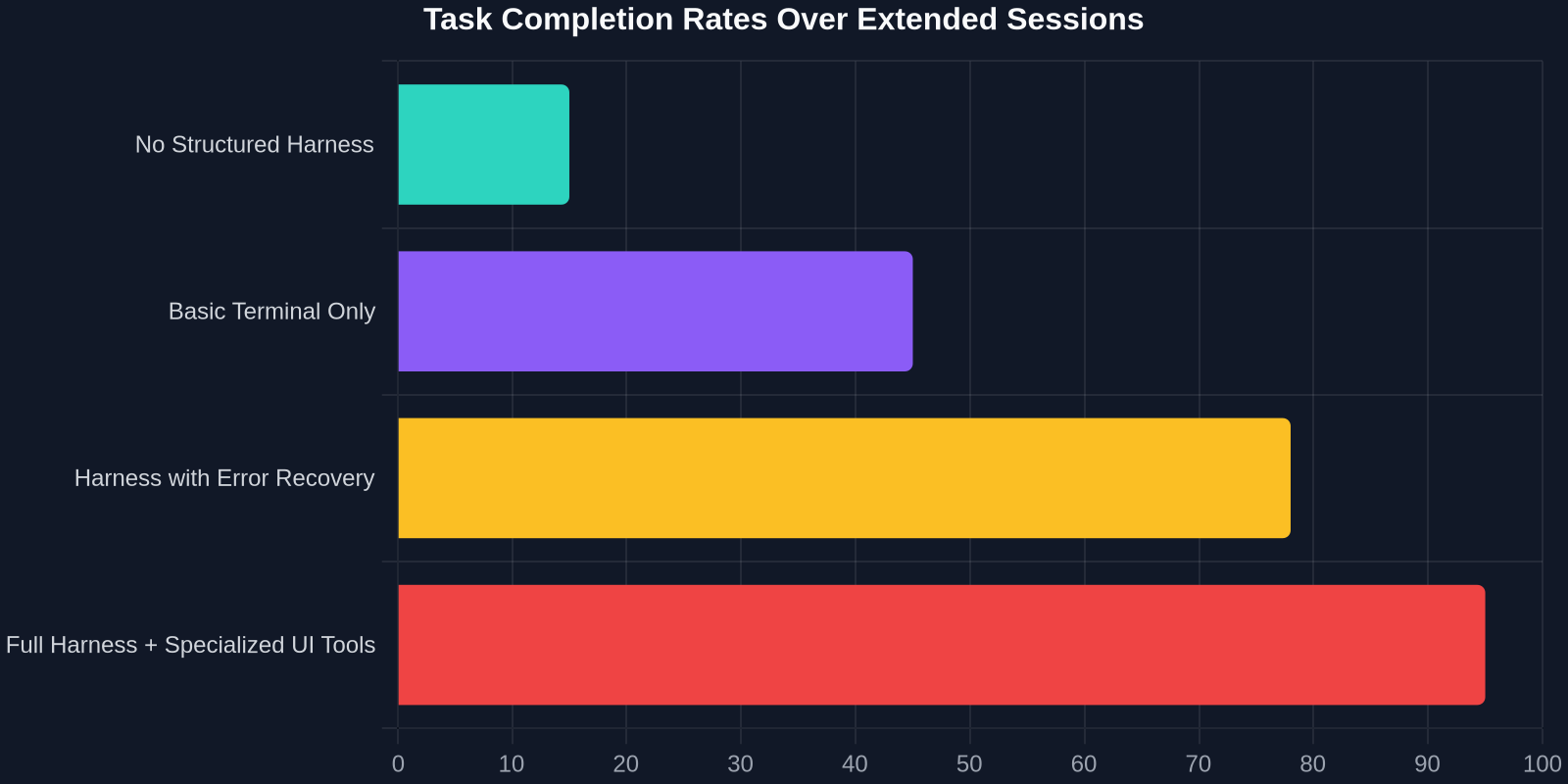
Anthropic highlights that unstructured, ad-hoc prompt chaining fails catastrophically in long-running tasks. The model forgets constraints, hallucinates tool outputs, or gets stuck in repetitive loops. A well-designed harness mitigates this through several mechanisms: structured work plans stored in a TODO.md file, checkpoint-based commits, and explicit human-in-the-loop feedback gates. This transforms an AI agent from a simple chatbot into a resilient development partner that can autonomously navigate a complex, multi-file UI project for hours.
Key Properties of an Effective Harness
Anthropic’s research identifies several non-negotiable properties for a production-grade harness. These translate directly into best practices for frontend tooling:
- Observability: The agent must be able to see the consequences of its actions. In a frontend context, this means headless browser snapshots, console logs, and network request waterfalls, all surfaced back to the model’s context.
- Statefulness: The harness maintains a persistent filesystem and memory. For a UI project, this is the Git repository. The agent can branch, commit, and revert.
- Tool Modularity: Each tool (e.g.,
write_file,run_terminal_command,take_browser_screenshot) has a clear, narrow scope, reducing ambiguity. - Recovery Loops: When a build fails or a test assertion doesn’t pass, the harness feeds that exact error message back to the agent, not a vague “something went wrong.”
Claude Code and the Terminal Harness: A New Frontend Workflow
Anthropic’s Claude Code is a prime example of harness design in action. It’s an agent that lives directly in your terminal, equipped with a broad suite of tools. For frontend developers, this is a game-changer. You can ask Claude Code to bootstrap a new Vite project, install Tailwind CSS, scaffold a component library, and implement a complex drag-and-drop interface, all while it iteratively fixes TypeScript errors and adjusts to your design feedback. The terminal harness provides the stable environment; Claude Code provides the intelligent, persistent labor.
Consider a common scenario: building a data dashboard with multiple interactive charts. Without an agent, you’d spend hours writing boilerplate, wiring up Chart.js or D3, and debugging data transformations. With a long-running agent in a proper harness, you can specify the high-level design and data schema, and let it work. It writes the components, runs the dev server, detects any stuck loading states, and refactors the data-fetching logic. The key is that the harness keeps it from going off the rails during the inevitable mid-development pivot when you ask to change from a bar chart to a scatter plot.
To prevent context bloat, use a summarizing commit hook. After a significant chunk of work, ask the agent to summarize its changes in a Git commit message. This summary can then be injected into future prompts to keep the agent aligned.
Translating Harness Design to Frontend SPA Architecture
The principles of harness design don’t just apply to AI agent infrastructure. They map surprisingly well onto modern frontend architecture, especially for single-page applications (SPAs) that need to remain stateful and responsive during long user sessions. Think of a sophisticated web-based design tool like Figma or a real-time dashboard. These are long-running applications in their own right, and they need their own internal “harness” to manage state, side effects, and error boundaries.
“A durable application architecturge is a harness for the user’s intention. It keeps their workflow coherent even as they navigate hundreds of state transitions in a single session.”
In a React or Vue application, this harness translates into several concrete implementations. A StateManager like Redux Toolkit or Zustand provides the persistent, observable state. React Query or SWR act as a declarative harness for server state, managing caching, background updates, and stale-while-revalidate cycles. Error boundaries serve as recovery loops, catching a crashed component and restoring the UI to a working state without refreshing the entire page. The application structure itself becomes a harness for your business logic, ensuring stability across a long-running user interaction.
Component-Level Harnessing: Encapsulating Complexity
Anthropic emphasizes tool modularity. In a component ecosystem, this is the principle of single responsibility and isolation. A well-designed component is a narrowly scoped tool that the larger application harness can orchestrate. The component receives props (a structured input), renders output (observability), and emits events (tool calls back to the parent harness). By keeping components modular and their state management explicit, you prevent the kind of contextual decay that Anthropic observes in poorly harnessed AI agents, but in your user interface. A component should not be entangled with the authentication logic. The harness, your app’s state management layer, keeps them cooperating safely over time.
The UI Bottleneck: When the Harness is Perfect, But the Design Isn’t
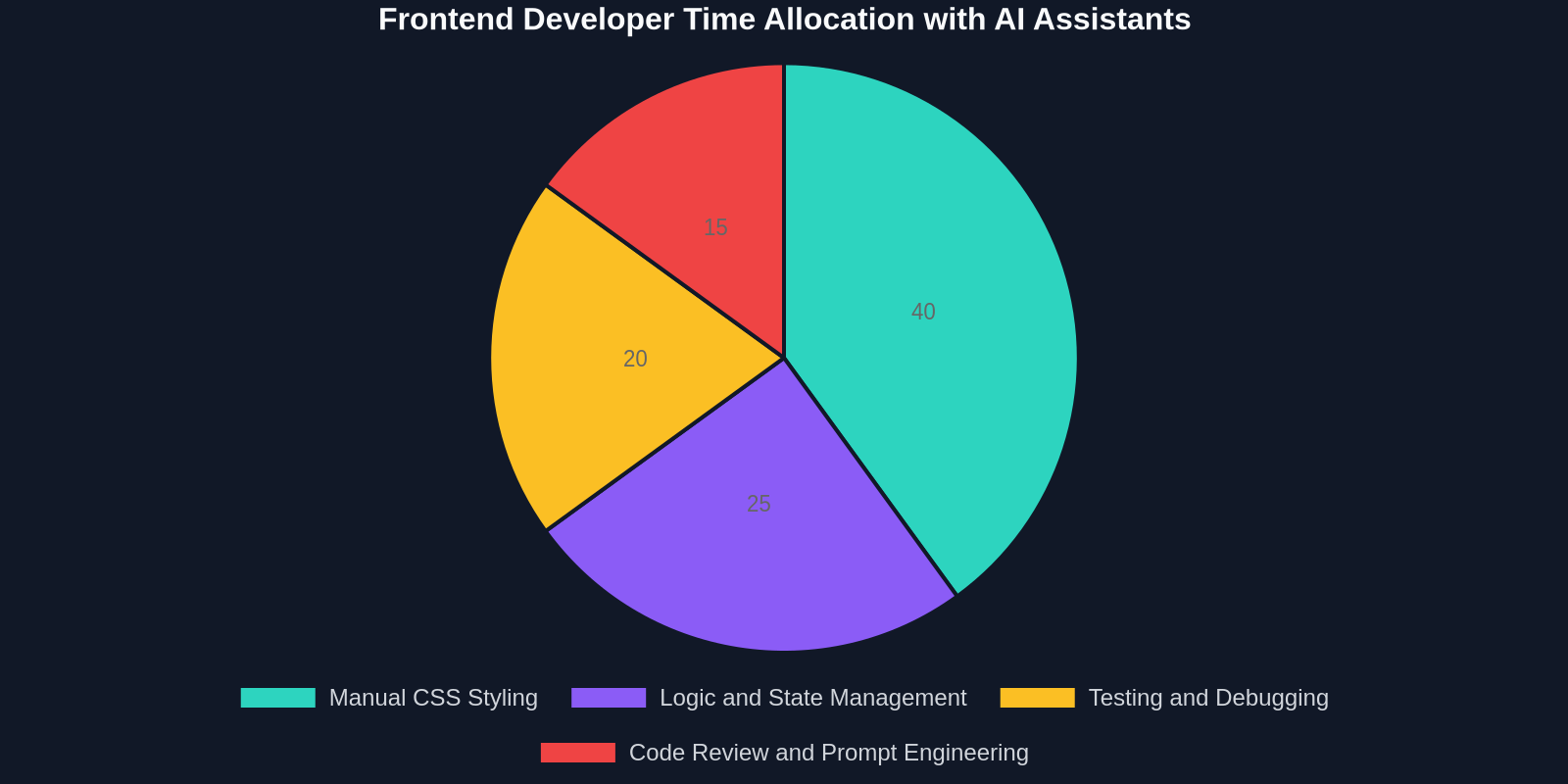
Even with a perfectly architected development harness and a tireless AI agent, one frontend bottleneck remains critical: the translation of a desired user interface design into production-ready code. The agent can write logical, error-free TypeScript, but if it spends hours laboriously trying to reproduce a complex gradient, a custom scrollbar, or a designer’s Figma mockup pixel-by-pixel, the harness’s productivity gains evaporate. This is where developers need a way to shortcut the UI conversion process, feeding the harness with immediate, accurate starting points rather than ambiguous visual descriptions.

This is precisely the gap that DivMagic fills. While a terminal harness like Claude Code provides the intelligent loop for building application logic, DivMagic acts as a precision tool for the visual layer. By allowing you to instantly copy any UI element from any website, extracting its exact, computed CSS, HTML structure, and design tokens, it eliminates the most tedious, time-sink part of long-running frontend projects. You no longer need to describe a shadow in natural language and hope the agent interprets it correctly. You copy it, paste it into your project, and let the agent integrate it within the larger harness.
DivMagic: The Missing Tool in the AI Harness Workflow
In an Anthropic-style development harness, the agent’s tools are everything. A typical toolset includes read_file, write_file, run_shell, and web_fetch. What these still lack is a reliable way to interpret visual design intent into code. A human can say “make it look like Stripe’s checkout form,” but an agent, even with vision capabilities, struggles to produce a faithful, production-ready reproduction from a screenshot alone. The resulting CSS is often bloated, semantically incorrect, or uses wrong spacing.
By integrating DivMagic into the harness as a new tool or as a manual preprocessing step, the workflow transforms. A developer identifies a reference UI component, a button, a modal, a pricing card. With one click in the browser, DivMagic captures its live, computed styles. This pristine, isolated CSS can then be saved directly into the component file in the project. The AI agent, operating within the terminal harness, is then instructed: “Use the newly saved PricingCard.module.css for styling. Integrate it with the dynamic billing logic we just wrote.” The agent handles the integration, the state, and the accessibility logic, but the visual DNA is perfectly rendered from the start.
Combining a powerful AI harness like Claude Code with a precision UI cloning tool like DivMagic creates a compound productivity effect. The harness is no longer bogged down by visual interpretation tasks, allowing it to spend its context window on complex architecture and logic problems.
Building a Long-Running Dashboard: A Practical Orchestration
Let’s walk through a concrete example. Suppose you need to build a long-running analytics dashboard for an IoT platform. The dashboard needs real-time data feeds, complex data visualizations, and a sophisticated user management panel. This is a multi-day task. Your harness is a Docker container with Node.js, a Vite React project, and Claude Code. Your workflow would be:
- Initialize the Harness: Set up the Git repository, install dependencies, and configure the testing and linting hooks. Create a
TODO.mdthat Claude Code will manage autonomously. - Seed the Visual Identity: Instead of describing the dashboard’s look, you use DivMagic to copy a series of polished components from several high-end SaaS dashboards, a sidebar, a stat card, a data table, and a filter bar. You paste these into individual CSS modules in your project.
- Delegate Logic to the Agent: Instruct the agent: “I have added styled components. Implement a real-time data feed using WebSockets in
useWebSocket. Populate theStatCardcomponents with live data from our mock API. Ensure the sidebar navigation updates the main content area.” - Iterate and Observe: The agent writes the hooks, connects to the data stream, and immediately runs the dev server. It uses Playwright to take a screenshot, parses the console for errors, and refactors its own data handling code when it detects stale closures.
- Final Polish: With the logic solid, you loop back on the UI. Ask the agent to add a dark mode toggle that affects all the DivMagic-copied components. It modifies the CSS variables and state context you defined. The entire cycle, from concept to a production-looking, data-connected prototype, takes hours instead of days.
Designing the Harness for Frontend Resilience
A long-running app, whether driven by an AI or a human user, is only as resilient as its error handling. Anthropic discusses the “reset problem,” where a long-running agent loses its context and must start over. In a frontend application, this is analogous to an uncaught JavaScript error crashing a section of the UI and forcing the user to refresh the page, losing their unsaved work. The harness design philosophy offers a cure: granular error boundaries, state checkpoints, and self-healing recovery loops.
Implementing a development harness that mirrors these concepts means writing code that is predictable under failure. For React developers, wrapping every major feature section in an with a fallback UI is a harness pattern. Persisting a slice of critical application state to localStorage or a service worker is another. The application can “restart” a component tree without losing the user’s form data or navigation context. This is the same principle that allows an AI agent to resume a coding session after a network error: the harness preserved the state that mattered.
Testing the Harness Itself
Anthropic’s team stress-tests their agent harnesses by simulating network failures, restarting the agent mid-task, and corrupting intermediate files. Frontend developers can apply the same mindset to their QA process. Don’t just test if the component renders correctly. Test if it can recover when its data source fails. Inject a null pointer into a prop, simulate a WebSocket disconnection, and assert that the “harness” (your state management and error boundary architecture) guides the UI back to a usable state without a full page reload. A tool like DivMagic ensures that even the fallback UI, perhaps a beautifully styled error card, is as polished as the rest of the application, because you can instantly capture and adapt any graceful-failure design pattern from a robust production app.
“The resilience of an AI agent is not measured by how often it succeeds, but by how gracefully it recovers. The same is true for the frontend code it produces.”
The Future of Frontend Harnesses: Multi-Agent Orchestration
Anthropic’s research hints at a near future where multiple specialized agents collaborate within a shared harness. One agent might be a CSS design-system expert, another a TypeScript logic master, and a third a testing and accessibility auditor. They would all share a Git repository and coordinate through a common task board. For a long-running frontend project, this is the logical endpoint of harness design. You wouldn’t have a single, overloaded context window; you’d have a dedicated, narrow-focus agent for each layer of the stack.
In such a multi-agent setup, a tool like DivMagic becomes the designated “visual context provider.” The design agent doesn’t generate CSS from a text prompt; it receives a direct, unadulterated clone of a target UI. Its job is then to intelligently generalize that clone into a design system, extracting color tokens, building a variant system, and ensuring accessibility. It communicates these patterns to the logic agent, which binds them to real data. This kind of orchestration, built on the principles of harness design, will define the next generation of AI-assisted frontend engineering.
Conclusion: Build the Harness, Then Build the App
Anthropic’s deep dive into harness design is a must-read for any frontend developer serious about leveraging AI in their daily work. The lesson is clear: stop trying to find the perfect all-in-one prompt. Start building a perfect environment. A reliable terminal harness with structured planning, error recovery, and deterministic tool calls will multiply the effectiveness of any model you place inside it. When you then equip that harness with specialized, precision tools like DivMagic to solve the unique challenge of UI implementation, you create a development pipeline that is faster, more resilient, and capable of tackling genuinely long-running, complex application builds.
The future of frontend development isn’t about replacing developers. It’s about designing such an effective harness for our AI tools that the craft of UI engineering shifts from pixel-pushing to high-level orchestration, defining the behavior, the state, and the resilience. The harness is the new IDE.