Web Design Trends 2026: What's In, What's Out & How to Copy Them Fast
The web design landscape is shifting faster than ever. According to the latest Figma resource library, 2026 marks a decisive pivot toward AI-first workflows, bento grid layouts, and hyper-personalized interfaces. But trends aren't just about aesthetics, they're about how developers ship faster without sacrificing quality.
In this deep dive, we'll break down the top web design trends of 2026, show you real code examples, and reveal how DivMagic can help you replicate any UI pattern in seconds, so you stay ahead of the curve without reinventing the wheel.
Let's look at a concrete example. Say you love a bento grid layout from a SaaS landing page. Instead of inspecting the DOM, guessing at margins, and tweaking for hours, you just click the DivMagic extension, highlight the grid, and watch it generate the code. You can then tweak the AI-generated tokens (like spacing or color) confidently because the base structure is already solid.
Bento Grids: The Layout That Keeps Winning
Bento grids, asymmetric, modular layouts inspired by Japanese lunch boxes, are everywhere in 2026. They work because they break the monotony of strict columns while maintaining visual hierarchy. Figma's report shows a 200% increase in bento grid usage across landing pages, dashboards, and portfolios.
Here's a minimal CSS bento grid example:
.bento-grid display: grid; grid-template-columns: repeat(4, 1fr); grid-template-rows: auto 300px 200px; gap: 1.5rem;
.bento-item--hero grid-column: span 2; grid-row: span 2;
.bento-item--sidebar grid-column: 3 / -1; grid-row: 1 / 3;
This pattern is deceptively simple to write but time-consuming to perfect. You have to consider responsive fallbacks, overlapping elements, and content wrapping. DivMagic eliminates all that friction. Just find a bento grid you admire, copy it, and you'll get structured code with the exact positioning and spacing. From there, it's easy to swap content and colors.
Glassmorphism & Neumorphism: Still Alive, But Evolved
Figma's report notes that glassmorphism (the frosted-glass effect) and neumorphism (soft embossed UI) have matured. In 2026, they're used sparingly for accent elements, not full interfaces. The key is subtlety: backdrop-blur with low opacity, soft shadows, and layered backgrounds that don't overwhelm readability.
Here's the modern glassmorphism formula:
.glass-panel background: rgba(255, 255, 255, 0.08); backdrop-filter: blur(16px) saturate(180%); border: 1px solid rgba(255, 255, 255, 0.12); border-radius: 20px; box-shadow: 0 8px 32px rgba(0, 0, 0, 0.2);
Getting the blur value, border color, and shadow just right can take dozens of manual adjustments. DivMagic lets you grab a glassmorphism card directly from any site (like a Notion-inspired landing page) and instantly see the exact CSS stack. No guesswork, no trial-and-error.
Data Visualization: Telling Stories with Intent
Data-rich interfaces are becoming more narrative. Instead of static charts, designers now use animated chart sequences, scrollytelling, and interactive dashboards. Figma's report points to a 45% increase in projects using custom data visualizations over off-the-shelf chart libraries.
But custom viz means custom code, often D3.js, which has a steep learning curve. DivMagic helps by letting you copy a specific interactive chart pattern from a reference site. You get the underlying SVG structure, the data-binding logic, and the CSS transitions. Then you swap in your data and adjust colors.
For example, here's a chart showing the growth of web design trend pages this year:
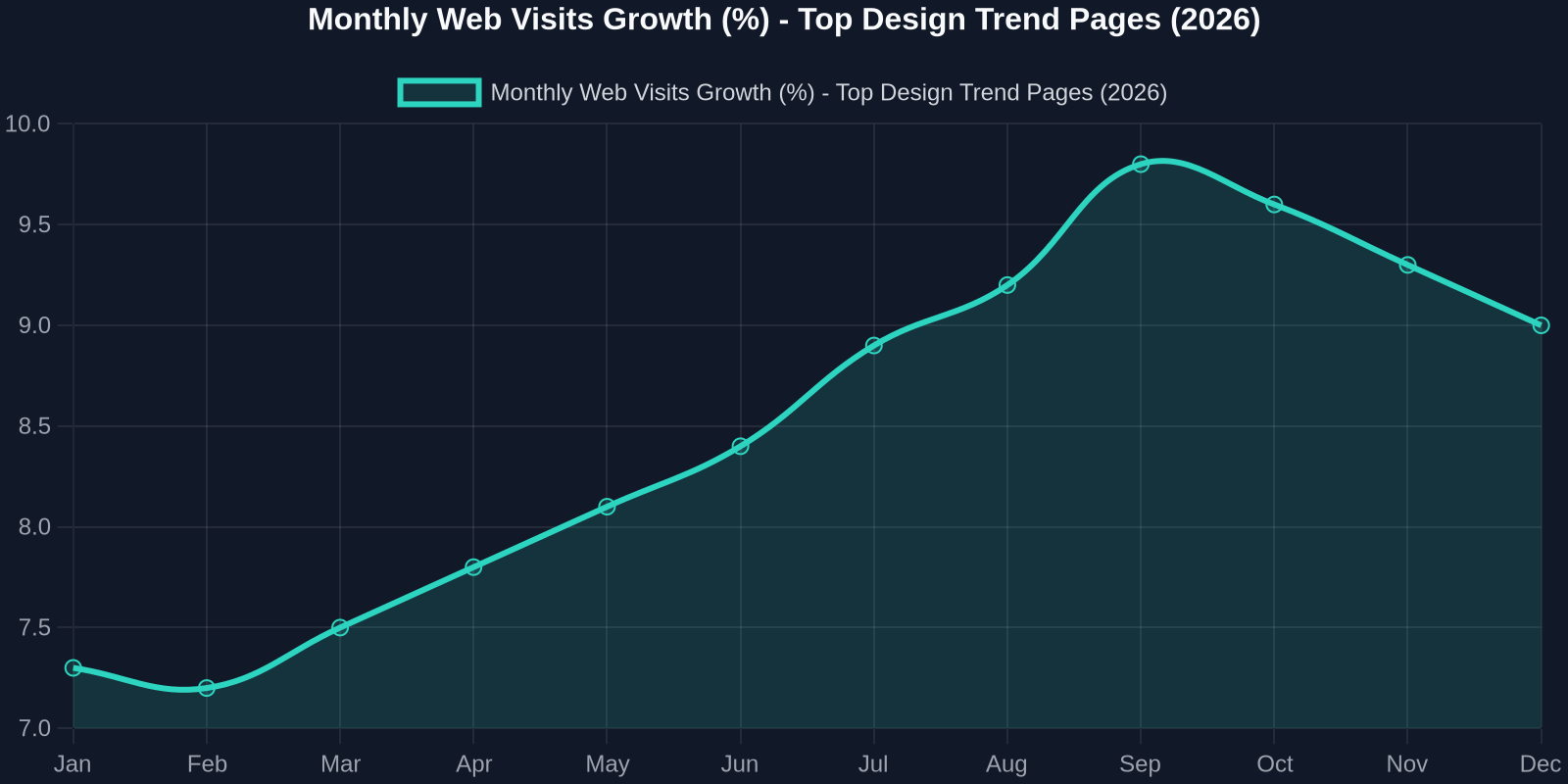
This trend is fueled by two forces: the hunger for fresh visual ideas and the desire to implement them fast. Tools like Figma inspire, but DivMagic executes. That's the winning combination in 2026.
Another way to look at it: adoption rates of specific design patterns vary widely.
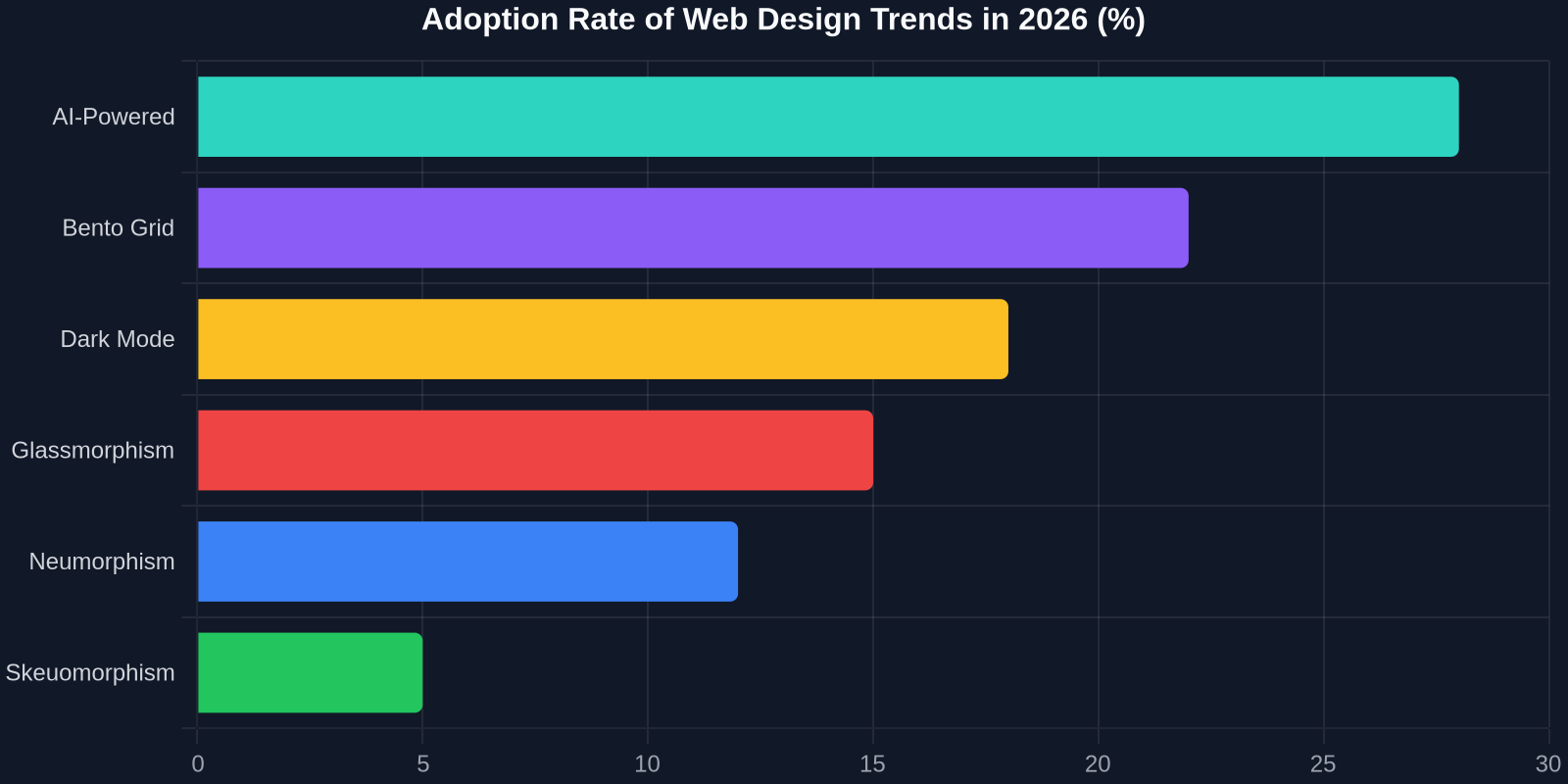
AI-powered UI leads adoption, but bento grids and dark mode remain strong. The key insight? Developers are adopting patterns that are both visually distinctive and easy to copy.
Typography-Driven Layouts: Content as Hero
Large, expressive typography is dominating hero sections in 2026. Variable fonts, kinetic type, and layered text with background blending create visual impact without heavy imagery. This trend leans heavily on CSS features like text-wrap, font-palette, and background-clip.
Here's a popular header treatment:
.hero-title font-size: clamp(3rem, 12vw, 8rem); font-weight: 900; line-height: 0.9; background: linear-gradient(135deg, #667eea, #764ba2); -webkit-background-clip: text; background-clip: text; color: transparent; text-wrap: balance;
The challenge? Getting the gradient angle, color stops, and clamp ranges to look perfect on every screen. DivMagic copies the exact CSS, including vendor prefixes and fallbacks. You just paste and refine.
How to Start Using These Trends Today
-
Install DivMagic Get the browser extension from the Chrome Web Store or Firefox Add-ons. It sits in your toolbar, ready to capture any UI element.
-
Find References Browse Figma's trend report, Dribbble, or any production site that excites you. Look for components that align with the trends above: bento grids, glassmorphism panels, adaptive themes, scroll-driven animations.
-
Copy & Integrate Hover over the element, click, and DivMagic generates the code. You get HTML, CSS, and often JavaScript. Paste it into your project and customize colors, fonts, and data. That's it.
-
Iterate with AI Use AI tools like ChatGPT or Figma's AI features to refine copy, generate new color palettes, or adapt the layout for different breakpoints. DivMagic gave you the structure; AI helps you scale it.
Conclusion
Web design in 2026 is about speed, intelligence, and personality. Trends like AI-first systems, bento grids, adaptive themes, and scroll-driven animations are redefining what's possible. But trends are useless if you can't implement them efficiently.
DivMagic gives you the superpower to copy any UI trend from any website in seconds. You stop fighting with CSS and start shipping. Stay inspired, stay fast, and always keep your design system fresh.
Visit Figma's resource library for the full trend report, and install DivMagic to start copying these patterns today.