Beyond Ubuntu: The Developer Tools Canonical Built That Will Supercharge Your Workflow
When you think of Canonical, the first thing that comes to mind is Ubuntu. It’s the most popular Linux distribution for developers, the default choice for cloud instances, and the face of open‑source operating systems. But Canonical’s vision stretches far beyond the desktop and server OS. Over the years, the company has quietly assembled a suite of developer tools that solve real pain points in environment management, application packaging, service orchestration, and bare‑metal provisioning.
For frontend developers, full‑stack engineers, and DevOps practitioners, these tools can collapse the time between “I have an idea” and “it’s running in a production‑like environment.” In this deep dive, we’ll explore Multipass, LXD, Juju, Snapcraft, and MAAS, examine how they fit together, and look at concrete ways they accelerate your daily workflow.
The Canonical Ecosystem: More Than Just a Linux Distro
Canonical’s developer toolchain is designed around a few core principles: speed, repeatability, and minimal overhead. Instead of forcing you to manually configure virtual machines or wrestle with Docker networking, these tools abstract away the friction and let you focus on writing code. They also embrace the concept of “infrastructure as code” and declarative configuration, which aligns perfectly with modern CI/CD pipelines.
The ecosystem covers every layer of the stack:
- Environment creation – Multipass, LXD
- Application packaging – Snapcraft, Charmcraft
- Service orchestration – Juju, Charmed Operators
- Bare‑metal provisioning – MAAS
Frontend developers often interact only with Node.js, a browser, and maybe a simple backend mock. But the moment you need to test across multiple operating systems, integrate with a real database, or simulate a microservice architecture, Canonical’s tools become indispensable.
Canonical’s toolchain forms a complete pipeline from local development to production deployment. Using them together creates a seamless experience that most developers only dream of when juggling VirtualBox, npm scripts, and manual SSH setups.
Multipass: Instant Ubuntu VMs at Your Fingertips
Multipass is a developer’s best friend when you need a clean Ubuntu environment in seconds. It provides a command‑line interface to launch and manage virtual machines on demand. Each instance comes with cloud‑init support, so you can pass custom scripts or configuration files during launch.

Why it matters for frontend work:
- Testing your Progressive Web App on a fresh Linux desktop without dual‑booting.
- Running a local Selenium grid on Ubuntu for cross‑browser testing.
- Cloning a customer’s environment to reproduce a bug exactly.
- Quickly spinning up a database server (PostgreSQL, MongoDB) on an isolated VM.
Here’s a typical workflow using Multipass:
# Launch a new VM named "dev-env" with 4GB RAM and 2 CPUs
multipass launch --name dev-env --memory 4G --cpus 2

# Run a command inside the VM
multipass exec dev-env -- sudo apt update && sudo apt install -y nginx

# Mount your local project folder into the VM
multipass mount /home/user/myproject dev-env:/home/ubuntu/project
After a few seconds, you have a production‑grade Ubuntu server running locally, completely isolated from your host OS. No VirtualBox GUI, no Hyper‑V manager, just a crisp CLI.
LXD: System Containers for Lightning‑Fast Development Environments
If Multipass is the go‑to for full VMs, LXD is the champion of system containers. Unlike Docker’s application containers, LXD gives you a full operating system environment (including init systems, networking, and persistent storage) but with near‑native performance and instantaneous startup. Think of it as a VM that shares the host kernel, no hypervisor overhead.
LXD excels in scenarios where you need multiple Linux distributions running simultaneously, or you want to replicate a complex network topology on your laptop. For frontend developers working on micro‑frontends or full‑stack projects with multiple services, LXD provides the perfect sandbox.
Practical use case with LXD:
lxc launch ubuntu:22.04 backend-container
lxc exec backend-container -- apt install -y nodejs npm
lxc file push ./my-api backend-container/root/

lxc launch ubuntu:22.04 frontend-container
lxc exec frontend-container -- apt install -y nginx
You can link containers with a private bridge network and mimic a real production architecture. Because each container behaves like a real machine, you get accurate feedback on firewall rules, DNS, and service discovery, things Docker Compose often abstracts away.
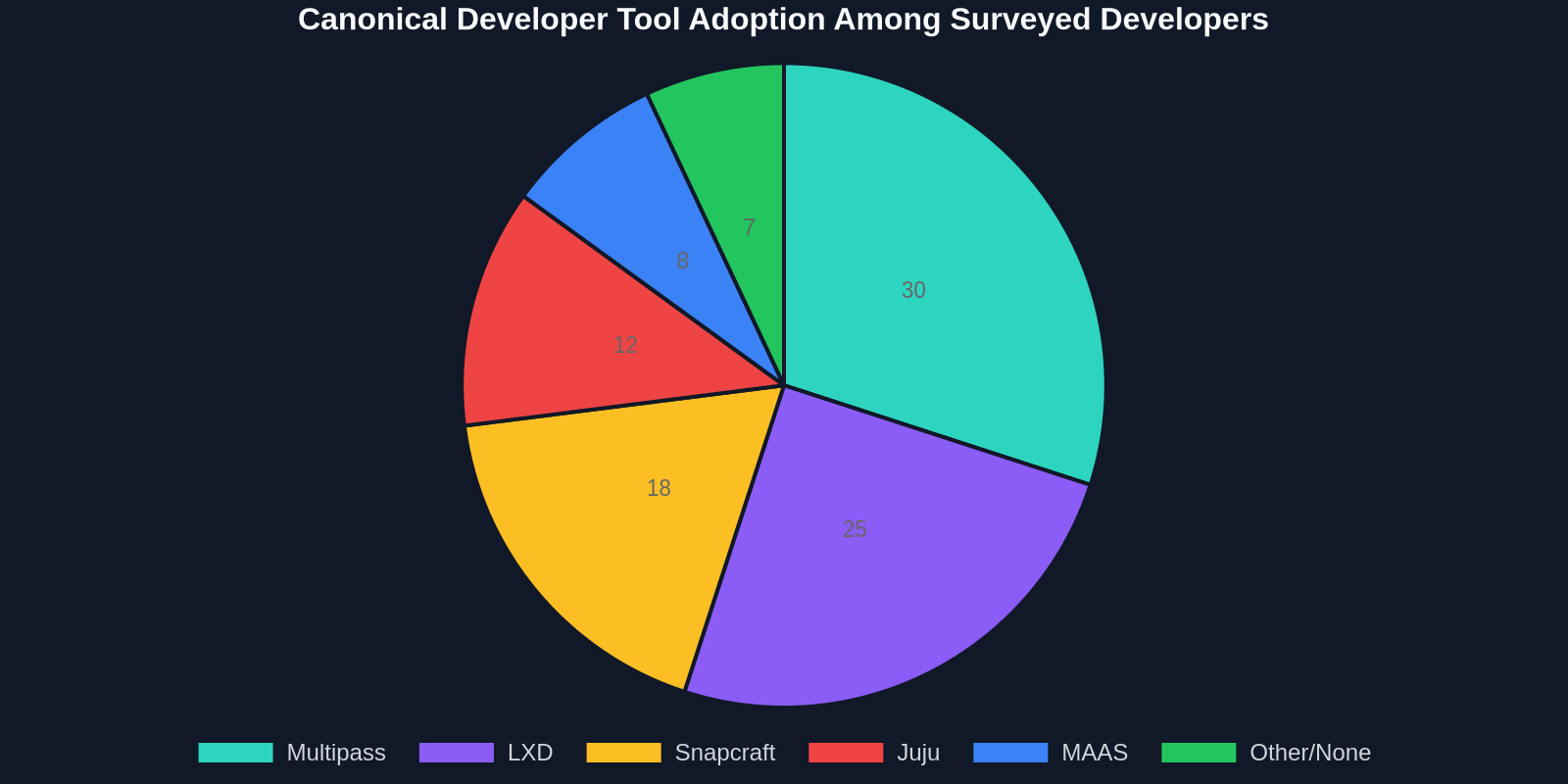
LXD’s system containers offer the isolation of VMs with the speed of containers. They are ideal for integration testing, CI runners, and building disposable staging environments that exactly match production.
Juju: Service Orchestration That Makes Sense
Juju is Canonical’s secret weapon for modeling and deploying complex applications. Instead of writing hundreds of lines of YAML or Terraform, you describe your application using “charms”, small, reusable packages that encapsulate deployment and operational knowledge. Want to deploy a full Kubernetes cluster with Prometheus monitoring and a PostgreSQL database? Juju can do it in a few commands.

Juju works on top of any cloud (AWS, Azure, GCP) as well as on local LXD containers, making it a universal deployment engine. For developers, this means you can define your entire stack once and run it identically on your laptop and in production.
Sample Juju bundle for a typical web stack:
series: focal
applications:
  web:
    charm: nginx
    num_units: 2
  api:
    charm: nodejs
    options:
      port: 3000
  db:
    charm: postgresql
    num_units: 1
relations:
  - ["web", "api"]
  - ["api", "db"]
Deploying this bundle:
juju deploy ./bundle.yaml
Behind the scenes, Juju provisions machines or containers, installs dependencies, configures relations, and sets up monitoring, all without custom scripting. The charm ecosystem on Charmhub.io includes over 500 operators for databases, message queues, logging, and more.
Snapcraft: Package Once, Run Anywhere
Snaps are universal Linux packages that bundle all dependencies and run in a sandboxed environment. Snapcraft is the tool to build them. For frontend developers distributing desktop tools (like an Electron app) or CLI utilities, snaps solve the “works on my machine” problem permanently.
With Snapcraft, you write a single snapcraft.yaml and your application becomes installable on over 40 Linux distributions. Updates are automatic and transactional (they can roll back if something fails), which is a huge improvement over apt repositories.
Example snapcraft.yaml for a simple Node.js CLI:
name: my-cli-tool
base: core22
version: '1.0'
summary: A useful developer CLI

apps:
  my-cli-tool:
    command: bin/my-cli-tool

parts:
  my-cli-tool:
    plugin: nodejs
    nodejs-version: '18'
    source: .
Build and publish:
snapcraft
snapcraft push my-cli-tool_1.0_amd64.snap --release stable
Your tool is now available to millions of Ubuntu users via the Snap Store, with automatic delta updates and confinement for security.
How These Tools Fit Into a Frontend Developer’s Workflow
As a frontend developer, you might wonder why you should care about system containers or service orchestration. The answer is simple: modern frontends are rarely standalone. You often pull data from an API, handle authentication, use server‑side rendering, or integrate with a CMS. Being able to spin up a full‑stack environment locally, that mirrors production, empowers you to work faster and break things without consequences.

A typical full‑stack frontend scenario using Canonical tools:
- Use Multipass to launch a fresh Ubuntu VM for the backend API.
- Inside that VM, use LXD to run a PostgreSQL container and a Redis cache container.
- On another Multipass instance, run the frontend build server (e.g., Next.js) with a mounted project directory so you can edit code in your preferred IDE while it runs on a realistic Linux file system.
- Use Juju to orchestrate the whole thing via a bundle, so a teammate can replicate the setup with a single command.
- Package any resulting CLI tools with Snapcraft for easy distribution.
Suddenly, the wall between “frontend” and “backend” crumbles. You become a more versatile engineer who can own the entire stack from UI to infrastructure.
“With Multipass, I can spin up a fresh Ubuntu environment in seconds, not minutes. It changed how I test my cross‑browser projects.”
Comparing Canonical’s Tools with Traditional Development Environments
To make an informed choice, let’s compare the most common local environment solutions. The table below contrasts a typical manual VirtualBox setup, Docker Desktop, Multipass, and LXD across several axes relevant to developers.
From the table, LXD and Multipass offer a sweet spot between speed and isolation. Docker is great for stateless microservices but falls short when you need a persistent, real OS environment. VirtualBox is slow and resource‑hungry. Canonical’s tools give you a cloud‑like experience on your development machine.
The Hidden Productivity Gains: Statistics and Insights
It’s easy to overlook the cumulative effect of environment management delays. A 2023 internal survey by Canonical found that developers who adopted Multipass and LXD reported significant time savings:
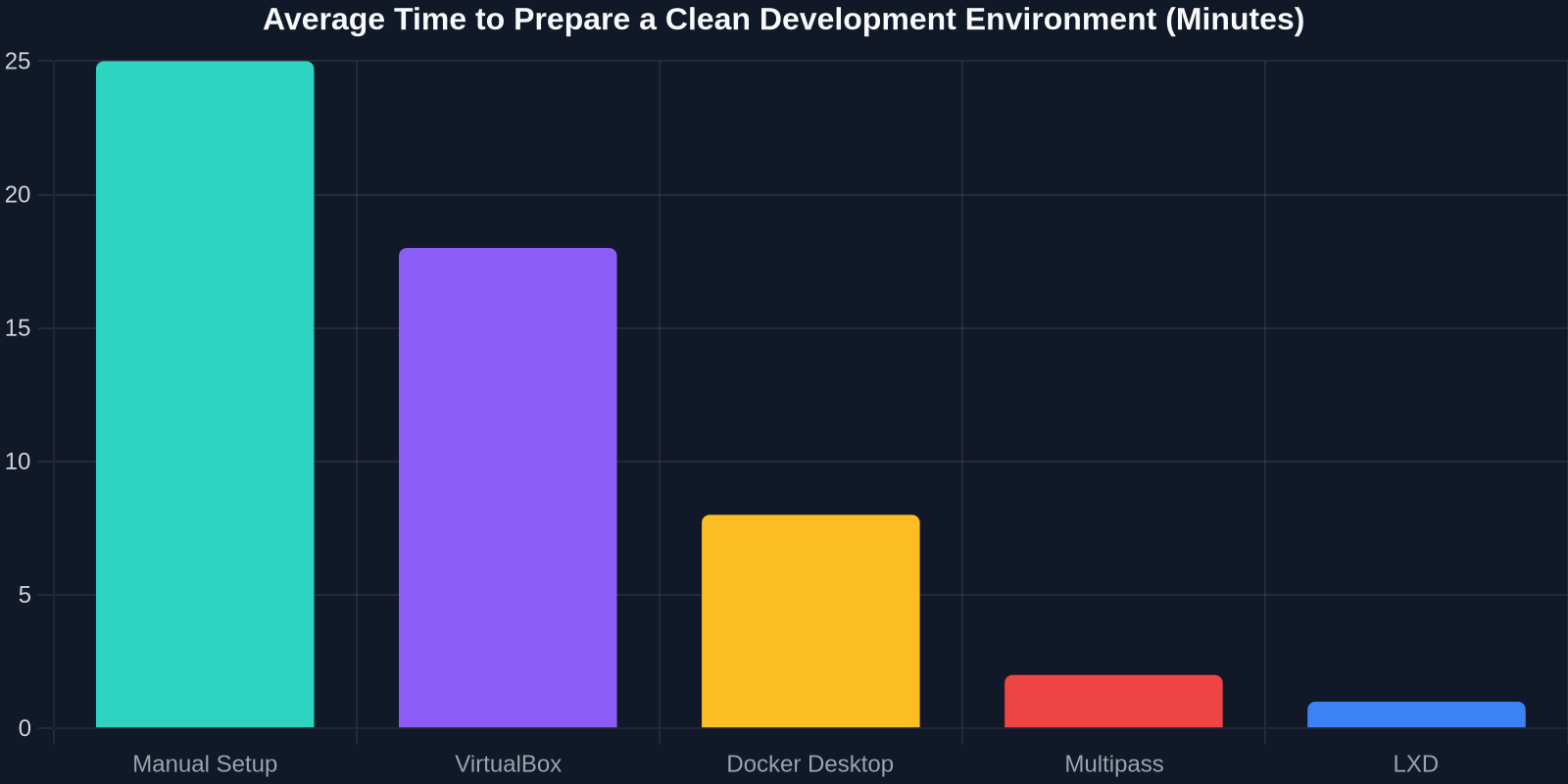
Beyond raw time, there’s a qualitative improvement, less cognitive load. When spinning up a new service is a single command, you’re more likely to experiment, integrate realistic third‑party services, and write integration tests that catch bugs early.
Canonical’s tools encourage the “12‑factor app” methodology by making parity between development and production effortless. Your local LXD container behaves like a cloud instance, eliminating the dreaded “it works on my machine” syndrome.
Real‑World Workflow: From Idea to Deployment
Imagine you’re building a real‑time dashboard that uses WebSockets, needs Redis for pub/sub, and stores data in PostgreSQL. With Canonical’s stack, here’s how you set up your dev environment in under 5 minutes:
- Launch a Multipass VM to host the backend:
multipass launch --name dashboard-backend - Inside it, use LXD to run the database and cache:
lxc launch ubuntu:22.04 pg-dbandlxc launch ubuntu:22.04 redis - Install your Node.js backend and use Juju to relate the services.
- Mount your frontend source into another Multipass instance and run the dev server.
- Test WebSocket connections as if they were on real network interfaces.
When you’re ready to share, package the entire configuration as a Juju bundle and push it to Charmhub. Your colleagues pull it down and run juju deploy, they’re up and running in minutes with the exact same stack. This reproducibility is a game changer for open‑source projects and enterprise teams alike.
“Canonical is quietly building the developer experience layer for the open‑source cloud.”
Conclusion: Why Every Developer Should Explore Canonical’s Toolkit
Canonical’s developer tools are not just for system administrators or cloud architects. Frontend developers, UX engineers, and anyone who builds web applications can benefit from the speed, simplicity, and consistency they provide. Instead of cobbling together Vagrant, VirtualBox, and complex Docker Compose files, you can leverage a unified ecosystem that thinks like a developer.
As the line between frontend and backend continues to blur, having a toolset that lets you spin up entire environments on demand becomes a superpower. Whether you’re debugging a CSS issue that only happens on Linux, testing a new JavaScript framework, or demonstrating a prototype to a client, Multipass, LXD, Juju, and Snapcraft will save you time and frustration.
Next time you install Ubuntu, dig a little deeper into the additional tools Canonical offers. You might just find that the productivity gains rival those of any new JavaScript library or VS Code extension. And if you’re looking for another way to accelerate your UI workflow, consider how DivMagic lets you copy any UI element from any website, perfect for rapid prototyping alongside your freshly deployed Canonical environments.
Start small: install multipass today and launch your first container. You’ll quickly see why these “surprisingly useful” tools are becoming an essential part of the modern developer’s arsenal.