Justice for CSS: Why the Web's Most Misunderstood Language Deserves Respect
For decades, CSS has been the punchline of web development jokes. Developers love to hate it: the cascade that cascades too far, the specificity wars, the endless battle to center a div. But beneath the frustration lies a sophisticated, declarative language that powers the visual web. In 2025, it's time we gave CSS the justice it deserves, and recognized the tools that make it not just bearable, but genuinely powerful.
At DivMagic, we see CSS differently. Our browser extension lets you copy any UI from any website, automatically extracting the exact CSS rules that bring a design to life. But before we dive into that, let's set the record straight on why CSS matters, how far it has come, and where the real bottlenecks lie for frontend developers.
The Underdog Story of CSS
CSS was born in 1996, a simple way to add fonts and colors to HTML. Over nearly three decades, it has evolved into a full-featured styling language capable of complex animations, adaptive layouts, and design systems that rival native applications. Yet the perception persists: CSS is “not real programming,” something junior developers can pick up in a weekend.
That “simple” language now includes features like CSS Grid, Flexbox, custom properties, logical properties, container queries, and even native nesting. A modern CSS codebase can be as intricate as any JavaScript framework, and just as prone to bugs when mishandled.
From Hacks to Standards
Early CSS required tricks: floats for layout, inline-block hacks, and the infamous clearfix. Today, Flexbox and Grid have made those hacks obsolete, but many developers still carry the trauma of the old ways. The Wired article “Justice for CSS” argues that the language deserves recognition for its elegance and power, not derision for its quirks. We agree.
CSS is not a bug. It's the most expressive styling language ever created.
The real problem isn't CSS itself, it's the workflow. Developers often spend hours manually inspecting and copying styles from a design tool or a competitor's site. That's where automation changes everything.
Why Developers Still Struggle with CSS
Despite its advancements, CSS remains a source of frustration. Let's break down the core pain points.

The Cascade and Specificity
The cascade is both CSS's greatest strength and its greatest confusion. When multiple rules target the same element, the browser uses specificity to decide which wins. For newcomers, this can feel unpredictable.
Layout and Responsiveness
Creating a layout that works across every screen size is a constant challenge. Flexbox and Grid help, but the learning curve is steep. Responsive design often requires media queries, fluid typography, and careful testing on real devices.
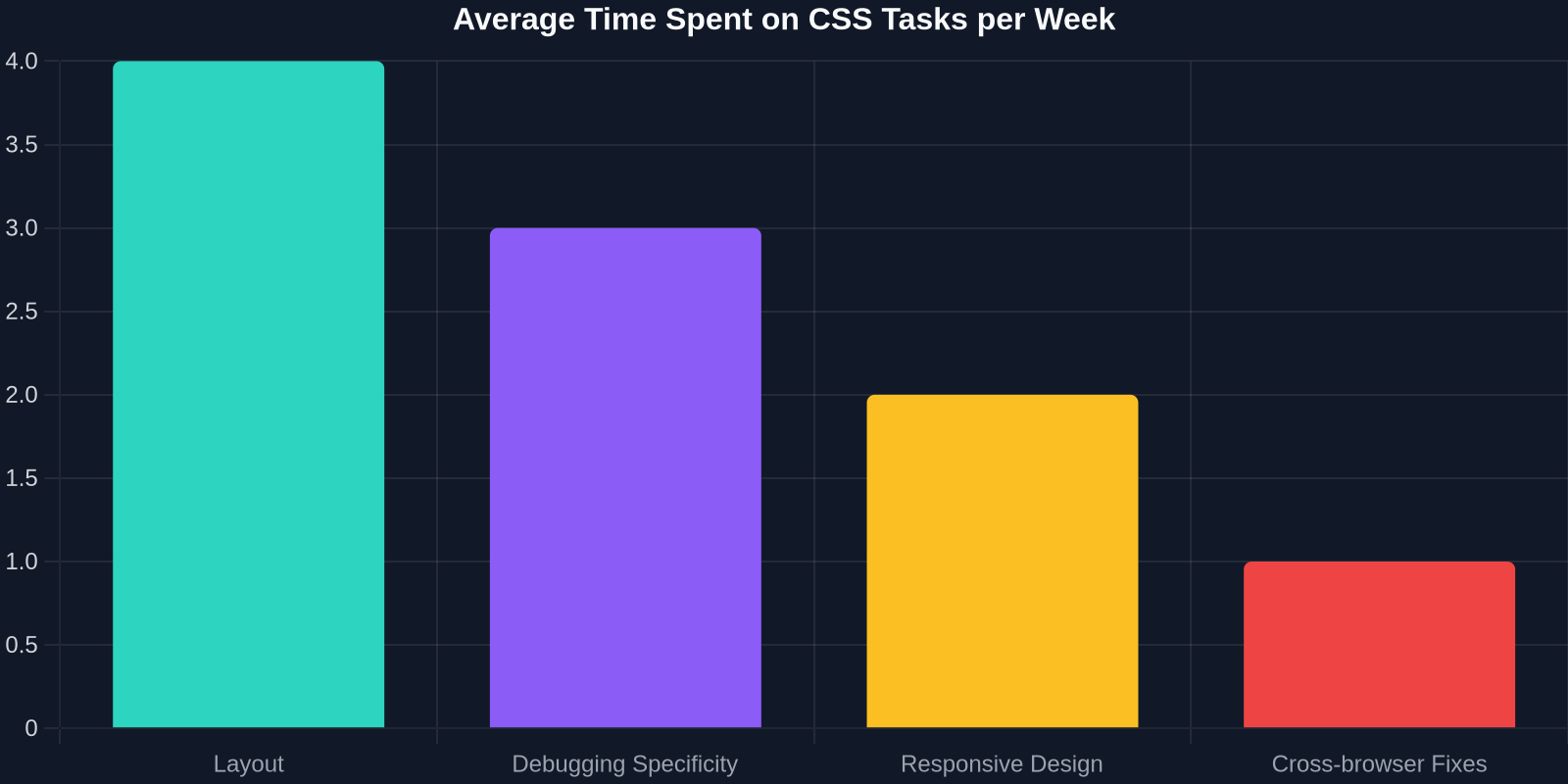
The chart above shows where frontend developers spend the most time on CSS tasks. Layout consistently tops the list, followed by debugging specificity issues and fine-tuning responsive behavior.
Cross-browser Compatibility
Each browser renders CSS slightly differently. While modern browsers have converged significantly, legacy support (cough, Internet Explorer, cough) still haunts many projects. Prefixes and fallbacks add yet another layer of complexity.
Design Handoff Friction
Even when a designer hands off a perfect Figma file, translating that into pixel-perfect CSS is tedious. Developers must manually measure dimensions, extract colors, and infer spacing rules. This process is error-prone and time-consuming.
Modern CSS Features That Deserve Justice
CSS has quietly become a powerhouse. Here are the features that prove it's a real language worthy of respect, and that developers should embrace.
CSS Grid: Full two-dimensional layout control, with intuitive placement and alignment.
Flexbox: One-dimensional layout that solved the vertical centering problem forever.
Custom Properties (CSS Variables): Dynamic values that can be changed at runtime, enabling themes and design tokens.
Container Queries: Style elements based on their parent container's size, not just the viewport.
CSS Nesting: Native nesting rules that reduce repetitive selectors (now supported in all major browsers).
Logical Properties: Writing-mode-agnostic properties like margin-inline-start for internationalization.
Subgrid: Inherit grid tracks from parent grids, simplifying complex nested layouts.
These features aren't just nice-to-haves; they represent a maturity that allows developers to build complex, maintainable design systems entirely in CSS. The adoption rates, however, lag behind their potential.
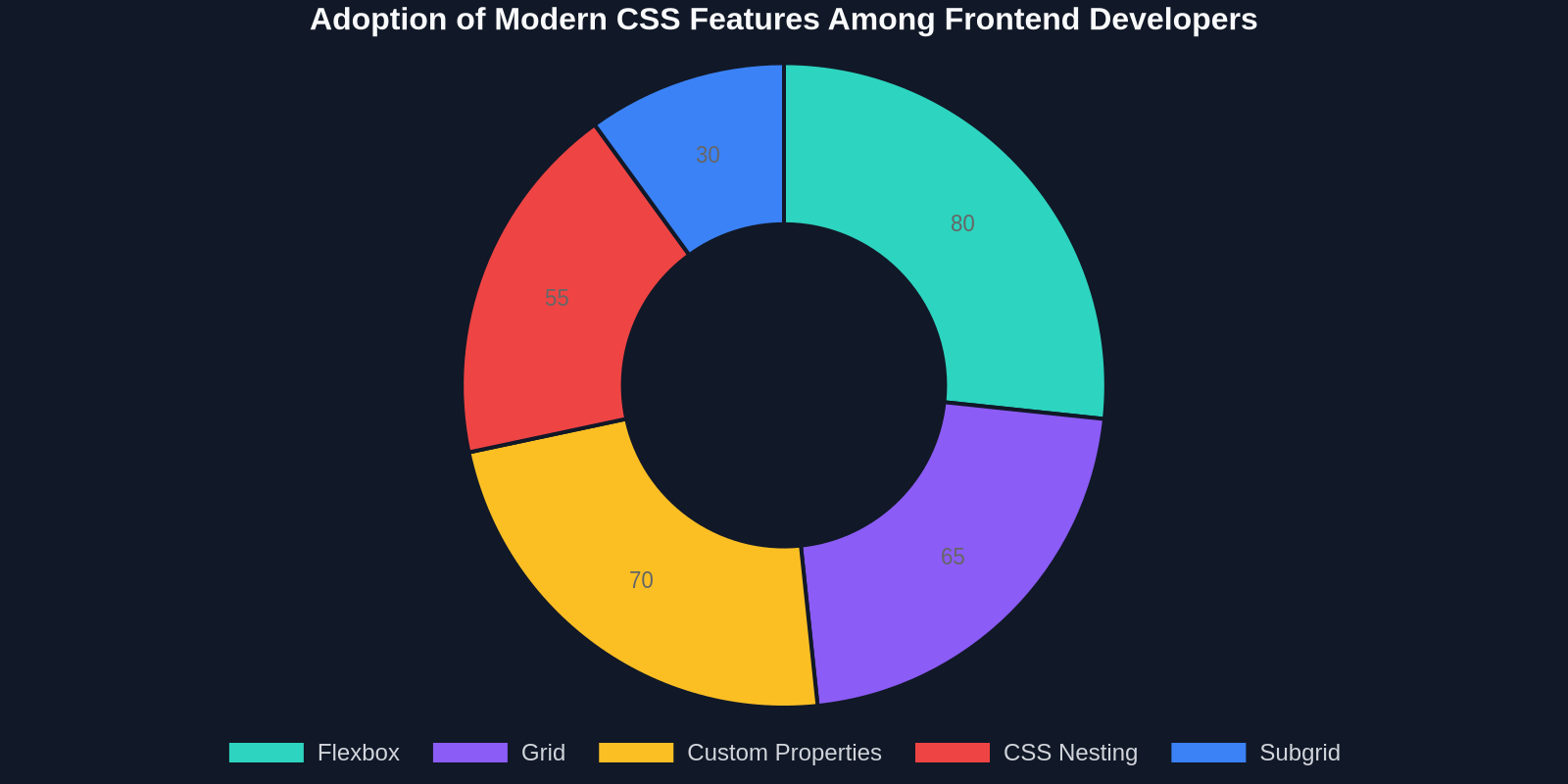
Flexbox and custom properties lead the way, but features like subgrid and even Grid itself are underutilized. Why? Often because legacy codebases or team knowledge gaps prevent adoption. But when developers can copy a working implementation from an existing site, they learn faster and adopt modern techniques more readily.
The Hidden Cost of Manual UI Copying
Let's face reality: in the daily grind of frontend development, a huge amount of time is spent not on creating new designs, but on replicating existing ones. Whether it's rebuilding a component from a mockup, matching a client's existing brand site, or simply borrowing a great layout for inspiration, manual CSS extraction is a bottleneck.

| Approach | Time | Quality |
|---|---|---|
| Manual CSS extraction | 1-2 hours per component | Error-prone, often missing fine details |
| Using DivMagic | Seconds per component | Pixel-perfect, includes hover states and responsive rules |
The table above compares two approaches to copying a single UI component. Manual extraction involves inspecting elements, copy-pasting HTML, identifying relevant CSS rules, and often recreating them from scratch. DivMagic automates this by analyzing the computed styles and extracting the exact CSS needed, including media queries, pseudo-classes, and custom properties.
How DivMagic Brings Justice to CSS Workflows
DivMagic is a browser extension that turns any website element into clean, production-ready CSS and HTML. Instead of fighting the cascade or manually rebuilding a button for the hundredth time, you can right-click, copy, and paste.
The Technical Magic Behind It
DivMagic doesn't just copy the inline styles. It analyzes the DOM, traces the cascade, and reconstructs the minimal set of CSS rules needed to reproduce the element. This includes:
- Computed styles: The final visual result, so you don't have to worry about specificity conflicts.
- Pseudo-classes: Hover, focus, active states are captured automatically.
- Responsive rules: Media queries that affect the element at different breakpoints.
- Custom properties: Variables are preserved when relevant, ensuring your copied component remains themeable.
- Web fonts: Font families and @import statements are detected and included.
This is CSS justice in action: instead of punishing developers for the language's complexity, we give them a tool that respects CSS's power and harnesses it.
Real-World Impact
Consider a typical frontend task: rebuilding a pricing card for a marketing page. Without automation, a developer might spend 45 minutes inspecting the original, copying styles, and adjusting for their codebase. With DivMagic, that same task takes under a minute. Multiply that across a team of five developers over a month, and the time savings are enormous.
Moreover, because the extracted CSS follows best practices (minimal selectors, no redundant rules), the copied code is cleaner and easier to maintain. This reduces the long-term technical debt that plagues many projects.
The Path Forward: Respecting CSS, Empowering Developers
CSS has earned its place. It's not a toy, not a mistake, and not something to be replaced. Even as CSS-in-JS solutions like styled-components and Emotion gained popularity, the core language remains the foundation. New frameworks like Tailwind CSS show that developers still rely on CSS primitives, they just want better ergonomics.

The future of frontend development isn't about avoiding CSS, it's about mastering it with the right tools.
By embracing modern CSS features and automating the tedious parts, developers can focus on what matters: building great user experiences. DivMagic is part of that future. We believe in a world where copying a beautiful UI is as easy as copying text, and where CSS gets the justice it has always deserved.
So the next time you curse a specificity conflict, remember: CSS isn't the enemy. It's a powerful ally, and with the right workflow, it can be your fastest path to shipping polished interfaces.
Conclusion
Justice for CSS means acknowledging its sophistication, leveraging its modern capabilities, and removing the unnecessary friction from development workflows. Whether you're a seasoned frontend engineer or a designer who dabbles in code, the tools you use shape your relationship with the language.
DivMagic turns CSS from a chore into a superpower. Copy any UI, respect the cascade, and ship faster. Try it today and see the difference for yourself.