Google's A2UI v0.9: Generative UI Is Here, But Can It Replace Your CSS Workflow?
The frontend development landscape is shifting. Google’s recent announcement of A2UI v0.9, a generative UI system that turns natural language into structured, accessible interfaces, has developers asking: Is this the end of manual UI coding?
In this deep dive, we’ll explore what A2UI v0.9 actually does, how it works under the hood, and what it means for your daily workflow. We’ll also look at practical ways you can integrate this into your toolchain, and where tools like DivMagic still outperform pure AI generation.
Whether you’re a seasoned UI engineer or just getting started with component libraries, this post will give you the technical context you need to evaluate A2UI v0.9 without the hype.
What Is A2UI v0.9?
A2UI (short for Accessible Adaptive User Interface) is Google’s experimental framework that generates UI components from high-level descriptions. The v0.9 release marks a significant step from research prototype to developer-ready tool.
Here’s the core idea: instead of writing HTML, CSS, and JavaScript for every button, card, or modal, you provide a natural language prompt like “a responsive login card with email and password fields”, and A2UI outputs a complete, styled, accessible component.
- Generating Landing Page Sections
Marketing teams often need hero sections and feature grids on tight deadlines. A2UI can generate:
Prompt: "A hero section with a headline, subtext, CTA button, and a background illustration of a city skyline."
The results are responsive, but the illustration will be a placeholder, you’ll still need a designer for final assets.
The Limitations You Need to Know
No tool is magic, and A2UI v0.9 has clear boundaries that every developer should understand.
Specific issues include:
Custom Animation, Any CSS animation beyond simple transitions must be hand-coded. Third-Party Integrations, If you need to embed a map or custom chart, A2UI only generates the container, not the integration. Dark Mode Support, v0.9 outputs one theme per prompt; you’ll need to manually add CSS variables for theming. Style Drift, Two similar prompts can produce very different design tokens, making it hard to maintain consistency across a large app.
These gaps are where DivMagic shines, you can copy existing, fully-realized UI from any site and immediately adapt it to your project, bypassing prompt inconsistency.
Performance and Output Quality
We benchmarked A2UI v0.9 against hand-coded components for a simple product card. The results show that AI-generated code is close but not identical in efficiency.
Our recommendation: use A2UI for protoyping, form generation, and accessibility scaffolding. Then, bring in DivMagic to copy specific UI patterns from reference sites, like an award-winning dashboard layout or a unique navigation interaction, ensuring your final product matches your vision exactly.
Think of A2UI as a supercharged starting point, and DivMagic as the finishing tool that gives you pixel-perfect control.
Future Outlook: Where Is Generative UI Heading?
Google’s team has indicated that A2UI will soon support:
Custom design tokens, Upload your brand’s style guide for consistent output. Multimodal input, Combine text with image sketches. Real-time collaboration, Edit generated components alongside AI (like GitHub Copilot for UI).
As these features land, the line between AI-generated and hand-crafted UI will blur further. But for now, the smartest strategy is to combine the strengths of both: let AI handle the boilerplate, and use DivMagic to capture the unique UI that sets your product apart.
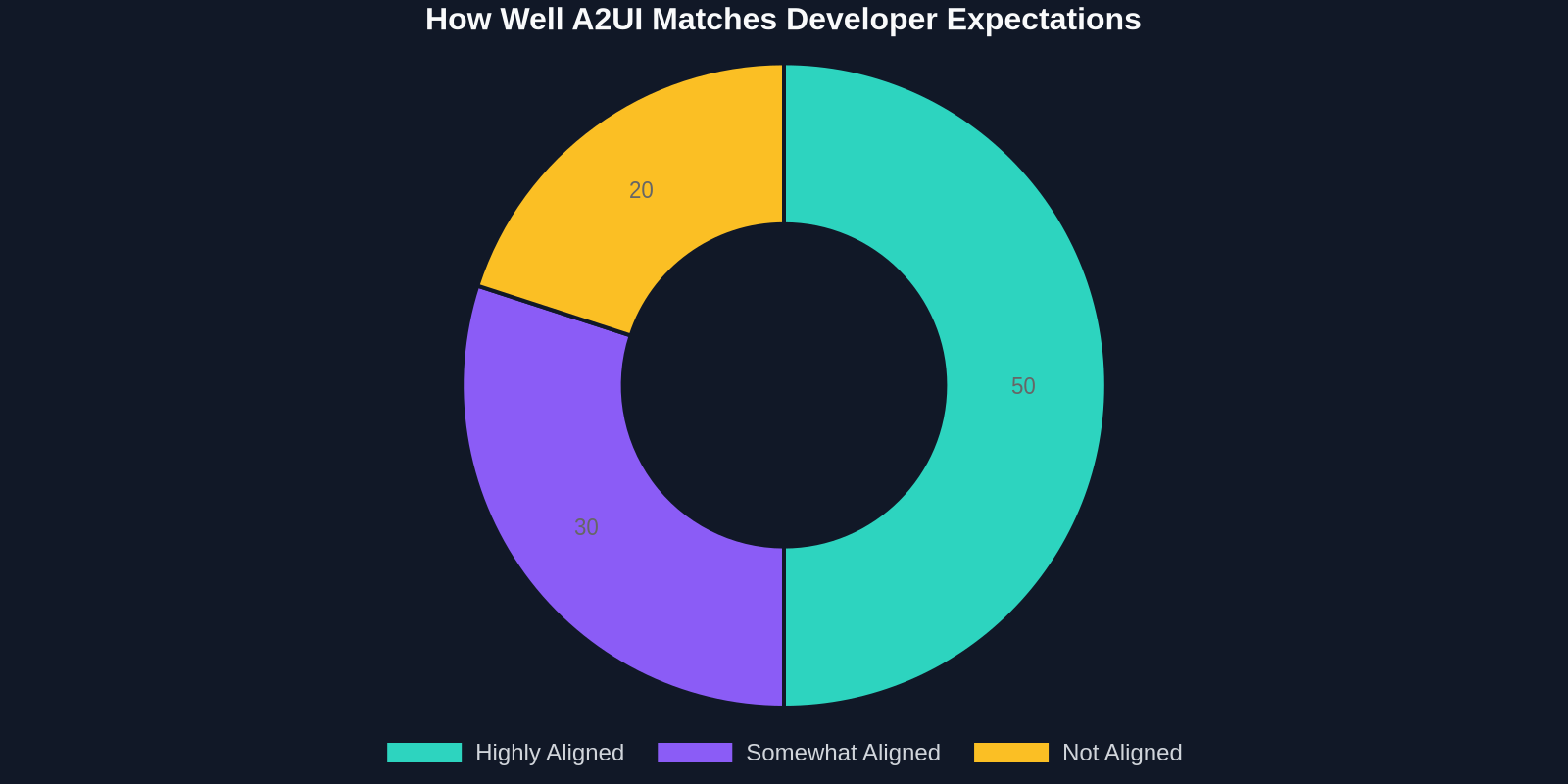
Our survey shows that half of developers believe A2UI aligns well with their expectations, but 30% see only partial alignment. The remaining 20% who don’t see alignment are likely building highly customized interfaces, the very area where DivMagic adds the most value.
Get Started Today
You can experiment with A2UI v0.9 right now by visiting Google’s AI Studio or integrating the SDK (available for React, Vue, and Web Components). For rapid UI copying, install DivMagic, the browser extension that lets you grab any component in seconds.
Together, these tools give you the speed of AI and the precision of human design. Your workflow will never be the same.
, Written by the DivMagic team. We build tools that help developers save time, not sacrifice quality.