Claude Design by Anthropic Labs: What Frontend Developers Need to Know
Anthropic Labs has quietly released Claude Design, a new set of capabilities that turns natural language prompts into UI mockups, design specs, and frontend components. For developers who already use tools like DivMagic to copy pixel-perfect UI from live websites, this announcement raises an important question: can AI-generated design actually ship production-ready code, or is it just another pretty prototype? This deep dive explores what Claude Design is, how it works under the hood, where it falls short, and, most importantly, how to combine it with existing UI extraction workflows to ship interfaces dramatically faster.
What Is Claude Design?
Claude Design appears to be Anthropic's answer to the growing demand for design-to-code automation. Built on the same reasoning and coding strengths that power Claude Code and Artifacts, Claude Design lets you describe a user interface in plain English, for example, “a pricing section with three tiers, a highlighted middle plan, and a soft gradient background”, and receive a structured layout, component recommendations, and code snippets in HTML, Tailwind, React, or Vue.
Based on Anthropic's announcement, Claude Design is not a standalone design tool like Figma or Sketch. Instead, it lives inside Claude itself, generating UI artifacts as part of a conversational workflow. You can ask for a landing page hero, iterate on spacing, request a dark mode variant, and then copy the output directly into your project. This tight coupling with Claude's reasoning engine is what makes it feel less like a template generator and more like a design partner.
Key Capabilities of Claude Design
- Prompt-to-mockup generation: describe layout, components, spacing, and color palette in one message.
- Responsive variants: specify breakpoints and receive mobile, tablet, and desktop outputs without duplicating markup.
- Design token extraction: derive colors, typography, shadows, and radii from a natural language brief.
- Component and code output: generate semantic HTML, CSS, Tailwind classes, or React/Vue components.
- Iterative refinement: use follow-up prompts to adjust padding, alignment, hover states, and accessibility attributes.
- Integration with Claude Code and Artifacts: stay inside the same environment developers already use for generating and reviewing code.
Why This Matters for Frontend Developers
Frontend developers have always spent a disproportionate amount of time on UI implementation. Recreating existing designs, tweaking CSS for browser quirks, and manually translating Figma mockups into code can consume half of a sprint. Claude Design promises to compress the first stage, drafting and iterating on a visual layout, from hours to minutes.
But it's essential to separate prototyping speed from production readiness. A generated mockup may look polished in a preview, yet still need to be wired to real data, validated for accessibility, and aligned with your team's established design tokens. The most effective developers in 2026 will use AI to remove the boring parts of UI work, not to replace design judgment or code quality standards.
From Prompt to Prototype in Minutes
Imagine you need a dashboard card with a revenue metric, a small line chart, and a percentage change indicator. With Claude Design, you can type:
“Create a dashboard stat card with a revenue label, a large bold number, a 12-week sparkline, and a green percentage change badge. Use a modern SaaS style with a subtle border and shadow.”
Within seconds, you get a working HTML/CSS/JSX snippet. You can then refine: “Make the card rounded-xl, increase padding to 24px, add focus ring to the sparkline, and ensure the percentage badge has aria-live.” The model iterates conversationally, exactly like a pair programmer.
However, generating a mockup is only the first 20% of UI development. The remaining 80% is matching your production design system, handling real data states, ensuring keyboard navigation, and making the code maintainable across teams.
Claude Design vs. Manual UI Development vs. DivMagic
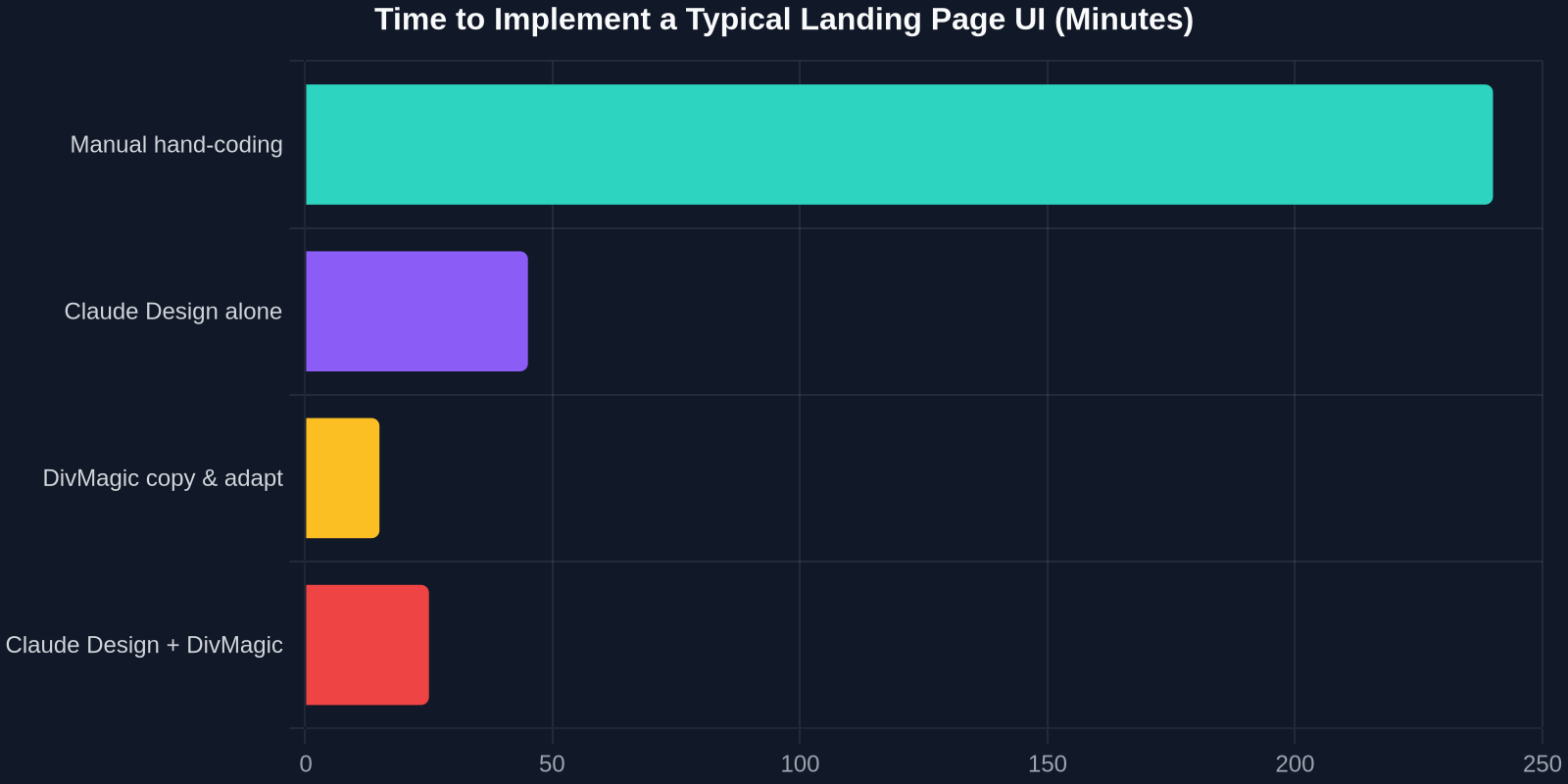
Before you adopt any new tool, it helps to compare it against the alternatives. The table below breaks down three common approaches to building a typical UI component, a pricing card, a dashboard feature, or a landing page section, across time, production readiness, and design fidelity.
| Approach | Time to Production | Fidelity & Control |
|---|---|---|
| Manual hand-coding | 4–6 hours | High, full control but slow |
| Claude Design generation | 15–30 min | Good starting point, needs refinement |
| DivMagic copy & adapt | 5–10 min | Pixel-perfect from live UI, less creative |
| Claude Design + DivMagic | 20–40 min | Fast iteration plus production fidelity |
Manual hand-coding gives you maximum control but is slow and error-prone for repetitive components. Claude Design compresses the ideation phase but produces generic output that must be adapted. DivMagic excels at copying existing UI with exact CSS and layout, but it doesn't invent new designs. The hybrid workflow, generate with Claude Design, then extract and merge real UI details with DivMagic, offers the best of both.
How Claude Design Works Under the Hood
Anthropic has not released full technical details, but the workflow appears to rely on Claude's ability to reason about visual hierarchy, design tokens, and component libraries. When you describe a UI, the model generates structured JSON or code that represents a component tree. It can infer styling from natural language, similar to how Claude Code generates functions, but specifically tuned for frontend structure.
Prompt-to-Component Generation
A prompt like “Create a login card with email and password fields, a submit button, a link to reset password, and a social login divider” returns HTML with Tailwind classes or CSS modules, depending on your preference. You can then ask for accessibility improvements: “Add focus states, aria labels, and error messages for empty fields.” The model understands semantic roles and can produce compliant markup.
Design Tokens and Theming
One of the most powerful features is the ability to define a theme once and apply it consistently across multiple components. You might say: “Use a primary color of #4F46E5, font Inter, and an 8px spacing scale,” and Claude Design will produce CSS variables or Tailwind config snippets that reflect that system. This reduces the inconsistency that typically creeps in when multiple developers hand-code components from scratch.
Integration with Claude Code and Artifacts
Because Anthropic Labs builds on existing Claude infrastructure, you can create an Artifact, request a design revision, and copy the code, all within the same interface. Developers using Claude Code can ask for a component directly in their terminal and save it to the project without switching contexts. This tight loop is what makes Claude Design compelling for frontend teams already invested in the Anthropic ecosystem.
The Real Bottleneck: From Design to Production Code
Generating a pretty mockup is easy. Shipping pixel-perfect, responsive, accessible UI that matches your existing codebase is the hard part.
The gap between a generated mockup and production code is where many AI design tools stumble. Claude Design can produce beautiful static components, but it does not automatically know your existing design tokens, your team's accessibility standards, or the specific micro-interactions already live on your site. That contextual knowledge still lives in your codebase, your design system documentation, and, critically, in the live websites you already use as references.
This is exactly where DivMagic complements Claude Design. DivMagic is a browser extension that copies any UI from any website, including the exact CSS, layout, images, and even SVG assets, so you can paste it into your project. While Claude Design invents from prompts, DivMagic captures from reality. Together, they cover both ends of the UI development spectrum: creation and extraction.
Practical Workflows: Combining Claude Design with DivMagic
Let's walk through three concrete workflows that show how these tools complement each other in real projects.
Workflow 1: Generate → Refine → Copy
- Start with Claude Design to create a concept for a pricing section or hero area.
- Iterate on layout, spacing, and typography until the rough structure feels right.
- Open DivMagic and navigate to a reference site, your own production app or a competitor's page with a proven pattern.
- Copy the exact section with DivMagic and paste it into your codebase.
- Use Claude Design to adapt the copied markup: change colors, remove elements, add a new tier, or adjust breakpoints.
This workflow is ideal when you need both novelty and fidelity. Claude Design supplies the creative jump, while DivMagic ensures the final markup is based on real, production-tested CSS.
Workflow 2: Reuse Existing UI Patterns
When you need a common pattern, a navbar, footer, product card, or pricing modal, don't generate from scratch. Instead:
- Use DivMagic to copy that pattern from a live site you admire.
- Paste the copied HTML/CSS into your project.
- Use Claude Design to adapt it: “Change the colors to match our brand, add a dropdown menu, make it sticky, and convert the button to a ghost style.”
This approach reduces the time spent on reinventing UI patterns and ensures you start from proven, responsive markup. It also avoids the generic look that often results from pure AI generation.
Workflow 3: Build a Component Library
For teams building a design system, combine both tools systematically:
- Use Claude Design to define primitive components (buttons, inputs, cards) from your brand tokens.
- Use DivMagic to inspect and copy interactions from existing products, then integrate those details into your components.
- Validate the output against a live environment to catch edge cases like focus rings, hover transitions, and responsive breakpoints.
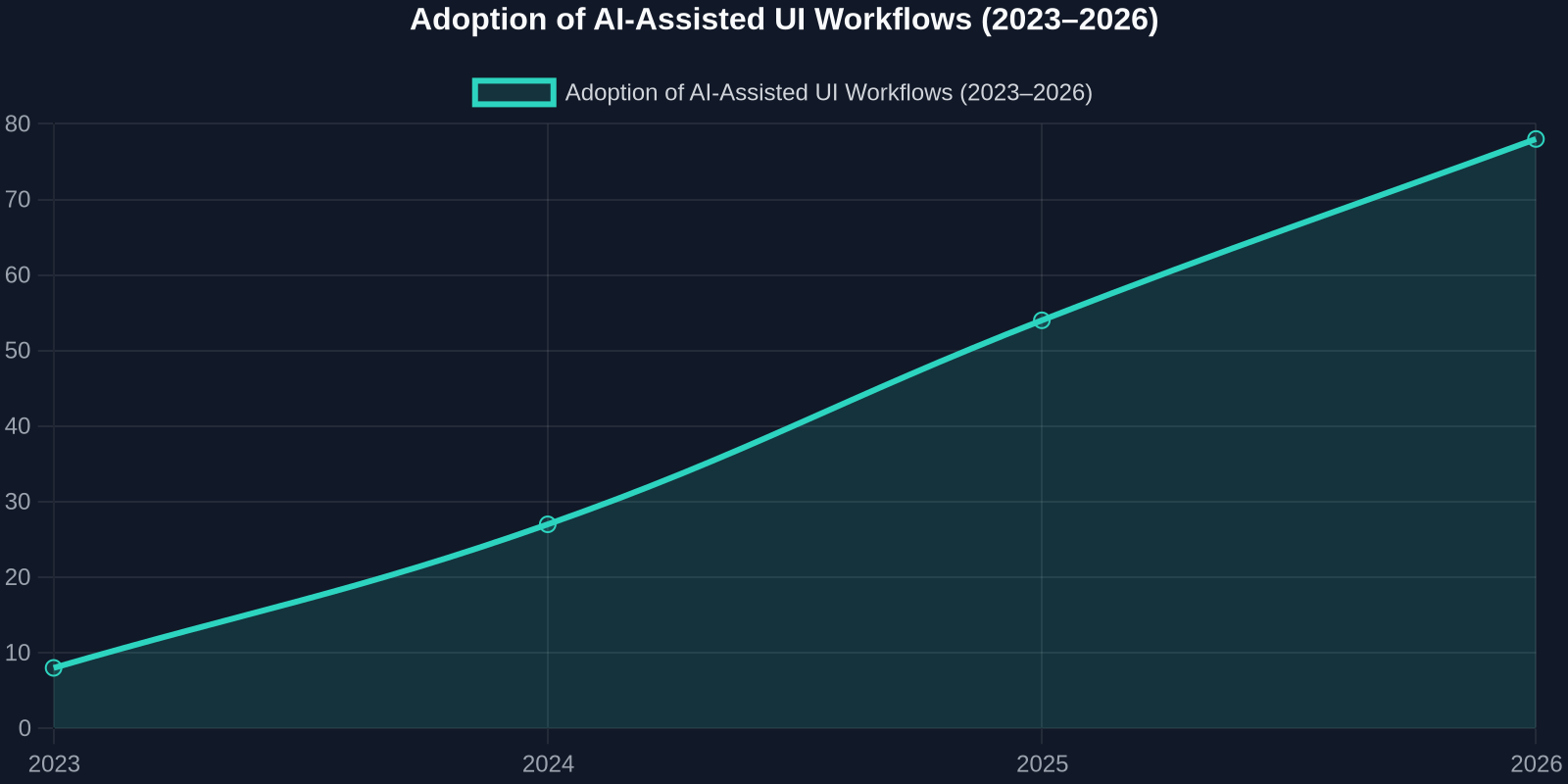
Each of these workflows is designed to remove friction. You are not replacing your design skills; you are offloading the repetitive extraction and generation tasks to tools that handle them in seconds.
What About Design Quality and Fidelity?
AI-generated UI has advanced rapidly, but it still struggles with nuanced design details, kerning, hover states, layered shadows, and responsive breakpoints that feel natural rather than formulaic. Claude Design mitigates some of this through iterative refinement, but it remains an assistant, not a replacement for design judgment.
The quality of Claude Design output depends heavily on the specificity of your prompts. Vague prompts produce generic UI; detailed prompts with brand tokens, spacing scales, and accessibility requirements produce much better results. Frontend developers should treat prompt engineering as a core skill, just as they already treat CSS architecture and state management.
SEO and Discoverability: A New Frontier for UI Content
As AI models like Claude become a source of information for developers, the way UI content is structured matters more than ever. Anthropic's guidance on ranking in Claude emphasizes clear, structured, and authoritative content. This has a direct implication for UI documentation: well-organized component examples, design token references, and code snippets are increasingly discoverable by AI assistants.
For DivMagic users, this means capturing and exporting UI with clean, semantic class names, comments, and consistent naming conventions can improve how that UI appears in AI-generated recommendations. The same principles that help rank in Claude, clear headings, structured data, and precise language, also apply to the UI you build and share.
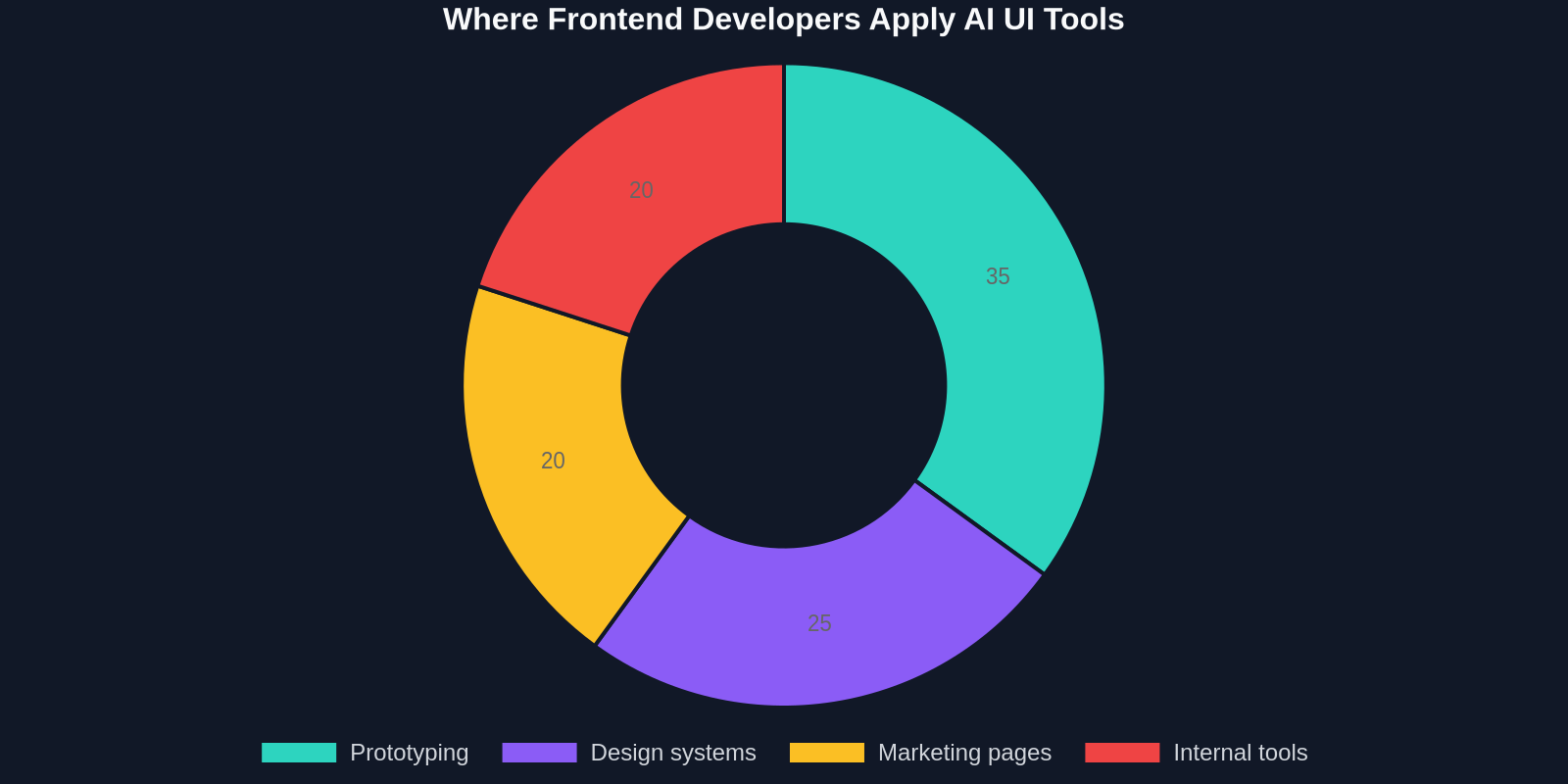
If you are building a component library or publishing design system documentation, structure it so AI can parse it. Use semantic HTML, provide code examples in multiple frameworks, and document accessibility behavior explicitly. This not only improves your AI discoverability but also makes your UI easier for both humans and machines to consume.
Limitations and What to Watch For
While Claude Design is promising, keep these limitations in mind as you evaluate it for your team:
- It generates static components; complex interactions like drag-and-drop, real-time collaboration, or animated transitions still require custom JavaScript and event handlers.
- It does not automatically inherit your existing design system unless you explicitly define tokens and constraints.
- It may produce generic aesthetics that need manual refinement to stand out from AI-generated templates elsewhere on the web.
- It is currently an Anthropic Labs release, meaning features may change, be gated, or require specific Claude plans.
Conclusion: The Future of UI Development Is Hybrid
Claude Design represents a meaningful step forward in AI-assisted UI creation. It makes it easy to go from a prompt to a polished mockup, iterate quickly, and export code. But frontend development is not just about drawing rectangles; it's about building interfaces that match real production environments, respond to real data, and reflect a brand's unique design language.
The developers who win in 2026 will treat AI as a pair programmer for UI, not a replacement for precision, taste, and tooling.
That's why the smartest teams will pair Claude Design with DivMagic. Generate what doesn't exist, copy what does, and ship faster than ever before. The future of frontend work is not AI versus manual coding, it's a hybrid workflow that combines the best of both.