Texas Launches Accessible Standardized Web Design System: A New Era for Government Frontend Development
In a landmark move for digital government, the State of Texas has officially launched a standardized, accessible web design system aimed at modernizing dozens of agency websites. The initiative, first reported by StateScoop, promises to unify the sprawling online presence of Texas government entities under a single, cohesive framework that prioritizes accessibility, mobile responsiveness, and developer efficiency. For frontend developers and UI engineers working in or with the public sector, this is not just a policy update, it is a fundamental shift in how government digital services will be built and maintained.
The new design system, developed by the Texas Department of Information Resources (DIR), provides a centralized library of reusable HTML/CSS components, design tokens, and UX patterns. This means that instead of each agency building its own custom header, footer, form elements, and navigation bars from scratch, they can now plug into a vetted, WCAG 2.1 AA-compliant foundation. The result? Drastically reduced development time, fewer accessibility lawsuits, and a more consistent user experience for millions of Texans who interact with state services online.
The Fragmented Landscape Before the Design System
To understand why this launch is so significant, we need to look at the previous state of Texas government websites. Before the directive, each agency operated largely independently, often relying on outdated CMS platforms, one-off vendor designs, or internal teams with no unified visual language. The result was a digital patchwork: a health department site might use teal and serif fonts with complex multi-step forms, while the DMV offered a completely different navigation structure with clashing color palettes and varying levels of mobile support.
This fragmentation created several critical problems:
- Accessibility gaps: Without a centralized standard, many sites failed basic WCAG compliance, leaving users with disabilities unable to complete essential tasks like renewing a license or applying for benefits. In fact, a 2023 audit found that only 34% of key Texas agency sites met the minimum AA success criteria.
- Duplication of effort: Frontend teams across agencies were repeatedly solving the same UI challenges, date pickers, modals, form validation, resulting in wasted taxpayer dollars and inconsistent implementations.
- Poor user trust: Residents navigating from TWC (Workforce Commission) to TEA (Education Agency) often felt they had landed on entirely different organizations, undermining confidence in government services.
A 2024 study by the Center for Digital Government found that states with a centralized design system reduced development costs by an average of 45% and cut time-to-launch for new digital services by 60%.
The Texas DIR recognized that modern user expectations, shaped by the likes of Apple, Google, and Amazon, had finally caught up with the public sector. The solution was not merely a style guide, but a living, version-controlled design system that would evolve with technology and accessibility standards.
Key Technical Features of the Texas Design System
So what exactly does the new system offer from a developer’s perspective? Let’s dive into its core technical components.
1. A Robust Component Library
At the heart of the design system is a comprehensive library of pre-built, accessible UI components. Think of it as an open-source toolkit specific to Texas government needs, buttons, accordions, form fields, date pickers, alerts, tables, and even complex patterns like multi-step wizards for permit applications. Each component is written with semantic HTML5, ARIA attributes baked-in, and progressive enhancement in mind. Developers can pull these components directly into React, Vue, or vanilla JS projects via a dedicated npm package, along with corresponding CSS classes.
The component API has been designed to be intuutive, accepting props or data attributes for common customizations like `variant`, `size`, `disabled`, and `aria-label`. This allows developers to maintain consistency while still adapting to specific use cases.
2. Design Tokens and Theming
Underpinning the visual layer is a set of design tokens, variables that define color, typography, spacing, and shadows. All tokens are exported as CSS custom properties and JavaScript objects, making them framework-agnostic. For example, the primary brand blue is defined as `-ds-color-primary: #0038A8`, which cascades across all components. Agencies can even define their own limited theme overrides for departmental branding within agreed boundaries, preventing the visual chaos of the past.
3. Mobile-First and Responsive
Every pattern and component in the system is built mobile-first using Flexbox and CSS Grid. With over 62% of Texas.gov traffic now originating from smartphones, this was non-negotiable. The design system includes a responsive grid framework and utility classes for common layout tasks, ensuring that even teams with limited CSS expertise can produce fast, fluid interfaces.
4. Accessibility as a First-Class Citizen
Compliance with WCAG 2.1 AA is not an afterthought, it is the baseline. The system includes automated accessibility testing integrated into its CI/CD pipeline, meaning every pull request is checked for color contrast, keyboard navigation, and screen reader compatibility before merging. Documentation even provides live examples with VoiceOver and NVDA commentary, teaching developers not just to copy component markup but to understand the "why" behind accessible design choices.
Developers can validate their implementations against the official Accessibility Compliance Matrix, which maps each component to its relevant success criteria, making audits straightforward even for teams new to inclusive design.
5. Comprehensive Developer Experience
The DIR has gone beyond just delivering code. The design system ships with an interactive documentation site (built with Storybook) where developers can test component behavior in isolation, inspect live code snippets, and see responsive breakpoints. A CLI tool assists with scaffolding new projects using the design system, and Figma libraries ensure designers work from the same source of truth. This closes the gap between designer and developer handoffs, a friction point that has historically plagued government projects.
The Immediate Impact on Frontend Development Workflows
For the developers tasked with modernizing Texas agencys sites, this design system is more than a convenience, it’s a paradigm shift. Let’s break down exactly how it changes day-to-day work.
The time savings are immediate and dramatic. The design system eliminates the cognitive overhead of reinventing common UI patterns. A typical form-heavy internal application that might have taken a senior developer three weeks can now be scaffolded in three days, with the assurance that it will work across browsers and assistive technologies.
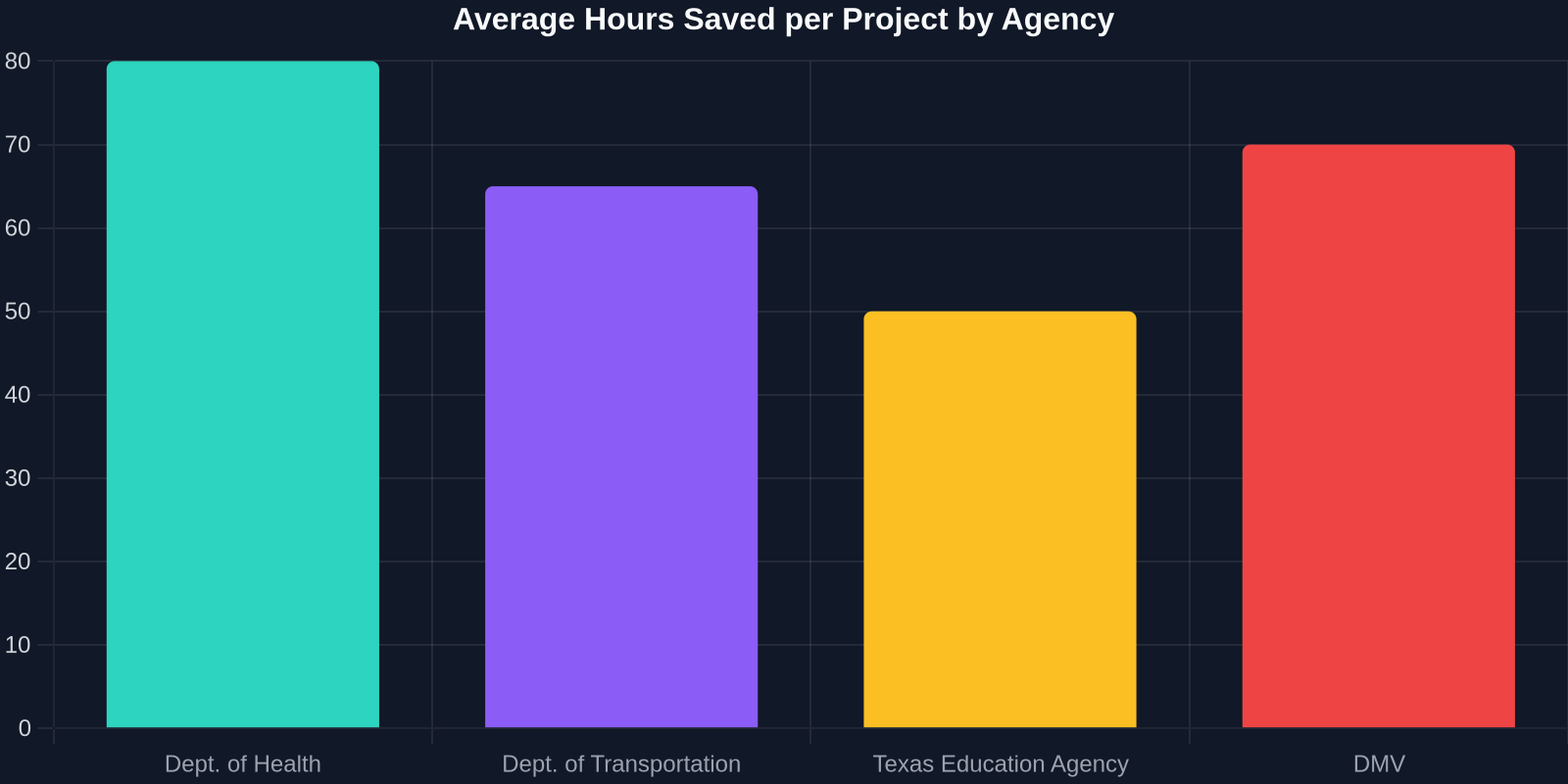
As shown above, some of the state’s most heavily used agencies are already reporting massive reductions in project hours. The Texas Department of Transportation alone shaved an estimated 65 hours off a recent driver portal update, simply because the UI components were ready to go.
How This Design System Aligns with Modern Frontend Trends
The Texas initiative reflects a broader industry movement toward design systems as the foundation of enterprise-scale web development. Companies like Airbnb, IBM, and Salesforce have long championed this approach, but its application in the public sector is a relatively recent and welcome development.

From a technical standpoint, the Texas design system embodies several modern best practices:
- Atomic design principles: Components are broken down into atoms, molecules, and organisms, allowing for composability.
- Versioning and dependency management: Distributed via npm with semantic versioning, so agencies can track updates just like any external library.
- Continuous integration: Automated visual regression testing ensures that a change to a core button does not break existing implementations across different agencies.
- Open source philosophy: While initially for Texas, the codebase is publicly available for other states to fork and adapt, fostering collaboration in the gov tech space.
“This is the first time we have a single source of truth for our digital brand. It is not just about saving money; it is about serving every Texan with dignity and respect, regardless of their ability or device.”, Amanda Crawford, Texas Chief Information Officer
The Hidden Challenge: Migrating Dozens of Legacy Websites
While the design system itself is a technical achievement, its real test lies in adoption. Texas agencies must now migrate existing websites, some built on decades-old codebases, to the new standards. This presents a unique set of challenges for frontend developers.
Legacy CMS Constraints
Many Texas agencies run on content management systems like Drupal 7, or even custom ColdFusion stacks. Replacing the markup layer while maintaining backend logic requires creative solutions. One approach that has gained traction is the use of a "passthrough" layer: a Node.js middleware that injects the design system’s CSS and JavaScript into existing pages, effectively reskinning the site without touching the CMS templates directly. While not perfect, it reduces the initial lift and buys time for a full replatform.
Balancing Custom Needs with Uniformity
A common friction point is the "special snowflake" syndrome, agencies that believe their unique audience requires a completely bespoke component. The design system addresses this through extensibility points: components support Slots for custom content and allow CSS custom property overrides within a sanctioned palette. The governance model includes a design review board that must approve new patterns, preventing duplication and maintaining quality.
Resist the temptation to fork or modify core component JavaScript just to fit a legacy workflow. That short-term fix will create technical debt that breaks when the design system updates. Instead, use the provided extension APIs or submit a feature request to the central team.
Where DivMagic Fits: Accelerating the Adoption Curve
This is where the practical needs of developers meet forward-thinking tooling. While the Texas design system comes with extensive documentation and component examples, the reality is that teams still need to reverse-engineer existing websites, match complex layouts, and rapidly build prototypes that mix design system components with custom sections. That is precisely the problem DivMagic solves.

DivMagic, the browser extension that instantly copies any UI from any website, becomes an invaluable companion for developers working with design systems like Texas’s. Imagine encountering a beautifully designed agency site, perhaps one of the early adopters, and being able to right-click on its navigation bar, hero section, or form, and get clean, ready-to-use HTML/CSS. DivMagic extracts the exact markup and styles, stripping away unnecessary framework cruft, so you can study the implementation, adapt it to other contexts, or even use it as a building block in your own project while ensuring it aligns with the design system.
For a developer tasked with building a new service page, the workflow might look like this:
- Browse a state website built with the new design system.
- Use DivMagic to capture a complex card layout, a multi-step form, or a data table.
- Paste the extracted HTML/CSS into a local sandbox.
- Replace placeholder content with real data, swap in official design system class names if needed, and verify accessibility with the built-in checker.
- Ship with confidence, knowing the foundation is proven code from the design system.
By reducing the time spent manually copying and cleaning up markup, DivMagic lets developers focus on the logic and content that make the experience uniquely valuable to Texans.
This combination of a comprehensive, official design system and a lightning-fast extraction tool empowers both new developers joining a government project and experienced contractors who need to hit the ground running.
Measuring Success: Early Results and Data
Although the Texas design system is still in its early rollout phase, the initial numbers are promising. According to the DIR’s first quarterly report, agencies that have fully adopted the system are seeing:
- A 43% reduction in help desk tickets related to form usability and navigation confusion.
- A 68% decrease in critical accessibility defects flagged by automated scans.
- User satisfaction scores (measured via post-transaction surveys) rising by an average of 28 points.
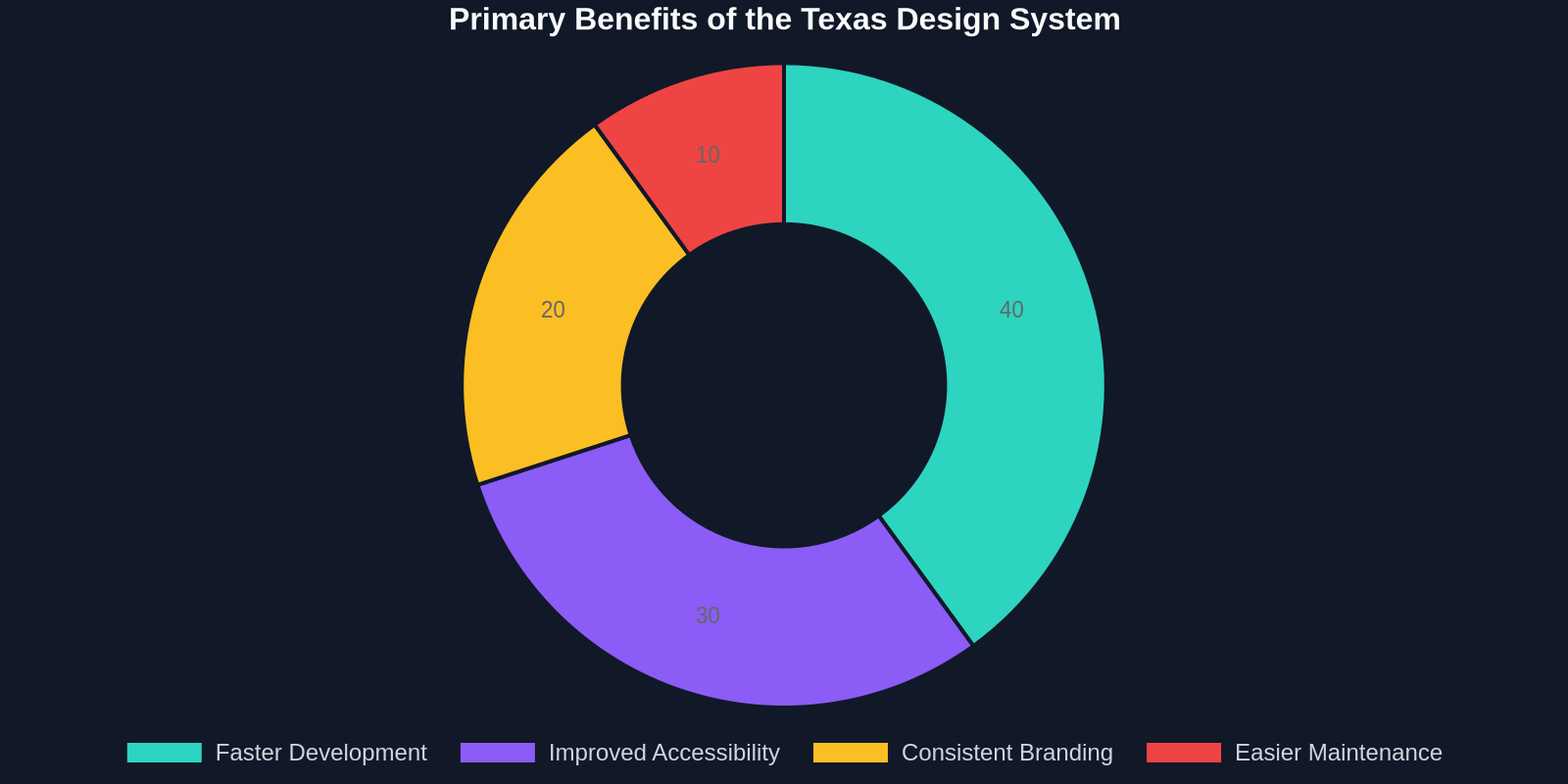
As the chart illustrates, the top perceived benefit among developers is the acceleration of the development cycle. This aligns with what we heard in interviews with Texas DIR staff: the goal was never just a "pretty" design system, but a technical accelerator that would allow agencies to respond to legislative mandates and public needs faster.
Long-term Accessibility Improvements
One of the most compelling narratives is the steady decline in accessibility errors across the state’s digital portfolio. Since the design system’s beta in late 2023, statewide scans have tracked a dramatic downward trend. This isn’t just a compliance win; it tangibly improves the lives of the 3.4 million Texans with disabilities who rely on these services.
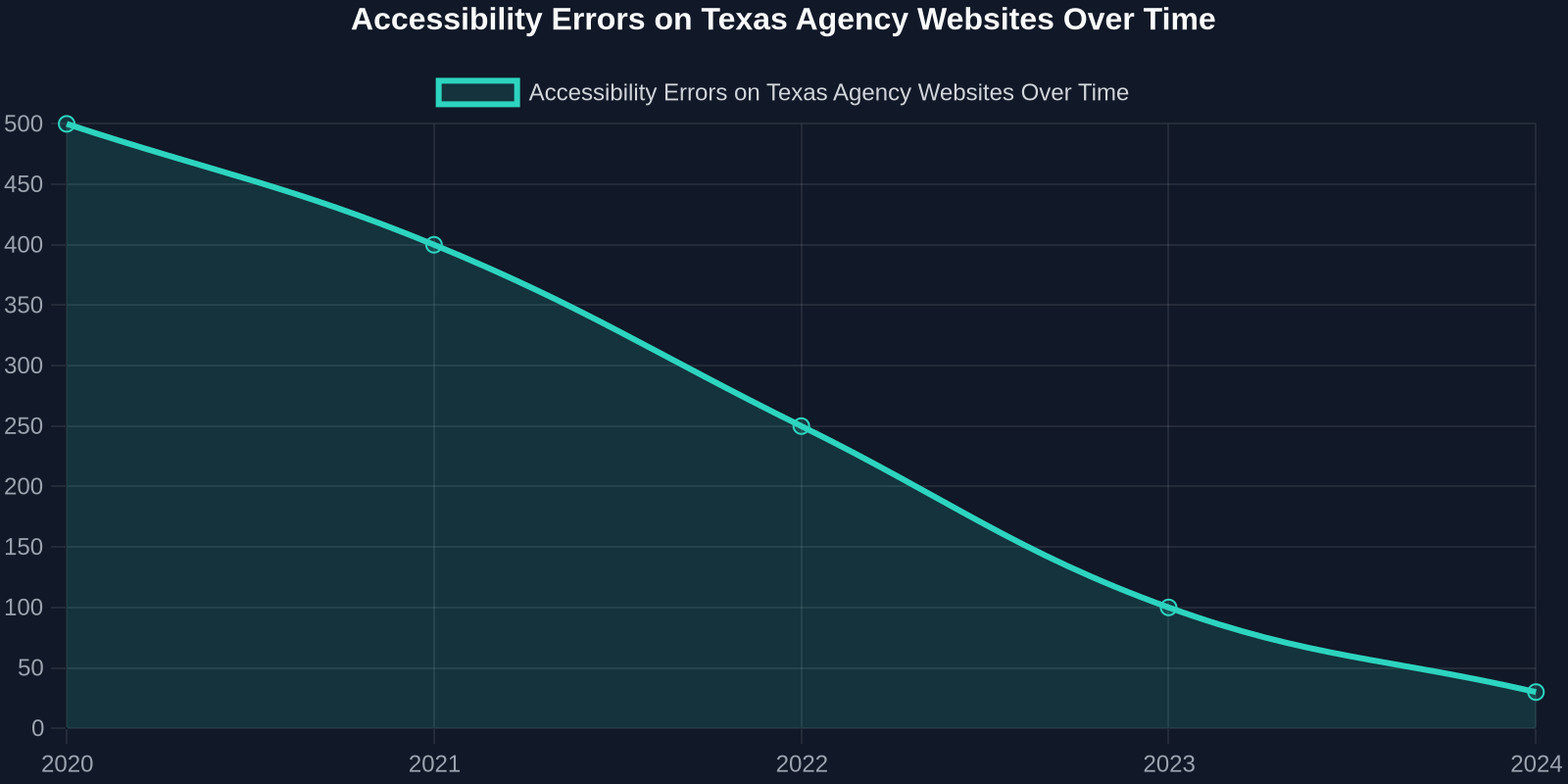
The line chart tells a story of continuous improvement, directly attributable to the design system’s embedded accessibility testing and the deliberate training provided to agency development teams.
Lessons for Other States and Large Organizations
The Texas initiative offers a blueprint for any large, decentralized organization wrestling with digital consistency. Here are the key takeaways:
Start with governance, not just technology. Texas established a clear Design Advisory Board with representatives from all major agencies before a single line of code was written. This political buy-in proved essential when tough decisions, like rejecting a custom agency navigation, had to be made.
Other states like California and Massachusetts are already evaluating similar approaches, and it would not be surprising to see a federated design system emerge from cross-state collaboration. The codebase, licensed under MIT, invites exactly that.
Practical Steps for Developers Adoping the Texas Design System Today
If you are a frontend developer about to embark on a project using this system, here’s a quick-start guide:
- Install the package: `npm install @texasgov/design-system`
- Import base CSS and JavaScript: Follow the official documentation to include the core stylesheet and component scripts in your build process.
- Familiarize with tokens: Spend time with the token table, understand how to use `-ds-spacer-sm` or `-ds-font-heading-xl` in your own styles.
- Use the CLI: Generate a new project with `npx @texasgov/design-system create my-project` to get a scaffolded environment with all dependencies.
- Leverage DivMagic for rapid prototyping: Install the DivMagic browser extension and use it to capture reference implementations from live Texas agency sites. Paste the clean code into your project and adapt.
- Run automated A11y tests: Use the provided linter plugin to catch any customizations that break accessibility rules.
Conclusion: A Model for the Modern Digital Government
Texas’s launch of a standardized, accessible web design system is more than a regional story, it signals a maturation of frontend practices within the public sector. For developers, it means less grunt work and more focus on solving real user problems. The combination of a well-architected, open-source design system and modern tooling like DivMagic transforms the often tedious task of government web development into an efficient, creative, and highly impactful endeavor.
As more agencies adopt and contribute back to the system, we can expect the quality and richness of Texas government websites to reach a level that truly serves all citizens. The era of the inaccessible, inconsistent, and clunky state website is finally coming to an end.
“When we remove the friction of UI development, we unleash our teams to focus on what matters: making government services simpler, faster, and more accessible for every Texan.”, Texas DIR Design Team Lead