Websites in Jeopardy: Navigating the US Web Design System Takeover
The federal web landscape is undergoing a seismic shift. A coalition led by the General Services Administration (GSA) and powered by the U.S. Web Design System (USWDS) is pushing for standardized, accessible, and modern digital services across all government agencies. For frontend developers, designers, and digital agencies that maintain these websites, this movement is both a mandate and a looming technical challenge. Many existing government websites are now in jeopardy of becoming non-compliant, outdated, or simply left behind.
This article explores what the USWDS takeover means for your projects, the technical hurdles you'll face, and how tools like DivMagic can dramatically reduce migration time while maintaining design quality.
What Is the US Web Design System?
The U.S. Web Design System (USWDS) is a design system created and maintained by the GSA's Technology Transformation Services. It provides a set of reusable, accessible, and mobile-friendly components, design tokens, and guidelines that help federal agencies build consistent, trustworthy digital experiences. USWDS is built on the U.S. Web Design Standards and incorporates best practices from industry leaders like the UK's GOV.UK and Australia's DTA systems.
For developers, USWDS is more than a UI kit; it's a comprehensive framework that includes CSS utilities, JavaScript behaviors, and a robust accessibility-first philosophy. It aligns with the 21st Century Integrated Digital Experience Act (IDEA), which mandates that all executive branch websites be modern, secure, and accessible.
The Coalition and the Push for Standardization
The recent push is being driven by a coalition of digital service teams, the GSA, and advocacy groups that argue the federal government wastes billions of dollars maintaining hundreds of bespoke, inaccessible websites. By standardizing on USWDS, agencies can share components, pool testing efforts, and deliver a unified user experience across .gov domains.

This coalition has published reports showing that agencies that adopted USWDS early saw a 50% reduction in design and development time for new digital services. The momentum is clear: future funding for web modernization may be contingent on USWDS compliance, making the transition unavoidable.
"Agencies that adopt USWDS are not just saving money, they're saving developers from reinventing the wheel on every project. The real jeopardy lies in sticking with legacy codebases that can't scale."
Why Websites Are in Jeopardy
The term "jeopardy" may sound dramatic, but for many agency websites, the writing is on the wall. Here are the core reasons existing websites face an existential threat:
- Compliance Deadlines: New federal guidance may require all public-facing .gov sites to align with USWDS standards within a set timeframe. Non-compliant sites risk losing funding or being taken offline.
- Technical Debt: Many legacy sites were built with outdated frameworks (e.g., jQuery, Bootstrap 3) or custom CSS that conflicts with modern accessibility and security requirements.
- Resource Constraints: Agency IT teams often lack the capacity to refactor entire sites. The coalition's push means that technical debt is no longer deferrable.
- User Experience Gap: Citizens increasingly expect the same experience from government sites as from commercial products. Legacy sites often fail on mobile, speed, and clarity, leading to user frustration and poor trust.
For developers, this means you must audit existing projects, identify components that don't meet USWDS standards, and plan a migration path. This is where the real work begins.
Technical Challenges of Migrating to USWDS
Migrating an existing website to USWDS is rarely a simple copy-paste operation. Here are the most common technical hurdles:

1. CSS Conflicts and Specificity Wars
USWDS uses its own design tokens and utility classes. If your site already has a custom CSS architecture (e.g., BEM, SMACSS, or a framework like Bootstrap), integrating USWDS often leads to style collisions. Global resets, typography scales, and spacing utilities can clash, causing broken layouts.
2. Component Mapping and Rewriting
You cannot simply swap a custom button for a USWDS button. USWDS components have specific markup, data attributes, and JavaScript initialization. Each custom component must be mapped to its USWDS equivalent and rewritten, this includes forms, navigation, tables, and modals.
3. Accessibility Regressions
USWDS is accessible by default, but if you override its CSS or misuse its components, you can introduce new accessibility failures. Developers must understand ARIA patterns, focus management, and semantic HTML to avoid regressions.
4. Content and Asset Migration
USWDS requires particular image sizes, icon sets, and content structures. Migrating content may involve reprocessing images, updating links, and restructuring CMS templates to output USWDS-compliant markup.
How to Prepare for the Transition
Despite the challenges, a well-planned migration can be executed efficiently. Here's a practical roadmap for frontend teams:
Step 1: Inventory and Audit
Catalog every page template, component, and asset on your site. Use automated tools like Lighthouse, axe, or WAVE to assess current accessibility and performance. Identify which components are candidates for replacement with USWDS equivalents.
Step 2: Prioritize High-Traffic Pages
Not all pages need to be migrated at once. Start with the homepage, key landing pages, and forms that users interact with most. This delivers visible wins and reduces compliance risk quickly.
Step 3: Build a Component Library
Create a living style guide that maps your legacy components to USWDS components. Document the differences in markup and behavior. This becomes your team's migration bible.
Step 4: Use Tools to Accelerate the Process
Manual migration is slow. Tools like DivMagic allow you to copy any UI component from any website and convert it into clean, USWDS-compatible code. Instead of rewriting a complex form or dashboard by hand, you can capture the visual output and adapt it to USWDS tokens quickly.
| Approach | Time per Component | Accessibility Compliance | Risk of Visual Regression |
|---|---|---|---|
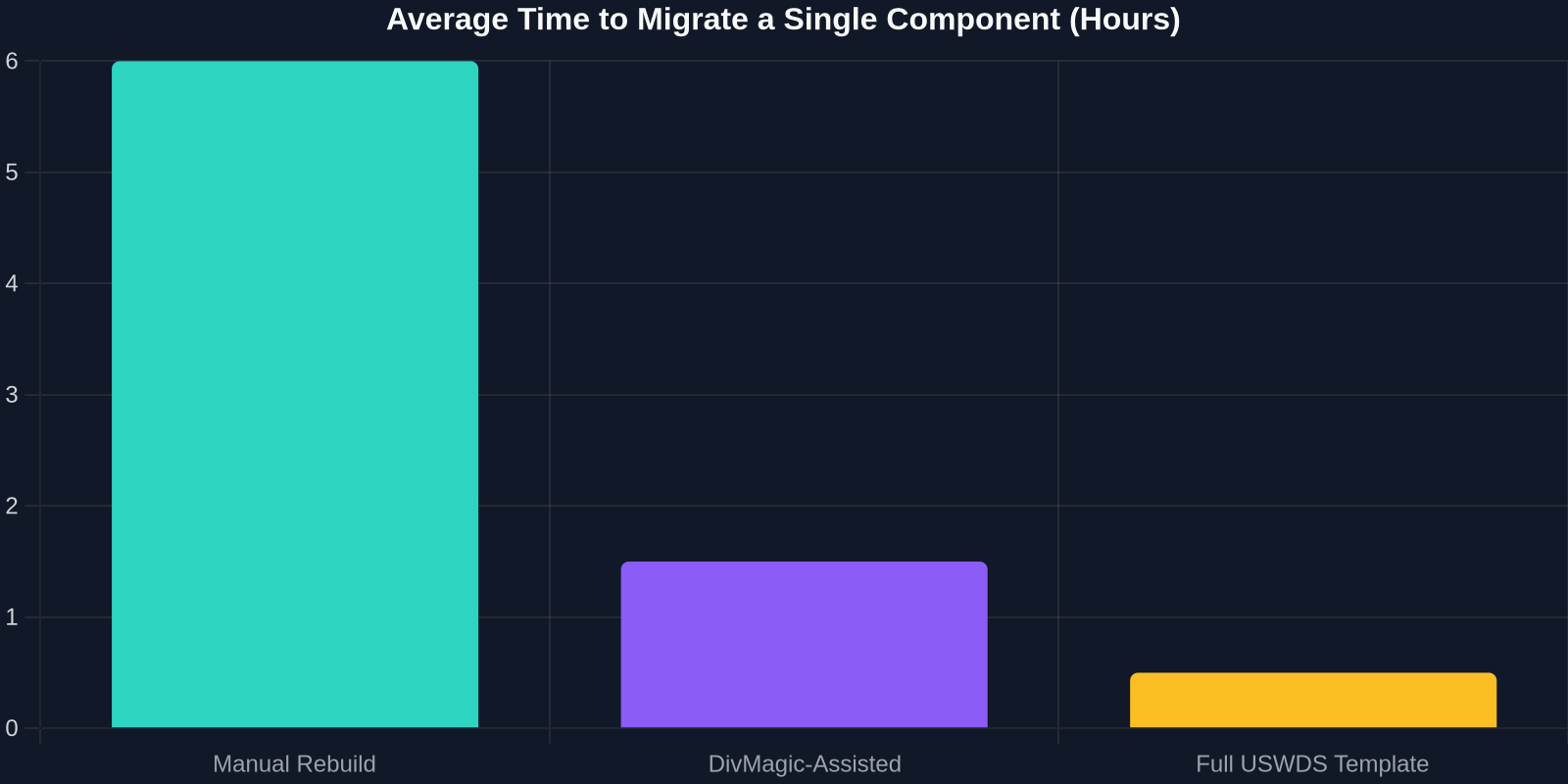
| Manual Rebuild | 4-8 hours | High if done correctly | Moderate |
| Copy-Paste from Legacy Code | 1-2 hours | Low (legacy issues persist) | High |
| Using DivMagic | 15-30 minutes | High (when paired with USWDS) | Low |
The Developer's Perspective: Threats and Opportunities
For frontend developers, the USWDS takeover is a double-edged sword. On one hand, it introduces a steep learning curve, especially if you're used to working with custom stacks or modern frameworks like React or Vue. USWDS is primarily a static HTML/CSS/JS system, though it can be integrated with any framework via npm packages. On the other hand, it standardizes the frontend, reducing the cognitive load of switching between agency projects.

However, there's a real risk that agencies will outsource or centralize web development, reducing the variety of projects available to contractors. The coalition's goal is to reduce redundancy, which means fewer bespoke builds. Developers who specialize in USWDS will be in high demand; those who don't may find their services less relevant.
"The USWDS coalition is not anti-developer, it's anti-duplication. The developers who thrive will be those who master the system and know how to migrate legacy code efficiently."
The Role of Automation in Migration
The most painful part of any migration is the repetitive manual work. Every button, form field, and navigation bar must be inspected, rewritten, and tested. This process can take months for large sites. Automation tools can cut this time dramatically.
DivMagic, for example, is a browser extension that lets you select any element on a webpage and copy its HTML and CSS in a clean, framework-agnostic format. During a USWDS migration, you can use DivMagic to:
- Capture complex legacy components (e.g., data tables, multi-step forms) and extract their structure without the surrounding bloat.
- Generate a starting point for USWDS-compatible markup by removing legacy classes and adding USWDS utility classes.
- Accelerate the visual regression testing phase by producing clean snapshots of before/after states.
Case Study: A Hypothetical Agency Migration
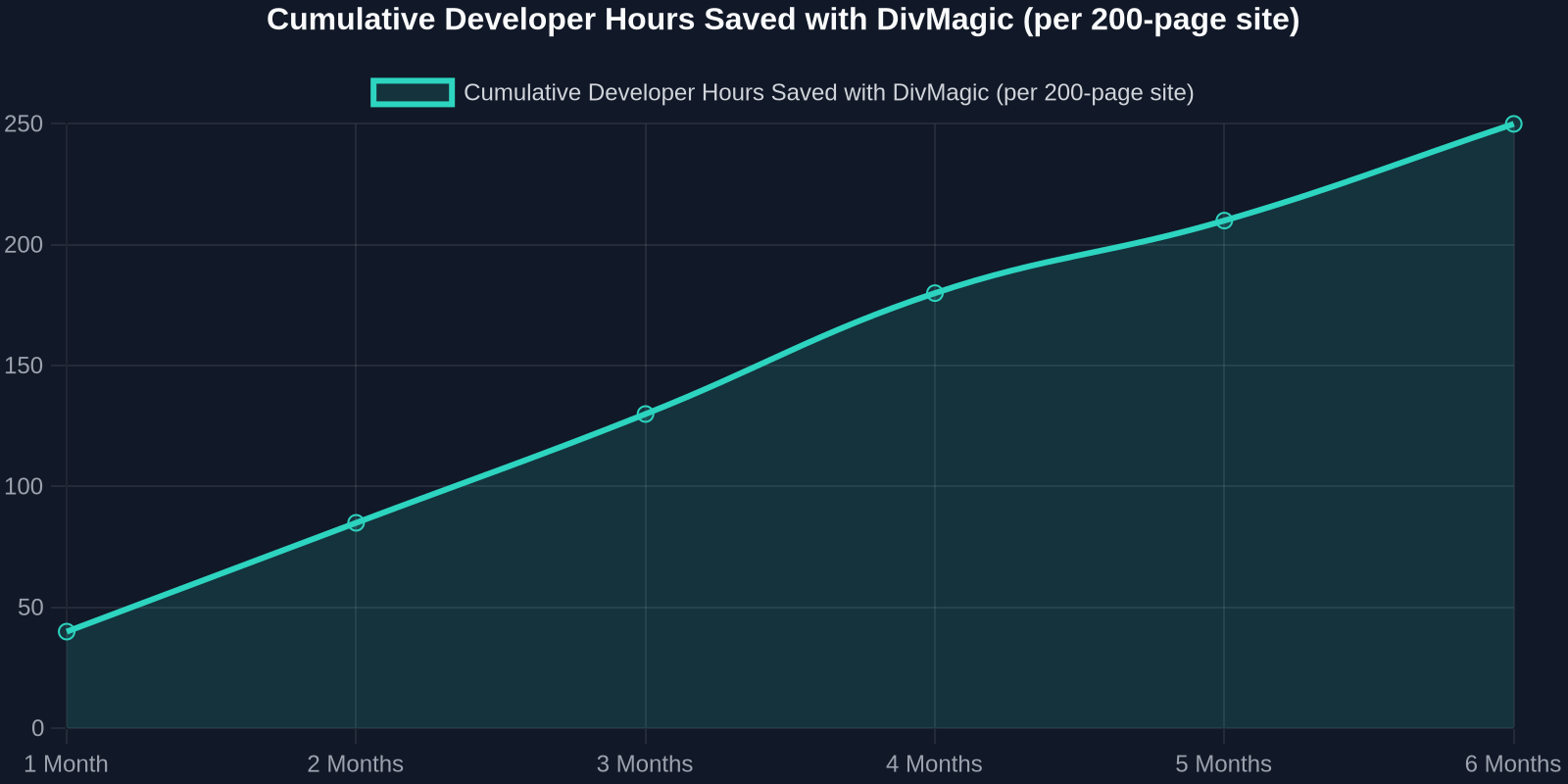
Imagine a mid-sized federal agency with 200 pages, 50 unique components, and a legacy Bootstrap 3 codebase. The team of three frontend developers must migrate to USWDS within six months. Using traditional methods, each component takes an average of 6 hours to rebuild and test, totaling 300 hours, roughly 7.5 weeks of full-time work for one developer.
By using DivMagic to capture existing components and accelerate the conversion, the same team can reduce the per-component time to 1.5 hours, saving 225 hours. Those saved hours can be reallocated to accessibility testing and user feedback, areas that truly determine success.
Future Outlook: The USWDS as a Baseline, Not a Ceiling
Looking ahead, the USWDS coalition's influence will likely expand beyond .gov to state and local governments, as well as contractors who build for the public sector. The system itself will continue to evolve, adding more components, theming capabilities, and integration with headless CMS platforms.
For frontend developers, the message is clear: invest in learning USWDS now, and arm yourself with tools that make migration painless. The jeopardy is real, but so is the opportunity to become a trusted expert in a rapidly standardizing market.
Conclusion
The US Web Design System takeover is not just a government mandate, it's a paradigm shift in how public digital services are built. Websites that fail to adapt risk becoming obsolete, but teams that embrace the system and use modern migration tools will deliver better products faster. As the coalition gains momentum, the developers who combine USWDS expertise with efficient tooling will lead the way.
Don't let your projects become a casualty of the transition. Start auditing your sites today, and explore how DivMagic can help you copy, convert, and ship USWDS-compliant interfaces in record time.