The Silent Sunset: How Edge Dropping Older Extensions Reshapes Privacy Tooling
In August 2026, Microsoft Edge will begin disabling extensions that still rely on an older, more powerful framework: Manifest V2. For many developers and users, this isn't just a routine update, it's a seismic shift that could cripple the browser's most effective privacy and ad-blocking tools. If you rely on extensions like uBlock Origin, Privacy Badger, or Decentraleyes, it's time to pay attention.
The transition to Manifest V3 has been brewing since Google first announced it in 2019. Chrome led the march, and now Edge, built on the same Chromium foundation, is following suit. The core argument from browser vendors is security: Manifest V3 restricts the capabilities extensions can use, reducing the surface area for malicious code. But for privacy-focused add-ons, those same restrictions gut the very mechanisms that make them powerful.
What Exactly Is Changing, and Why Now?
Manifest V2 allowed extensions to use webRequest blocking APIs, which let them intercept and modify network requests before a page loaded. This was the backbone of content blockers. Manifest V3 replaces that with a declarative declarativeNetRequest system, imposing a hard limit on rules and preventing real-time dynamic filtering. The result is a much blunter instrument.
Microsoft’s move is partly motivated by the need to stay consistent with Chromium’s upstream changes and avoid forking the codebase. It also aligns with a broader industry trend: browsers are increasingly acting as gatekeepers, balancing user empowerment against platform safety. For Edge, which positions itself as the enterprise-friendly, security-conscious alternative to Chrome, this shift makes strategic sense. However, it leaves millions of users in a bind.
The Privacy Tool Bloodbath: Who Gets Hit Hardest
Many popular privacy tools are either entirely based on V2 or have V3 versions that are significantly less capable. The Malwarebytes report highlights this tension, noting that "Edge’s upcoming changes will effectively neuter some of the most trusted privacy extensions in the ecosystem."

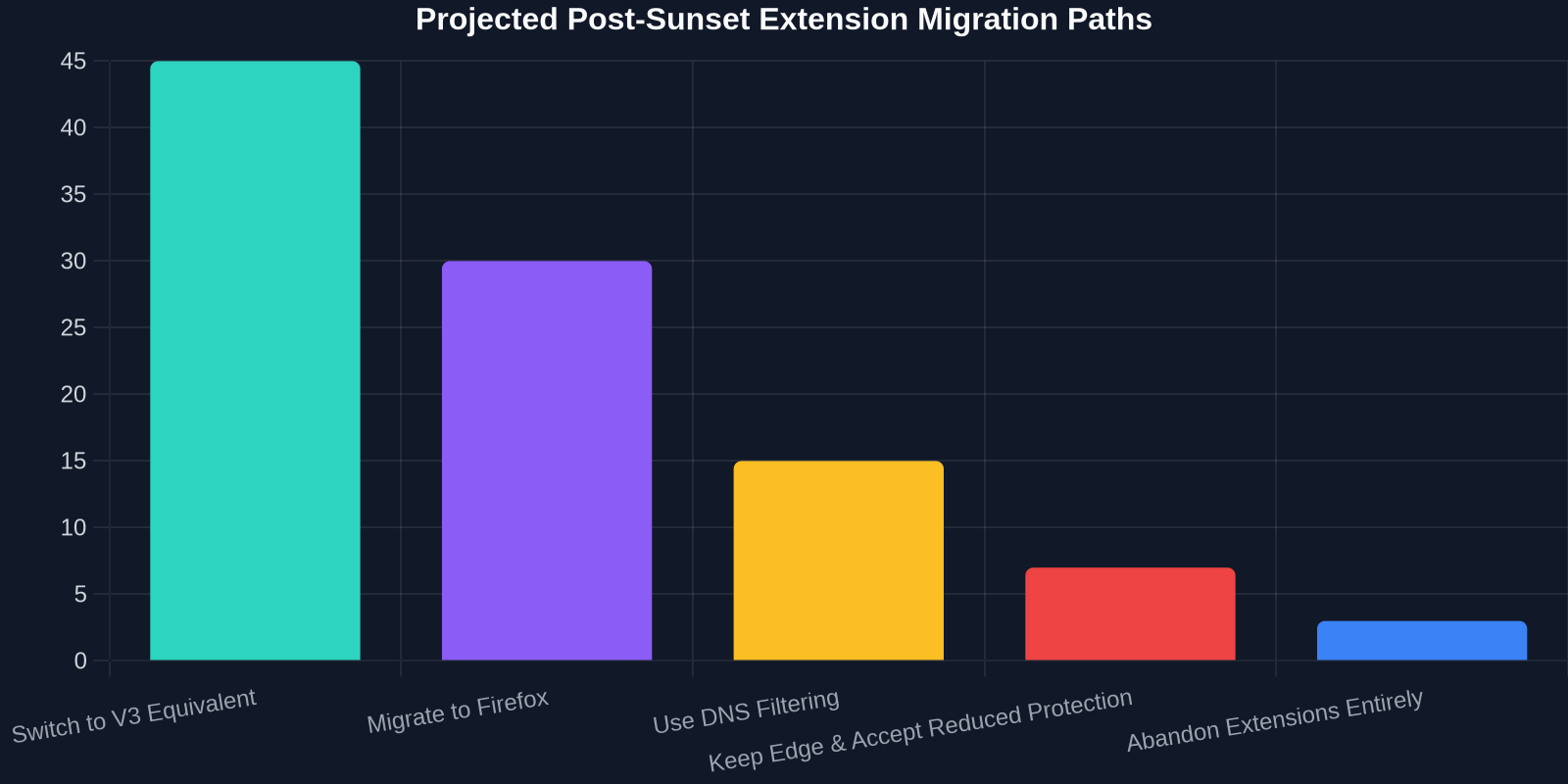
Users who depend on these tools for ad blocking, anti-tracking, and script management are facing a hard choice: accept reduced protection, migrate to other browsers that may still support V2 (like Firefox), or adopt system-wide filtering solutions like DNS-based ad blockers.
Why the Limitations Matter: A Deeper Technical Look
At first glance, switching from one API to another might seem like a minor refactor. The reality is far more complex. The declarativeNetRequest API works by evaluating requests against a static set of rules loaded at extension installation. Once installed, the extension cannot dynamically modify these rules based on real-time observations. For ad blockers that maintain extensive filter lists and need to respond to new tracking techniques hourly, this is crippling.
Moreover, cosmetic filtering, the ability to remove DOM elements that correspond to ad placeholders, is severely hampered because it requires script-level access that V3 discourages. Without it, pages often display blank boxes or broken layouts where ads used to be. This degrades the browsing experience and makes V3-based blockers visually inferior.
The Developer Experience: More Barriers, Less Autonomy
For frontend developers and extension authors, the sunset of V2 means rewrites, retests, and rethinking architectures. Many have spent years building sophisticated tools atop V2 APIs. Now they must strip down features to fit into V3’s sandbox. The Chrome Web Store’s automated review process already enforces these restrictions; Edge’s extension store will follow suit, with Microsoft providing a transition guide but limited grace.

The transition is not purely negative. Manifest V3 does bring some improvements: service worker-based background scripts instead of persistent pages (better for memory), stricter permission isolation, and promise-based APIs. However, for privacy tools, the losses far outweigh the gains.
User Impact: Security Theater vs. Real-World Privacy
Microsoft and Google argue that limiting extension capabilities reduces the risk of data exfiltration or supply-chain attacks, valid concerns. However, many security researchers contend that these changes create a “security theater” effect: the browser appears safer but actually reduces user agency and forces reliance on less transparent, built-in tracking protections that often serve the vendor’s business model.
“Manifest V3 won’t stop malicious extensions; it will only stop extensions that try to protect you from the web’s worst tracking.”, independent extension developer, commenting in the Malwarebytes report
Edge users may not immediately notice the difference. After the August 2026 update, extensions that haven't migrated will be disabled automatically, and Edge’s built-in tracking prevention will fill some gaps. But the granular control many power users demand will be gone. The Malwarebytes article emphasizes that "privacy-conscious users should start evaluating alternatives now rather than waiting for the forced deprecation."
Alternative Paths: Firefox, DNS Filtering, and Network-Level Solutions
In response to the Manifest V3 wave, a segment of users is migrating to Firefox, which has committed to maintaining Manifest V2 support in parallel with V3 for the foreseeable future. Mozilla’s approach allows both systems to coexist, giving extension developers breathing room. However, Firefox’s market share is small, and its rendering engine differs, meaning not all Chromium extensions are available.

Another avenue is network-level blocking via DNS filters (e.g., NextDNS, Pi-hole) or using VPNs with ad-blocking capabilities. These operate outside the browser and are immune to V3 restrictions. The trade-off: less precision, no per-site control, and potential performance overhead. Still, for the non-technical user who just wants ads gone, they are an increasingly attractive solution.
Enterprise and IT Implications
For organizations that deploy Edge as their standard browser, this change creates compliance and support headaches. Many enterprise environments rely on legacy extensions for security, data loss prevention, or accessibility. Admins will need to audit their extension catalog, test V3 alternatives, and possibly delay Edge updates or switch to Firefox ESR (Extended Support Release) to maintain business continuity.
The burden falls on developers to communicate these changes clearly and provide migration paths. Frontend teams building internal tools that leverage extension-like functionality may need to pivot to Progressive Web Apps (PWAs) or standalone desktop applications to retain full system access.
Visualizing the Shift: Data Trends
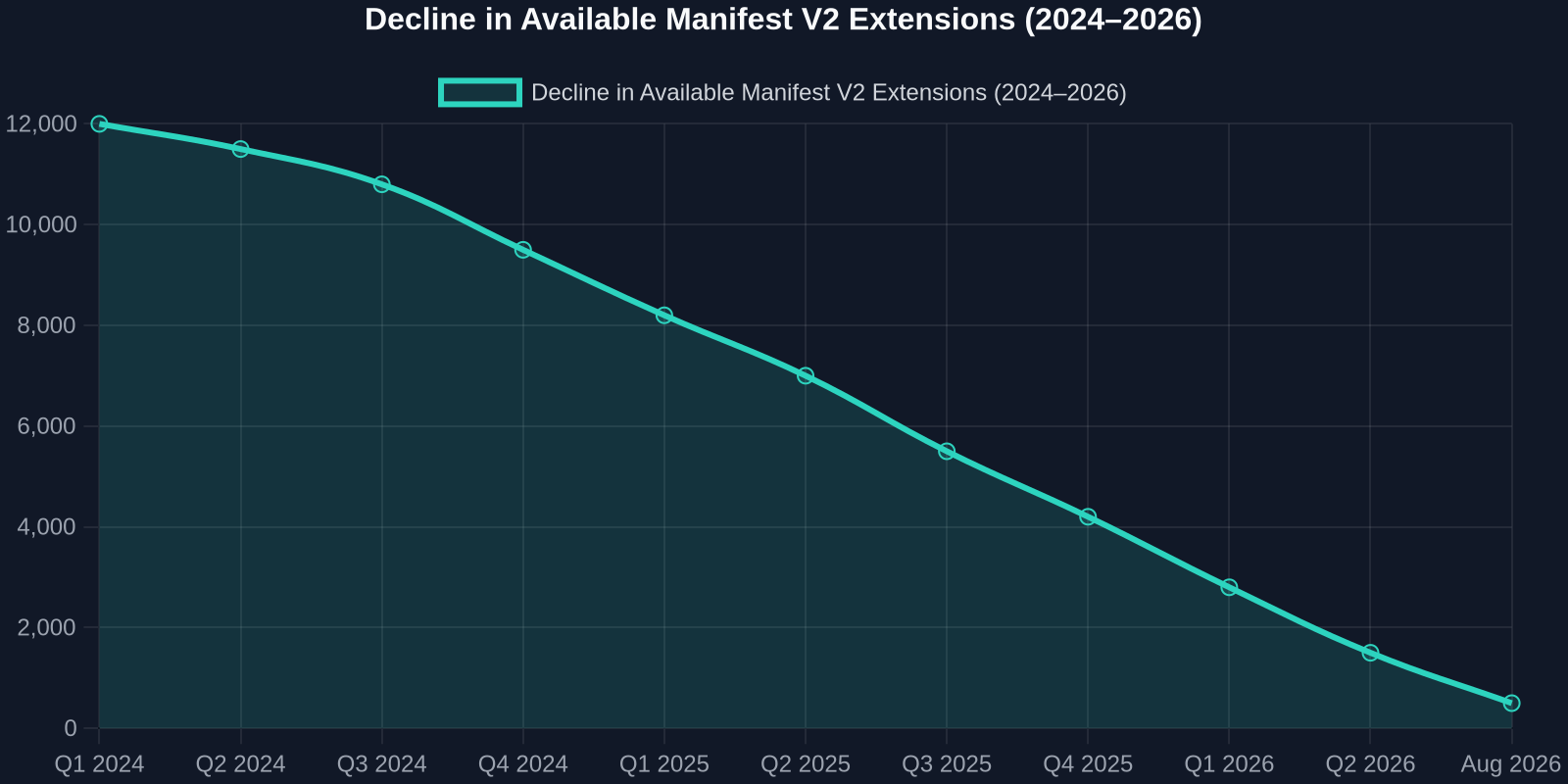
To understand the scale of change, consider the gradual decline of Manifest V2 extensions in the Chrome Web Store over the past three years, a trend Edge will now accelerate. By the sunset date, thousands of extensions will be forcibly removed from availability, even if users have them installed.
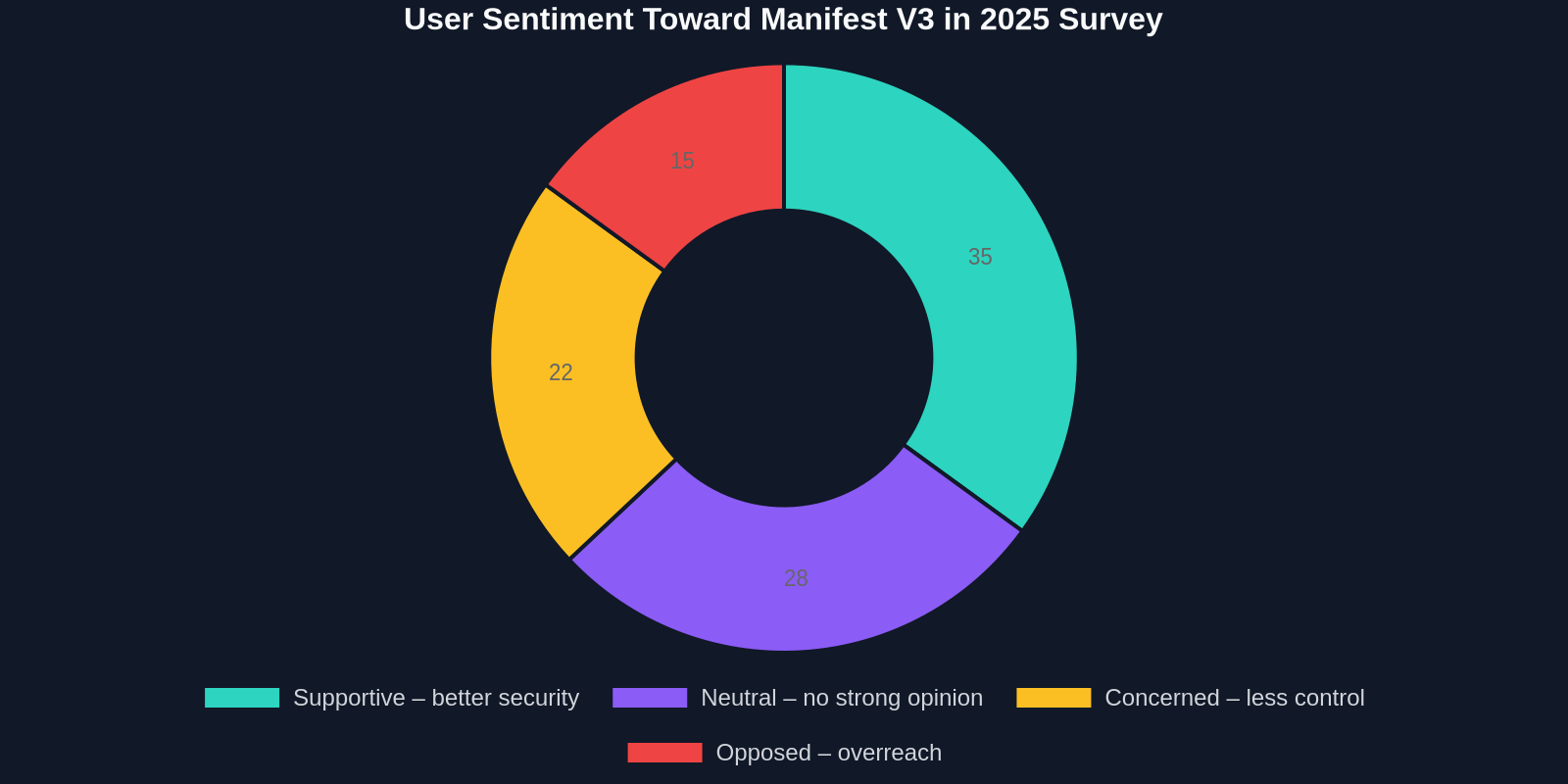
Simultaneously, user sentiment toward browsers’ increasing control is shifting. A 2025 study indicated that while many users appreciate improved baseline safety, a vocal minority of developers and tech-savvy consumers view V3 as an overreach. This polarization is likely to deepen as Edge follows through.
Extension developers themselves are split. Some see V3 as an inevitable evolution and are building “Lite” versions; others are abandoning the browser platform entirely in favor of native desktop applications or browser forks.
What DivMagic Users and Web Developers Can Do
For DivMagic users, who often copy UI elements from live websites, the extension ecosystem changes matter less directly, but the broader shift in browser philosophy is noteworthy. As browsers lock down, tools that scrape or inspect DOM structures may face increased friction. DivMagic, which helps developers copy any UI from any website, currently operates within the boundaries that Manifest V3 allows. However, as browsers tighten content-security policies and reduce extension capabilities, innovative workarounds and deeper platform integrations may become necessary.
Developers should stay informed about browser policy changes and test their own extensions early on Edge Canary builds. The Malwarebytes report suggests a practical checklist: audit current extensions, identify mission-critical V2 ones, find or build V3 alternatives, and consider a contingency browser for sensitive tasks.
Preparing for August 2026: A Practical Roadmap
With less than a year until the deadline, here’s how to navigate the sunset:
- Audit your extension list: In Edge, go to
edge://extensionsand enable Developer mode to see which Manifest versions are in use. Flag anything still on V2. - Check for V3 equivalents: Many developers have already released V3 versions; they may be less powerful but better than nothing.
- Test in parallel: Run a second browser instance with only V3-compatible extensions to gauge the experience before the switch is forced.
- Push for progress: Engage with extension developers to ask about V3 roadmaps. Your voice influences prioritization.
- Consider a backup browser: Firefox or Brave might serve as your “privacy browser” when Edge can’t provide the same protections.
The Bigger Picture: Browser Consolidation and User Control
Edge’s decision is part of a broader consolidation of browser engines. With Chromium dominating over 80% of the desktop market, decisions made by Google reverberate across the entire web. This homogeneity gives browser vendors enormous leverage, both to enhance security and to shape the web’s monetization model. For ad-supported businesses, less effective ad blocking means higher revenue. The incentives are clear.
“When one browser engine dictates extension policy, the entire web bends to its will. That’s power without accountability.”, web standards advocate
For frontend developers, this raises fundamental questions: how much of your work depends on a handful of corporate decisions? Diversifying your skill set across platforms, embracing web standards, and contributing to open-source browser alternatives are ways to build resilience.
Conclusion
Edge’s dropping of older extensions in August 2026 will undoubtedly reshape the privacy landscape for millions. While the move is framed as a security necessity, its collateral damage to beloved privacy tools is real. Developers and users alike must proactively adapt: explore V3-compatible alternatives, consider alternative browsers, and advocate for extension APIs that don’t sacrifice user control at the altar of corporate convenience.
The tools will change, but the mission remains: a web where users decide who gets their data. As DivMagic helps developers build faster, we know that innovation thrives when the browser remains a user-first platform. Let’s keep it that way.
Information for this article was drawn from the Malwarebytes blog and community developer discussions. For the latest updates, always monitor official Edge channels and your extension developers’ documentation.