How StepSecurity’s Dev Machine Guard Automates Browser Extension Inventory, Securing Developer Workstations at Scale
Browser extensions have become indispensable tools for frontend developers, designers, and QA engineers. From color pickers and accessibility checkers to React developer tools and DivMagic’s own copy any UI from any website capability, extensions supercharge productivity. However, each installed extension also represents a potential attack vector with access to sensitive DOM structures, clipboard data, authentication cookies, and even local file systems. For developer machines that routinely touch proprietary source code, production credentials, and internal APIs, a compromised browser extension can escalate into a catastrophic security incident.
StepSecurity, a leader in developer workstation security, recently announced that its Dev Machine Guard now inventories browser extensions across all managed developer machines. This feature brings long-overdue visibility into the extension landscape, replacing manual audits with continuous, automated risk assessment. In this post we’ll dissect why this matters, how the inventory works, and what it means for teams that rely heavily on browser-based workflows, especially when building or debugging user interfaces.
The Hidden Threat Landscape of Browser Extensions
Browser extensions enjoy broad permissions by default. Even a seemingly innocent color contrast checker can request access to all website content, while a React DevTools extension requires the ability to read and modify DOM trees. In the hands of a malicious actor, these capabilities become powerful exfiltration channels.
Extensions operate inside the browser’s trusted zone. They can bypass Content Security Policies, intercept HTTP requests, and silently collect authentication tokens, often without triggering antivirus or endpoint detection tools.
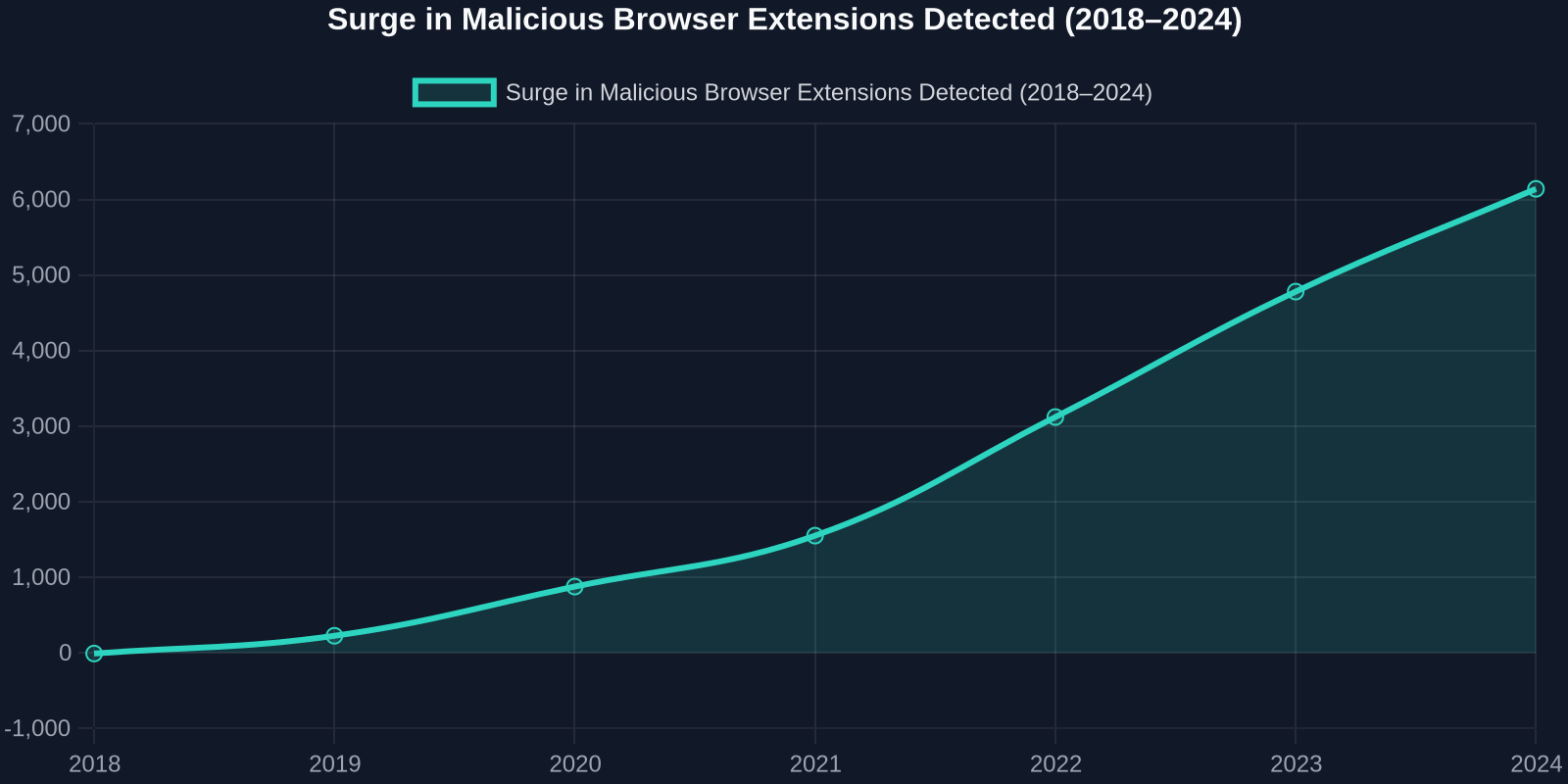
Security researchers have documented a steady rise in both intentionally malicious extensions and legitimate extensions that get compromised through supply-chain attacks. A 2023 analysis identified over 1.3 million users affected by extensions that stole credentials, logged keystrokes, or injected unwanted ads into web pages. Developer machines, with their elevated access to internal Git repositories, CI/CD pipelines, and cloud consoles, are prime targets.
Why Developer Machines Are the New Battleground
Attackers increasingly shift focus from production infrastructure to the far less guarded endpoints: developer laptops. A single compromised extension on a developer’s browser can leak environment variables, API keys stored in developer tools’ local storage, or entire source code snippets copied to the clipboard. According to the 2024 State of DevSecOps report, 41% of successful security breaches originated from a developer’s workstation, with browser-based attacks accounting for a rapidly growing share.

“Without an automated inventory, you’re flying blind in a world where a single extension can exfiltrate source code, access your staging environment, or pivot to internal services.”
Manual oversight simply cannot keep pace. Developers frequently install and remove extensions for specific tasks, test unverified extensions during local debugging, or maintain different extension sets in Chrome, Edge, Firefox, and Brave. A compliance officer or security team that relies on periodic surveys never captures the full, real-time picture.
How StepSecurity’s Dev Machine Guard Inventories Extensions
StepSecurity’s Dev Machine Guard deploys as a lightweight agent on macOS, Windows, and Linux workstations. With its latest update, the agent now enumerates every browser extension installed across all Chromium-based browsers (Chrome, Edge, Brave, Opera, Arc) and Firefox. It extracts the extension ID, name, version, requested permissions, and developer information, then compares this metadata against multiple threat intelligence feeds.
Real-Time Discovery and Classification
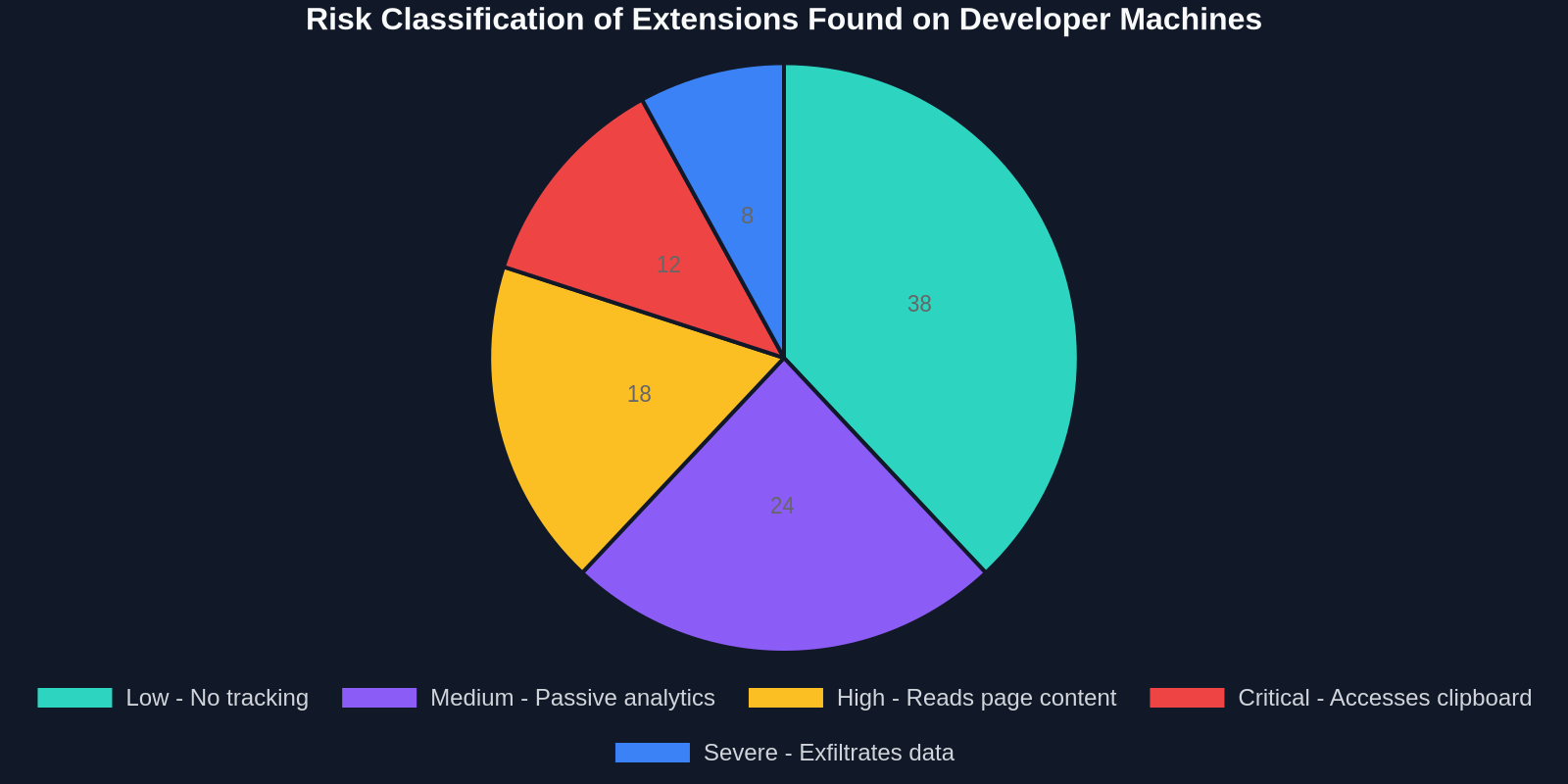
Unlike periodic scripts that capture only a point-in-time snapshot, Dev Machine Guard continuously monitors the browser’s extension directory. The instant a new extension appears, whether installed from the official store, sideloaded in developer mode, or pushed by an enterprise policy, the agent logs it, classifies its risk level, and, if configured, blocks it automatically.
Even extensions installed via Load unpacked in developer mode are captured. This is critical because many developers test unpublished extensions locally, often with full permissions, and forget to remove them later.
The risk classification engine uses a proprietary model that weighs several factors:
- Presence of the extension on known-bad lists (e.g., Google Safe Browsing, CRXcavator)
- Permissions that exceed what’s typical for the extension’s stated functionality
- Developer reputation and update frequency
- Age of the extension and review count on the Chrome Web Store
- Execution of obfuscated JavaScript or known C2 communication patterns
Unified Dashboard and Policy Engine
All inventoried extensions appear in a centralized dashboard, where security teams can search, filter by risk level, and drill into individual extension details. The dashboard also surfaces anomalies, such as an extension that was installed by a developer in one region suddenly appearing on machines in another continent, often a sign of credential stuffing or account takeover.
Administrators define policies that dictate what happens when a high-risk extension is detected. Options range from sending a Slack alert and opening a Jira ticket to force-removing the extension and temporarily revoking the developer’s VPN access until the issue is resolved.
Comparing Manual Audits to Automated Inventory
Before purpose-built tools like Dev Machine Guard, most organizations relied on manual spreadsheets, periodic questionnaires, or endpoint management solutions that lacked browser-specific insight. The table below highlights the difference:

Real-World Breach Prevention Scenarios
To understand the impact, consider three situations where automated extension inventory would have halted a breach:
1. The Color Picker That Stole API Keys
A widely used color picker extension with 500,000+ installs was silently updated to scoop up any string that matched an API key pattern from the DOM and forward it to a remote server. Developers testing payment gateways or cloud integrations had Stripe and AWS keys exfiltrated. Dev Machine Guard would have flagged the permission change and the newly obfuscated background script immediately.
2. The Ex-Employee’s Sideloaded Extension
After a contractor left, an investigation revealed they had sideloaded a custom extension that forwarded every visited URL and form submission to a personal server for months. Because it was never published to the store, traditional endpoint tools missed it. Dev Machine Guard’s local directory monitor would have detected the presence of an unpacked extension within minutes.
3. The Compromised Dev Rel Tool
An extension used by developer advocates to demonstrate APIs was compromised via a maintainer’s stolen credentials. The poisoned version captured cookies and GitHub tokens. The risk engine’s anomaly detection would have alerted on the sudden change of extension hash and unusual outbound traffic patterns.
In all three cases, the extensions operated for weeks before discovery. Automated inventory reduces the dwell time from weeks to seconds.
Developer Experience Meets Security: A Balanced Approach
A common fear is that heavy-handed security tooling will slow down developers or block legitimate tools. StepSecurity designed Dev Machine Guard to be non-intrusive. The agent runs quietly in the background, consuming less than 1% CPU, and blocks extensions only when explicitly configured to do so. Developers can still install any extension they need for debugging or testing; the goal is visibility and risk awareness, not blanket prohibition.

Moreover, the inventory actually helps developers maintain a cleaner, faster browser. The dashboard provides a personalized view of one’s own extensions, showing which haven’t been used in months and which have known vulnerabilities. It becomes a self-service hygiene tool, much like a dependency scanner for npm packages.
Why This Matters for UI Developers and Power Users
As a company that builds DivMagic, the browser extension that lets you copy any UI from any website, we live in the extension ecosystem every day. We know firsthand how extensions must be carefully designed to respect user data while delivering powerful features. When you use DivMagic to clone a React component or a Tailwind layout, you trust that our extension only accesses the specific DOM nodes you select and nothing more.
“Developers who use UI-related extensions should insist on inventory visibility. You cannot protect what you cannot see, and a single compromised extension can leak every pixel and line of code you’ve ever inspected.”
The broader lesson is that any tool that interacts with the DOM or network requests, whether it’s a CSS extractor, a debugging proxy, or a clipboard manager, must be audited. StepSecurity’s innovation normalizes this audit trail across the entire fleet of developer machines, making it a standard part of DevSecOps pipelines.
Integrating Extension Inventory into CI/CD Security Gates
Progressive organizations are starting to treat developer workstation posture as a build-time check. Dev Machine Guard exposes a rich API that can be queried during CI/CD pipeline execution. For example, a GitHub Actions workflow can call the API to verify that the committing developer’s browser extensions were all in the “low risk” category at the time of the commit. If any extension had an elevated risk score, the pipeline can block the build or require an additional review.
This approach shifts security left to the absolute earliest possible point: the keystrokes of the developer. Combined with code‑review tools and dependency scanners, browser extension inventory becomes another layer of defense against supply‑chain attacks that exploit the human side of software creation.
Preparing for the Next Era of Extension Security
Looking ahead, expect regulators to include browser extensions in compliance frameworks. Already, SOC 2 and ISO 27001 audits increasingly ask about endpoint software inventory, and auditors are beginning to specifically inquire about browser add-ons. GDPR mandates that personal data access be logged, and if a developer’s extension inadvertently captures personal data from a staging database shown in the browser, that constitutes a data processing activity that must be documented.
StepSecurity’s move to inventory extensions is not just a feature; it’s a recognition that the browser has become the primary development environment for a whole generation of engineers. Protecting that environment with the same rigor applied to servers and cloud accounts is long overdue.
Final Thoughts
The announcement that Dev Machine Guard now inventories browser extensions marks a significant step toward maturing developer workstation security. For teams shipping web applications, whether SPAs, mobile backends, or SaaS platforms, ignoring the browser extension surface is tantamount to leaving a backdoor ajar. The combination of automated discovery, risk scoring, and policy enforcement transforms what was once a blind spot into a transparent, manageable asset.
At DivMagic, we believe that great UI development depends on trust, trust in your tools, trust in your environment, and trust in the code you bring into your projects. By keeping your browser extension inventory clean and monitored, you not only safeguard your own work but also protect the users who will interact with the interfaces you build. Explore StepSecurity’s Dev Machine Guard to see how automated inventory can elevate your team’s security posture, and never lose sight of the permissions you grant to the extensions that sit alongside your most valuable daily drivers.