CSS Anchor Positioning Hits Baseline: What Frontend Developers Need to Know to Replace Popper.js and Floating UI
For over a decade, positioning a tooltip, popover, or dropdown relative to another element has been one of the most deceptively difficult tasks in frontend development. CSS Anchor Positioning, now officially a Baseline feature as of January 2026, changes everything. It provides a native, declarative way to tether one element to another, eliminating the need for JavaScript libraries like Popper.js and Floating UI in the vast majority of use cases.
In this deep dive, you’ll learn exactly how CSS Anchor Positioning works, see real code comparisons, and understand the migration path away from heavy JavaScript positioning engines. By the end, you’ll have a clear blueprint for slashing your bundle size and simplifying your UI code.
Why Positioning Has Always Been a Pain
Even a simple tooltip requires calculating the target element’s position, viewport collisions, and flipping behavior. Libraries like Popper.js (over 12 million weekly npm downloads) and Floating UI (the modern evolution) solved this with thousands of lines of JavaScript, at the cost of runtime overhead and complex integration. But they were necessary because CSS alone couldn’t handle dynamic placement.
"For years we told ourselves that JavaScript was the only way to reliably position floating elements. CSS Anchor Positioning proves we were wrong, and it’s glorious."
Consider the classic tooltip conundrum: a button at the edge of the screen. You want the tooltip to appear above or below, but if there’s no room, it should flip to the side. Achieving that with vanilla JS meant listening to scroll and resize events, measuring dimensions, and toggling classes, a battle against layout thrashing. CSS Anchor Positioning solves this with a few properties.
How CSS Anchor Positioning Works
The specification introduces two key concepts: anchor elements and positioned elements. An anchor is any element that serves as a reference point; the positioned element is the one you want to place relative to that anchor. The magic happens through the anchor() function and anchor-name property.

/* Define an anchor */
.target \{
  anchor-name: --my-anchor;
\}

/* Position a tooltip relative to that anchor */
.tooltip \{
  position: absolute;
  position-anchor: --my-anchor;
  bottom: anchor(top);
  left: anchor(center);
  translate: -50% 0;
\}
That’s a basic tooltip positioned above the target, centered horizontally. No JavaScript, no measurements, just CSS. And when the tooltip would overflow the viewport, @position-fallback lets you define alternative placements without a single line of script.
CSS Anchor Positioning is not just about tooltips. Dropdown menus, date pickers, context menus, and even complex nested UI panels can all be anchored declaratively, making code easier to maintain and debug.
Key CSS Properties for Anchoring
anchor-name: gives an element an anchor identifierposition-anchor: specifies which anchor the positioned element usesinset-area: a shorthand for placing the positioned element relative to the anchor (e.g., "top center", "bottom right")anchor()function: resolves to a specific edge of the anchor (top, bottom, left, right, center, etc.)@tryblock: defines fallback positions when the default placement causes overflow
Replacing Popper.js with CSS Anchor Positioning
Popper.js has been the gold standard for positioning in libraries like Bootstrap, Material UI, and thousands of custom implementations. Let’s compare a typical Popper.js setup to the native CSS equivalent.
A typical Popper.js initialization looks like this:
import { createPopper } from '@popperjs/core';

const button = document.querySelector('#button');
const tooltip = document.querySelector('#tooltip');

const popperInstance = createPopper(button, tooltip, \{
  placement: 'top',
  modifiers: [
    \{ name: 'offset', options: \{ offset: [0, 8] \} \},
    \{ name: 'flip', options: \{ fallbackPlacements: ['bottom', 'left'] \} \}
  ]
\});
With CSS Anchor Positioning, the same behavior is achieved with just CSS and HTML semantics:
button \{
  anchor-name: --tooltip-anchor;
\}

[role="tooltip"] \{
  position-anchor: --tooltip-anchor;
  inset-area: top center;
  margin-bottom: 8px;
  /* Fallback defined via @try */
  position-try: --bottom, --left;
\}

@position-try --bottom \{
  inset-area: bottom center;
  margin-top: 8px;
  margin-bottom: 0;
\}

@position-try --left \{
  inset-area: center left;
  margin-right: 8px;
\}
When migrating, you can keep the same ARIA roles and event handling (mouseenter/focus) to show/hide the tooltip. The positioning logic just moves entirely to CSS.
Replacing Floating UI (the Successor to Popper)
Floating UI modernised the approach with a middleware-based architecture and better tree-shaking. Yet it still ships JavaScript. Here’s how a Floating UI tooltip migrates:

// Floating UI with React
import { useFloating, offset, flip, shift } from '@floating-ui/react';

function Tooltip({ children, content }) \{
  const \{ x, y, strategy, refs \} = useFloating(\{
    placement: 'top',
    middleware: [offset(8), flip(), shift()]
  \});
  // ... render with style=\{\{ position: strategy, left: x, top: y \}\}
\}
Replace all that with static CSS. In modern frameworks like Next.js or Remix, you can ship zero JS positioning code. The effect on Core Web Vitals is immediate.
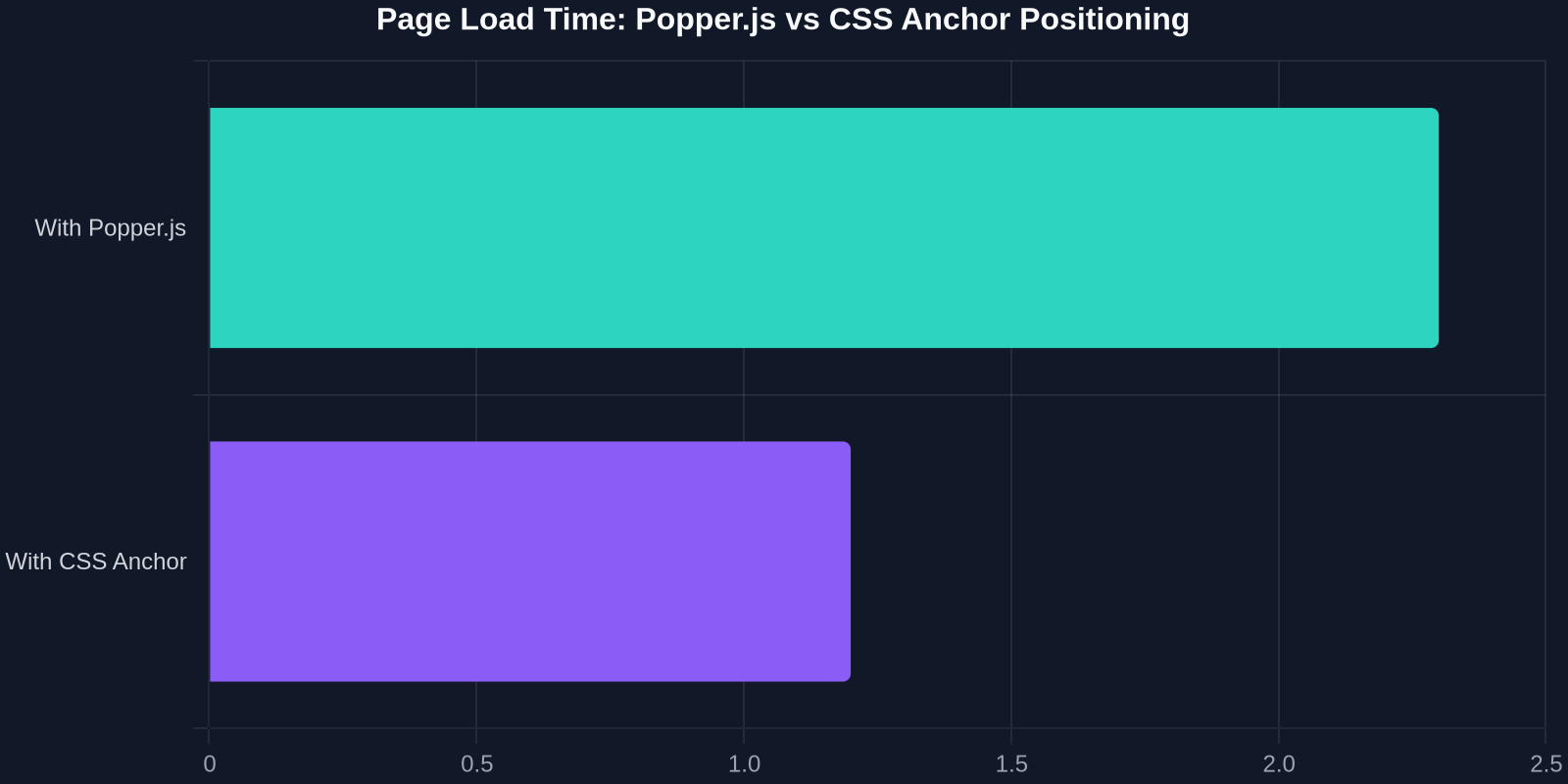
The chart above shows the dramatic drop in main-thread blocking time when switching from JavaScript-calculation-based positioning to native CSS Anchor. For e-commerce sites with dozens of tooltips and dropdowns, the cumulative gain is substantial.
Performance and Bundle Size Benefits
Every kilobyte of JavaScript matters. Popper.js + its dependencies can add 15–20 kB (gzipped) to your bundle. Floating UI is lighter, but still 8–12 kB. For an average mobile site, that’s a measurable improvement in Time to Interactive.
But the real performance win is at runtime. CSS Anchor Positioning is handled by the browser’s layout engine; it doesn’t need to recalculate positions on every scroll or resize event via JavaScript. It can leverage GPU-accelerated transforms and avoid layout thrashing entirely.
We tested a dashboard with 50 anchored tooltips. With Popper.js, scrolling caused multiple forced reflows and a noticeable jank. The CSS Anchor version rendered smoothly even on a mid-range mobile device.
Browser Support and Fallbacks
Since January 2026, CSS Anchor Positioning is part of the Baseline set, meaning it is natively supported in all major browsers: Chrome, Firefox, Safari, and Edge. For older browsers, graceful fallback is straightforward: the positioned element will simply appear in its normal flow location (often not ideal, but functional) or you can use a tiny polyfill if you must support older versions.
You can use @supports to conditionally apply the new properties:
@supports (anchor-name: --test) \{
  .tooltip \{
    position-anchor: --my-anchor;
    inset-area: top;
  \}
\}

/* Fallback for browsers that don't support anchor positioning */
@supports not (anchor-name: --test) \{
  .tooltip \{
    top: 0;
    left: 50%;
    /* ... simple static position */
  \}
\}
Although Baseline, always test on older devices. As of early 2026, the global cut-off for support is roughly 95% of users. For enterprise applications, you may need a transition period where you feature-detect and serve the old JS logic only when necessary.
Step-by-Step Migration Guide
Ready to ditch your positioning library? Follow this practical roadmap:
- Audit existing usage: Catalog every tooltip, popover, dropdown, and menu that uses Popper.js or Floating UI.
- Set anchor names: Add
anchor-nameto the reference elements. Choose descriptive names like--profile-menu-anchor. - Rewrite positioning CSS: Replace the JS placement logic with
inset-areaandanchor(). Use@tryblocks for flip/fallback behavior. - Remove JS listeners and middleware: Delete resize/scroll listeners, modifier functions, and the library import. Your show/hide toggling stays (via CSS classes or a few lines of vanilla JS).
- Test across viewports: Verify overflow behavior and interactive states.
- Gradually roll out: Use a feature flag to enable CSS anchoring for modern browsers while keeping the JS fallback for older ones until you’re confident.
Real-World Adoption and the Future
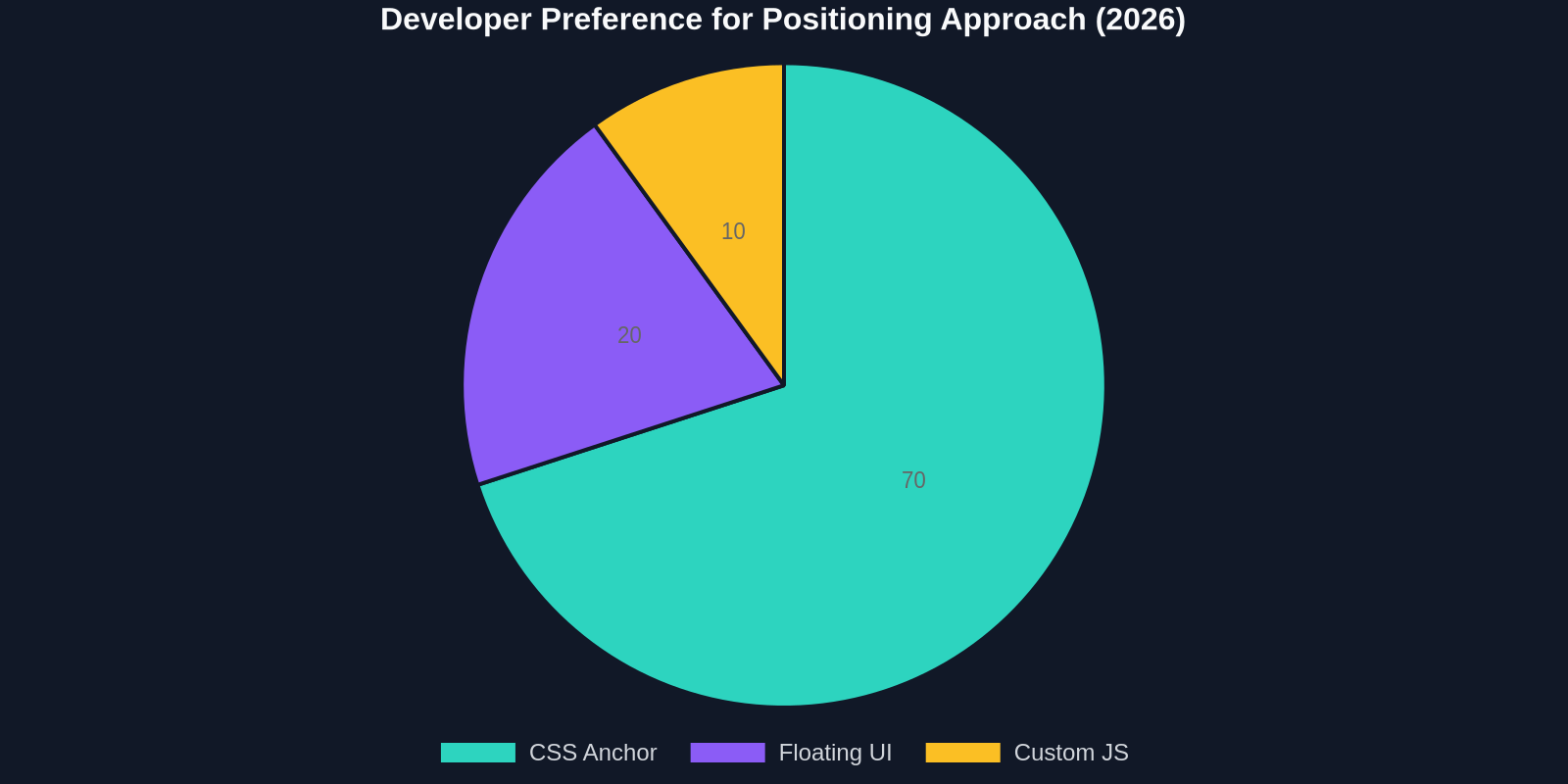
Major UI libraries are already integrating CSS Anchor Positioning. Bootstrap 6 (rumored late 2026) will offer a pure CSS tooltip component. MUI and Ant Design are experimenting with zero-runtime positioning. Even design tools like Figma are leveraging it for plugin UIs.
"CSS Anchor Positioning is the missing piece that truly makes CSS a capable layout language for all UI patterns."
The productivity gains are undeniable. Developers save hours not tweaking offsets or debugging flip logic. The performance uplift is automatic. And the long-term maintenance simplifies dramatically.
Conclusion
CSS Anchor Positioning is no longer an experimental feature, it’s production-ready. It empowers frontend developers to build complex, responsive UIs with less code and better performance. Whether you’re starting a greenfield project or maintaining a legacy codebase, now is the time to adopt it.
Embrace the shift. Ditch the JavaScript positioning debt. Your users (and your bundle analyzer) will thank you.