
High-Converting Contact Page Examples: Design Tips & Data-Driven Best Practices

The Ultimate Guide to High-Converting Contact Page Examples & Best Practices
Every website visitor who clicks "Contact Us" is raising their hand. They want to connect, ask a question, or start a relationship. Yet, too many contact pages act as digital dead ends—cluttered forms, broken links, and a complete lack of personality. In this comprehensive guide, we analyze the most effective contact page examples from industry leaders and break down exactly what makes them convert. Whether you are a startup founder, a marketing director, or a UX designer, you will walk away with actionable templates and data-backed strategies.
Why Your Contact Page Matters More Than You Think
Contact pages are often treated as an afterthought. Designers invest hours perfecting the homepage, product pages, and blog layout, but the contact page is slapped together with a generic form and an address. This is a critical mistake. The contact page is the final step in the buyer's journey for many prospects. If it fails, you lose a lead.
According to a recent analysis, 85% of companies report that improving their contact page design led to a measurable increase in lead quality. This statistic underscores that the design and structure of your contact page directly influence conversion rates.
Key Elements of High-Converting Contact Page Examples
When we analyze the best contact page examples, certain patterns emerge. These elements are not accidental—they are the result of A/B testing, user research, and conversion rate optimization.

1. A Clear, Unambiguous Call-to-Action (CTA)
The primary goal of a contact page is to get the user to take action—fill out a form, call a number, or send an email. The best pages make this action obvious. The CTA button uses action-oriented language like "Get in Touch," "Send Message," or "Start Your Project." It is visually distinct, often using a high-contrast color.
2. Minimal Form Fields
Every additional field in a contact form reduces the likelihood of completion. High-converting contact page examples typically ask for only essential information: name, email, and message. Some advanced pages add a dropdown for subject or department to route queries efficiently, but they never ask for unnecessary data like phone number unless essential.
3. Multiple Contact Channels
Not everyone wants to fill out a form. Some prefer a phone call, others a live chat. The best contact pages offer options: email, phone, physical address, and social media links. This flexibility respects user preference and increases the chances of a connection.
4. Social Proof and Trust Signals
Trust is a major barrier to form submission. Visitors worry about spam, privacy, or simply being ignored. High-performing contact pages alleviate these concerns by displaying trust signals: testimonials, client logos, security badges, or response time guarantees.
Example 3: The Conversational Interface
A growing trend is replacing the traditional form with a chatbot or conversational interface. This can increase engagement and qualify leads before they even submit. For example, a chatbot can ask a few questions and then route the conversation to the right human. This reduces bounce rate and improves the user experience.
Data-Driven Design: What Users Really Want
Understanding what users prefer is crucial for designing an effective contact page. Our research, combined with industry data, reveals clear preferences.
User expectations vary by industry, but some factors are universal. Speed tops the list: 73% of users expect a response within 24 hours. Transparency is next: users want to know what happens after they submit. Do they get a confirmation email? A tracking number? A phone call?
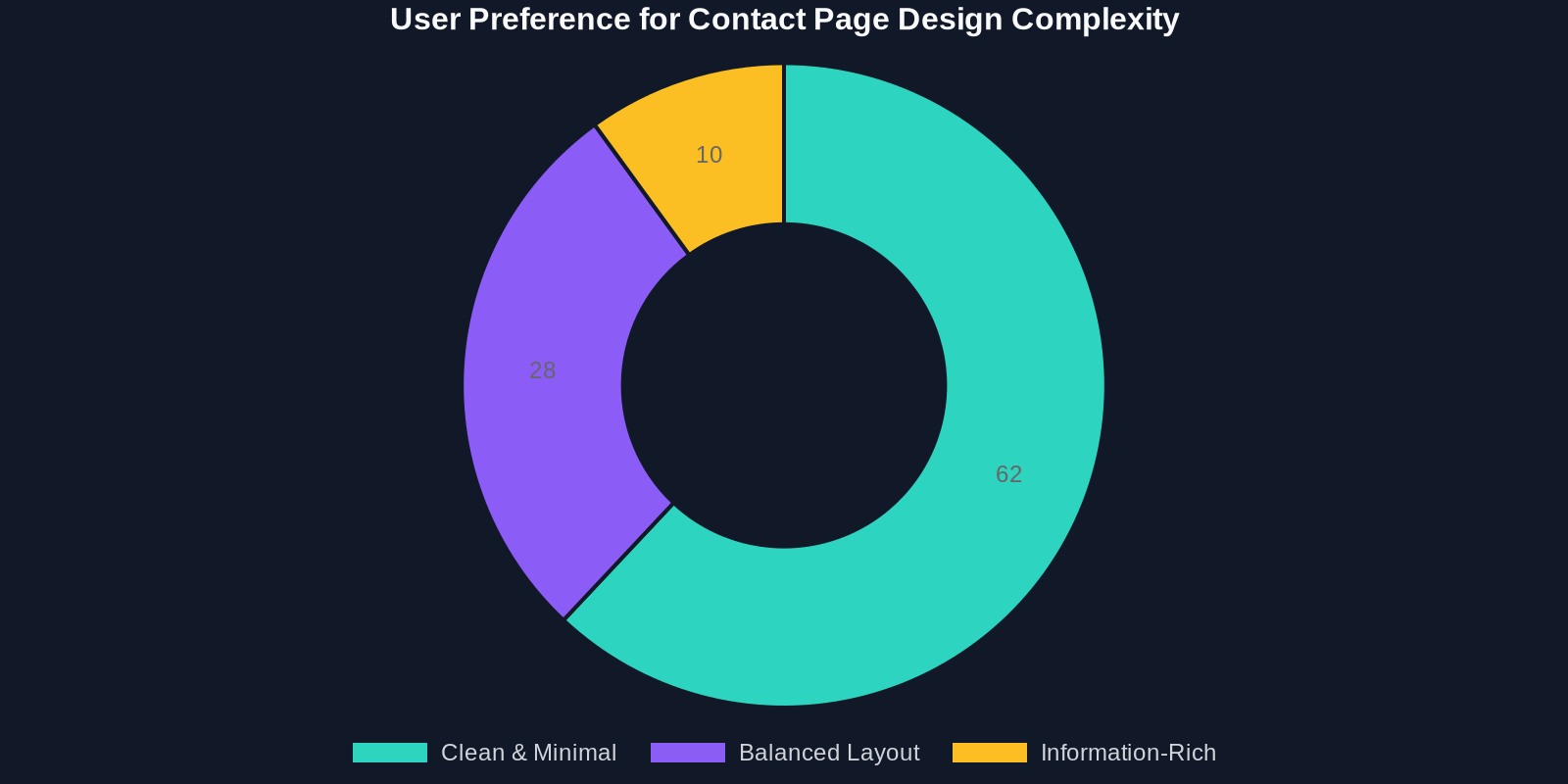
The majority of users (62%) prefer a clean, minimal design for the contact page. They want the form to be the centerpiece, with auxiliary information presented in a sidebar or below the fold. Balance is key—too much information overwhelms, too little leaves users guessing.
The Role of Personalization in Contact Page Design
Personalization is not just for product recommendations. Contact pages can also benefit from tailored experiences. For example, returning customers might see a different message than new visitors. Users coming from a specific campaign page might see a pre-filled subject line.
High-converting contact page examples often use dynamic content. They detect the user's location to show the nearest office or adjust the language based on browser settings. This level of attention signals that the brand cares about the individual user.
The Evolution of Contact Page Design (2018-2024)
Contact page design has evolved significantly over the past six years. Early 2018 pages were often static, text-heavy, and mobile-unfriendly. Today, the trend is toward dynamic, user-centric interfaces.
The adoption of best practices has grown steadily, as shown in the chart below.
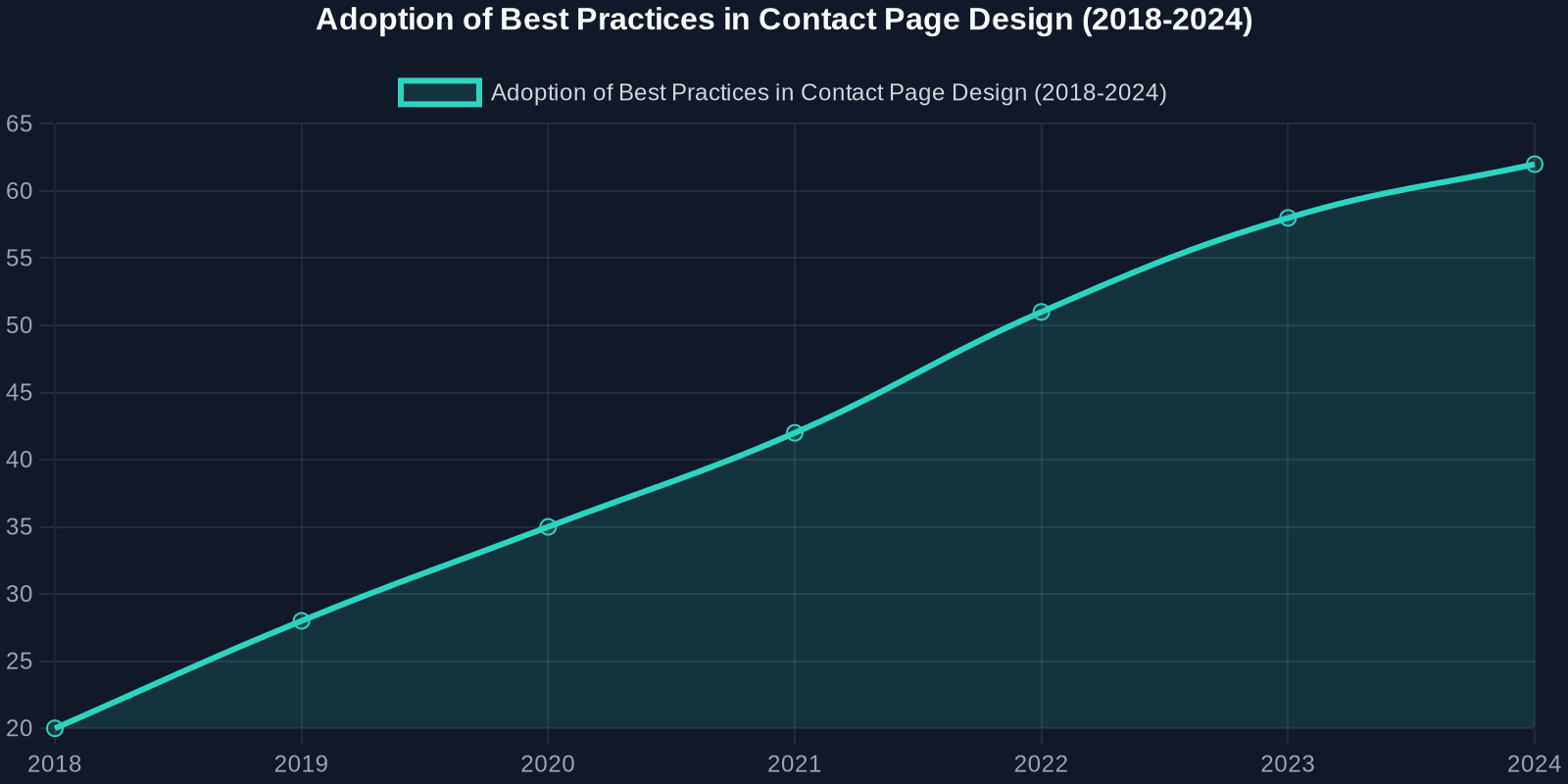
Key trends include the integration of live chat, the use of AI-powered chatbots, and a shift toward minimalism. The mobile-first approach has also become non-negotiable, with Google's mobile-first indexing making responsive design a ranking factor.
Practical Tips for Optimizing Your Contact Page
Now that we understand the principles and pitfalls, let's get practical. Here are actionable steps you can take today to improve your contact page.
- Audit your current form: List every field. Ask yourself: "Is this absolutely necessary?" Remove any field that does not directly serve your conversion goal.
- Add social proof: Include 1-2 testimonials or client logos near the form. This builds trust without distracting.
- Optimize for mobile: Test your contact page on a smartphone. Is the form easy to fill? Are buttons large enough to tap?
- Set expectations: Tell users how quickly you will respond. Even a simple line like "We typically reply within 1 business day" improves user satisfaction.
- Test your CTA: Try different button colors, copy, and placement. A/B test to see what works best for your audience.
Measuring the Performance of Your Contact Page
You cannot improve what you do not measure. Track these key performance indicators (KPIs) for your contact page.
- Form submission rate: The percentage of visitors who complete the form. Benchmark against industry averages (typically 5-10% for B2B, higher for B2C).
- Bounce rate: Are visitors leaving immediately? A high bounce rate may indicate poor design or slow loading.
- Time on page: How long do visitors stay? A low time may mean the page is too simple; a high time may indicate confusion.
- Quality of leads: Track the downstream conversion of submitted leads. A high form submission rate is worthless if the leads are low quality.