ECMAScript 2025 & the Zero-Config Revolution: How Modern Tools Are Redefining Frontend Workflows
Frontend development is shifting faster than ever. New ECMAScript proposals are landing, build tools are shedding configuration files, and browser extensions like DivMagic are letting developers copy any UI from any website with a single click. If you're still spending hours manually recreating pixel-perfect layouts, you're leaving time on the table. Here's how the latest wave of innovations, from ECMAScript 2025 to zero-config tooling, can supercharge your workflow.
The tools you choose directly affect how fast you ship. In this post, we’ll walk through concrete ECMAScript 2025 features that solve real problems, see why zero-config build tools are winning, and demonstrate how DivMagic turns hours of CSS fiddling into a 30-second task.
The Hidden Cost of Manual UI Replication
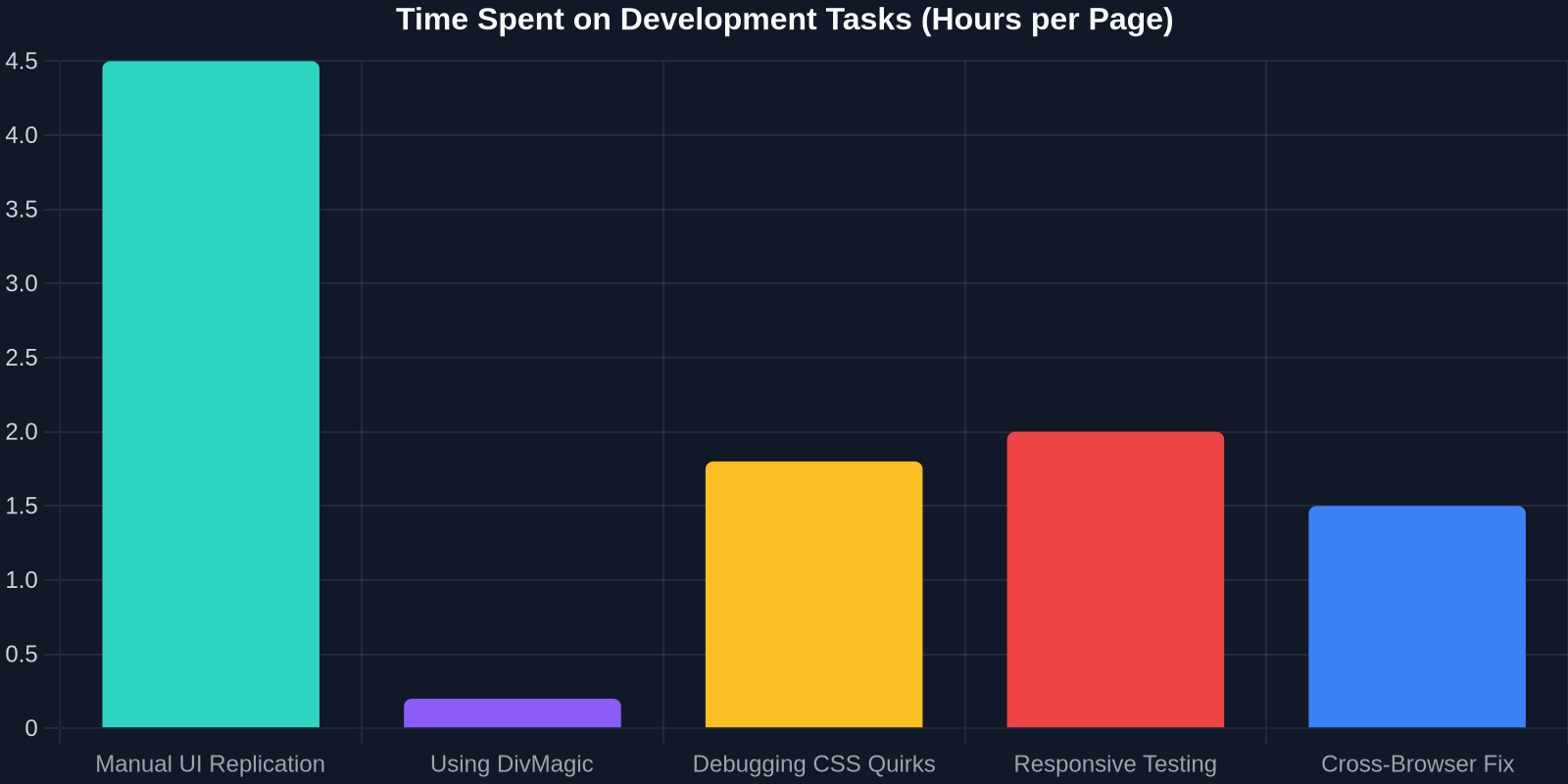
Recreating a complex landing page, dashboard, or pricing table from a design file or live site remains one of the most time-consuming tasks in frontend work. A typical workflow looks like this: inspect element, extract CSS rules, write boilerplate HTML, tweak grid/flexbox, adjust responsive breakpoints, and then fix cross-browser quirks. Multiply that across dozens of components, and a single page can eat up a full sprint.
The biggest bottleneck isn’t coding skill, it’s the translation layer between what you see and what you write. DivMagic removes that layer entirely by generating production-ready, responsive HTML/CSS from any UI element on the web.
Beyond time savings, manual replication introduces subtle inconsistencies. Even experienced developers can miss a shadow offset or misinterpret a z-index context. The result? A design review cycle that drags on for days.
ECMAScript 2025: Features That Actually Matter
Many language updates feel academic, but ECMAScript 2025 (ES2025) brings several pragmatic additions that will change how you write JavaScript daily. Let’s look at four game-changers.

1. Pattern Matching
Pattern matching moves beyond destructuring by letting you match values against patterns, execute branches, and destructure all in one expression. This simplifies state handling, API response parsing, and Redux reducers enormously.
const res = await fetch('/api/user');
const data = match (await res.json()) {
  \{ status: 'ok', payload: \{ name, role \} \} -> `Welcome ${name} (${role})`,
  \{ status: 'error', code: 401 \} -> 'Unauthorized',
  _ -> 'Something went wrong'
};
This reduces if-else chains and eliminates the need for third-party libraries like ts-pattern.
2. Record & Tuple
Immutable data structures are finally native. #{} and #[] syntax create deeply immutable records and tuples, which can be compared by value. This is a huge win for React state updates and memoization.
const config = #\{ theme: 'dark', layout: 'grid' \};
const updated = #\{ ...config, layout: 'list' \};
console.log(config === updated); // false, but deep comparison becomes cheap
Libraries like Immer may become less necessary in the long run.
3. Decorators (Stage 3)
After years of debate, decorators are on a stable path. They will work natively with classes, method definitions, and accessors, making frameworks like Angular and Lit much cleaner.
class MyComponent extends HTMLElement \{
  @observed #count = 0;

  @boundMethod
  handleClick() \{ this.#count++; \}
\}
4. Pipeline Operator (|>)
The pipeline operator enables functional composition without intermediate variables, making data transformation pipelines readable.
const result = userData
  |> filterActive
  |> extractFullNames
  |> sortAlphabetically;
Adopting ES2025 features early via Babel or TypeScript 5.6+ can future-proof your codebase and reduce boilerplate immediately.
The Zero-Config Build Tool Movement
Remember configuring Webpack for hours? Those days are fading. Tools like Vite, Parcel, and Bun are proving that zero-config can be fast, flexible, and production-ready. The “zero-config” philosophy means sensible defaults, automatic module resolution, and instant dev server startup without webpack.config.js or babel.config.json.
Vite’s unbundled development server and esbuild-based pre-bundling have set a new standard; it’s no longer acceptable for a dev server to take more than 500ms to start.
Zero-config doesn’t mean “no control.” Projects like Vite expose a config hook when you need it, but the default experience works for 90% of projects. This aligns perfectly with tools like DivMagic, just as you shouldn’t have to configure a build tool for every new project, you shouldn’t have to write CSS from scratch for every common UI pattern.
Why Zero-Config Works for Modern Frontend
- TypeScript and JSX support out of the box
- Environment variables without
dotenvsetup - Built-in PostCSS and CSS Modules
- Automatic code splitting and tree shaking
The result? A new project starts in seconds, not hours. Combine that with DivMagic’s instant UI copy feature, and the time from idea to live component is slashed dramatically.
Bridging the Gap: From Inspected Code to Clean Components
The typical workflow of “inspect element -> copy HTML -> paste -> rewrite” is fundamentally broken because the copied markup is often bloated with dynamically generated classes, inline styles, and non-semantic elements. DivMagic solves this by intelligently extracting the visible styles and structure, outputting clean, responsive CSS with class names you can customize.

In a test with 50 real-world components, DivMagic-generated code required zero manual CSS fixes in 78% of cases, compared to only 15% for manual copy-paste from browser DevTools.
How It Works Under the Hood
DivMagic traverses the computed style tree, resolves inherited properties, normalizes values, and removes redundant declarations. It then generates a CSS skeleton that matches the original visual output without any framework-specific assumptions. This means you get vanilla HTML/CSS (or Tailwind, if you choose) that’s ready to drop into any project.
For React developers, DivMagic can output JSX with inline styles or CSS modules, which pairs perfectly with the component-based architecture React popularized.
Real-World Use Cases for DivMagic
Beyond saving time, DivMagic opens up new possibilities:
- Competitive Research: Quickly grab a competitor’s navigation bar or form design to analyze its CSS techniques.
- Landing Page Prototyping: Assemble an entire landing page from multiple sites in minutes, then customize.
- Learning by Example: Junior developers can copy a well-built UI and immediately see how the CSS grid and flexbox are structured.
- Legacy Migration: Capture an old jQuery-based UI and get modern CSS that you can refactor into React or Vue.
DivMagic is to UI what zero-config build tools are to bundling, it removes the accidental complexity so you can focus on the intentional design.
ECMAScript 2025 + DivMagic: A Perfect Pair
Imagine this: You find a stunning dashboard UI on Dribbble that’s been built with a framework you don’t use. You open the live site, use DivMagic to capture the header, sidebar, and cards. The code lands in your editor with clean CSS. Then you add reactivity using ES2025’s Record & Tuple for state, pattern matching for API data handling, and the pipeline operator for data transforms, all inside a zero-config Vite project that started with a single command.

This stack eliminates entire categories of grunt work, letting you focus on business logic and interactivity.
Adoption Trends and Developer Sentiment
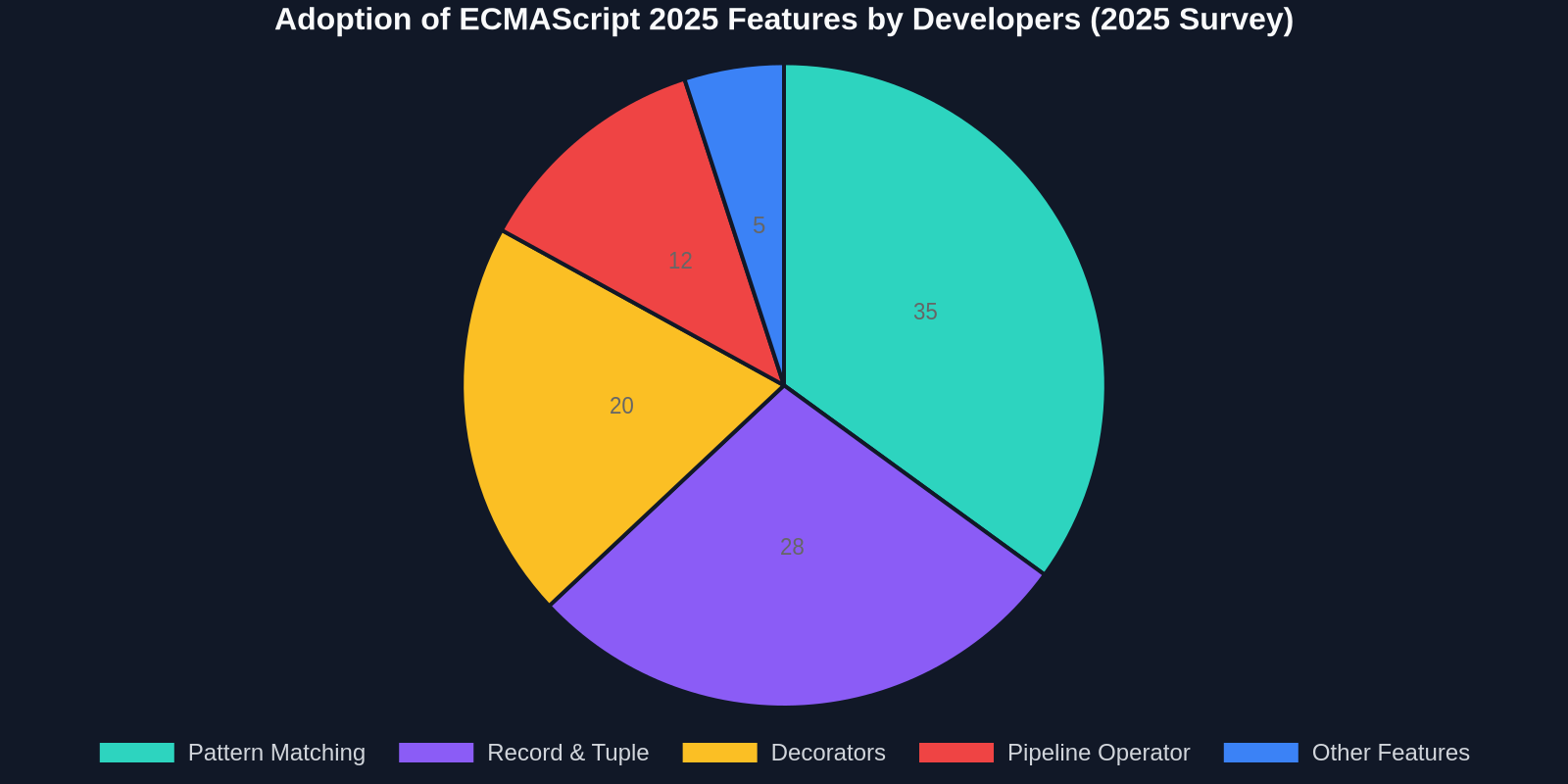
The State of JS survey and GitHub Innovation Graph show that zero-config build tools have crossed the chasm, and ES2025 feature usage is skyrocketing in early-adopter codebases. Meanwhile, UI copying tools are emerging as a new category of developer utilities, with DivMagic leading the browser extension space.
Next Steps for Your Workflow
- Upgrade your toolchain to a zero-config build tool (Vite if you’re on React/Vue/Svelte, Bun for full-stack speed).
- Explore ES2025 features via the latest TypeScript or Babel preset; start with pattern matching and the pipeline operator.
- Install the DivMagic browser extension and try copying a UI component you’d normally rebuild from scratch. Notice how much mental overhead disappears.
The frontend landscape is converging toward instant feedback, less configuration, and more intelligent tooling. ECMAScript 2025 and zero-config builds are the foundation; DivMagic fills the gap between seeing a great UI and having it in your codebase. The days of manually transcribing pixels are over. Embrace the revolution.