
जब टेक्सास ने अपने सुलभ, मानकीकृत वेब डिज़ाइन सिस्टम की घोषणा की, जो एजेंसी साइटों को आधुनिक बनाने के लिए है, तो यह सिर्फ राज्य सरकार के लिए जीत नहीं थी, बल्कि हर जगह फ्रंटएंड डेवलपर्स के लिए एक ऐतिहासिक क्षण था। StateScoop द्वारा रिपोर्ट की गई यह पहल, 30 मिलियन से अधिक निवासियों की सेवा करने वाली सैकड़ों राज्य वेबसाइटों में स्थिरता, पहुंच और दक्षता लाने का लक्ष्य रखती है।
डेवलपर्स के लिए, यह कदम एक व्यापक बदलाव का संकेत देता है: डिज़ाइन सिस्टम अब वैकल्पिक कॉर्पोरेट विलासिता नहीं हैं; वे सार्वजनिक बुनियादी ढांचा बन रहे हैं। और उन्हें बनाने के लिए उपयोग की जाने वाली तकनीकें—पुन: प्रयोज्य घटक, पहुंच-प्रथम CSS, और मानकीकृत UI पैटर्न—बिल्कुल वही हैं जो आधुनिक फ्रंटएंड डेवलपर्स को मास्टर करने की आवश्यकता है।
The Core Technical Challenges Texas Addressed
Building a design system for an entire state government presents unique technical hurdles:
- Diverse legacy systems: Agencies use different CMSes, frameworks, and hosting environments.
- Accessibility compliance: Legal requirements under Section 508 and WCAG 2.1 mean zero tolerance for non-compliance.
- Cross-agency collaboration: Design decisions must work for tourism, health services, transportation, and more.
- Long-term maintainability: The system must survive administration changes.
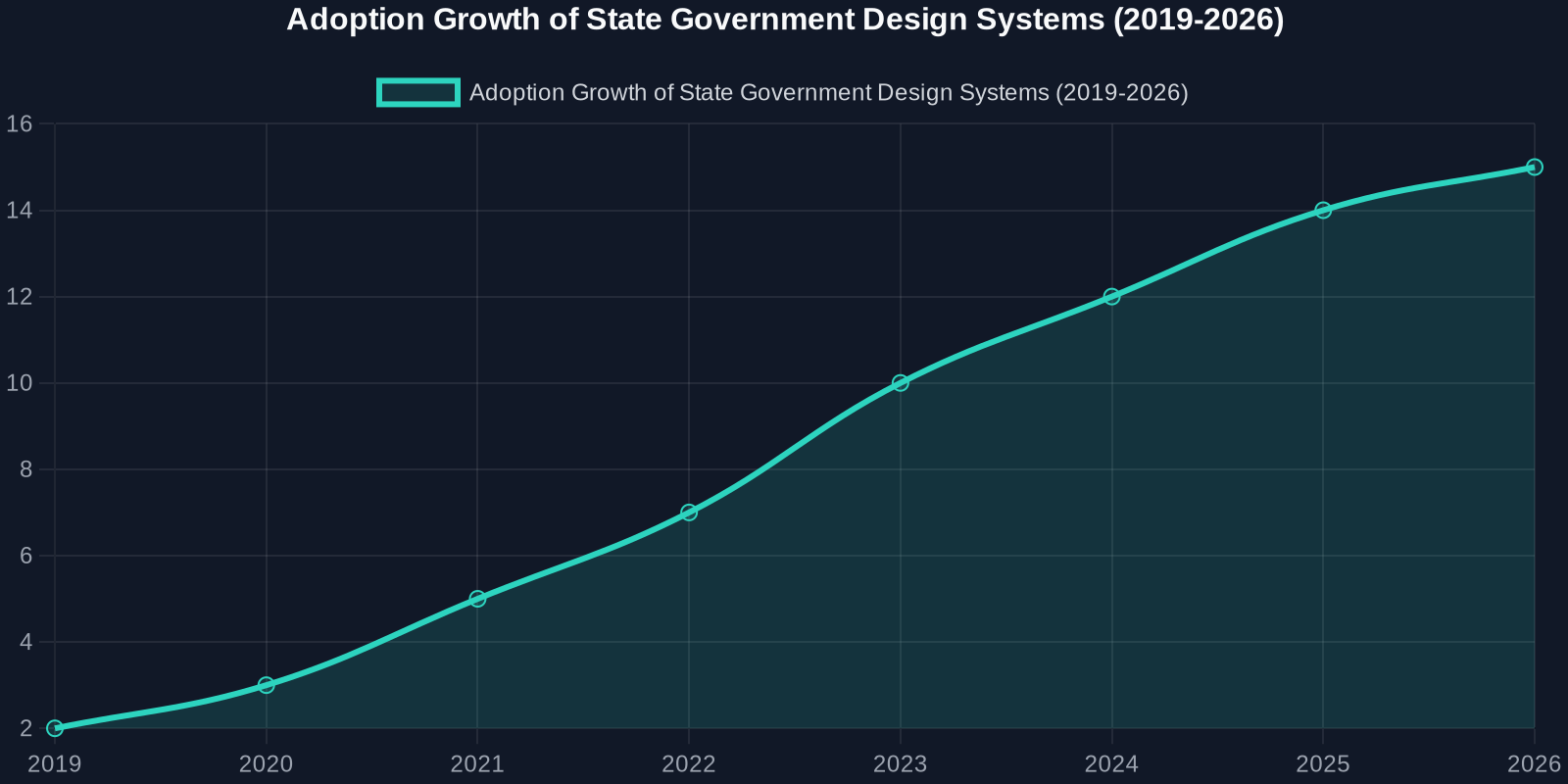
The Anatomy of an Accessibility-First Design System
Texas’ approach mirrors best practices from industry leaders like Google Material Design, IBM Carbon, and the U.S. Web Design System (USWDS). Let’s break down the key technical components.

1. Component-Based Architecture
Rather than providing templates, the Texas design system delivers reusable components with documented APIs. For example, a button component must support multiple states: default, hover, active, disabled, and focus (with visible outlines for keyboard navigation).
/* Example: Accessible button with focus ring */
.usa-button {
  --btn-bg: #005ea2;
  --btn-text: #ffffff;
  --btn-border: transparent;
  background-color: var(--btn-bg);
  color: var(--btn-text);
  border: 2px solid var(--btn-border);
  padding: 0.75rem 1.5rem;
  font-size: 1rem;
  line-height: 1.5;
  border-radius: 4px;
  cursor: pointer;
  transition: background-color 0.2s, box-shadow 0.2s;
}

.usa-button:focus-visible {
  outline: none;
  box-shadow: 0 0 0 4px #2491ff;
}

.usa-button:disabled {
  opacity: 0.5;
  cursor: not-allowed;
}
2. Accessibility Tokens
Design tokens in CSS custom properties and Sass variables ensure accessibility is built into the visual language. Contrast ratios, spacing, and typography all follow pre-set accessibility thresholds.
:root {
  --color-primary: #005ea2;
  --color-primary-dark: #1a4480;
  --color-focus: #2491ff;
  --font-heading: 'Public Sans', sans-serif;
  --font-body: 'Source Sans Pro', sans-serif;
  --line-height-heading: 1.2;
  --line-height-body: 1.6;
  --spacing-unit: 8px;
}
3. Responsive & Mobile-First
Government sites now see over 60% of traffic from mobile devices. The Texas system uses a mobile-first CSS approach with breakpoints tied to content, not devices.
/* Mobile-first grid */
.grid-container {
  display: grid;
  grid-template-columns: 1fr;
  gap: 1rem;
  max-width: 64rem;
  margin: 0 auto;
  padding: 0 1rem;
}

@media (min-width: 48em) {
  .grid-container {
    grid-template-columns: repeat(12, 1fr);
  }
}
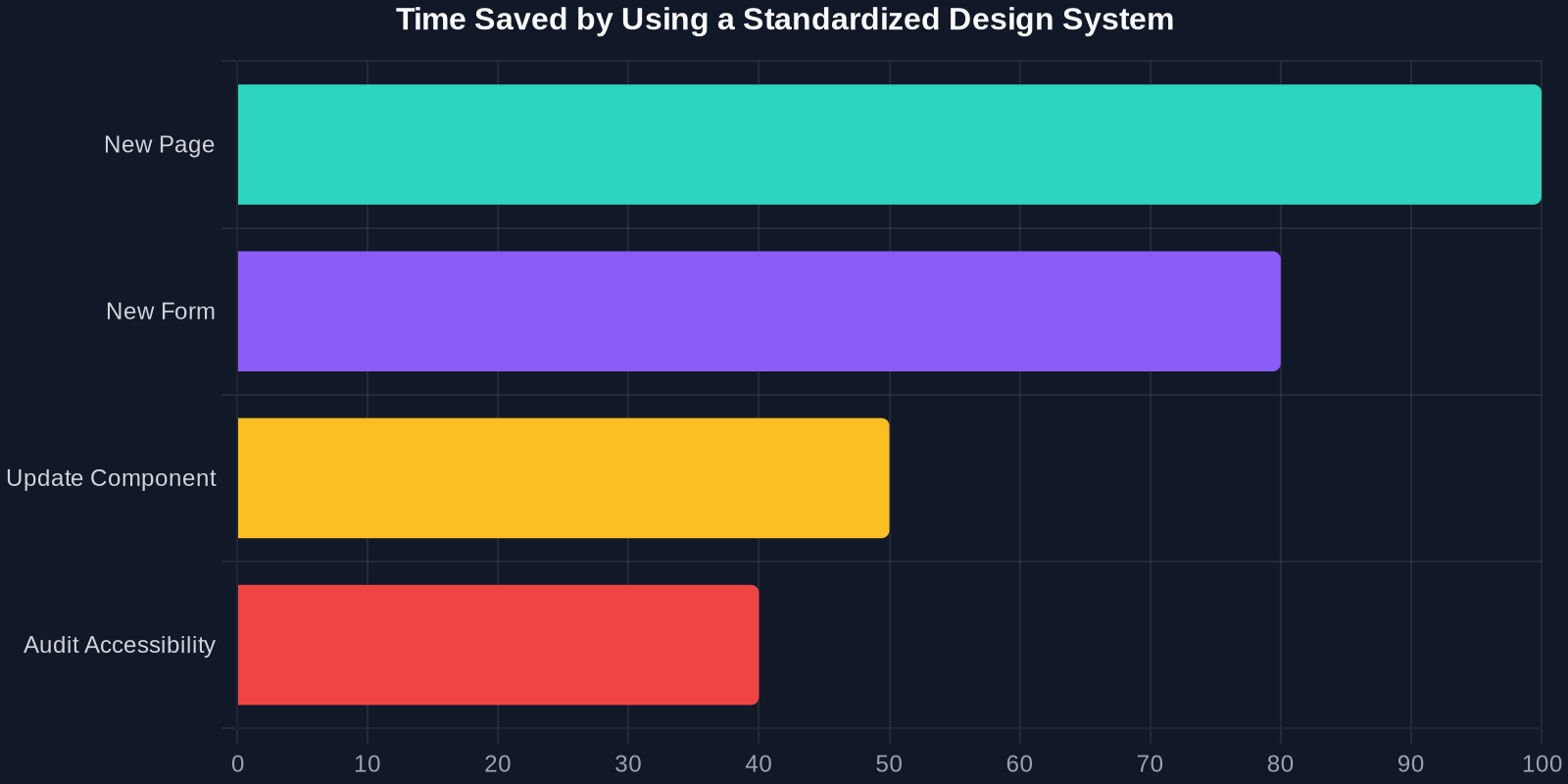
Comparison: Traditional vs. Design System Approach
To appreciate the impact, let’s compare the old way of building government sites with the new standardized system.
वास्तविक दुनिया का प्रभाव: डेवलपर्स क्या सीख सकते हैं
पहुंच कोई सुविधा नहीं है; यह एक नींव है
टेक्सास पहल साबित करती है कि पहुंच पहला विचार होना चाहिए, बाद में सोचने वाली चीज़ नहीं। डेवलपर्स को अपने कोड का ऑडिट करने के लिए axe-core या Lighthouse जैसे टूल अपनाने चाहिए, लेकिन इससे भी बेहतर: एक ऐसा डिज़ाइन सिस्टम चुनें जो शुरू से ही अनुपालन को शामिल करता हो।
अपने डिज़ाइन सिस्टम को वर्ज़न करें
सॉफ्टवेयर की तरह, एक डिज़ाइन सिस्टम को सिमैंटिक वर्ज़निंग की आवश्यकता होती है। एक बटन के होवर रंग में बदलाव अनगिनत पेजों को तोड़ सकता है। चेंजलॉग का उपयोग करें और हितधारकों के साथ ब्रेकिंग चेंजेस संवाद करें।
हर चीज़ का दस्तावेज़ीकरण करें
टेक्सास सिस्टम का सबसे मूल्यवान हिस्सा दस्तावेज़ीकरण है। घटक पूर्वावलोकन, कोड स्निपेट, पहुंच नोट्स और उपयोग दिशानिर्देश। दस्तावेज़ीकरण के बिना, एक डिज़ाइन सिस्टम सिर्फ CSS का ढेर है।
अपना खुद का डिज़ाइन सिस्टम बनाने के कदम (टेक्सास से प्रेरित)
चरण 1: अपने मौजूदा UI का ऑडिट करें

हर बटन, फॉर्म फील्ड, कार्ड और मोडल को सूचीबद्ध करें। वर्तमान CSS और HTML कैप्चर करने के लिए DivMagic का उपयोग करें। असंगतियों की तलाश करें।
चरण 2: डिज़ाइन टोकन परिभाषित करें
अपने सर्वश्रेष्ठ प्रदर्शन करने वाले पेजों से रंग, स्पेसिंग, टाइपोग्राफी और शैडो निकालें। उन्हें CSS कस्टम प्रॉपर्टीज़ में संग्रहीत करें।
चरण 3: घटक बनाएं
छोटे से शुरू करें: बटन, इनपुट, अलर्ट। सुनिश्चित करें कि प्रत्येक घटक पहुंच जांच पास करता है। उन्हें दस्तावेज़ित करने के लिए Storybook जैसे टूल का उपयोग करें।
चरण 4: परीक्षण और पुनरावृत्ति करें
यह देखने के लिए वास्तविक उपयोगकर्ता परीक्षण और एनालिटिक्स का उपयोग करें कि घटक कैसे प्रदर्शन करते हैं। टोकन और शैलियों को व्यवस्थित तरीके से अपडेट करें।
निष्कर्ष
टेक्सास का एक सुलभ, मानकीकृत वेब डिज़ाइन सिस्टम की ओर कदम नागरिकों, डेवलपर्स और सार्वजनिक क्षेत्र की तकनीक के भविष्य के लिए एक जीत है। यह प्रदर्शित करता है कि जब आप पुन: प्रयोज्य, सुलभ UI पैटर्न में निवेश करते हैं, तो सभी को लाभ होता है: तेज विकास, कम लागत और बेहतर उपयोगकर्ता अनुभव।