
14 MCP सर्वर जो हर UI/UX इंजीनियर को जानना चाहिए (2025 गाइड)

14 MCP सर्वर जो हर UI/UX इंजीनियर को जानने चाहिए (2025 गाइड)
कल्पना करें कि आप स्क्रीन का आकार बदलने, प्लेसहोल्डर कंटेंट जनरेट करने, या एक्सेसिबिलिटी जांचने जैसे दोहराए जाने वाले कार्यों पर कम समय बिताते हैं, और उन रचनात्मक निर्णयों पर अधिक समय लगाते हैं जो असाधारण उपयोगकर्ता अनुभवों को परिभाषित करते हैं। यही UI/UX इंजीनियरों के लिए MCP सर्वर का वादा है। मॉडल कॉन्टेक्स्ट प्रोटोकॉल (MCP) तेजी से यह परिभाषित कर रहा है कि AI सहायक डिज़ाइन टूल्स और डेवलपमेंट एनवायरनमेंट के साथ कैसे इंटरैक्ट करते हैं।
हाल के उद्योग डेटा के अनुसार, 85% शीर्ष इंजीनियरिंग टीमें अब MCP सर्वर को अपने वर्कफ़्लो में एकीकृतकरती हैं ताकि UI/UX कार्यों को सुव्यवस्थित किया जा सके। AI को आपके ब्राउज़र, डिज़ाइन एप्लिकेशन और कोड रिपॉजिटरी से जोड़कर, MCP AI को वह संदर्भ प्रदान करता है जिसकी उसे एक शक्तिशाली, सहयोगी भागीदार के रूप में कार्य करने के लिए आवश्यकता होती है।
इस व्यापक गाइड में, हम UI/UX इंजीनियरों के लिए विशेष रूप से तैयार किए गए 14 आवश्यक MCP सर्वरों का पता लगाएंगे। आप सीखेंगे कि प्रत्येक सर्वर कैसे काम करता है, इसका उपयोग कब करना है, और इसे अपने दैनिक वर्कफ़्लो में कैसे एकीकृत करना है।
For UI/UX engineers, this means: -Direct browser control– AI can open tabs, inspect elements, and simulate user interactions. -Real-time design feedback– AI can analyze a Figma file or a live web component and suggest improvements. -Code-aware suggestions– AI understands your component library and can generate code that matches your design system.
The 14 Essential MCP Servers for UI/UX Engineers
1. Chrome MCP Server
 **What it does:**A Chrome extension-based MCP server that exposes your browser to AI assistants. AI can open new tabs, navigate to URLs, click buttons, extract text, and capture screenshots.
**Why UI/UX needs it:**Perfect for testing user flows, taking snapshots of design mockups, and validating responsive behavior across breakpoints. You can ask AI to “navigate to the signup page and screenshot the form” without leaving your editor.
**What it does:**A Chrome extension-based MCP server that exposes your browser to AI assistants. AI can open new tabs, navigate to URLs, click buttons, extract text, and capture screenshots.
**Why UI/UX needs it:**Perfect for testing user flows, taking snapshots of design mockups, and validating responsive behavior across breakpoints. You can ask AI to “navigate to the signup page and screenshot the form” without leaving your editor.
2. Figma MCP Server
**What it does:**Connects AI directly to your Figma documents. AI can read layers, component properties, and design tokens, and can even suggest modifications. **Why UI/UX needs it:**Eliminates the manual effort of translating design specs into code. The AI can extract color variables, typography scales, and spacing rules automatically.
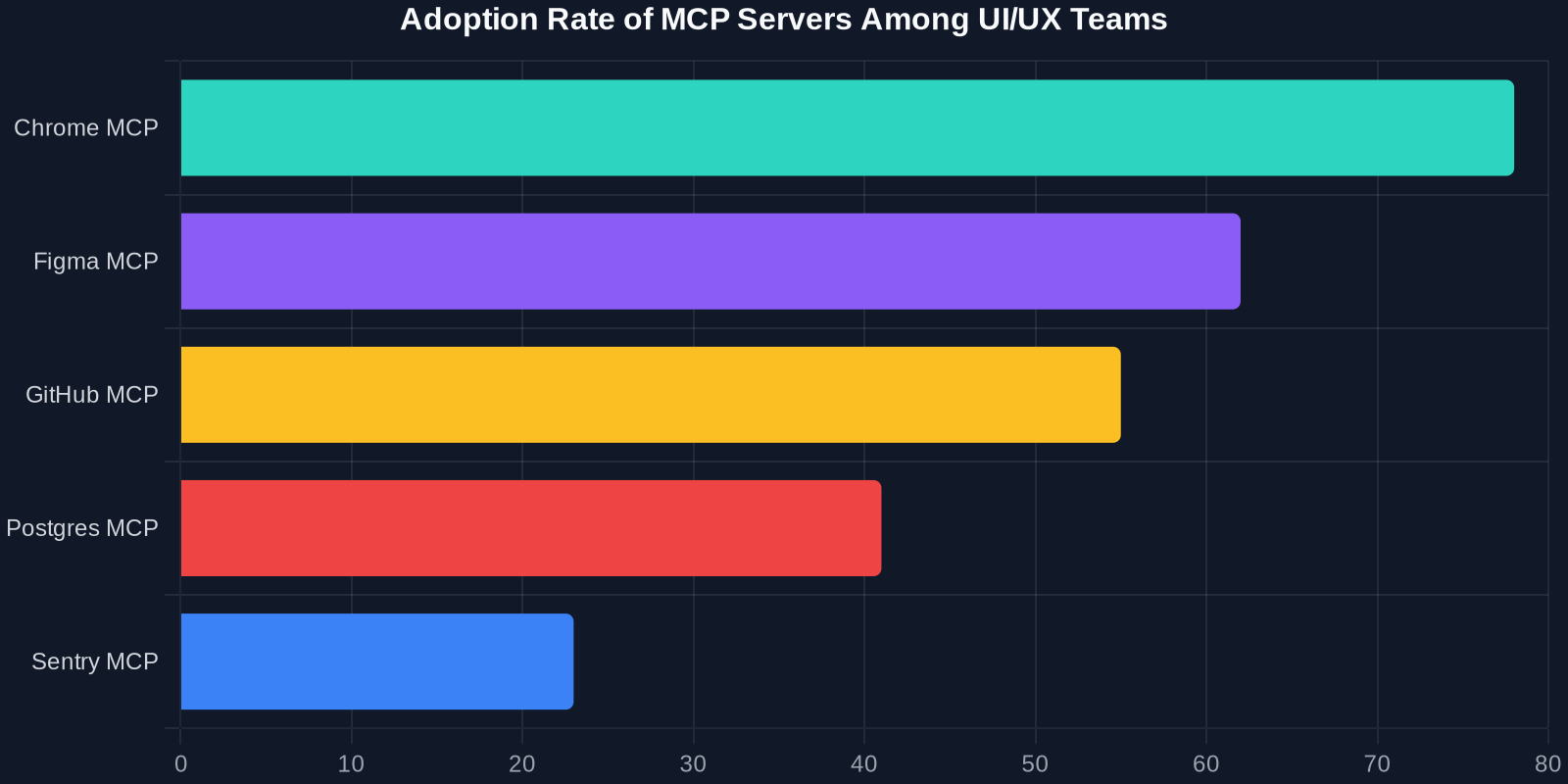
3. GitHub MCP Server
**What it does:**Provides AI with access to your repositories, issues, pull requests, and code reviews. **Why UI/UX needs it:**Automate code review for frontend components, generate changelogs from recent design system updates, or ask AI to “find all outdated class names in the button component.”
4. Storybook MCP Server
**What it does:**Exposes your Storybook instances to AI, allowing it to browse component stories, test props, and capture component states. **Why UI/UX needs it:**Accelerates component documentation. AI can generate new stories based on existing components or validate that every component has a corresponding story.
5. Postgres MCP Server
**What it does:**Gives AI read/write access to your PostgreSQL database. **Why UI/UX needs it:**When designing dashboards or data-heavy interfaces, AI can query real user data to build realistic prototypes and test performance.
6. Memory MCP Server
**What it does:**Maintains persistent memory about user preferences, design decisions, and project context across sessions. **Why UI/UX needs it:**Stops AI from forgetting your design system rules. Once you tell it “we use a 4-point grid system,” it remembers across all interactions.
7. Stripe MCP Server
**What it does:**Integrates with the Stripe API to test payment flows, subscription models, and checkout UI. **Why UI/UX needs it:**Validate payment forms, error states, and confirmation screens without manual testing.
8. Slack MCP Server
**What it does:**Reads and sends Slack messages, searches channels, and manages notifications. **Why UI/UX needs it:**Automate design handoff notifications, pull in feedback from stakeholders, or ask AI to “summarize the UX feedback from #design channel.”
9. Linear MCP Server
**What it does:**Connects to Linear for project management, issue tracking, and sprint planning. **Why UI/UX needs it:**Turn AI-generated bug reports into Linear tickets, or ask AI to “create tasks for the accessibility issues found on the homepage.”
10. Filesystem MCP Server
**What it does:**Gives AI access to local and remote file systems for reading, writing, and organizing files. **Why UI/UX needs it:**Manage icon libraries, SVG sprites, or design asset folders. AI can rename hundreds of files according to a naming convention in seconds.
12. Webflow MCP सर्वर (कम्युनिटी)
**यह क्या करता है:**CMS कंटेंट एडिटिंग और साइट मैनेजमेंट के लिए Webflow के साथ प्रायोगिक एकीकरण। **UI/UX को इसकी आवश्यकता क्यों है:**कंटेंट डिज़ाइनर और UX राइटर सीधे AI वार्तालापों से कॉपी परिवर्तन जनरेट और पुश कर सकते हैं।
13. Sentry MCP सर्वर
**यह क्या करता है:**Sentry एरर ट्रैकिंग और परफॉरमेंस मॉनिटरिंग से जुड़ता है। **UI/UX को इसकी आवश्यकता क्यों है:**उपयोगकर्ता सत्रों से JS एरर सतह पर लाएं जो UI बग्स को इंगित करते हैं, फिर उन्हें अपने डिज़ाइन सिस्टम बैकलॉग में फीड करें।
14. कस्टम इंटरनल API MCP सर्वर
**यह क्या करता है:**आपकी कंपनी के आंतरिक माइक्रोसर्विसेज को MCP एंडपॉइंट के रूप में एक्सपोज़ करता है। **UI/UX को इसकी आवश्यकता क्यों है:**प्रोप्राइटरी डिज़ाइन टूल्स या कंपोनेंट लाइब्रेरी वाली एंटरप्राइज़ टीमों के लिए, यह सर्वर AI और कस्टम वर्कफ़्लो के बीच की खाई को पाटता है।
MCP सर्वर UI/UX वर्कफ़्लो को कैसे बदलते हैं
अपनी दैनिक प्रक्रिया में MCP सर्वर को एकीकृत करना केवल गति से अधिक बदलता है—यह इंजीनियरिंग संस्कृति को बदलता है। यहाँ पहले और बाद की तुलना है:
MCP से पहले
- 5 ब्रेकपॉइंट पर मैन्युअल ब्राउज़र टेस्टिंग: प्रति पेज 20 मिनट
- Figma को कोड में अनुवाद करना: प्रति स्क्रीन 2-4 घंटे
- UI कंपोनेंट के लिए कोड रिव्यू: प्रति पुल रिक्वेस्ट 30 मिनट
MCP के बाद
- AI समानांतर में ब्राउज़र टेस्ट चलाता है: 2 मिनट
- AI स्वचालित रूप से डिज़ाइन टोकन निकालता है: तुरंत
- AI कोड रिव्यू टिप्पणियां पहले से भरता है: 5 मिनट
दोहराए जाने वाले कार्यों को AI पर छोड़कर, UI/UX इंजीनियर माइक्रो-इंटरैक्शन, मोशन डिज़ाइन और उपयोगकर्ता अनुसंधान पर ध्यान केंद्रित कर सकते हैं—वे उच्च-मूल्य वाली गतिविधियाँ जो उत्पादों को अलग करती हैं।
सुरक्षा और सर्वोत्तम अभ्यास
MCP सर्वर महत्वपूर्ण शक्ति रखते हैं। चूंकि "MCP सर्वर को Chrome एक्सटेंशन की तरह पूर्ण अनुमतियाँ होती हैं," आपको उन्हें उचित रूप से सुरक्षित करना होगा।

-**न्यूनतम विशेषाधिकार का सिद्धांत:**प्रत्येक MCP सर्वर को केवल वही अनुमतियाँ दें जिनकी उसे आवश्यकता है। -**ऑडिट लॉग:**अपने AI एजेंटों को टूल्स, MCP सर्वर और वर्कफ़्लो में लगातार रेड-टीम करने वाले टूल का उपयोग करें ताकि प्रोडक्शन से पहले वास्तविक हमले के रास्ते उजागर हों। -**वर्जन कंट्रोल:**अपनी MCP कॉन्फ़िगरेशन फ़ाइलों को कोड के रूप में मानें; पुल रिक्वेस्ट में उनकी समीक्षा करें।
MCP सर्वर के साथ शुरुआत करना
लागू करने के लिए तैयार हैं? यहाँ एक त्वरित-प्रारंभ चेकलिस्ट है:
1.MCP क्लाइंट इंस्टॉल करें– अधिकांश प्रमुख AI टूल अब मूल रूप से MCP का समर्थन करते हैं। 2.अपना पहला सर्वर चुनें– तत्काल ROI के लिए Chrome MCP सर्वर से शुरुआत करें। 3.अनुमतियाँ कॉन्फ़िगर करें– परिभाषित करें कि प्रत्येक सर्वर कौन सी क्रियाएं कर सकता है। 4.वास्तविक कार्य के साथ परीक्षण करें– AI से कहें "होमपेज खोलें, स्क्रीनशॉट लें, और किसी भी विज़ुअल बग की पहचान करें।" 5.धीरे-धीरे विस्तार करें– आत्मविश्वास बनाने पर Figma, GitHub और डेटाबेस सर्वर जोड़ें।
निष्कर्ष
ब्राउज़र ऑटोमेशन से लेकर डिज़ाइन टोकन निष्कर्षण तक, यहां प्रस्तुत 14 MCP सर्वर UI/UX इंजीनियरों को स्मार्ट तरीके से काम करने में सक्षम बनाते हैं। इन टूल्स को अपने वर्कफ़्लो में एकीकृत करके, आप मैन्युअल टेस्टिंग को 80% तक कम कर सकते हैं, डिज़ाइन-टू-कोड हैंडऑफ को तेज कर सकते हैं, और उस काम के लिए रचनात्मक बैंडविड्थ खाली कर सकते हैं जो वास्तव में मायने रखता है—सहज, आनंददायक उपयोगकर्ता अनुभव तैयार करना। आपका अगला कदम: इस सूची से एक MCP सर्वर चुनें, इसे आज सेट करें, और अपना पहला AI-संचालित UI परीक्षण चलाएं। परिणाम खुद बोलेंगे।