
The software around it: its tools, instructions, memory, runtime and ways of interacting with other systems can substantially change what the same model is able to do.
In web design, we are witnessing a fascinating divergence. On one side, pure automation promises to generate entire websites from a single prompt. On the other, a new breed of "craft-first" tools is emerging, prioritizing developer intent, precision, and the granular control that professional frontend engineers demand. This isn't a rejection of AI; it's an evolution beyond the black box.
The recent surge in AI-powered builders has solved a specific problem: speed to a prototype. But for production-grade interfaces, the gap between a generated first draft and a shippable, pixel-perfect component remains vast. The tool highlighted by Creative Bloq directly addresses this gap, arguing that the power isn't just in the model, but in the software that surrounds it.
The Context Conundrum: Why Pure AI Generation Falls Short
When we prompt an AI to "build a modern pricing table," it often delivers a generic, CSS-flexbox interpretation that lacks the specific design tokens, grid subleties, and interaction states of a hand-crafted interface. The missing ingredient is context. The model has no memory of your existing design system, no understanding of your team's naming conventions, and no adherence to your specific accessibility standards.
This is the core thesis of the craft-first movement. It's not about making the AI generate more pixels, but about creating an environment where the developer can inject their specific constraints, brand logic, and structural preferences before the generation happens. The result is code that doesn't just look right but feels right within the existing codebase.
The Hidden Cost of Automated Code
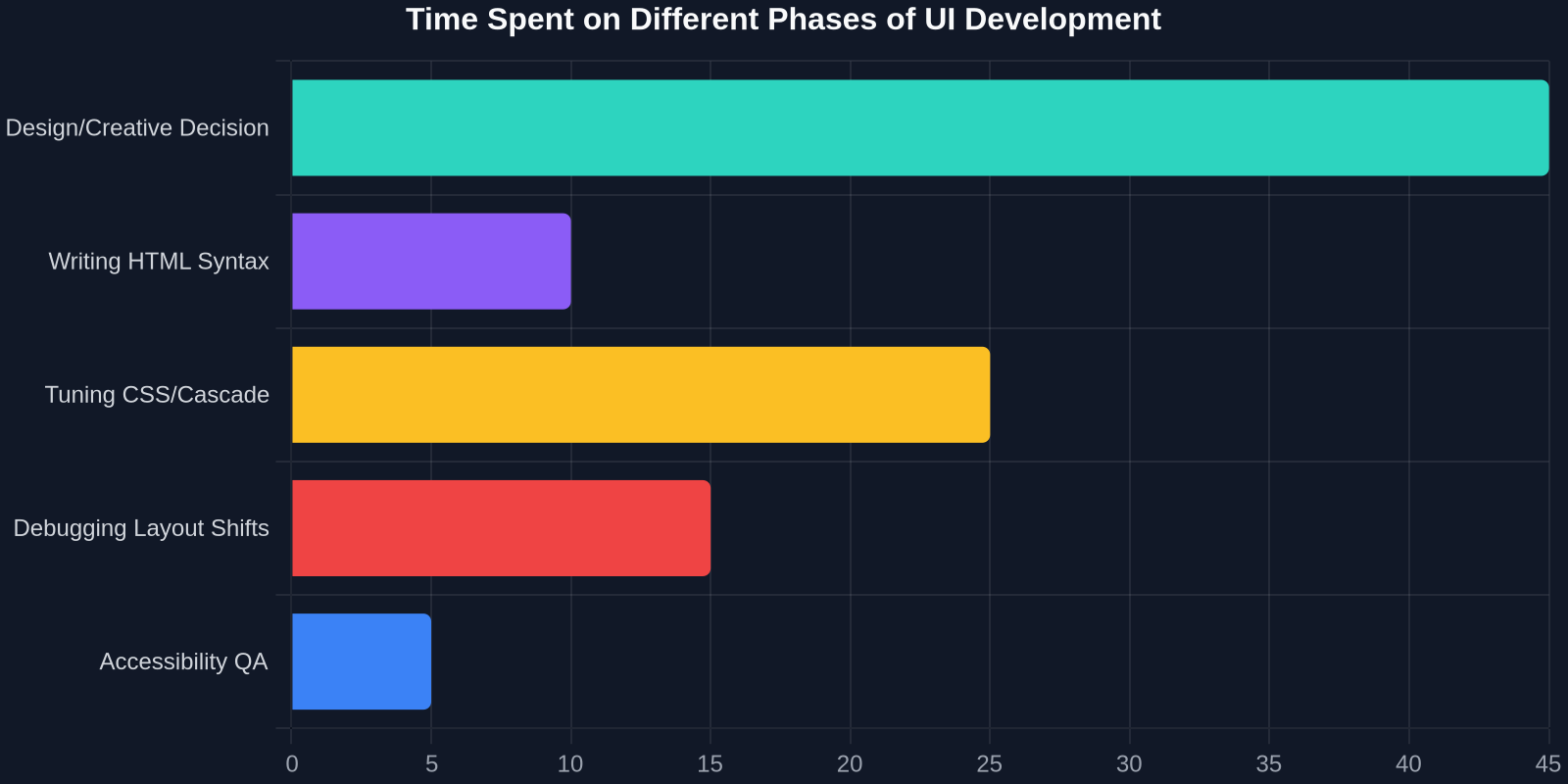
Developers often celebrate the initial speed burst but dread the "refactoring hour." Code vomited by a general-purpose AI often lacks semantic HTML structure, creates deeply nested CSS specificity wars, and ignores flexible layout paradigms like Container Queries or Logical Properties. The time saved in generation is frequently lost in debugging.
Designing the system around the user's craft isn't about simpler interfaces; it's about creating a bridge between human intent and machine execution that respects the developer's existing mental model.
The Shift from Generation to Composition
The modern craft tool doesn't ask you to start from a blank text field. Instead, it integrates into the browser, allowing you to analyze existing code, extract design tokens, and manipulate the Document Object Model (DOM) with surgical precision. It treats existing websites not as off-limits territory, but as a rich material palette for learning and inspiration.

This shift represents a major workflow upgrade. Instead of fighting "responsive" breakpoints in a 10,000-line CSS file, developers can visually manipulate spacing, type scales, and color variables directly on rendered components, while the tool ensures the underlying code remains clean, composable, and scalable.
Visual Manipulation, Code Integrity
The key differentiator here is idempotency of style updates. When a craft-focused tool adjusts a component's border radius, it doesn't inject a flat style attribute with border-radius: 8px !important. Instead, it maps that change to the correct CSS custom property (--card-radius: 0.5rem) within the matching layer of the cascade. This preserves the architectural integrity of the design system.
Integrating Live Data and Real-World Constraints
A design is not truly a design until it interfaces with reality. The latest advancements in craft tools, as seen with integrations into platforms like Parallel, break the mold of static prototyping. You can now connect a live, browser-extracted component directly to dynamic data sources without breaking the UI.
You can now connect your Lovable app to Parallel to search the live web. This functionality extends far beyond simple API calls; it allows a UI element to be a living, breathing part of the internet. Use it for price monitors, lead scrapers, and research tools built on live web data.
From Static Scalpel to Dynamic Stethoscope
Imagine a dashboard widget that monitors competitor pricing. A pure design tool would mock this up with a static table. A craft-first tool allows you to bind the scraped live data directly to the table rows while maintaining the complex nth-child hover effects and column alignment you perfected manually. If the live data returns a null value, the tool should ideally provide utility classes to handle @empty state without JavaScript hacks.
The Runtime Revival: Mastering the Cascade
The "C" in CSS, the Cascade, is often the first victim of automation. AI generators often flatten it out of fear, resulting in inline styles or highly specific flat selectors. Craft-first tools are reviving the mastery of the cascade by actively surfacing inheritance and specificity to the developer.

By visualizing the computed styles life-cycle, developers can understand why a font isn't loading on a button: is it a missing global token? Is it a shadow-DOM encapsulation barrier? Is it a specificity override from a sibling rule? This debugging layer transforms CSS from a black box into a transparent, traceable system.
Component-Level Debugging
Modern browser DevTools are powerful, but they aren't tailored to the component architecture of frameworks like React or Vue. A specialized craft tool can display props, context, and the resulting applied CSS in a single pane, closing the mental loop between a state change in JavaScript and a visual update on screen.
Craft Does Not Mean Manual: The Role of Assisted Precision
It's crucial to dismantle the false dichotomy that "craft" means doing everything by hand. Craft-first tools are deeply automated, they just automate the right things. They automate the extraction of tokens, the conversion of pixel values to relative rem units, and the generation of gap utilities for consistent vertical rhythm. They do not automate the decision of what the visual rhythm should be.
This preservation of intent is the secret sauce. If a developer sets a box shadow to create a specific depth illusion, the tool should never override that decision in subsequent edits unless explicitly asked. This contrasts sharply with "regenerative AI," where asking the bot to slightly widen a card might reset your carefully tuned shadow.
Tokenization as the Source of Truth
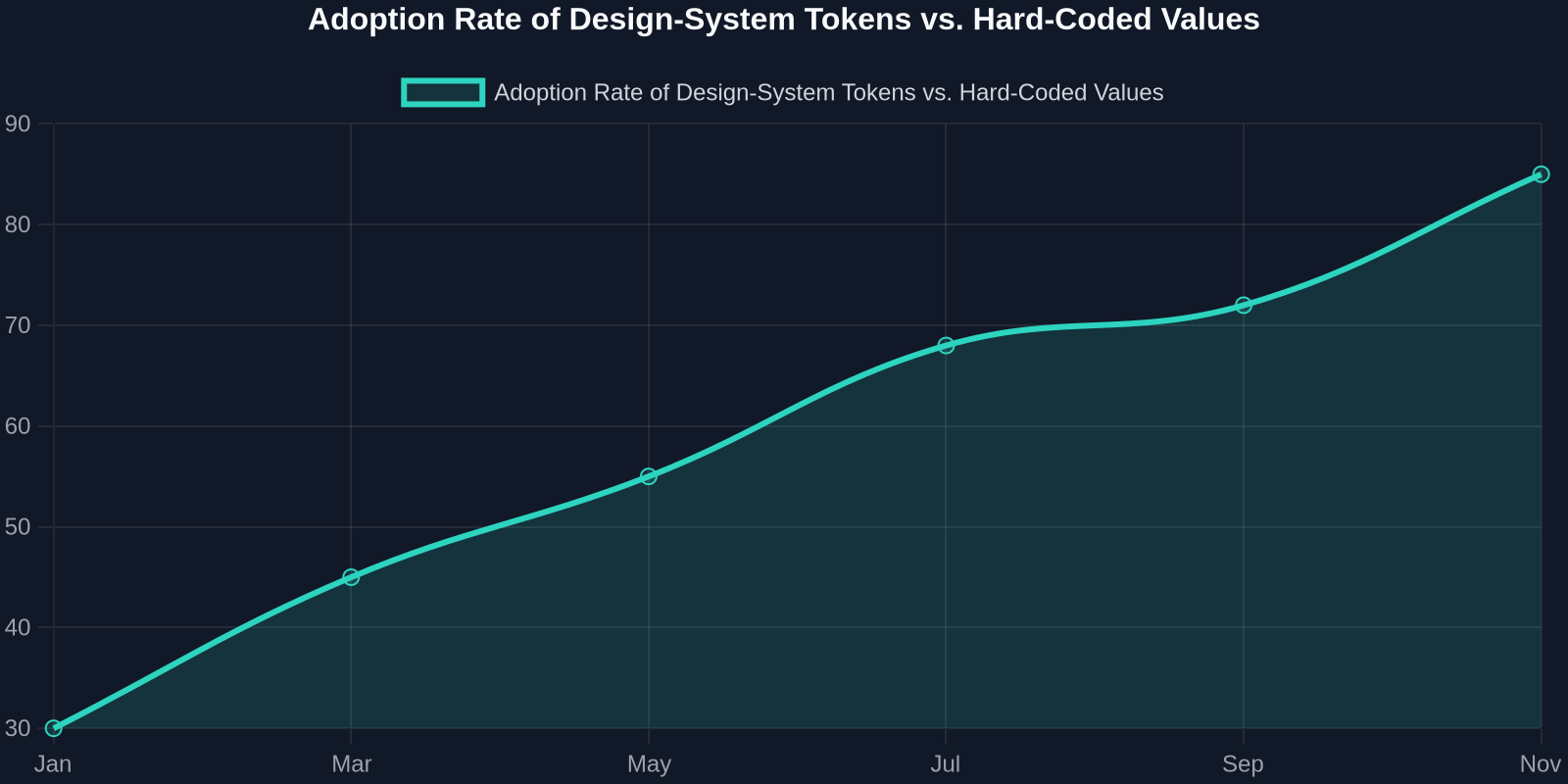
A robust craft workflow normalizes everything into tokens. Colors become var(--primary-500), spacing becomes spacing.m instead of 12px, and type scales are locked to mathematical progressions rather than random pseudo-pixel values. This rigid adherence to a flexible token system is difficult to maintain with pure prompt engineering but becomes second nature when the tooling enforces it visually.
| Approach | Initial Code Quality | Long-Term Maintainability | Design System Adherence |
|---|---|---|---|
| Prompt-to-Site Generators | Variable (often inline styles) | Low (requent rebasing hard) | Non-existent |
| Drag-and-Drop Builders | Presentational (div-soup) | Medium (vendor lock-in risk) | Proprietary |
| Craft-First Tools (DivMagic) | Semantic & Composable | High (framework-agnostic CSS) | Enforced via visual token picking |
Практический рабочий процесс: Извлечение и доработка секции Hero
Давайте пройдемся по практическому, без лишней воды рабочему процессу с использованием браузерного расширения для работы с кодом, такого как DivMagic. Вы не начинаете с файла Figma; вы черпаете вдохновение с живого, сложного сайта, на котором реализована блестящая CSS Grid-анимация.

- **Выборочная инспекция:**Вместо «клонирования скриншотов» вы переходите в режим визуальной инспекции. Вы наводите курсор на сложный элемент сетки, и инструмент подсвечивает точное DOM-поддерево, отвечающее за макет.
- **Контекстное извлечение:**Вы запускаете копирование, но вместо сырых CSS-идентификаторов и классов-зомби инструмент предварительно обрабатывает вывод с помощью эвристической очистки. Он сохраняет
display: gridиgrid-template-areas, но абстрагирует имена классов, чтобы они соответствовали вашей BEM-конвенции или конвенции утилит. - **Перевод в живую среду:**Вы вставляете код, и инструмент отслеживает рендеринг. Он обнаруживает, что исходный сайт использовал определенный CSS-медиазапрос для точки останова ноутбука. Он немедленно предлагает перевести его в стандартные запросы
min-width, соответствующие вашему локальному файлу_breakpoints.scss. - Доработка вместо перегенерации: Вы решаете, что отступ после заголовка слишком мал. Используя ползунки, привязанные к вашей шкале отступов, вы регулируете переменную
--flow-space. Код не раздувается; один токен обновляется во всех адаптивных контекстах.
Контроль качества с участием человека
Для фронтенд-разработчиков контроль качества — это не просто «отсутствие ошибок 404». Это производительность перерисовки в конвейере рендеринга. Это предотвращение смещения макета (CLS). Генераторы ИИ здесь часто терпят неудачу, потому что не понимают разницы в стоимости анимации свойства height по сравнению с transform.
Инструменты для работы с кодом преуспевают, потому что оставляют человека в цикле принятия этих решений о производительности. Если вы попытаетесь анимировать ширину, умный инструмент может выдать мягкое предупреждение: «Вы анимируете свойство, вызывающее перекомпоновку макета. Рассмотрите возможность использования scale() для анимации только на уровне композитора». Этот образовательный слой повышает квалификацию разработчика в процессе сборки.
Создание живой дизайн-системы
Дизайн-система — это не статичный PDF-файл или библиотека Figma. Это код в продакшене. Инструменты, ориентированные на работу с кодом, признают это, позволяя живой среде быть источником истины. Если вариант кнопки существует только в продакшен-бандле CSS, расширение, ориентированное на работу с кодом, такое как DivMagic, может извлечь не только элемент, но и всю его контекстную логику стилей, фактически выполняя обратный инжиниринг архитектуры @layer для глубокого погружения в инженерию.
За пределами эффективности: Радость созидания
В «лепке» пользовательского интерфейса есть отчетливое психологическое удовольствие. Когда инструмент убирает утомительный поиск синтаксиса и математику преобразования hex в oklch, но оставляет право принятия дизайнерских решений полностью за разработчиком, это открывает состояние потока. Это возвращает веб-дизайн к стремлению к пропорциям, интервалам и типографическому ритму, а не к рутине борьбы с синтаксисом.
Когда инструментарий берет на себя трение, связанное с рендерингом браузера, разработчик может полностью сосредоточиться на мастерстве: на негативном пространстве, визуальной иерархии и эмоциональном отклике, который вызывает цветовой градиент.
Выбор инструмента: На что обратить внимание в инструменте, ориентированном на работу с кодом
Оценивая инструмент, который обещает поддержать ваше «мастерство», смотрите не только на результат. Исследуйте его процесс. Уважает ли он вашу существующую кодовую базу или требует чистого холста? Может ли он взаимодействовать с аутентифицированными панелями управления и живыми состояниями DOM?
Ищите инструменты, которые являются нативными браузерными расширениями (например, DivMagic), а не внешними приложениями. Контекст внутри браузера позволяет им видеть разрешенные веб-шрифты, отступы, вызванные zoom, и сложные контексты наложения, которые внешний холст просто не может захватить. Если инструмент просит вас сделать скриншот сайта и ждать сборки, вы проиграли битву за мастерство. Настоящее мастерство происходит в реальном времени, с живым кодом.
Будущее веб-дизайна — это не аренда генерации интерфейсов у модели, предлагающей самую высокую цену. Это вооружение разработчика более острым скальпелем. Это переход от «автоматизации» к «ускорению». Это оставляет разработчика на вершине творческого процесса, совершая прыжок от «кодера» к «инженеру-дизайнеру», где код служит видению, а не наоборот.