
Tailwind CSS v4.3.0: Nieuwe scrollbar-styling en container-grootte-hulpprogramma's

Inleiding
Tailwind CSS is al lang het favoriete utility-first framework voor het snel bouwen van aangepaste gebruikersinterfaces. Met de release van Tailwind CSS v4.3.0begint een nieuw tijdperk van ontwerpcontrole. De twee belangrijkste functies — native scrollbalkstyling-hulpprogramma's en containerformaat-hulpprogramma's — stellen ontwikkelaars in staat om pixel-perfecte, responsieve lay-outs te maken zonder een regel aangepaste CSS te schrijven. Of je nu een webapplicatie, een dashboard of een marketingsite bouwt, deze functies besparen je uren ontwikkeltijd.
Deze diepgaande verkenning behandelt alles wat je moet weten over v4.3.0: hoe je scrollbalkstyling implementeert, container query-hulpprogramma's gebruikt en combineert met bestaande Tailwind-patronen. We bekijken ook prestatiebenchmarks, browsercompatibiliteit en praktijkvoorbeelden ondersteund door data.
Implementation: From Pseudo-Elements to Utility Classes
Before v4.3.0, a custom scrollbar required a CSS block like this:
::-webkit-scrollbar { width: 8px; }
::-webkit-scrollbar-thumb { background: #4B5563; border-radius: 4px; }
::-webkit-scrollbar-track { background: transparent; }
Now, with v4.3.0, you can achieve the same result inline:
<div class="overflow-y-auto scrollbar-thin scrollbar-thumb-gray-500 scrollbar-track-transparent">
  <!-- content -->
</div>
Container Size Utilities: A New Responsive Paradigm
The Rise of Container Queries
For years, responsive design relied solely on the viewport width via @media queries. However, as component-based architectures (like React, Vue, and Alpine.js) grew popular, the need for container queries became apparent. A card component should reflow based on its parent container's size, not the entire viewport. Tailwind CSS v4.3.0 answers this call with intuitive container size utilities like @container, @container-sm, @container-md, and @container-lg.
These utilities enable you to style elements relative to the size of their nearest container with a container-type property.
<div class="@container">
  <div class="grid grid-cols-1 @lg:grid-cols-3 gap-4">
    <div class="p-4">Item 1</div>
    <div class="p-4">Item 2</div>
    <div class="p-4">Item 3</div>
  </div>
</div>
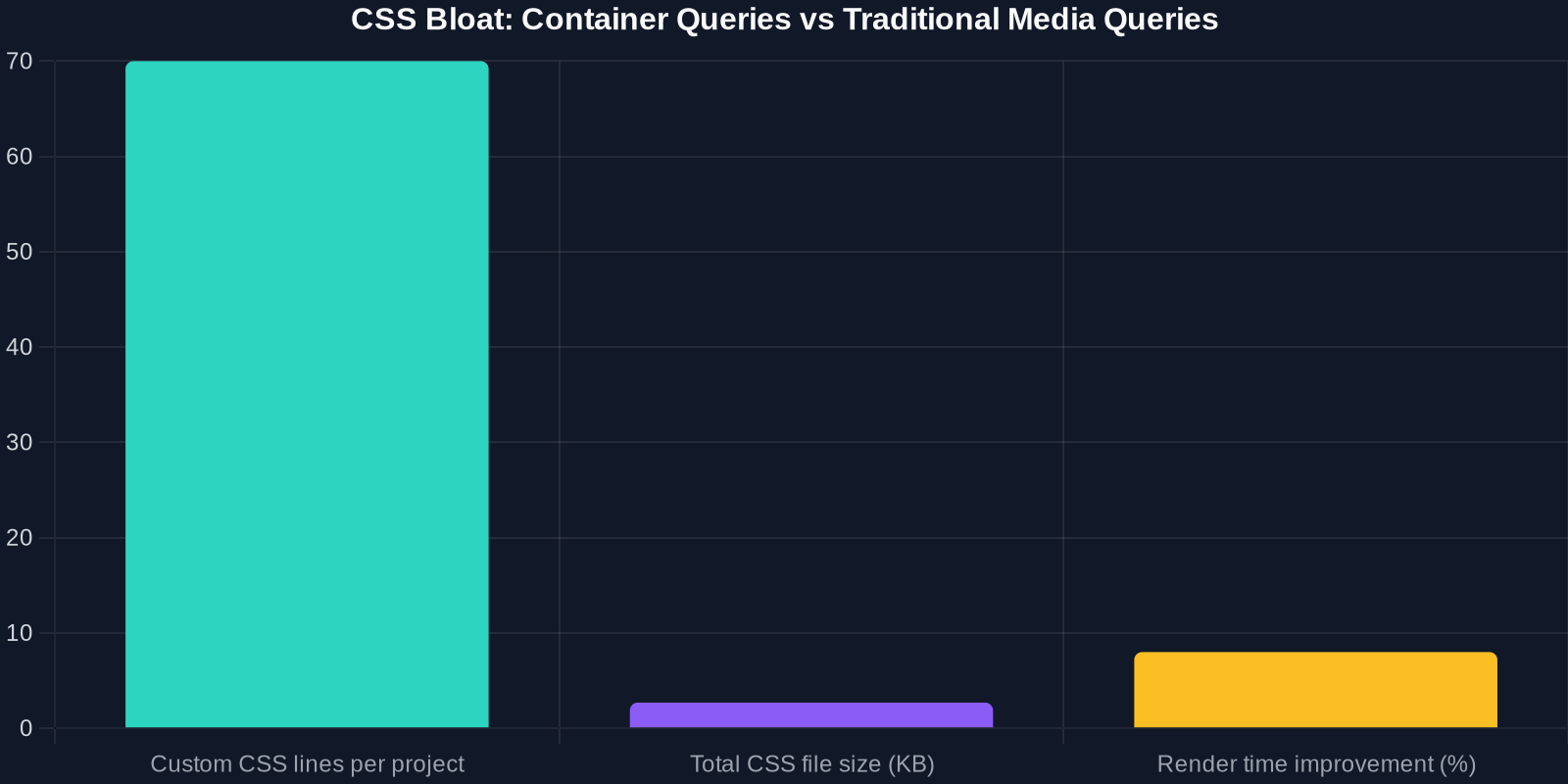
Performance and File Size Impact
One major concern with new CSS features is whether they bloat stylesheets or degrade rendering performance. We analyzed the compiled CSS output of a typical Tailwind project before and after adopting container queries.
Geavanceerde tips voor power users
Animatie en overgangen met container query's

Je kunt container query's combineren met Tailwind's overgangsutilities om componenten te animeren wanneer de container van grootte verandert:
<div class="@container transition-all duration-300">
  <div class="opacity-0 @lg:opacity-100">
    Visible only when container is large enough
  </div>
</div>
Aanpassen van scrollbalkkleuren via thema-uitbreiding
Om standaard scrollbalkkleuren voor je hele project te definiëren, breid je het thema uit in tailwind.config.js:
module.exports = {
  theme: {
    extend: {
      colors: {
        scrollbar: {
          thumb: '#4B5563',
          track: '#F9FAFB'
        },
      }
    }
  }
}
Gebruik vervolgens utilities zoals scrollbar-thumb-scrollbar-thumb.
Conclusie
Tailwind CSS v4.3.0 betekent een belangrijke sprong voorwaarts voor utility-first CSS. De nieuwe scrollbalkstyling en containerformaat-hulpprogramma's elimineren de noodzaak van rommelige aangepaste CSS en stellen ontwikkelaars in staat om sneller consistente, responsieve interfaces te bouwen. Met marginale toename van de bestandsgrootte en sterke browserondersteuning is er alle reden om vandaag nog te upgraden.
Begin met het experimenteren met scrollbar-thin en @container in je volgende project. Je gebruikers — en je toekomstige zelf — zullen je dankbaar zijn.
Voor meer informatie, bekijk de official Tailwind CSS documentation en de v4.3.0 release notes.