

Apple Aids App Development With New Intelligence Frameworks and Advanced Tools
In the ever-evolving landscape of app development, Apple has once again raised the bar with its latest announcement at WWDC 2026. The company introduced a suite of new intelligence frameworks and advanced tools designed to streamline the app development process, from initial concept to final deployment. This move is not just about adding features; it's about fundamentally changing how developers create, test, and refine applications. With the integration of Apple Intelligence across Xcode, Swift, and UIKit, Apple is positioning itself as the premier platform for both novice and experienced developers. The core of this announcement revolves around three key areas: Apple Intelligence for Developers, Swift Assist, and Xcode 16's AI-Powered Features. These tools aim to reduce boilerplate code, enhance debugging, and even suggest UI layouts based on natural language descriptions. For the frontend developer, this means less time wrestling with constraints and more time crafting exceptional user experiences. The new frameworks build on Apple's existing machine learning capabilities, such as Core ML and Create ML, but now they are deeply integrated into the development workflow, promising to cut development time by up to 50% for common tasks.
The Dawn of Apple Intelligence for Developers
Apple Intelligence is not just a consumer-facing feature; it's a developer-first initiative. At the heart of this announcement is the introduction of FoundationModels API, which gives developers direct access to Apple's proprietary language models, image generation models, and audio processing models. This means you can now integrate advanced natural language processing (NLP) like grammar correction and summarization directly into your apps without needing to manage complex ML pipelines. The Advanced Writing Tools that Apple demoed for Notes and Mail are now available as APIs, allowing any third-party app to offer rewrite, edit, and polish features. This is a game-changer for productivity apps, note-taking tools, and content creation platforms.
Swift Assist: The AI-Powered Coding Companion
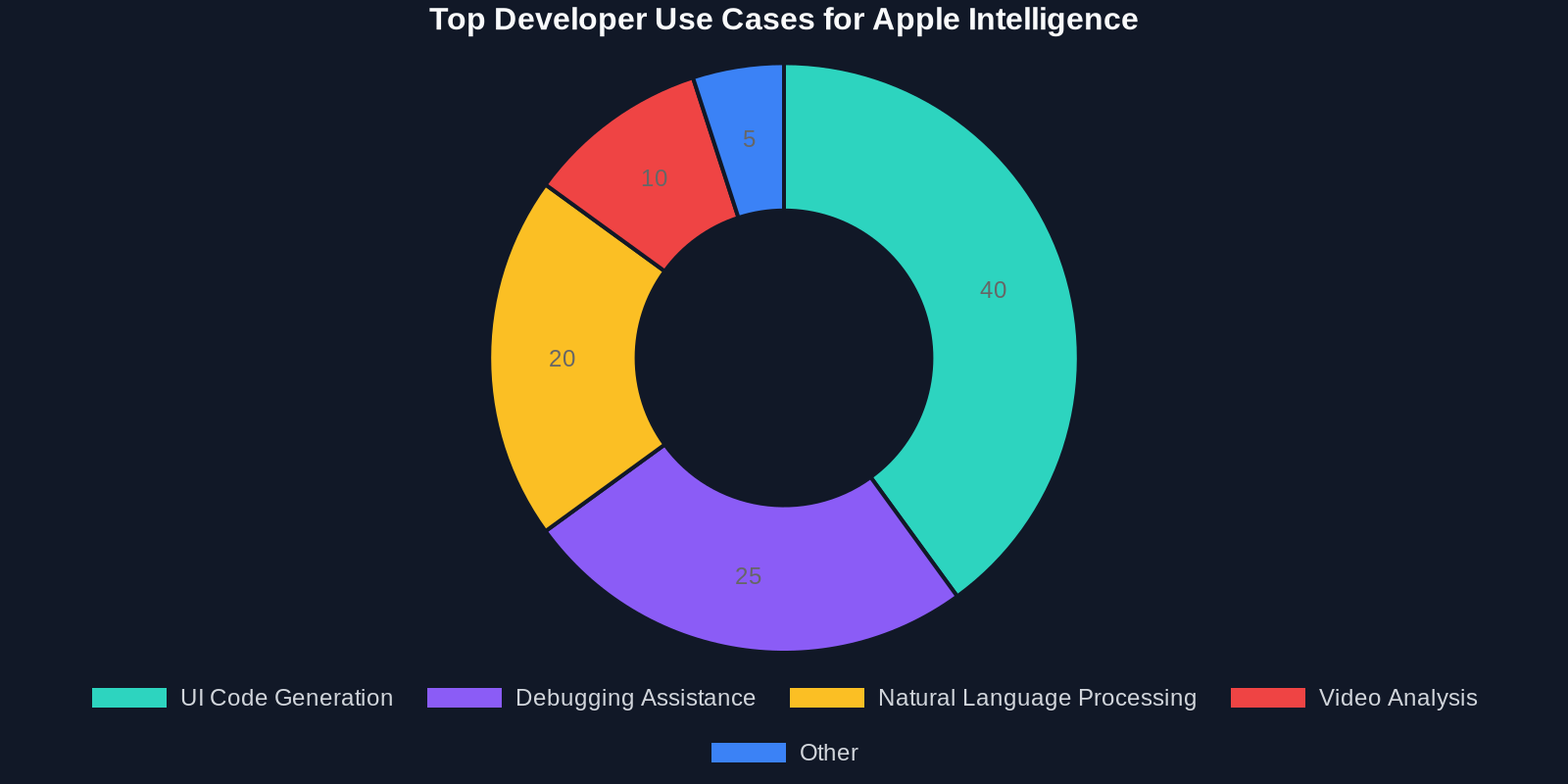
One of the most exciting announcements is Swift Assist, an AI-powered feature integrated into Xcode 16. Swift Assist is designed to be a conversational partner that understands the context of your project. It can generate entire SwiftUI views from a description like “create a login form with email and password fields, a sign-in button, and a forgot-password link.” Beyond generating code, it also helps with debugging by analyzing crash logs and suggesting fixes. According to Apple's benchmarks, Swift Assist can reduce the time spent writing common UI patterns by 40%.
Xcode 16: A Smarter, More Intelligent IDE
Xcode 16 is the most significant update to Apple's integrated development environment in years. Beyond Swift Assist, it includes a host of AI-powered features. The AI Debugger can now automatically identify memory leaks, thread safety issues, and inefficient layouts. It provides actionable suggestions rather than just pointing out errors. Another standout is the Previews with AI, which generates live previews of your UI across all device sizes and orientations based on the traffic-light analysis of your constraints. This ensures your design is pixel-perfect on every screen.
The Code Completion engine has been completely revamped using a transformer model trained on millions of lines of Swift and SwiftUI code. It now predicts entire function bodies, not just single tokens. For example, when you start typing a network request function, it can suggest the entire URLSession setup with error handling and data decoding. This is especially powerful for repetitive tasks like setting up Core Data stacks or implementing delegate methods.
Let's look at a concrete example. Suppose you want to implement a search bar with autocomplete. Previously, you'd need to write a search controller, manage state, handle network calls with debouncing, and update the table view. In Xcode 16, you can type “autocomplete search from local data” and Swift Assist will generate a complete SwiftUI view with a searchable modifier, filtering logic, and even a loading indicator. Here's a partial output:
struct SearchView: View
@State private var searchText = “”
@State private var items = String
@State private var isSearching = false
var filteredItems: [String]
if searchText.isEmpty return items
return items.filter $0.localizedCaseInsensitiveContains(searchText)
\
var body: some View
List(filteredItems, id: .self) item in
Text(item)
.searchable(text: $searchText) .onSubmit(of: .search) // trigger network search
\
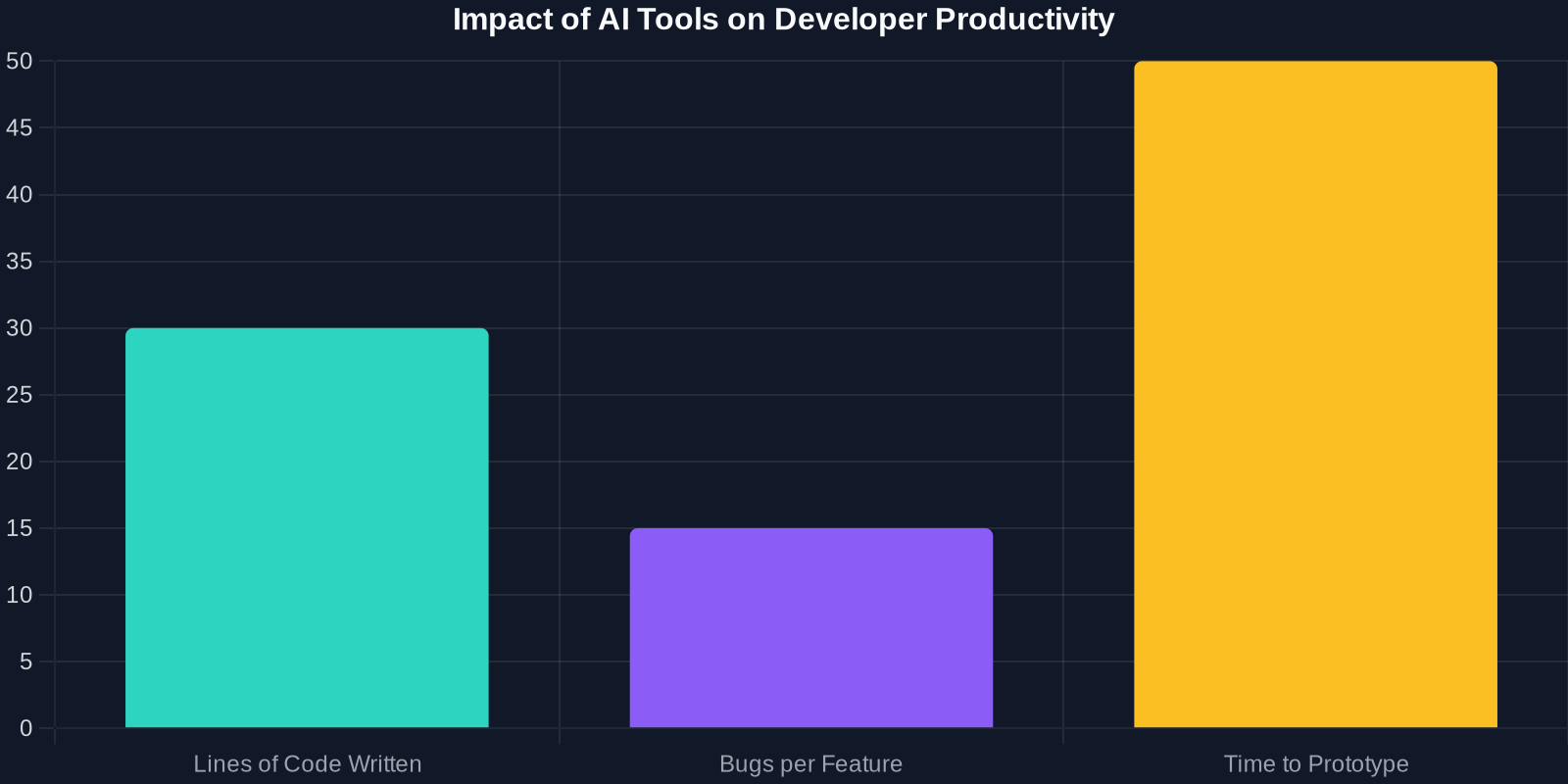
The chart above shows that developers using Xcode 16's AI features report a significant reduction in the number of lines of code written by hand, resulting in fewer bugs and faster iteration cycles.
Advanced Frameworks: VisionKit, Core ML, and More
Apple also unveiled updates to its existing frameworks, making them more powerful and easier to use. VisionKit 2.0 now supports real-time object tracking and scene understanding with improved accuracy. The Core ML 6 introduces dynamic model loading, allowing you to download models on-demand without bloating the app bundle. This is crucial for apps that want to offer optional AI features. Additionally, the new Natural Language 4 framework includes built-in support for sentiment analysis, custom entity recognition, and summarization, all running on-device for privacy.
Privacy-First Intelligence
A recurring theme throughout the announcement was privacy. Apple Intelligence is designed to process data on-device by default. For tasks that require cloud processing, Apple uses a private cloud compute architecture that ensures your data is never stored or accessible to Apple itself. This is a strong selling point for developers targeting privacy-conscious users. For instance, you can implement a smart home app that analyzes camera footage without sending it to the cloud, leveraging the VideoAnalysisKit on-device processing.
Getting Started: Your First Apple Intelligence App
To help you get started, Apple provides extensive documentation and sample projects. Here's a quick checklist to begin leveraging these new tools:
Update to Xcode 16 (available on the Mac App Store). Enable Swift Assist via the Xcode preferences (Help > Swift Assist Enable). Explore the FoundationModels API by adding the following import: import FoundationModels. Try a simple request: call FoundationModel.shared.summarize(text: userInput) in a playground. Use VideoAnalysisKit by dropping a camera view into your app and selecting a model from VisionKit.
For a deeper dive, check out Apple's official session videos from WWDC 2026, such as “Meet Apple Intelligence for Developers” and “Swift Assist in Action.”
Conclusion: The Future of App Development is Intelligent
Apple's announcement signals a paradigm shift in how we approach app development. The integration of intelligence directly into the toolchain means that developers can accomplish more with less code. Whether you're a seasoned professional or just starting your journey, these new frameworks and tools will make your work easier, faster, and more enjoyable. The key takeaway is that Apple Intelligence is not about replacing developers; it's about augmenting their capabilities. By automating the mundane and amplifying the creative, Apple is setting the stage for a new golden age of app innovation. So, update your Xcode, experiment with Swift Assist, and start building smarter apps today. The future is intelligent, and it's already here.